
Hello again. In the previous lesson, you learned to verify a requester using evidence that was already trusted by the organization and proportionate to the account action. This lesson focuses on the moment before that verification process: recognizing when a password-reset or access request may be an attempt to manipulate the help desk.
Social engineering is not limited to obvious phishing emails. An attacker may call, chat, or submit a well-written ticket while claiming to be a legitimate employee. They may know the employee’s manager, job title, username, and even details from recent organizational changes. Your task is not to “spot a liar” by instinct. It is to recognize risk signals, avoid bypassing the process, and move the request into the correct secure workflow.
By the end of this lesson, you should be able to identify common warning signs in password-reset, MFA, and access requests, explain why a cluster of signs matters more than any one sign, and respond without disclosing information or weakening controls.
Suggested study time: about 40 minutes.
Social engineering targets a support process, not just a password
A help desk is valuable to an attacker because it can change the security state of an identity. A password reset may restore access. An MFA-device replacement may let the attacker approve future sign-ins. A group-membership change may grant access to sensitive systems. In each case, the attacker is trying to persuade a legitimate support analyst to make an authorized-looking change.
A useful distinction is:
| Normal support request | Social-engineering attempt |
|---|---|
| The requester follows the required verification and approval process. | The requester attempts to influence, rush, evade, or reshape the process. |
| The requested access aligns with an established role and approved workflow. | The request is unusually broad, sensitive, or unsupported by normal approvals. |
| The requester may be frustrated, but accepts secure alternatives. | The requester argues that controls must be skipped “just this once.” |
| Details in the request can be verified through trusted sources. | The attacker uses believable details as persuasion, while steering you toward untrusted evidence. |
A genuine employee can be stressed, traveling, locked out before a deadline, or unfamiliar with the process. Therefore, urgency is not proof of an attack. The concern arises when urgency is paired with requests to bypass controls, use a new contact method, or make a high-impact change.
The basic support mindset is:
Treat unusual behavior as a reason to strengthen the process, not as proof that the person is malicious.
This avoids both mistakes: granting access because a story sounds convincing, and accusing a legitimate user based on a single imperfect signal.
The warning signs to recognize
Social engineering usually works through a cluster of signals. An attacker may combine a plausible identity claim, a time-sensitive story, personal information, and pressure to bypass the normal path.
1. Pressure, urgency, and authority
Attackers often manufacture a consequence for delay:
- “I am about to board a flight and need an MFA reset immediately.”
- “The CEO needs these files in ten minutes.”
- “Payroll closes today, so add me to the finance group now.”
- “My manager approved it verbally. Do not make me wait for a ticket.”
- “I know this is against policy, but I will take responsibility.”
These statements may be emotionally compelling, but they do not increase the strength of the requester’s identity evidence or authorization. A high-pressure demand is especially suspicious when it concerns a password reset, MFA replacement, privileged role, financial system, HR data, executive mailbox, or remote-access account.
A legitimate business deadline may change priority. It should not reduce the verification threshold.
2. Requests to bypass or redesign the verification process
A common goal is to move the proof of identity to a channel the attacker controls. Watch for requests such as:
- “Send the code to my new number; I lost the old one.”
- “My work email is inaccessible, so use this personal address.”
- “Can you remove MFA temporarily? I will set it up later.”
- “I cannot answer those checks, but I can give you my employee ID and manager’s name.”
- “Just reset the password first; we can verify everything afterward.”
- “Do not call my registered number. I am in a meeting.”
The issue is not merely that a phone was lost or that a user has a new number. Those things happen. The warning sign is the attempt to turn a newly supplied phone number, email address, or device into the evidence that authorizes changing the account.
Recall the rule from the previous lesson: never let the requester choose the evidence that proves their identity.
3. A suspiciously high-impact combination of changes
An attacker who obtains only a password may still face MFA. An attacker who gets both a password reset and an MFA-method replacement can gain durable control of an account.
Treat these combinations as higher risk:
| Request pattern | Why it deserves attention |
|---|---|
| Password reset plus new MFA-device registration | May transfer both primary and second-factor control. |
| MFA replacement plus recovery-phone or recovery-email change | May give the requester a persistent recovery path. |
| Lost-phone report plus a request to use SMS immediately | A SIM-swap or number-port risk may exist. |
| Privileged-account reset or MFA change | A successful takeover could affect many users, systems, or subscriptions. |
| “Temporary” admin access without the usual approval | Temporary privilege can still be enough for serious damage. |
| Broad access request outside the user’s normal job role | May be reconnaissance, privilege escalation, or misuse of a compromised account. |
A support analyst should not assume that each component is harmless in isolation. Look at the effect of the complete request: would it give one person new control, broader access, or a way to recover the account later?
4. Excessive knowledge is not strong authentication
An attacker may know a surprising amount about the employee they impersonate. Public professional profiles, breach data, internal directories, social-media posts, and prior phishing can reveal:
- job title and department;
- manager and team names;
- office location;
- recent travel or family events;
- employee username or phone number;
- tools the organization uses, such as Entra ID, VPN, or a service desk.
Knowing these details can make a story sound credible, but it is not the same as controlling an authenticator already bound to the account.
This is also why traditional security questions and other knowledge-based checks are weak for high-impact recovery actions.
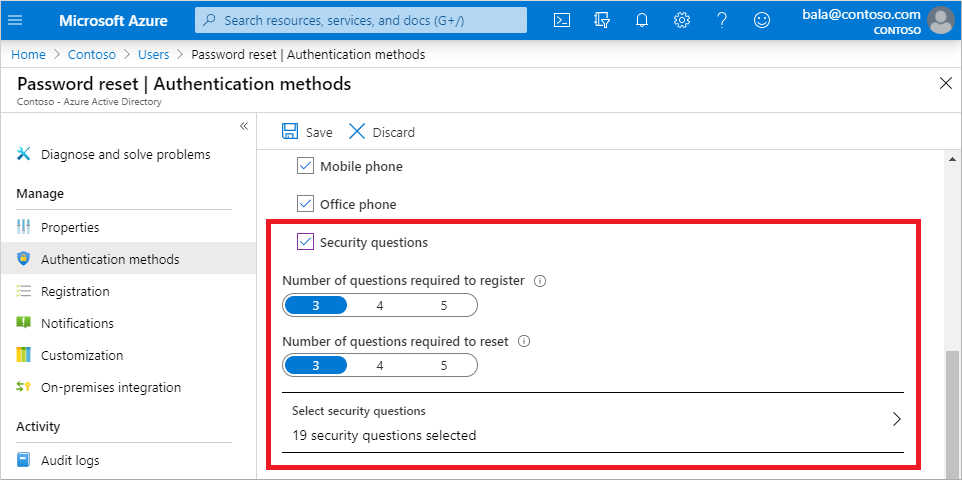
The Azure security-question configuration shows that an organization can require several questions, but more questions do not necessarily create independent evidence. Answers may be public, guessed, shared with acquaintances, exposed in data breaches, or obtained through social engineering. For password resets, MFA changes, and privileged access, use the stronger organization-approved methods covered previously: existing authenticators, registered channels, formal account recovery, and documented authorization.
A real attacker playbook: reconnaissance, calls, and MFA takeover
The danger is not theoretical. CISA’s advisory on Scattered Spider describes attackers who gather employee information, learn help-desk procedures, and then use targeted calls to obtain password resets or transfer MFA methods. The important support lesson is that an attacker can make several contacts over time: an early call may simply be probing for details about your procedure, while a later call attempts the actual account takeover.
Read CISA’s advisory section on the group’s recent tactics. It connects social-engineering warning signs to a concrete account-takeover pattern: research the organization, learn the reset process, then pressure employees or help-desk personnel into changing credentials or MFA.
In the “Recent Scattered Spider TTPs” section, under “Reconnaissance, Resource Development, and Initial Access,” begin with the paragraph describing the shift from broad phishing to targeted calls. Read the attack sequence through the explanation of how attackers gather information, make several calls, learn password-reset procedures, and ultimately try to reset passwords or transfer MFA tokens. Focus on the sequence of preparation and manipulation, rather than on memorizing the group names or technique IDs.
Several practical warning signs follow from that pattern:
- A caller asks detailed questions about verification requirements before actually requesting assistance.
- A person contacts multiple analysts, perhaps hoping one will interpret the policy more loosely.
- A requester knows employee details but cannot use any previously registered authenticator.
- A caller attempts to make you disclose whether an account exists, whether it is privileged, or which MFA methods are registered.
- A request arrives shortly after phishing, repeated MFA prompts, a lost-phone report, or an unexpected sign-in alert.
- The requester insists that their manager, executive status, contractor relationship, or an emergency makes normal controls inapplicable.
A request for procedural information is not automatically hostile. You can safely provide general public guidance, such as “Password recovery requires the approved verification process.” Do not disclose account-specific information, reset thresholds, enrolled MFA methods, internal escalation contacts, or details that would help someone tailor a future impersonation.
Manipulation tactics: what to hear beneath the story
Social engineering works by creating a decision environment in which the analyst feels that the fastest action is the most helpful one. Listen for the tactic, not merely the narrative.
| Tactic | What it can sound like | Secure interpretation |
|---|---|---|
| Urgency | “This must be done in the next five minutes.” | A deadline does not verify identity or authorize an exception. |
| Authority | “I am a director; do not make me go through this.” | Seniority does not remove security requirements. |
| Fear or distress | “I will miss payroll,” “I am stranded,” or “I will lose my job.” | Respond professionally, but use the approved recovery path. |
| Reciprocity or friendliness | “You are the only person who has been helpful.” | Appreciation must not influence a security decision. |
| Intimidation | “Escalate me to someone who will do it.” | Escalate the case, not the control bypass. |
| Secrecy | “Do not notify my manager; this is confidential.” | Legitimate confidentiality may require a formal process, not an undocumented exception. |
| Process probing | “What do I need to say to pass verification?” | Explain general policy only; do not coach someone through account-specific checks. |
| MFA fatigue | “Please approve the prompts; I am trying to sign in.” | Repeated unexpected prompts can indicate an attack and should be reported, not approved. |
A neutral, policy-based response is effective because it removes the attacker’s leverage:
“I understand this is time-sensitive. Because this change affects account access, I must use the approved verification and authorization process. I cannot use a new contact method to verify the request.”
That response is firm without accusing the caller or revealing which part of the story seemed suspicious.
The following short demonstration shows how a fabricated urgent story, caller-ID spoofing, and personal details can lead a customer-service agent to change an account password. Treat it as an analysis example, not a script to reproduce.
This is how hackers hack you using simple social engineering
Watch “This is how hackers hack you using simple social engineering” from oracle mind. The example demonstrates how emotion, time pressure, a plausible relationship story, and weak knowledge-based checks can be used to obtain an account change.
Watch the interaction. Notice the attacker’s use of caller-ID spoofing, a stressful personal story, a claimed relationship to the account holder, and a request to avoid the normal SMS verification path. Identify the specific moment at which the representative changes the password without independently established account control.
The key failure in the demonstration is not that the representative was polite or wanted to help. It is that the representative allowed the caller’s story and supplied information to substitute for reliable verification.
Password-reset and access-request red flags are related, but not identical
A password-reset request seeks control of an identity. An access request seeks authorization for a resource. Both can be socially engineered, but the signals you examine differ slightly.
Password reset or MFA recovery
Pay particular attention when the requester:
- reports loss of every authentication method but rejects formal account recovery;
- asks to send verification material to a new phone or personal email;
- demands a password reset and MFA replacement in the same interaction;
- reports unexpected MFA prompts but asks you to send or approve another prompt;
- asks you to read out, relay, or collect a one-time passcode;
- requests an exception because they are an executive, contractor, or remote worker;
- calls from an unfamiliar number while claiming the registered number is unavailable;
- requests that security notifications be suppressed or sent elsewhere.
A registered phone number can be better evidence than an incoming number, but it is not infallible. Reports of a SIM swap, a recent phone-number port, unexpected recovery activity, or suspicious MFA prompts should prompt the security workflow rather than routine recovery.
Access and permission requests
For access requests, look for a mismatch among the user, business need, approval, and requested scope:
- “Add me directly to the admin group; the group owner is unavailable.”
- “Give me access to the finance share just for today,” with no documented manager or data-owner approval.
- “I need the same permissions as my manager.”
- “My teammate left; use their account or transfer everything to me.”
- “Do not put this in the ticket because it is confidential.”
- “I need tenant administrator access to troubleshoot one issue.”
- A request for access that is unrelated to the requester’s role, project, or assigned responsibilities.
- A manager approval that arrives from a new external address, an unusual channel, or a lookalike domain.
A legitimate urgent request can still be fulfilled through a secure route: locate the correct application owner, manager, or approver through the organization’s directory and workflow, then grant the least access necessary after approval. Do not accept a forwarded message, an unverified chat instruction, or a caller’s assertion as a substitute for the approved authorization record.
A safe response when red flags appear
You do not need to determine with certainty whether an attacker is present. You need to prevent a risky change until the organization can establish identity and authorization safely.
Use this response sequence:
-
Pause the requested action.
Do not reset the password, unlock the account, enroll an MFA method, change recovery details, grant access, or disclose account-specific information. -
State the policy neutrally.
Explain that account-affecting changes require approved verification and, for access requests, approved authorization. Avoid debating the requester’s story. -
Use trusted channels and records.
Refer to the authoritative identity system, approved ticketing workflow, known group owner, or registered contact method. Do not rely on the number, address, link, or approval supplied during the suspicious interaction. -
Check for related security signals.
Note recent MFA prompts, lost devices, unexpected changes, risky sign-ins, similar tickets, repeated contacts, and whether the target is privileged or high impact. -
Escalate according to policy.
A suspected account takeover, a privileged-account recovery request, an MFA transfer attempt, or an attempt to bypass verification normally warrants security-team or designated identity-team review. An unapproved access request may also require the application owner, data owner, or manager. -
Record observable facts.
Document what was requested, the contact channel, the verification status, the exact policy exception requested, relevant timestamps, and where the case was routed. Avoid writing conclusions such as “caller was definitely an attacker” unless an investigation establishes that.
The difference between an observation and an assumption matters:
| Appropriate ticket note | Avoid |
|---|---|
| “Caller requested password reset and enrollment of a new MFA phone in one interaction.” | “Caller is a hacker.” |
| “Requester asked that verification be sent to a newly supplied personal email address.” | “The personal email is malicious.” |
| “No approved access request or resource-owner authorization located; routed to application owner.” | “User has no legitimate business need.” |
| “User reported repeated uninitiated MFA prompts; routine reset paused and case escalated.” | “The account is certainly compromised.” |
This style of documentation preserves useful evidence while allowing security, HR, or an application owner to make the appropriate determination.
Key takeaways
Social engineering in IAM support is an attempt to turn your legitimate administrative capability into account takeover or unauthorized access.
- Look for clusters of signals: pressure, authority claims, process-bypass requests, new contact methods, unusually sensitive changes, and inconsistencies with normal approvals.
- Personal and organizational facts can make an impersonator convincing, but they do not prove control of an existing authenticator.
- A password reset combined with MFA replacement, recovery-contact change, or privileged access is substantially higher risk than a routine request alone.
- Treat caller ID, a familiar name, manager details, security-question answers, and an urgent story as context—not as sufficient proof.
- Do not disclose account-specific details, collect passwords or one-time codes, or let a requester select the channel used to verify them.
- When warning signs appear, pause the action, use trusted records and channels, and escalate through the approved process.
- Record observable facts rather than accusations.
Next, you will practice turning this judgment into a defensible IAM ticket record: documenting the requested action, verification evidence, impact, actions taken, and resolution without storing secrets or unnecessary personal data.
Can't find a good explanation? Sign up and we'll make it for you
Sign up