
Hello again. In the previous lesson, you learned to create an IAM ticket that records evidence, impact, actions, and the actual resolution state. That record becomes especially important when the right outcome is not “complete the request,” but escalate it to the team that owns the risk or decision.
This final lesson in the IAM Foundations module focuses on recognizing when an IAM issue belongs with Security, HR, or an application owner. The goal is not to make you an investigator, HR representative, or business approver. It is to help you identify the boundary of a support role, take safe initial actions, and route the case with a concise, defensible handoff.
Suggested study time: about 40 minutes.
Escalation is a routing decision, not a failure to solve the ticket
Many IAM support tickets are routine: a verified user needs an account unlocked, an approved group membership must be applied, or a user needs guidance registering an MFA method. Support can handle these through documented procedures.
Escalation becomes necessary when the request involves a decision that exceeds support’s authority or when acting normally could increase security, personnel, legal, or business risk.
A practical rule is:
Escalate when you cannot safely answer one of these questions using an approved procedure and evidence already available:
- Is this identity or request trustworthy?
- Is the person’s employment status or role accurate and current?
- Is the requested access appropriate for the business resource?
- Could a normal support action worsen a security event or override a control?
The destination depends on what kind of decision is required:
| Escalation destination | They own the decision about | Typical IAM support trigger |
|---|---|---|
| Security / Security Operations | Account compromise, threats, incident containment, risky authentication activity, policy exceptions with security implications | Suspected phishing, unusual sign-in activity, attempted account takeover, unauthorized privileged access |
| HR | Employment status, employment dates, department or manager records, leave status, personnel processes | Employee claims their termination or transfer is incorrect; HR record conflicts with a request |
| Application owner / resource owner | Business need, application-specific roles, data access, role design, approval of access | Requester needs a role that support cannot interpret or an entitlement owner has not approved |
| More than one team | Linked security, personnel, and business decisions | Departing employee still accessing sensitive data; manager disputes a termination; suspected insider misuse |
Support remains responsible for documenting the report, protecting the user and organization from an unsafe change, and ensuring the ticket reaches the correct owner. Escalation does not mean closing the ticket as “resolved” simply because it was transferred.
The three ownership boundaries
A useful way to classify a ticket is to focus on the question that remains unanswered, rather than on the system named in the request.
Security: “Could this be compromise, abuse, or control bypass?”
Escalate to Security when there is a reasonable indicator that an identity, authentication method, session, or privileged entitlement may be misused. You do not need conclusive proof of compromise. In fact, waiting for proof may allow an attacker more time.
Common IAM triggers include:
- A password-reset or MFA-replacement request includes social-engineering indicators: urgency, threats, a newly supplied contact method, refusal of normal verification, or pressure to bypass process.
- A user reports an approval, MFA prompt, password reset, group change, or sign-in that they did not initiate.
- You identify an unexplained account, role, group-membership, authentication-method, recovery-contact, or forwarding-rule change.
- A privileged account shows unusual activity or a request would provide broad administrative access without the required approval.
- A leaver account remains active when it should have been disabled, particularly if it retains sensitive or privileged access.
- Multiple failed sign-ins, suspicious successful sign-ins, or unexpected MFA prompts suggest password spraying, phishing, MFA fatigue, or stolen credentials.
- A ticket asks you to weaken a control, such as excluding a user from MFA or Conditional Access, without an established emergency process and proper authorization.
The support response should be measured. Do not label someone malicious or write “account compromised” when the evidence only supports suspicion. Use objective wording:
Observed: User reported three MFA prompts that they did not initiate at 09:42 UTC.
Action withheld: No MFA method was removed or replaced through the ticket.
Risk: Approval of an unsolicited prompt or an unverified recovery change could enable unauthorized account access.
Route: Escalated to Security Operations under the suspected account-compromise process.
If your organization’s incident runbook authorizes a specific containment action, such as temporarily disabling an account or revoking sessions, follow that procedure and document it. Do not independently delete accounts, clear logs, or make broad access changes merely because a case feels suspicious. Those actions can disrupt business operations and may complicate investigation.
The NIST incident-handling guidance makes an important organizational point: Security incident response relies on coordinated expertise beyond the incident team itself, including IT support, HR, management, legal, and system owners.
Computer Security Incident Handling Guide
Read the selected sections of NIST Special Publication 800-61 Revision 2 to see why a security event often requires coordinated notification and why support should route evidence to the people responsible for the next decision.
In Section 2.4.4, “Dependencies within Organizations” (p. 18), read from the discussion of organizational dependencies. Focus on the distinct responsibilities of Information Assurance, IT Support, HR, and Legal. Then read Section 3.2.7, “Incident Notification” (pp. 34–35), beginning with the notification list. Notice that the system owner and HR may be notified alongside Security; escalation can be parallel rather than a single handoff.
HR: “Is the workforce information or personnel process correct?”
HR escalation is appropriate when an access decision depends on authoritative employment information or when the event has a personnel dimension. Support should not decide whether a person is employed, has been terminated, is on leave, has changed manager, or is entitled to an exception based solely on an email, a manager’s informal message, or the requester’s statement.
Typical HR escalation triggers include:
- A user says their account was disabled “by mistake” after a departure, suspension, leave, or contract end date.
- A hiring, transfer, return-from-leave, manager-change, or departure record conflicts with the access request.
- A manager asks support to keep a departing employee active beyond the recorded end date.
- A former employee, contractor, or employee on leave requests restored access.
- You suspect that a current employee intentionally misused access, particularly if disciplinary handling may be needed.
- A sensitive personnel application such as payroll, performance management, benefits, or disciplinary records is involved.
Consider this case:
A department manager asks you to reactivate Alex’s account because Alex needs to “finish a few files.” The HR system shows that Alex’s employment ended that morning.
This is not a normal account-reactivation ticket. HR owns the employment-status fact, while the application or data owner may need to decide how the files should be transferred. If there are signs that Alex attempted to access systems after departure, Security should also be involved.
Your internal note might state:
Evidence: HR-driven lifecycle event disabled the account at 08:00 UTC; manager requested reactivation at 09:15 UTC.
Action: No reactivation performed.
Escalation: Routed to HR for employment-status confirmation and to the data owner for business continuity decision.
Security impact: Reactivating a departed identity without approved authorization could restore access to corporate data.
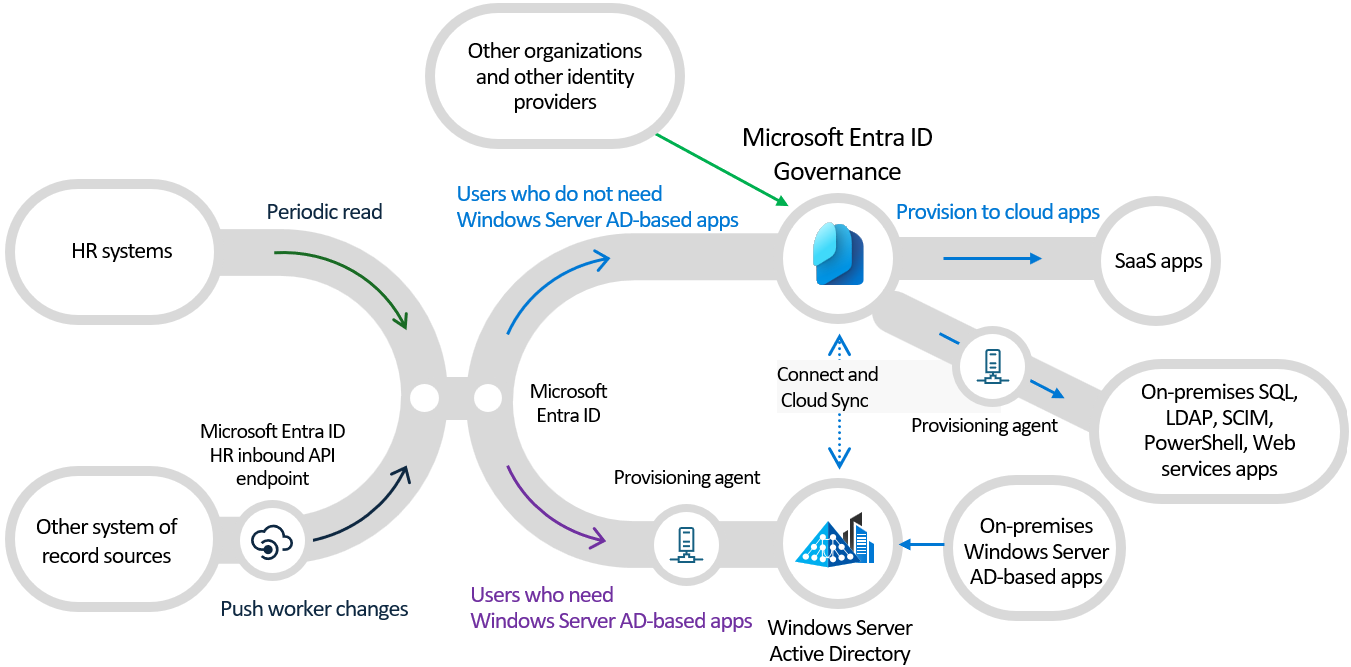
Microsoft Entra Lifecycle Workflows illustrates why this boundary matters: HR systems can supply lifecycle information, while automated offboarding workflows can disable accounts, remove group membership, revoke licenses, and notify HR or managers according to organizational policy.
Automate onboarding & offboarding tasks with Microsoft Entra | Identity Lifecycle Management
Watch Microsoft Mechanics’ “Automate onboarding & offboarding tasks with Microsoft Entra | Identity Lifecycle Management” for the relationship between HR-driven lifecycle events and time-sensitive access removal.
Watch the lifecycle overview to connect onboarding and offboarding with security and compliance. Then watch the offboarding example. Focus on the immediate-separation scenario and on the separate roles of automated workflow, manager, and HR notifications.
Application owner: “Does this person need this specific business access?”
An application owner, sometimes called a resource owner or business owner, decides whether a person needs access to a particular application, workspace, data set, or business role. The owner understands the application’s data, its roles, and the business consequences of granting access. Support may provision an approved entitlement, but should not invent the approval or interpret an ambiguous role.
Escalate to the application owner when:
- The request lacks a required application-owner approval.
- The requested application role is ambiguous, unusually powerful, or not part of a standard role catalogue.
- A user asks for a role that grants access to confidential, financial, customer, production, or regulated data.
- The requester’s manager approves access, but the application requires resource-owner approval as well.
- The application-specific role mapping is unclear. For example, you know a group grants access, but cannot determine whether it provides Reader, Editor, Approver, or Administrator permissions.
- Access must be extended, renewed, or retained after a project end date.
- An access review identifies a user who no longer appears to need access.
- The application itself rejects a correctly provisioned user, and the IAM configuration appears correct. The owner may need to check application-side assignment, licensing, configuration, or role mapping.
An application owner’s decision is not necessarily a security incident. It is often a business authorization question. Treating every missing approval as a Security case creates noise and delays legitimate work.
Microsoft’s access-review guidance distinguishes the roles clearly: Security focuses on enforcing least privilege and reducing risk, while business units own applications and review or approve access to applications and groups.
Plan a Microsoft Entra access reviews deployment
Read Microsoft Learn’s guidance to clarify who owns access-governance decisions. This will help you distinguish a support provisioning task from a Security control decision or an application-owner authorization decision.
In the “Engage the right stakeholders” section, read the stakeholder responsibilities. Compare the responsibilities assigned to IT administration, Security teams, and Business units. Then, in “Who will review the access to the resource?”, read from the reviewer model. Focus on resource owners, delegates, and managers as distinct sources of access decisions.
A routing method for real support tickets
When a ticket arrives, use a short assessment before making a consequential change.
1. Identify the requested action and its blast radius
Start with the exact action: password reset, MFA replacement, account enablement, group membership, license assignment, privileged-role activation, or application-role assignment.
Then identify scope:
- Does it affect one ordinary user or a privileged identity?
- Does it provide access to low-risk collaboration space or sensitive business data?
- Does it modify primary authentication, recovery methods, or administrative privilege?
- Is it a normal lifecycle event, an exception, or a request to reverse a lifecycle event?
A password reset for a verified user is routine. A password reset plus an MFA-device replacement plus a recovery-email change is much higher impact because it affects several account-recovery controls at once.
2. Identify the missing authority or risk signal
Use this quick distinction:
| If the unresolved issue is… | Primary route |
|---|---|
| Whether the account or request is legitimate and safe | Security |
| Whether the person is active, transferred, terminated, on leave, or assigned to a manager | HR |
| Whether the person should have a specific application role or data access | Application owner |
| Whether the request meets multiple conditions | Escalate to each relevant owner; state their separate decisions needed |
For example, a user’s access-review removal may require the application owner to decide whether the access is still needed. If audit data also shows that the user deliberately granted themselves access, Security should investigate the potential misuse. The same ticket can properly involve both teams.
3. Take only approved, reversible support actions
While escalation is pending, support should do what the procedure permits:
- preserve the original request and timestamps;
- verify the requester using the approved method;
- collect limited, relevant evidence such as audit-event references, request approvals, exact error text, and affected identities;
- avoid granting, restoring, or expanding access without the right decision;
- apply documented containment actions only when policy authorizes them;
- communicate a neutral status update to the user.
Avoid actions that silently change the case. For example, do not remove suspicious audit evidence, overwrite a recovery contact, or reactivate an account while waiting for HR confirmation.
4. Make the escalation actionable
A useful escalation should let the receiving team decide without reconstructing the entire case. Build on the ticket-writing structure from the previous lesson:
| Handoff element | What to include |
|---|---|
| Reason for escalation | One sentence naming the unresolved decision or risk |
| Affected identity and resource | User, account type, application, group, role, device, or service account |
| Observed facts | Objective timeline, audit references, request source, verification outcome, exact error text |
| Impact and urgency | Current business impact and security consequence if mishandled |
| Actions taken | Include containment performed and high-impact actions deliberately withheld |
| Decision requested | Precise question for Security, HR, or the application owner |
| Current status | Escalated, pending approval, security investigation, or other process-defined state |
A strong escalation request is specific:
Escalation to application owner: Please confirm whether R. Patel requires the
Finance-QuarterClose-Approverrole through 30 April. The manager approved finance-system access generally, but this role can approve payment exceptions and the required resource-owner approval is absent. No access change has been made.
A weak escalation simply says:
“Please review access.”
The weak version leaves the recipient to discover the user, role, risk, missing approval, and requested outcome.
Three worked routing examples
Case 1: “I got MFA prompts all night. Please remove MFA so I can work.”
This is primarily a Security escalation. Unsolicited MFA prompts can be evidence of an attempted sign-in using a known password. Removing MFA would weaken the protection at the moment it may be most needed.
Support should:
- verify the caller through the approved process;
- record when the prompts occurred and whether any were approved;
- avoid removing MFA merely to restore convenience;
- follow the account-compromise or MFA-fatigue runbook;
- document any authorized containment action and route to Security.
A user-facing update should be neutral:
Your sign-in issue is being handled through the account-security process. We will provide the next approved recovery step through this ticket.
Do not reveal detailed detection logic or enrolled authentication methods in the user-facing message.
Case 2: “My manager says I transferred teams today, but my old access is still there.”
This normally begins as an HR and application-owner matter, not automatically a Security incident.
HR or the authoritative workforce process must confirm the employee’s new department, manager, effective date, and employment status. The application owner must determine whether old-team access should be removed and which new-team role is appropriate. Support can check whether lifecycle synchronization or provisioning has failed, but should not preserve or add access based on an informal statement alone.
If the user is actively using access that should have been removed or if sensitive data is involved, notify Security according to policy as well.
Case 3: “Please give this contractor production administrator access today. The project is blocked.”
This requires application-owner approval and likely Security or privileged-access review, depending on organizational policy.
The urgency may be real, but it does not make a broad administrative role least privilege. Support should clarify the exact task, target environment, duration, and existing approval path. An owner may be able to authorize a narrower role, a time-bound assignment, or supervised access instead.
The appropriate record is not “project blocked, admin granted.” It is:
Contractor requires access to complete a stated production deployment task. Requested role provides broad administrator permissions. No resource-owner approval or time limit was supplied. No role assignment made. Escalated to application owner for task-specific access decision and to the privileged-access process for approval.
Avoid two common escalation errors
Do not escalate every exception to Security
Security is not a substitute for business ownership. Missing application approval, unclear role mapping, or a request for access to a project workspace generally belongs with the resource owner first. Security becomes relevant when the request signals compromise, abuse, policy violation, or elevated risk.
Do not treat HR confirmation as permission to grant every application role
HR can confirm that someone is an active employee and that a transfer is effective. That does not mean HR decides access to payroll, production systems, customer data, or a finance-approval workflow. The application owner still decides what access the active employee needs.
In short:
- HR establishes workforce facts.
- Application owners establish business authorization.
- Security evaluates and directs response to identity risk.
- Support verifies, documents, applies approved changes, and routes exceptions safely.
Key takeaways
Escalation is an essential IAM support skill because identity tickets often cross organizational boundaries.
- Escalate to Security for suspected compromise, suspicious authentication activity, unauthorized changes, control bypass attempts, and risky privileged access.
- Escalate to HR when employment status, lifecycle data, manager relationships, leave, termination, or personnel handling determines whether access should exist.
- Escalate to an application owner when the decision concerns business need, application roles, sensitive data access, entitlement design, or missing resource approval.
- A ticket may require multiple destinations when a security event also has employment and application-access consequences.
- Preserve evidence, make only policy-authorized containment changes, state what you deliberately did not change, and ask the receiving team for a precise decision.
- Keep the ticket status accurate: transferred or pending review is not the same as resolved.
You have now completed the IAM Foundations module. The next module moves from support judgment into the Microsoft identity environment itself, beginning with the different roles of Active Directory Domain Services, Microsoft Entra ID, and Microsoft 365.
Can't find a good explanation? Sign up and we'll make it for you
Sign up