
Hello. In the previous lesson, you established what the GRE scores mean for MBA admissions: Verbal and Quantitative Reasoning are reported separately, and Quantitative Reasoning is likely to be an especially useful academic-readiness signal in your application. Now you need evidence about your own starting point.
This lesson has one practical outcome: complete one official, timed, full-length GRE diagnostic in conditions close enough to test day that its result is useful. It is not a score to judge yourself by, and it is not yet an admissions forecast. It is a controlled baseline that will let you spend your six weekly study hours where they matter most.
The instructional part of this lesson takes about 20 minutes. The diagnostic itself requires a protected session of roughly 2 hours 15 minutes to 2 hours 30 minutes, including setup and recording results. That longer block is intentional: a full diagnostic only works if you take it in one sitting.
Why this must be official and timed
A diagnostic answers a narrow question:
What can I currently do on authentic GRE questions, at authentic pace, without help?
An untimed quiz cannot answer that question. It might show whether you can eventually solve a question, but not whether you can interpret it, choose an approach, calculate accurately, and make a decision before the clock expires. For MBA preparation, the split between your verbal and quantitative baseline will be more useful than any informal overall impression.
Study Advice for the GRE General Test
Read ETS’s “Study Advice for the GRE General Test” for its rationale for beginning with an official practice test and simulating the conditions of the real exam.
In the section “Take a practice test,” read ETS’s diagnostic rationale. Then continue through the remainder of that section, especially the paragraph beginning “The free practice test simulates the actual GRE General Test.” Focus on the link ETS makes between timed mode, uninterrupted conditions, and a trustworthy baseline.
ETS’s POWERPREP practice software is the appropriate tool because it uses official-style questions and reproduces the screen-based testing environment. Use one timed, full-length practice test now. Preserve any remaining official practice test for a later checkpoint, after you have studied and corrected weaknesses.
Open ETS’s POWERPREP page to confirm the features of the free timed practice test and access the official software.
Read the section “POWERPREP 2 timed practice test,” beginning with the description of the timed test. Select the timed full-length option when you register or launch it. Do not choose the untimed version: ETS states that untimed attempts do not produce Verbal and Quantitative Reasoning scores.
A useful distinction: POWERPREP’s description includes scored sample Analytical Writing essays with commentary. Do not assume that this means your own diagnostic essay will receive an official-style Analytical Writing score. The essential baseline outputs from this session are your timed Verbal and Quantitative results, plus evidence about your pacing and test-taking process.
Schedule the diagnostic as an appointment
Choose a time within the next seven days when you can protect one uninterrupted block. Put it in your calendar now, rather than treating it as a task to do “when ready.” Readiness is not the point; an unprepared baseline is more informative.
Aim for a time that resembles when you would realistically sit the official GRE:
- after a normal night’s sleep;
- not immediately after a demanding workday if you would avoid that for the real test;
- fed and hydrated, but not reliant on an unusual amount of caffeine;
- in a quiet, desk-based setting;
- using a laptop or desktop with stable internet and power.
Avoid doing GRE drills, watching strategy videos, or revising vocabulary immediately beforehand. You may complete the software tutorial and make sure you understand the buttons; that is familiarization with the interface, not preparation with test content.
Your diagnostic appointment
| Stage | What to do | Approximate time |
|---|---|---|
| Setup | Clear desk, silence phone, prepare materials, open the timed test | 10–15 min |
| Full diagnostic | Complete every section in the software without pausing | Follow the software’s timer |
| Short record | Save scores and neutral observations before reviewing answers | 10 min |
For the current GRE, the timed testing content itself is approximately 1 hour 58 minutes. Allow additional time for instructions, the software tutorial, any break offered by the system, and saving your results. The practice software’s on-screen sequence and timers are the authority for your specific attempt.
Create test-day conditions at home
The goal is not to make home uncomfortable. It is to remove forms of assistance that will not exist on test day.
Before clicking Begin, use this checklist:
- Put your phone in another room or switch it fully off.
- Close email, messaging, social media, documents, browser tabs, and notifications.
- Clear your desk of notes, books, formula sheets, and a separate calculator.
- Keep water nearby if needed; do not plan a snack, conversation, or work interruption.
- Prepare blank scratch paper or a whiteboard, consistent with the setup you expect to use for your test delivery.
- Use only the GRE software’s on-screen calculator where it is available.
- Tell anyone sharing your space that you cannot be interrupted.
During the diagnostic:
- Start the test only when you are ready to remain seated for the whole session.
- Take only the breaks presented by the software. Do not create extra breaks between sections.
- Do not look up a word, formula, or answer. Even a single lookup compromises the value of that section’s result.
- Do not pause, restart, or extend a section.
- Answer every question before a section ends. As covered previously, a wrong answer and an unanswered question both earn no credit.
If an interruption forces you to pause, receive help, or leave the computer for a substantial period, complete the attempt if possible but label it compromised in your record. Do not pretend it is a precise baseline. Also, do not immediately use another official test to “fix” it: the disrupted attempt may still be useful for interface familiarity, and you will decide later whether a replacement baseline is necessary.
Use the interface without turning the diagnostic into a strategy experiment
You do not need advanced pacing rules yet. Use sensible, natural behavior:
- Work each question seriously.
- If you are genuinely uncertain, make your best provisional choice and mark it.
- If time remains, use the review screen to revisit marked or unanswered questions.
- Do not spend several minutes forcing a single question merely because it looks difficult.
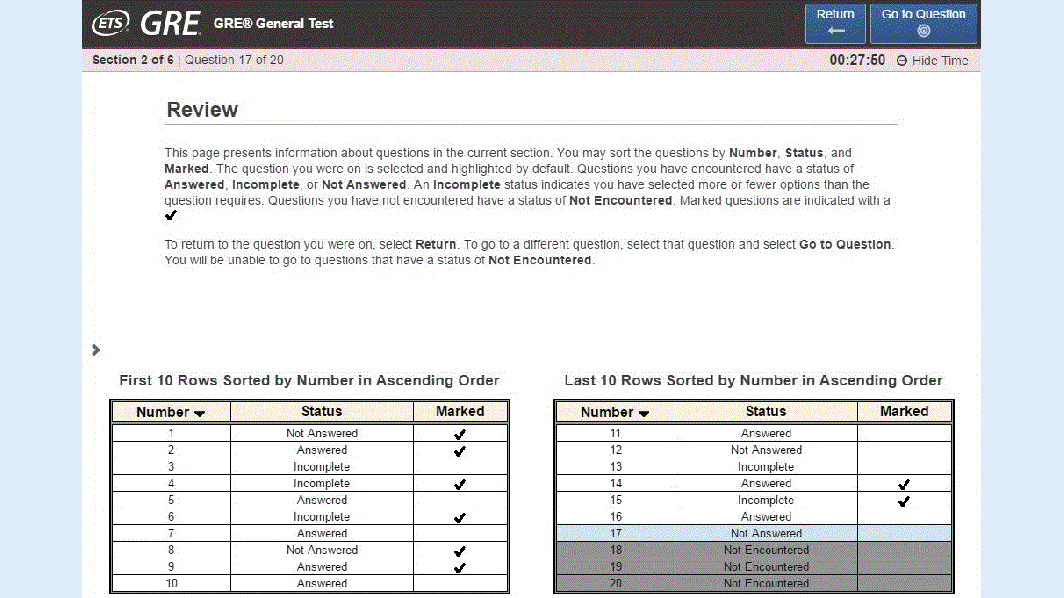
The review screen supports a simple rule: make sure no question is left unanswered, then spend remaining time where it has the best chance of changing an answer. You may navigate and change answers within the current section, but once that section ends, treat it as closed.
For this first diagnostic, resist the temptation to impose a new technique halfway through. The result should reflect your current habits, including any inefficient ones. Later lessons will give you specific tools for skipping, returning, estimation, Quantitative Comparison, and question-type processes. First, you need to see where those tools would have the greatest effect.
What to record immediately after the test
When the report appears, take a screenshot or write the information down before closing the software. Record facts, not explanations. The next lesson will introduce a structured way to diagnose why questions were missed.
Use this compact diagnostic record:
| Field | Record |
|---|---|
| Date and time | |
| Test used | Official timed POWERPREP, test name/number if shown |
| Verbal Reasoning score | |
| Verbal percentile, if shown | |
| Quantitative Reasoning score | |
| Quantitative percentile, if shown | |
| Analytical Writing | Completed essay: yes/no; any feedback available |
| Timing observations | Any section where you rushed, guessed repeatedly, or ran out of time |
| Completion | Any unanswered questions when a section ended |
| Test conditions | Quiet/uninterrupted? Any pause, lookup, interruption, or technical issue? |
| Immediate observations | Maximum three neutral notes, such as “fractions felt slow” or “long passages required rereading” |
Keep the final row observational. Write “ran short on time in Quant” rather than “I am bad at Quant.” A diagnostic measures a starting condition, not a fixed ability.
Do not review the explanations yet
Once you have recorded the result, stop. Do not begin looking through answer explanations, correcting questions, or studying topics that same day. Your next lesson will separate five different causes of missed questions:
- knowledge gaps;
- interpretation errors;
- strategy errors;
- pacing errors;
- carelessness errors.
Reviewing impulsively tends to blur those causes. For example, seeing that an answer used a formula may make a timing problem look like a knowledge problem. A disciplined pause preserves better evidence for the analysis.
Completion standard
This outcome is complete when all four statements are true:
- You took an official POWERPREP full-length test in timed mode.
- You completed it in one sitting, without content help or extra pauses.
- You attempted every question in each section.
- You saved your Verbal and Quantitative results and the brief diagnostic record.
The main takeaway is simple: an honest baseline is more valuable than a flattering one. It tells you whether your highest-return GRE work should begin with quantitative foundations, verbal process, pacing, or a combination.
Next, you will use the diagnostic—not vague impressions—to classify the causes of missed questions.
Can't find a good explanation? Sign up and we'll make it for you
Sign up