
Hello! Welcome back.
In our last lesson, we learned how to identify SQL injection entry points. We used metacharacters, boolean logic, and time delays to confirm when an application was vulnerable. We noted that database error messages are a tell-tale sign of SQLi. While we used them as a simple confirmation signal, we didn't explore what those errors were actually telling us.
Today, we're going to turn those errors into our primary tool for data exfiltration. This lesson focuses on error-based SQL injection, a technique where you intentionally craft payloads that cause the database to fail in a specific way, forcing it to reveal sensitive information within the error message itself. This method can turn a situation with no visible output into a direct channel for leaking database schema, table names, and user data.
By the end of this 60-minute lesson, you will be able to exploit error-based SQL injection to extract database error messages and schema information.
1. Understanding Verbose Error Messages
In the previous lesson, we were happy to see any kind of error, even a generic "500 Internal Server Error," because it signaled that our payload broke something. For error-based SQLi, however, we need more. We're looking for verbose errors—detailed messages generated by the database engine itself that describe what went wrong.
These messages are a goldmine because they often contain parts of the original query, helping you understand how the application communicates with the database.
To see how an attacker deciphers these clues, let's watch a short demonstration.
How Hackers Craft Advanced SQL Injection Attacks
The video "How Hackers Craft Advanced SQL Injection Attacks" by Neurix provides a clear example of triggering and analyzing an SQL error to understand the underlying query.
Watch from 08:14 to 10:27. Focus on two key steps: How a single quote is used to generate the initial SQL error. How the attacker analyzes the text of the error message to piece together the exact SELECT statement being used by the application.
As you saw, the process is methodical:
- Inject a metacharacter (like a single quote) to break the query syntax.
- Receive a verbose error. If you only get a generic error page, error-based exploitation might not be possible, and you'd have to rely on the blind techniques from our last lesson.
- Analyze the error message to reconstruct the backend query.
- Repair the query using a comment (
--or#) to confirm you have full control over the query's structure. If the page returns to its normal state, you've confirmed your injection point and are ready to craft an exploit.
2. Forcing the Database to Leak Data
Now for the exciting part. How do we go from understanding the query to extracting data like usernames and passwords? We need to construct a payload that is syntactically correct but logically flawed in a way that forces the database to include the data we want in its error report.
A very common and powerful technique is to abuse data type conversion. Your computer science background will be useful here; you know that trying to treat a string like "administrator" as an integer will cause a type-casting error in most programming languages. Databases are no different.
We can exploit this by asking the database to perform a comparison or conversion between a piece of secret data (which is a string) and an incompatible data type (like an integer).
The following video from Rana Khalil is a complete walkthrough of this technique on a PortSwigger lab. It shows the entire process, from initial probing to final password extraction.
SQL Injection - Lab #18 Visible error-based SQL injection | Short Version
In this video, Rana Khalil solves a PortSwigger lab focused on error-based SQLi. Pay close attention to her iterative process of building the payload. Real-world exploitation often involves trial and error.
First, watch from 02:03 to 05:13. This part covers the initial steps we just discussed: triggering a verbose error with a single quote and then fixing the syntax with a comment (--) to regain a valid response.
Now that the injection point is confirmed, the next step is to craft a payload to cause a deliberate error. Rana uses the CAST function, which attempts to convert a value to a specified data type.
SQL Injection - Lab #18 Visible error-based SQL injection | Short Version
Let's continue with the video. This next segment shows how to use the CAST function to create an error and then refine the payload to extract information.
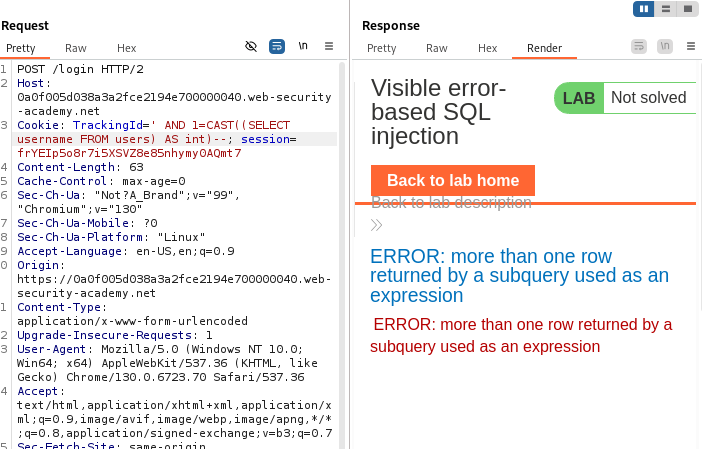
Watch from 05:13 to 13:33. This is the core of the technique. Observe how: The initial CAST((SELECT 1) AS int) payload is constructed and how the error message guides her to wrap it in a boolean comparison (1=CAST(...)). She modifies the payload to CAST((SELECT username FROM users) AS int). This fails because the subquery returns multiple rows. She fixes this with LIMIT 1. The final error message invalid input syntax for type integer: "administrator" successfully leaks the username. She then easily pivots to extract the password by changing SELECT username to SELECT password.
This walkthrough demonstrates the attacker's mindset perfectly:
- Form a hypothesis: "I can use
CASTto cause an error." - Test it: Inject the payload.
- Analyze the result: Read the new error message.
- Refine the payload: Adjust the query based on the error's feedback.
- Repeat: Continue this cycle until the desired data is extracted.
The lab from the video is available on PortSwigger's Web Security Academy. I recommend keeping this page handy as a reference for the steps involved.
Lab: Visible error-based SQL injection
This is the official documentation for the PortSwigger lab you just saw demonstrated. It provides a concise, step-by-step written guide to the same exploit.
Quickly read through the 'Solution' section. It mirrors the video's steps and serves as a great textual summary of the CAST to int technique for PostgreSQL.
Test your understanding!
You are exploiting the same vulnerability as in the video. You have successfully used the payload ' AND 1=CAST((SELECT username FROM users LIMIT 1) AS int)-- to leak the username "administrator".
Now, you want to find out what tables are in the database. In PostgreSQL, there is a special table called information_schema.tables which contains a column named table_name.
How would you modify the payload to leak the name of the first table from the database?
Show answer
You would replace the subquery that selects the username with a new subquery that selects the table name.
The modified payload would be:' AND 1=CAST((SELECT table_name FROM information_schema.tables LIMIT 1) AS int)--
This payload instructs the database to:
- Select the first
table_namefrom theinformation_schema.tablestable. - Attempt to
CASTthat table name (which is a string) to anint. - This will trigger a type conversion error, and the error message will contain the name of the table.
3. Adapting Payloads for Different Databases
The CAST function is common, but it's not the only way to trigger errors, and the syntax can vary between database systems. A professional penetration tester needs to be able to identify the backend database and tailor their payloads accordingly.
For example:
- PostgreSQL:
CAST(value AS int) - MS SQL Server:
CONVERT(int, value) - MySQL: Does not throw an error for invalid casts in the same way. Instead, attackers often abuse XML functions like
extractvalue()orupdatexml(). - Oracle: Uses functions like
CTXSYS.DRITHSX.SNorDBMS_XSLPROCESSOR.NEWXSLPROCESSOR.
The following article provides a fantastic overview of different error-based techniques and includes a helpful cheat sheet.
📚 Error-Based SQL Injection – A Deep Dive! 🎓🔍
The article 'Error-Based SQL Injection – A Deep Dive!' by OnyxWizard provides a clear explanation of different error-based techniques, including those specific to certain databases.
Please read the following sections: 'What is Error-Based SQL Injection?': To reinforce the core concept. 'Different Databases, Different Tricks': To see examples for PostgreSQL and MySQL. 'Summary Table' and 'Bonus: Cheat Sheet Snippet': These are excellent quick references for crafting payloads.
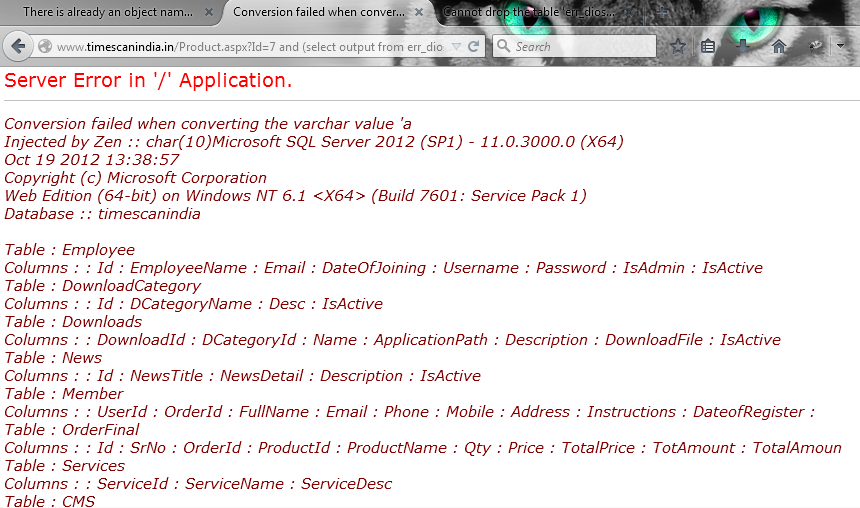
The key takeaway is that while the principle of forcing errors is universal, the implementation is database-specific. In a real engagement, you would first fingerprint the database (e.g., based on syntax differences or unique functions) and then choose the appropriate error-based payload.
Conclusion
Today, we've transformed database errors from a simple vulnerability indicator into a powerful channel for data exfiltration. You've learned how to read verbose error messages to understand the backend system and how to craft specific payloads to force that system to reveal its secrets.
Key Takeaways:
- Verbose vs. Generic Errors: Error-based SQLi relies on detailed database error messages, not generic HTTP errors.
- The Exploit Cycle: The process involves breaking the query, analyzing the error, and iteratively refining a payload to force data into the error message.
- Type Conversion is Key: A common technique is to force a data type conversion that you know will fail, such as converting a string to an integer using
CASTorCONVERT. - Database-Specific Payloads: The exact functions and syntax for triggering errors vary between database engines like PostgreSQL, MySQL, and MS SQL.
Next Lesson Preview:
Error-based injection is incredibly powerful, but it depends on the application being configured to display verbose errors. What if it isn't? In our next lesson, we will explore union-based SQL injection. This technique applies when the application does not show errors but does display the results of a query on the page. You'll learn how to use the UNION operator to merge the results of your own malicious query with the application's legitimate results, allowing you to read out database contents directly within the web page.