
Hello! Welcome to the first lesson in our module on SQL Injection.
In the previous module, we focused on breaking application logic and bypassing authorization controls. We saw how manipulating business workflows, like in password resets or shopping carts, could lead to critical vulnerabilities. Now, we shift our focus from the application's logic to how it handles data. Specifically, we'll explore what happens when an application insecurely communicates with its database.
This lesson introduces one of the most classic and high-impact web vulnerabilities: SQL Injection (SQLi). Our goal is to master the first and most critical step in finding this flaw, as defined by our learning outcome: Identify SQL injection entry points by testing input fields with SQL metacharacters. We will learn where to look for these vulnerabilities and how to use special characters to provoke a response that reveals a weakness.
1. What is SQL Injection?
At its core, SQL injection is a vulnerability that allows an attacker to interfere with the queries an application makes to its database. It occurs when user-supplied data is not properly sanitized and is included in a database query. This allows an attacker to inject their own SQL commands, potentially leading to data theft, modification, or even complete server compromise.
Let's consider a typical web application that displays products. When you click on a category, the URL might look like this: https://example.com/products?category=Gifts. The server-side code might build a SQL query like this:
SELECT * FROM products WHERE category = 'Gifts' AND released = 1;
The vulnerability arises when the application constructs this query by simply concatenating the user's input from the category parameter into the query string:
$category = $_GET['category'];
$query = "SELECT * FROM products WHERE category = '" . $category . "' AND released = 1;";
// Execute the query...
An attacker can manipulate the category parameter to change the structure of the query. This is the fundamental principle we will be exploiting.
To get a solid overview of SQL injection and its potential impact, the following article from PortSwigger is an excellent starting point.
What is SQL Injection? Tutorial & Examples
Read the introduction to PortSwigger's guide on SQL Injection to understand what the vulnerability is and the severe impact it can have.
Please read the first two sections of the article: "What is SQL injection (SQLi)?" and "What is the impact of a successful SQL injection attack?". Focus on understanding why mixing code and user data is dangerous.
2. Finding Potential Entry Points
Before we can test for SQLi, we need to identify all the places where our input might be sent to a database. As a bug bounty hunter, you must develop a keen eye for these "entry points."
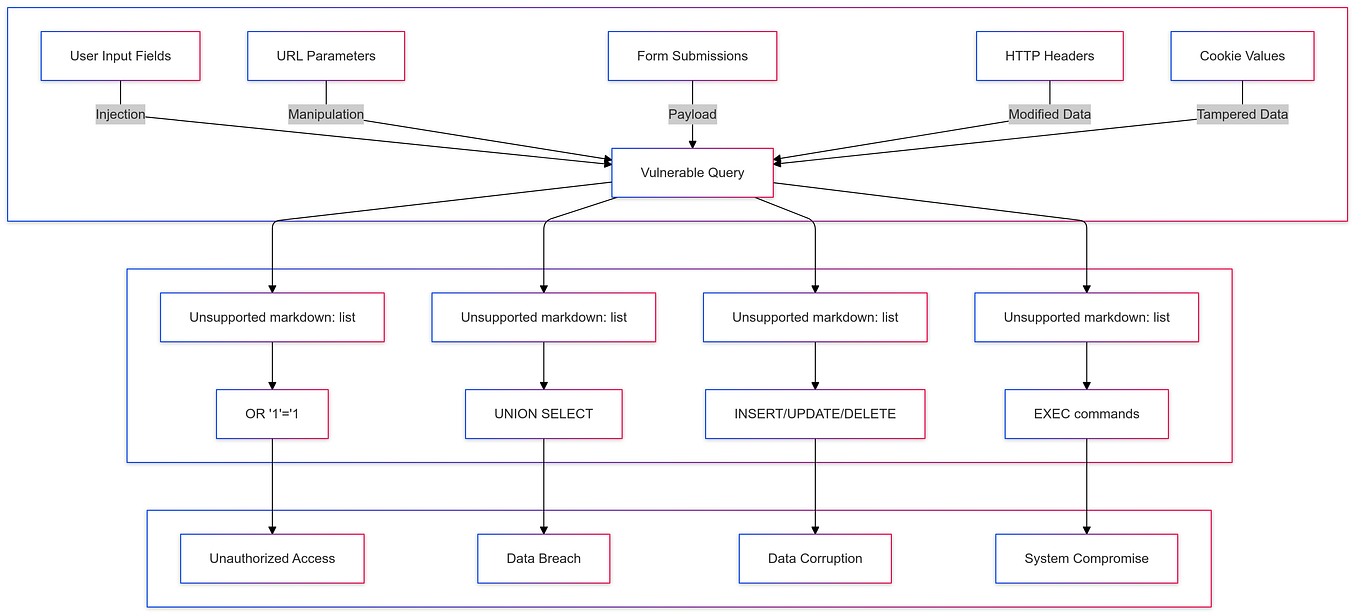
Common entry points include:
- URL Parameters: Especially those that filter or retrieve content (e.g.,
id=,category=,search=). - Form Fields: Login forms, registration forms, contact forms, and search bars are all prime candidates.
- HTTP Headers: Less common, but sometimes headers like
User-Agent,Referer, or custom headers are logged to a database. - Cookies: Cookie values can be used to track user preferences or session information, which might involve a database query.
The flowchart below visualizes these various input sources and how they can feed into a vulnerable query.
The following video provides a practical look at how a bug bounty hunter starts searching for these entry points on a live website.
BUG BOUNTY HUNTING: IDENTIFY SQL INJECTION ON LIVE WEBSITE
The video "BUG BOUNTY HUNTING: IDENTIFY SQL INJECTION ON LIVE WEBSITE" by BePractical demonstrates the initial reconnaissance phase of finding potential SQLi vulnerabilities.
Watch from 01:24 to 03:07. Pay attention to how the presenter identifies that a parameter is interacting with the database and uses Google Dorking to find more potentially vulnerable URLs.
3. The Litmus Test: Probing with Metacharacters
Once you've identified a potential entry point, the next step is to test it. The simplest and most common technique is to inject a SQL metacharacter—a character with a special meaning in the SQL language—and observe the application's response.
The Single Quote (')
The single quote is the most powerful tool in your detection arsenal. In SQL, it's used to enclose string values. If you inject a single quote into a parameter that is being concatenated into a query string, you will likely break the query's syntax.
Let's revisit our example:SELECT * FROM products WHERE category = 'userInput' AND released = 1;
If a user provides Gifts as input, the query is valid:SELECT * FROM products WHERE category = 'Gifts' AND released = 1;
But if an attacker provides Gifts' as input, the query becomes:SELECT * FROM products WHERE category = 'Gifts'' AND released = 1;
This query is now syntactically incorrect because of the mismatched quotes. This will likely cause the database to return an error.
What to look for after injecting a single quote:
- Database Error Messages: The application might display a verbose error message, like
Unclosed quotation mark...orYou have an error in your SQL syntax.... This is a clear sign of SQLi. - Changes in the Page: The page content might disappear, or a generic error page (like a "500 Internal Server Error") might be displayed. This indicates that something broke on the backend, which is a strong hint.
- No Change: If nothing changes, the application might be handling the input correctly, or it might be suppressing errors (which we'll deal with next).
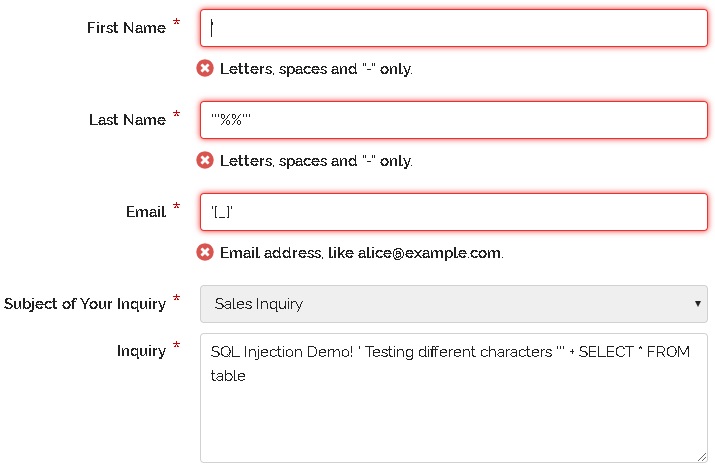
The image below shows an example of testing various input fields, one of which contains SQL metacharacters.
4. Confirming the Vulnerability
A database error is a good indicator, but sometimes errors are hidden. To be certain, you need to prove that you can control the query's logic. We can do this using boolean conditions or by inducing a time delay.
Boolean-Based Confirmation
This technique involves injecting a logical condition and observing whether the application's response changes based on whether the condition is true or false.
Consider a URL like https://example.com/items?id=10.
-
Inject a TRUE condition:
https://example.com/items?id=10' AND '1'='1
The resulting query might look like:SELECT * FROM items WHERE id='10' AND '1'='1'. Since'1'='1'is always true, the query's logic remains the same, and the page should load normally. -
Inject a FALSE condition:
https://example.com/items?id=10' AND '1'='2
The resulting query might look like:SELECT * FROM items WHERE id='10' AND '1'='2'. Since'1'='2'is false, theANDcondition fails, and the query should return no results. The page will likely change, showing "item not found" or simply being blank.
If the application behaves differently for the true and false conditions, you have confirmed a SQL injection vulnerability.
Time-Based Confirmation
Another powerful confirmation method is to tell the database to wait for a specific amount of time. If the website's response is delayed by that amount of time, you've proven you can execute arbitrary SQL commands.
For example, using a payload like: ...id=10' AND SLEEP(5)--
- MySQL:
SLEEP(5) - PostgreSQL:
pg_sleep(5) - MS-SQL:
WAITFOR DELAY '0:0:5'
The -- at the end is a comment indicator, which causes the database to ignore the rest of the original query, preventing further syntax errors. If the page takes 5 seconds longer to load, you've confirmed SQLi.
The following resources provide excellent demonstrations of these manual detection techniques.
BUG BOUNTY HUNTING: IDENTIFY SQL INJECTION ON LIVE WEBSITE
Returning to the BePractical video, the presenter now demonstrates how to confirm the vulnerability using the very techniques we just discussed.
Watch from 03:07 to 06:55. Observe how the presenter first uses a single quote to see a change, then confirms the SQLi with both a time-based payload (SLEEP) and boolean-based conditions (AND 1=1 / AND 1=2).
OWASP WSTG - Testing for SQL Injection
The PortSwigger and OWASP guides provide further textual examples and explanations of these detection methods. They are great references to solidify your understanding.
Skim through the sections "How to Test" and "SELECT Statement". Notice the structured approach: identify interactions, test with metacharacters, and use logic to confirm. This guide is a valuable part of a professional's toolkit.
Test your understanding!
You are testing a search function at https://e-shop.com/search?q=laptops.
- When you search for
laptops, you get a list of laptops. - When you search for
laptops', you get an empty results page with the message "No products found." - When you search for
laptops''(two single quotes), you get the original list of laptops again.
What does this behavior suggest? What would be your next two tests to definitively confirm an SQL injection vulnerability?
Show answer
What it suggests:
This behavior strongly suggests an SQL injection vulnerability.
- The single quote (
') breaks the query, resulting in no products found (the application fails gracefully instead of showing a DB error). - The double single quote (
'') is often treated as an escaped single quote in SQL, which means the query becomes valid again, explaining why the original results return.
Next two tests:
To confirm, you should use boolean-based tests:
- Test 1 (True condition):
https://e-shop.com/search?q=laptops' AND '1'='1- Expected result: The original list of laptops should appear, as the
ANDcondition is true.
- Expected result: The original list of laptops should appear, as the
- Test 2 (False condition):
https://e-shop.com/search?q=laptops' AND '1'='2- Expected result: The "No products found" message should appear, as the
ANDcondition is false, causing the query to return no results.
- Expected result: The "No products found" message should appear, as the
If the application responds as expected to these two tests, you have confirmed the SQLi vulnerability.
5. Using Burp Suite for Detection
While manual testing in the browser is essential, using a tool like Burp Suite makes the process more efficient. You can use Burp Repeater to quickly send and modify requests with different payloads, and Burp Intruder to automate the testing of many payloads against a parameter.
The following video from PortSwigger shows how to use Burp Intruder to test for SQLi.
Testing for SQL injection vulnerabilities with Burp Suite
This official PortSwigger video demonstrates how to use Burp Suite to test for SQL injection. It covers using both the automated scanner and, more importantly for our learning, the semi-manual Intruder tool.
Watch from 01:03 to 03:10. Focus on the workflow: sending a request to Intruder, selecting the parameter to test (the payload position), and loading a list of test strings (payloads). Analyzing the response length and content is key to spotting anomalies.
Conclusion
In this lesson, we took our first step into the world of SQL injection. We've learned that identifying a vulnerability begins with methodical reconnaissance and testing. You are now equipped with the fundamental techniques to probe web applications for this critical flaw.
Key Takeaways:
- SQL injection occurs when an application insecurely combines user-provided data with SQL queries.
- Entry points are everywhere: URL parameters, form fields, headers, and cookies.
- The single quote (
') is your primary tool for initial detection, as it often breaks the SQL syntax. - Look for database errors, changes in page content, or differences in HTTP response codes.
- Confirm vulnerabilities reliably using boolean-based logic (
AND '1'='1vs.AND '1'='2) or time-based delays (SLEEP(5)). - Tools like Burp Repeater and Intruder are essential for efficiently testing entry points.
Next Lesson Preview:
Now that we know how to identify SQL injection entry points, our next step is to learn how to exploit them. In the next lesson, we will focus on error-based SQL injection. You'll learn how to interpret the database error messages we've been provoking to systematically extract information about the database's structure, tables, and contents.