
Hello! Welcome to our next lesson on SQL Injection.
In our last session, we dove into error-based SQL injection, where we manipulated queries to force the database to reveal information through verbose error messages. That's a powerful technique, but it relies on one key condition: the application must be configured to display detailed errors. In many secure environments, these errors are suppressed, leaving you with only a generic error page or no error at all.
This brings us to our topic today: union-based SQL injection. This is your go-to technique when error messages are hidden, but the application does display the results of a successful query on the page. We will learn how to use the SQL UNION operator to append the results of our own malicious query to the application's legitimate query, effectively turning the web page into an output terminal for the database.
By the end of this lesson, you will be able to perform union-based SQL injection to retrieve data from other database tables.
1. The UNION Operator: Combining Queries
Before we inject anything, let's understand the tool we'll be using. In SQL, the UNION operator is used to combine the result sets of two or more SELECT statements.
Imagine a database with a users table and an articles table. A UNION query can pull data from both and display them in a single, combined result set.
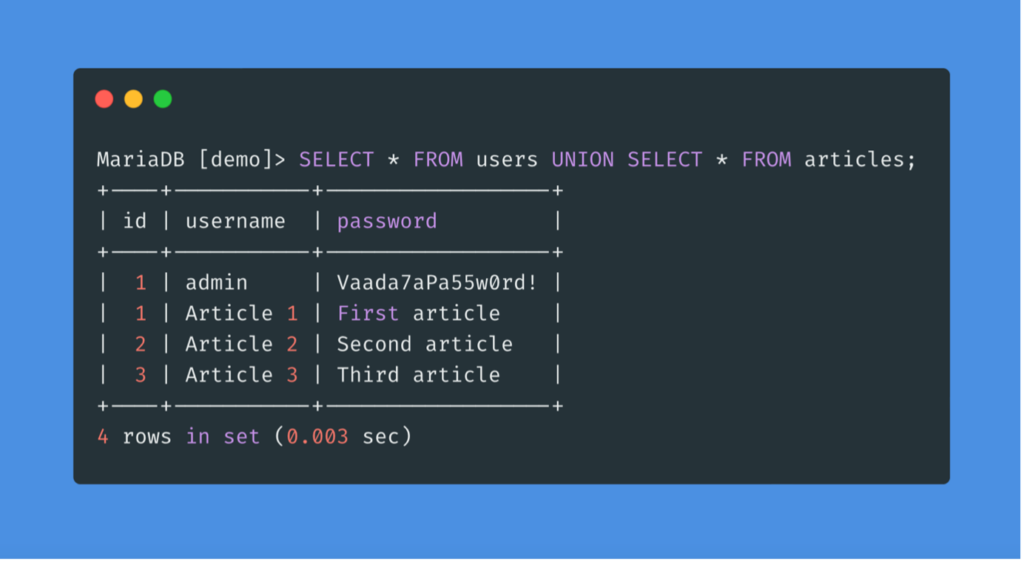
For a UNION query to work, two critical conditions must be met:
- The individual
SELECTstatements must return the same number of columns. - The data types in each corresponding column must be compatible (e.g., you can't easily union a column of dates with a column of integers).
Our entire attack strategy revolves around satisfying these two conditions within our injected payload.
To get a formal introduction to this attack, please start by reading the first part of PortSwigger's guide on this topic.
This material from PortSwigger, the creators of Burp Suite, introduces the core concept of SQL injection UNION attacks.
From the 'Contents' list, please read the two short pages under the heading 'SQL injection UNION attacks'. Focus on understanding the two fundamental requirements for a successful UNION attack.
2. Step 1: Determine the Number of Columns
Our first task is to figure out how many columns the original, vulnerable query is returning. If we get this number wrong, the database will throw an error (which we likely won't see) and our attack will fail. There are two primary methods for this.
Method A: Using ORDER BY
You can inject an ORDER BY clause and increment the column index. The query will succeed as long as the index is valid. When you specify an index that is out of bounds (e.g., ORDER BY 10 when there are only 9 columns), the query fails. The last number that didn't cause an error is the correct column count.
Payload example: ' ORDER BY 1-- , ' ORDER BY 2--, etc.
Method B: Using UNION SELECT
You can inject a series of UNION SELECT statements with an increasing number of NULL values. The application's behavior will return to normal only when your UNION clause has the exact same number of columns as the original query.
Payload example: ' UNION SELECT NULL--, ' UNION SELECT NULL,NULL--, etc.
The following resource provides a textual overview of both methods and a hands-on lab from PortSwigger to practice.
Determining the number of columns required
This section of the PortSwigger learning path covers the two methods for determining the column count.
Please read the material under the heading 'Determining the number of columns required'. Afterward, I highly recommend you attempt the associated 'Lab: SQL injection UNION attack, determining the number of columns returned by the query'. This will solidify your understanding.
To see the ORDER BY method in action, watch this short segment.
SQL injection Tutorial - Union Based Attack
The video 'SQL injection Tutorial - Union Based Attack' by Infosec Mastery clearly demonstrates using the ORDER BY clause to find the column count.
Watch from 02:21 to 04:26. Observe how the attacker iteratively increases the number in the ORDER BY clause until the page breaks, revealing that the query uses five columns.
3. Step 2: Find Columns with a Useful Data Type
Now that we know the number of columns, we need to find out which ones are both displayed on the page and have a data type suitable for holding text. We're usually interested in exfiltrating string data like usernames and passwords.
To do this, we craft a UNION SELECT payload with the correct number of columns, placing a unique string in each position. We then observe the page to see which of our strings are reflected in the output.
For example, if the query has five columns, our payload might be:' UNION SELECT 'col1', 'col2', 'col3', 'col4', 'col5'--
If "col2" and "col3" appear on the page, we know that the second and third columns are our targets for data exfiltration.
The following video and text demonstrate this process.
SQL injection Tutorial - Union Based Attack
Continuing with the Infosec Mastery video, this part shows how to identify which columns' contents are displayed on the page.
Watch from 04:26 to 05:37. Notice how the payload UNION SELECT 1, 2, 3, 4, 5 is used, and the numbers that appear on the page identify the useful columns.
Finding columns with a useful data type
PortSwigger's guide also covers this step, along with another practical lab.
Read the material under the heading 'Finding columns with a useful data type' and try the associated lab to find a column that can hold text.
Test your understanding!
You are attacking a product search feature. You've determined the query returns three columns. You inject the payload ' UNION SELECT 'aaa', 'bbb', 'ccc'--.
The search results page now shows the product name as "bbb" and the product description as "ccc". The product price field is empty.
Which columns should you use to extract a username and password?
Show answer
You should use the second and third columns.
Since your injected string 'bbb' appeared where the product name usually is, and 'ccc' appeared where the description is, you know that the second and third columns of the query are displayed and can hold string data. You could place username in the second column and password in the third column of your final payload.
4. Step 3: Retrieve Data from Other Tables
We're now ready for the final step: extracting data. We'll construct a UNION SELECT payload that has the correct number of columns, but instead of our test strings, we will place a subquery that retrieves the data we want in the columns we identified as useful.
For example, if we found that a three-column query displays string data in columns 2 and 3, our payload to extract credentials might look like this:
' UNION SELECT NULL, username, password FROM users--
NULLis a placeholder for the first column, which we don't need.usernameandpasswordwill be selected from theuserstable.- Their values will appear in the second and third column positions on the web page.
The following video provides a complete, end-to-end demonstration of this entire process using Burp Suite. It covers finding the column count (using the UNION SELECT NULL method), correctly formatting the payload, and finally extracting user credentials.
How Hackers Craft Advanced SQL Injection Attacks
The video 'How Hackers Craft Advanced SQL Injection Attacks' from Neurix offers an excellent practical walkthrough of a full union-based attack.
Watch from 10:27 to 20:35. This is the core of the lesson. Pay close attention to: Finding Column Count (10:27 - 16:41): How the attacker uses trial and error with UNION SELECT 1,2,3... and analyzes the server response (500 vs. 200 OK) to find the correct number of columns. URL Encoding (13:49 - 15:20): Note how Burp Suite's Inspector is used to URL-encode the payload. This is a crucial practical step. Extracting Data (16:41 - 20:35): Observe how the placeholder numbers are replaced with id, email, and password from the users table to exfiltrate the data.
This process is also documented by PortSwigger with a final lab that brings everything together.
Using a SQL injection UNION attack to retrieve interesting data
This is the final piece of the PortSwigger guide for this lesson, where you put everything together to retrieve data from another table.
Read the material under this heading and complete the 'Lab: SQL injection UNION attack, retrieving data from other tables'. This lab challenges you to exfiltrate all usernames and passwords from a users table.
Conclusion
Today we've added a critical technique to your SQL injection arsenal. When error messages are suppressed but query results are displayed, union-based SQLi is the way to go. You learned the methodical, three-step process that professionals use to carry out this attack.
Key Takeaways:
- The Goal: To merge the results of a malicious query with a legitimate one using the
UNIONoperator. - The Conditions: The attack only works if your injected query returns the same number of columns with compatible data types.
- The Methodology:
- Find Column Count: Use
ORDER BYorUNION SELECT NULLiteration. - Find Usable Columns: Use
UNION SELECT 'a','b',...to see which columns are displayed and accept strings. - Extract Data: Replace the placeholders with a
SELECTstatement targeting the data you want (e.g.,SELECT username, password FROM users).
- Find Column Count: Use
Next Lesson Preview:
We've now covered scenarios with visible errors and scenarios with visible query results. But what about the most challenging situation: when there are no useful errors and no data from the query is displayed on the page? These are known as blind SQL injection vulnerabilities. In our next lesson, we will explore boolean-based blind SQL injection, a technique where we ask the database a series of true/false questions and infer the answers based on subtle changes in the application's response.