
Hello! Welcome to the seventh module of our course, API & Web Application Security.
In the previous module, we focused on making our API robust and developer-friendly by implementing versioning and generating professional documentation. Now, we shift our focus to a topic that is non-negotiable for any application: security. An API, no matter how well-designed, is a liability if it's not secure.
We'll begin with one of the most fundamental aspects of security. Our learning outcome for today is to implement secure password storage using Laravel's hashing mechanisms. We'll explore not just how to do this in Laravel, but also why these specific techniques are crucial for protecting user data.
1. The "Why": Principles of Secure Password Storage
Before touching any code, it's vital to understand the principles behind storing passwords. Storing them in plain text is out of the question, as a single database breach would expose every user's credentials. The correct approach is hashing.
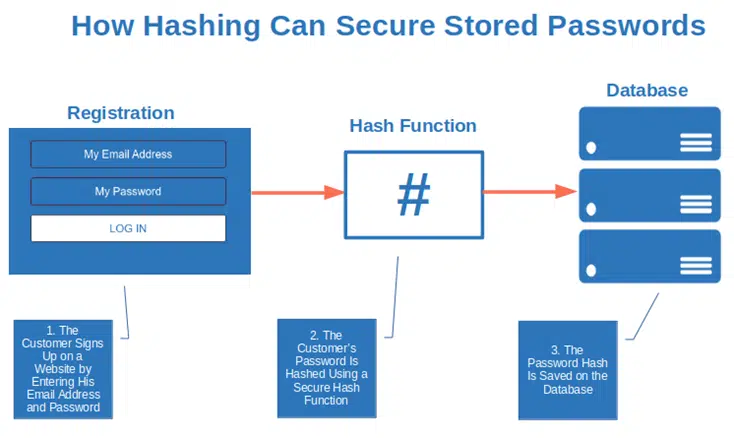
But what is hashing, and how is it different from encryption?
Laravel Password Hashing With Salt
This article from Inspector Dev provides a clear, concise distinction between hashing and encryption, which is foundational to our topic today.
Read the introductory section and the part titled 'Hashing is different from Encryption'. Focus on understanding why hashing is a one-way process and why that makes it suitable for password storage.
As the article explains, hashing is a one-way process. You can't "un-hash" a password to get back to the original text. When a user logs in, you hash the password they just provided and compare it to the hash stored in your database.
However, not all hashing algorithms are created equal, especially for passwords. A simple md5 or sha256 hash is fast, which is great for many purposes but terrible for password security. Speed makes it easy for attackers to mount a brute-force attack if they get a copy of your database.
To understand what makes a hashing algorithm truly secure for passwords, let's watch a detailed explanation.
What's the Best Hashing Algorithm for Storing Passwords?
This video from Rob Conery breaks down the essential traits of a good password hashing algorithm and explains the common threats they are designed to mitigate.
Watch the video from the beginning until 05:23. Pay close attention to these key concepts: The Problem: Why even hashed passwords can be vulnerable after a data breach. Key Traits: The four properties of a good hashing algorithm. Why Speed is Bad: Why being intentionally slow is a critical security feature for password hashing. Salting: What a 'salt' is and how using a unique salt for each password thwarts attacks using 'rainbow tables' (pre-computed hash lists). Modern Algorithms: The video then discusses modern algorithms like bcrypt, scrypt, and Argon2, which build on these principles. We will focus on bcrypt and Argon2 as they are directly supported by Laravel.
To summarize the key takeaways from the video:
- One-Way: The hash cannot be reversed.
- Salted: A random string (the salt) is added to each password before hashing. This ensures that even two identical passwords result in different hashes, making pre-computed "rainbow table" attacks useless.
- Slow & Costly: The algorithm should be computationally expensive. This is often controlled by a "work factor" or "cost" parameter. A higher cost makes it exponentially harder for an attacker to try many password guesses.
- Memory-Hard (Advanced): Modern algorithms like Argon2 also require a significant amount of memory, making them more resistant to attacks using specialized hardware like GPUs.
Laravel's default hashing algorithm, Bcrypt, satisfies all these criteria and is an excellent, time-tested choice.
2. The "How": Hashing Passwords in Laravel
Laravel provides a simple and elegant API for handling all this complexity through its Hash facade. Under the hood, this facade is a convenient wrapper for PHP's native password_hash() and password_verify() functions, which are the current industry standard for PHP applications.
Let's explore the official documentation to see how it works.
The official Laravel documentation is the definitive guide for using the Hash facade. We'll look at the fundamental methods for creating and verifying hashes.
Please read the following sections from the documentation: Introduction: This confirms that Laravel uses Bcrypt and Argon2 and explains why the adjustable 'work factor' is a key benefit. Hashing Passwords: Focus on the Hash::make() method. Note the example code for updating a user's password. Verifying That a Password Matches a Hash: Focus on the Hash::check() method, which is the counterpart to make().
Hashing a New Password
As the documentation shows, creating a password hash is as simple as calling Hash::make():
use Illuminate\Support\Facades\Hash;

$hashedPassword = Hash::make('my-secret-password');
Because Laravel automatically generates a new salt each time, calling this function with the same input will produce a different hash every time. The algorithm, cost factor, and salt are all embedded within the resulting hash string, so Laravel knows exactly how to verify it later.
Verifying a Password on Login
When a user tries to log in, you use Hash::check() to compare their plain-text input against the stored hash:
use Illuminate\Support\Facades\Hash;

$storedHash = '...'; // Retrieved from the 'password' column in your users table

if (Hash::check('my-secret-password', $storedHash)) {
    // The passwords match. Log the user in.
} else {
    // Passwords do not match.
}
This is the core of Laravel's password authentication logic.
3. A Modern and Automatic Approach: The hashed Cast
While using Hash::make() in your controllers or services works perfectly, Laravel offers an even more convenient and modern way to handle this automatically: the hashed attribute cast.
By adding this cast to your User model, Laravel will automatically hash any value assigned to the password attribute before saving it to the database.
NEW in Laravel 10.10: Cast Password as "hashed"
The Laravel Daily channel provides a quick, clear demonstration of the hashed cast feature and a very important warning about using it.
Watch from 01:00 to the end. Pay attention to: How the 'hashed' cast is added to the $casts array in the User model. How this eliminates the need to call Hash::make() manually. The critical warning: if you use the cast, you must remove any manual hashing to avoid double-hashing the password, which would prevent users from logging in.
Here's how you would implement this in your User model:
// app/Models/User.php

namespace App\Models;

use Illuminate\Foundation\Auth\User as Authenticatable;
// ... other imports

class User extends Authenticatable
{
    // ...

    /**
     * The attributes that should be cast.
     *
     * @var array<string, string>
     */
    protected $casts = [
        'email_verified_at' => 'datetime',
        'password' => 'hashed', // Add this line
    ];
}
Now, when you create or update a user, you can pass the plain-text password directly. Laravel handles the rest.
// In a controller, e.g., RegisterController.php
User::create([
    'name' => $data['name'],
    'email' => $data['email'],
    'password' => $data['password'], // This will be automatically hashed!
]);
This approach is cleaner, less error-prone, and is the recommended way to handle password hashing in modern Laravel applications.
4. Adjusting the Work Factor
As hardware gets faster, you may want to increase the "cost" of hashing to maintain a strong defense against brute-force attacks. Laravel makes this configurable.
You can set the work factor for Bcrypt in your config/hashing.php file. The rounds parameter controls the cost. The default is 10, which is a good baseline. Increasing it to 12, for example, makes the hashing significantly slower (and thus more secure).
// config/hashing.php

'bcrypt' => [
    'rounds' => env('BCRYPT_ROUNDS', 12), // Changed from 10 to 12
],
What about existing users whose passwords were hashed with the old work factor? Laravel has a solution for that too: Hash::needsRehash(). You can use this method during your login process to check if a user's password was hashed with the current application settings. If not, you can rehash and update it on the fly.
// In a login controller, after a successful password check
if (Hash::needsRehash($user->password)) {
    $user->password = Hash::make($request->password);
    $user->save();
}
This ensures that your users' password security is gracefully upgraded over time without requiring them to reset their passwords.
Conclusion
You now have a solid understanding of both the theory and practice of secure password storage in Laravel. This is a critical first step in building a secure application.
Key Takeaways:
- Always Hash Passwords: Never store passwords in plain text. Hashing is a one-way function that is irreversible.
- Use Slow, Salted Algorithms: Secure password hashing is intentionally slow and uses a unique, random "salt" for every password. Laravel's default, Bcrypt, does this automatically.
- Use the
HashFacade: Laravel providesHash::make()to create a hash andHash::check()to verify a password against a hash. - Prefer the
hashedCast: The most modern and convenient method is to add'password' => 'hashed'to yourUsermodel's$castsarray. This automates the hashing process. - Configuration is Key: You can adjust the security "cost" (work factor) in
config/hashing.phpand useHash::needsRehash()to upgrade users to stronger hashes over time.
Up Next:
Now that we've secured passwords at rest in our database, our next lesson will focus on another critical area: preventing common web vulnerabilities. We will explore how Laravel's architecture, specifically its Eloquent ORM and Blade templating engine, inherently protects you from two of the most dangerous types of attacks: SQL Injection and Cross-Site Scripting (XSS).