
Hello. In the previous lesson, you used a RACI matrix to clarify who performs O2C work and who owns each outcome. That model becomes operational only when each team knows precisely what it may hand over, what it must accept, and what happens when the output is incomplete.
This lesson defines entry and exit criteria for the major O2C handoffs in a B2B SaaS lifecycle. By the end, you should be able to turn a broad statement such as “Sales sends the deal to Billing” into a controlled handoff with required data, evidence, acceptance status, ownership, and an exception route.
Entry and exit criteria: the operating contract between teams
A handoff occurs whenever responsibility for a transaction, decision, or exception moves between teams or systems. O2C is full of them:
- Commercial terms move from Sales and Deal Desk into Order Management.
- A billable order moves into Billing.
- An issued invoice becomes an AR item.
- A customer receipt moves from the bank or payment processor into Cash Application.
- Contract, billing, and service-delivery data move to Revenue Accounting.
- Operational balances and reconciliations move into month-end close.
A process map tells you the usual sequence. A RACI tells you who is involved. Entry and exit criteria define the conditions under which work may cross a boundary.
| Term | Meaning | Example |
|---|---|---|
| Entry criteria | Conditions that must be true before the receiving team can start work or accept an item | Billing can accept an order only when customer, price, currency, payment terms, billing schedule, and approval evidence are complete. |
| Exit criteria | Conditions that prove the sending team has completed its responsibility and produced an acceptable output | Billing has issued the invoice, created a traceable invoice number, recorded the status, and retained validation and delivery evidence. |
| Acceptance criteria | The receiving team’s specific checks before it accepts ownership | AR confirms the invoice is posted as an open receivable with a due date, billing contact, and dispute status. |
| Exception criteria | Conditions that prevent normal progression and require return, hold, or escalation | A required customer PO is missing; an invoice amount differs from the signed agreement; a receipt cannot be identified. |
The criteria on each side are closely related, but they are not identical.
For example, Deal Desk may mark an order package as complete. Billing still has to validate whether it is fit to bill. The upstream team is accountable for providing a complete package; the downstream team is accountable for accepting only a package that meets its operating standard.
This distinction prevents a weak but common process design:
“The opportunity is Closed Won, so Billing should invoice.”
“Closed Won” may be a commercial status, but it does not prove that the legal customer entity, billing contact, tax treatment, purchase order, payment terms, start date, and approved billing schedule are present and correct.
What makes a handoff criterion useful?
A criterion should be objective enough that two trained people reach the same conclusion. “Order reviewed” is not a useful criterion. “Order passes the billing-release validation with no unresolved mandatory-field or approval exceptions” is.
A practical handoff specification normally includes six elements:
-
Defined object and status
Identify the record being transferred: contract package, sales order, invoice, receipt, credit memo, revenue schedule, or reconciliation. -
Required data and documents
State the minimum information needed for the next activity, not every possible field in the system. -
Authority and approval
Specify which approvals must exist, especially for nonstandard pricing, payment terms, contract language, credits, or write-offs. -
Evidence of completion
Require a system status, document link, validation log, approval ID, delivery confirmation, bank reference, or reconciliation support. -
Receiving-team acceptance
Name the test the downstream owner performs before taking responsibility. -
Exception route and timing
Define whether the item is rejected, held, corrected, escalated, or processed through an approved exception. Include an SLA where speed matters.
The goal is not to create a long checklist that no one uses. It is to prevent ambiguous work from entering the next stage and becoming harder to correct.
Order-to-Cash Automation: End-to-End Guide for SaaS… | JustPaid
Read JustPaid’s “Order-to-Cash Automation: End-to-End Guide for SaaS” as a high-level map of the SaaS O2C stages and of the points where handoffs most often fail. Use it to identify why acceptance gates matter, rather than as a universal system-design template.
In the section “What is order-to-cash?”, read the six-stage overview. Then move to “Where the O2C cycle breaks — the five most common failure points” and read the failure-point discussion. Focus on the contract-to-invoice gap, cash-application lag, and month-end close dependency: each is usually a failure to define, enforce, or evidence a handoff.
The resource’s “contract-to-invoice gap” is particularly important. Manual re-entry is not automatically bad, but it is risky when the recipient has no structured way to compare the new order against the approved agreement. A manager should ask: What must be true before an order becomes eligible for billing, and what evidence proves it?
The major SaaS O2C handoffs
The following reference model is deliberately practical. Your organization’s systems and titles may differ, but the decision points should remain recognizable.
1. Commercial agreement to structured order
This handoff begins after a customer accepts an agreement and ends when the commercial deal has been translated into a usable operational order.
| Item | Entry criteria for Order Management / Billing Operations | Exit criteria from commercial setup |
|---|---|---|
| Commercial authorization | Executed contract or approved order form exists; required discount, pricing, and term approvals are attached. | The order record is linked to the current signed agreement and approved deal version. |
| Customer setup | Legal customer entity, bill-to entity, billing contact, address, tax information where applicable, and currency are available. | Customer master and billing profile pass required validation. |
| Commercial data | Product or SKU, quantity, contract term, start and end dates, price, discount, billing frequency, payment terms, and payment method are specified. | Structured order and billing schedule accurately reflect the executed agreement. |
| Customer-specific requirements | Customer PO, invoice-delivery method, procurement portal details, or vendor registration requirements are available when contractually required. | Required customer references are captured in the order; nonstandard requirements are documented. |
| Exception handling | Any missing field or conflicting term is visible to the receiving team. | Incomplete items are returned to the accountable commercial owner or formally approved as exceptions; they are not silently corrected by Billing. |
A sound exit status might be “Order Created—Pending Billing Validation.” That status does not mean the order can yet be invoiced. It means the commercial team has completed its package and Billing can now perform an independent acceptance check.
2. Validated order to billable event
For SaaS, a signed agreement is not always the same thing as a billable event. The contract may permit invoicing on signature, on service activation, on a specific future date, or after an implementation milestone. The governing criterion is the contractual billing trigger, not a generic operational preference.
| Item | Entry criteria for Billing | Exit criteria from order validation |
|---|---|---|
| Order quality | Order is linked to an approved agreement and contains all mandatory billing data. | Order has passed validation, with no unresolved pricing, date, currency, tax, or payment-term errors. |
| Billing trigger | Contractual invoice date, subscription start date, activation evidence, or milestone evidence is available. | Billing eligibility is recorded for the relevant period or milestone. |
| Change control | Amendments, cancellations, and special terms have documented approval and an effective date. | The active order version and billing schedule represent the approved change. |
| Decision status | Billing can see whether the item is released, held, rejected, or awaiting clarification. | The order is marked Released for Billing or moved into an exception queue with a named owner and reason. |
The key control is the release decision. Billing should not be forced to infer the intended terms from a contract PDF or email thread. Conversely, Billing should not alter a price or start date simply to make an invoice run complete.
Billing, AR, and cash: where a good handoff protects cash and customer trust
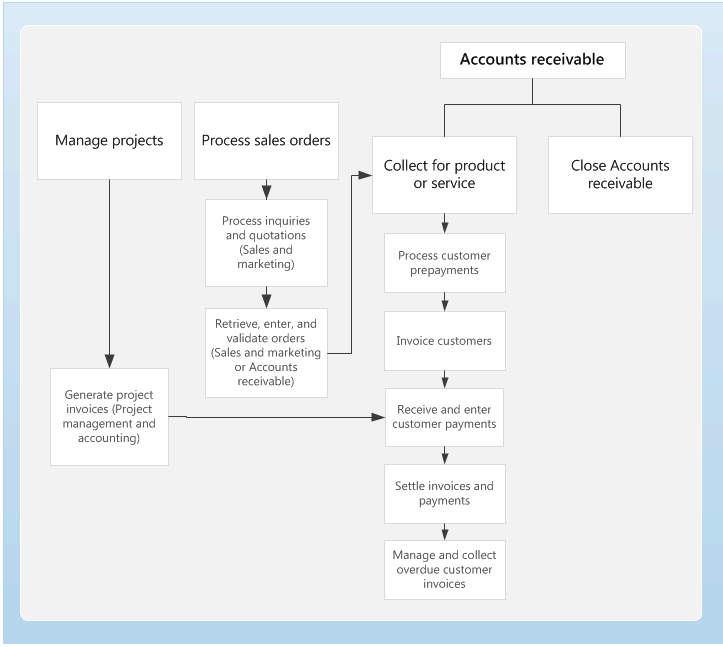
The Accounts Receivable process flow below focuses on the part of O2C that starts around invoicing and continues through payment handling and overdue collections.
3. Billable order to issued invoice
There are usually two distinct stages inside Billing:
- Create and validate a draft invoice.
- Finalize, post, and deliver an issued invoice.
Separating them matters because the draft is the last safe point to correct data without affecting a customer-facing financial document.
| Stage | Entry criteria | Exit criteria |
|---|---|---|
| Draft invoice creation | Released order; valid billing trigger; approved billing schedule; current customer billing data; tax and currency treatment; invoice template and delivery channel. | Draft invoice is tied to the source order, has correct line items and dates, and passes automated and manual validation. |
| Invoice finalization and issue | Draft validation is complete; necessary exception approvals are retained; no open hold exists. | Invoice has a unique number and final status; amount, customer, and tax fields are locked or controlled; the invoice is posted or available for AR processing; delivery status is recorded. |
| Billing exception | Validation identifies a discrepancy, missing PO, unapproved discount, invalid tax data, or an incorrect billing trigger. | Invoice is not issued; an exception case identifies the owner, reason, next action, and target resolution date. |
An important nuance: invoice issuance and invoice delivery are related but separate controls. A financial system may post an invoice successfully, while the email to the customer bounces or an EDI transmission fails. AR may own the receivable after posting, but Collections needs visibility that the customer actually received a usable invoice.
Status transitions and finalization | Stripe Documentation
Stripe’s documentation provides a concrete system-state example of a Billing handoff. Although its API terms are Stripe-specific, the control idea applies broadly: an invoice should move from an editable state to a payable, controlled state only after it is ready.
Read the transition table in “Transitions and endpoints” to see the possible invoice states. Then read the “Finalize draft invoices” subsection and the “Post-finalization” and “Finalized invoice restrictions” subsections. In particular, study the finalization effects, then note why customer and total-related fields become controlled after finalization. Focus on the managerial question: what validation must be complete before a draft becomes a customer-payable invoice?
In Stripe’s model, finalization changes an invoice from draft to open. It makes the invoice payable, ensures an invoice number is present, and restricts changes to certain customer and amount-related fields. Other billing systems use different status names, but the general design principle is the same:
The more difficult a transaction is to reverse, the stronger its entry criteria should be.
Once an invoice has been issued, a correction should follow a controlled correction path rather than an informal edit. This protects auditability, tax compliance where relevant, customer communication, and downstream revenue assessment.
4. Issued invoice to AR monitoring and collections
AR should receive an invoice as a usable receivable, not merely a PDF that was sent to a customer.
Entry criteria for AR
- The invoice is posted or otherwise recorded as an open customer balance.
- The customer account, invoice number, amount, currency, issue date, due date, and payment terms are present.
- The billing delivery result is known: delivered, pending, failed, or customer-portal available.
- Any known dispute, service hold, payment-plan arrangement, or credit risk indicator is visible.
- The invoice has a traceable source order and correction history.
Exit criteria from the Billing-to-AR handoff
- The invoice appears in the AR worklist and aging population.
- The invoice has a defined owner or automated queue rule.
- The customer’s current balance reflects the new open item.
- A billing issue is either resolved before handoff or logged as an explicit dispute or exception; it is not hidden in a free-text note.
Collections is often a function within AR, but it still benefits from a separate queue-entry rule. An invoice normally enters routine collections when it reaches its due date or becomes overdue. Earlier escalation may be appropriate for a high-value account, a failed automatic payment, a customer already on credit hold, or an invoice with repeated delivery failure.
Exit criteria from AR monitoring to an active collections case could include:
- The invoice meets an aging or risk trigger.
- The account’s contact details, open balance, prior collection history, and dispute status are available.
- The case has a priority, owner, next action date, and approved communication path.
- If a valid dispute exists, it is routed to its root-cause owner rather than treated as a standard payment chase.
5. Customer receipt to Cash Application
Receipt is not the same as cash application. The company may see money in the bank before it knows which customer or invoice the money settles.
| Item | Entry criteria for Cash Application | Exit criteria from Cash Application |
|---|---|---|
| Receipt identification | Bank or payment-processor record contains amount, currency, value date, payer information, transaction reference, and available remittance. | Receipt is linked to a customer and invoice or invoices, or is placed in a controlled exception category. |
| Invoice matching | Relevant open invoices, credits, and prior on-account balances are available for review. | Applied amount, remaining invoice balance, and any residual cash balance are accurately recorded. |
| Exception treatment | Partial payment, overpayment, short payment, foreign-currency difference, duplicate receipt, or absent remittance is identified. | Residual is categorized as unapplied, on-account, customer credit, or unidentified receipt according to policy, with an owner and follow-up action. |
| Reconciliation evidence | Application result can be compared with the bank or processor transaction. | Bank-to-subledger reconciliation support is retained, and unresolved differences are visible for investigation. |
A dangerous shortcut is to clear an invoice just because a payment amount happens to match it. If there is no reliable remittance, payer identification, or approved matching logic, cash should remain controlled as an exception until the match is supported.
6. Cash Application back to AR and Collections
Cash Application’s exit is AR’s entry. When application is complete:
- AR must see the revised open balance immediately or through a controlled interface.
- Collections must see whether an invoice is paid, partially paid, still overdue, disputed, or covered by a promise to pay.
- A payment that remains unapplied must not make an invoice appear settled.
- Material application exceptions should have a clear aging threshold for escalation to AR, Treasury, Billing, or Accounting.
This is a common source of avoidable customer friction. A customer may have paid on time, but if Cash Application does not apply the receipt promptly, Collections may send an incorrect dunning notice. The operational handoff therefore needs both an accuracy standard and a timeliness standard.
Revenue Accounting and close handoffs run alongside collection
O2C is not strictly a single line in which revenue waits until cash is received. Revenue Accounting often needs contract and service information before payment occurs, and may need to assess amendments or credits after the initial invoice.
7. Commercial, Billing, and delivery data to Revenue Accounting
For a straightforward SaaS subscription, Revenue Accounting needs enough information to understand what was promised, when service begins, what has been billed, and what has changed.
Entry criteria for Revenue Accounting
- Executed contract and current approved order version.
- Subscription or service start and end dates.
- Product or service description sufficient to identify the promised deliverables.
- Billing schedule, invoice and credit information, and relevant amendment or cancellation data.
- Service activation or implementation evidence when it affects the commencement of revenue recognition.
- Clear effective dates for changes.
Exit criteria from the Revenue Accounting handoff
- A contract-level revenue schedule or documented accounting assessment exists.
- Billing and credit events are reflected or identified as reconciling items.
- Revenue entries and supporting schedules are prepared for the reporting period.
- Exceptions, judgmental items, and missing delivery evidence are logged with an owner before close.
This lesson does not require you to calculate revenue recognition. The operating point is simpler: Revenue Accounting cannot reliably assess a contract if Billing, Customer Success, or Deal Desk sends incomplete or conflicting effective dates.
8. O2C operations to month-end close
The final major handoff is not a single transaction. It is the transfer of complete, supported O2C results to the close process.
| Entry criteria for close | Exit criteria from the O2C close workstream |
|---|---|
| Billing cutoff status is known, including late invoices, credits, and pending corrections. | Billing, AR, cash-application, and revenue-related reconciliations are completed and reviewed. |
| AR aging and unapplied-cash reports are produced for the close date. | Reconciling items are resolved or documented with owner, cause, financial impact, and expected resolution date. |
| Cash receipts and payment-processor data are available through the defined cutoff. | Required journal-entry support and management explanations are complete. |
| Revenue schedules and contract-change information are complete or explicitly flagged. | The Controller or designated close owner has accepted the O2C close package. |
A close handoff is weak if the team says, “The reconciliation is almost done.” The exit criteria should distinguish:
- Reconciled with no differences
- Reconciled with approved, documented reconciling items
- Not reconciled; escalation required
Only the first two should normally be acceptable close outputs.
Make the criteria enforceable, not aspirational
A handoff document should fit into a procedure, workflow, system configuration, or control matrix. For each major handoff, capture the following on one page:
| Field | Example: Order release to Billing |
|---|---|
| Upstream owner | Deal Desk / RevOps produces the approved order package. |
| Downstream owner | Billing Operations accepts or rejects the order for billing. |
| Trigger | Contract is executed, or an approved amendment is effective. |
| Entry criteria | Mandatory customer, product, price, term, billing schedule, payment-term, tax, and approval data are present. |
| Exit criteria | Order is released for billing or routed to an exception queue. |
| Evidence | Contract link, order ID, validation result, approval ID, status timestamp. |
| Exception route | Return commercial-data issue to Deal Desk; route a customer PO issue to Sales; route an accounting assessment to Revenue Accounting. |
| SLA and escalation | For example, standard orders accepted, rejected, or queued within one business day. |
Three practices make these definitions work in real operations.
First, configure visible statuses. Terms such as Pending Validation, Released for Billing, On Hold, Draft, Issued, Open AR, Unapplied Cash, and Close Exception make backlog and ownership visible. Avoid a single vague status such as In Progress.
Second, use controlled rejection rather than silent repair. If Billing changes a start date or price without documented authorization, the invoice may be correct by accident but the audit trail, revenue schedule, and future renewal data may all be wrong. Returning the item to the source owner is slower in the moment but faster and safer across the lifecycle.
Third, measure handoff quality. A manager can track first-pass acceptance rate, number of orders returned for missing data, time spent in exception queues, invoice delivery failures, unapplied-cash aging, and unreconciled close items. These metrics reveal whether a downstream backlog is actually caused by an upstream quality problem.
Key takeaways
- Entry criteria state what the receiving team needs before it can accept work; exit criteria state what proves the sending team has completed its obligation.
- A strong handoff defines the transaction status, required data, approvals, evidence, acceptance check, exception path, and expected timing.
- “Closed Won” or “contract signed” is usually not sufficient to release a SaaS order to Billing. The contractual billing trigger and complete operational data matter.
- Billing should distinguish editable draft invoices from finalized, controlled, customer-payable invoices.
- Receipt of cash does not by itself settle AR. Cash Application must make a supported match or classify the receipt as a controlled exception.
- Revenue Accounting and month-end close depend on complete, date-accurate information from multiple O2C teams; they should not discover missing data only at period end.
Next, you will trace the downstream operational and financial effects of an upstream contract or order-data error. The handoff framework from this lesson will make it easier to identify exactly where an error should have been stopped—and how it can spread when it is not.
Can't find a good explanation? Sign up and we'll make it for you
Sign up