
Hello! Welcome to your next lesson in the AI-Powered Content Creation Workflows module.
In our last session, we established a professional-grade research workflow. You learned how to use Perplexity for gathering fresh, source-backed intelligence and how to employ the "AI Analyst Panel" method for deep competitive analysis. You now have a system for the "what"—gathering the raw materials for great content.
Today, we shift from research to creation. We'll focus on turning those insights into polished, publishable content that sounds uniquely like your brand, not a generic robot. This lesson directly addresses the learning outcome: Build a library of custom prompts for ChatGPT or Claude to generate differentiated, long-form content in a consistent brand voice.
By the end of this lesson, you'll have a systematic way to instruct AI models to write high-quality articles, a core skill for scaling your content marketing efforts efficiently for your future SaaS ventures.
1. The Anatomy of a High-Performance Prompt
Just as software development relies on clear syntax and logic, effective AI prompting relies on a clear, structured formula. A vague request like "write a blog post" yields a vague result. To get exceptional output, you must provide exceptional input.
Let's start with a foundational formula that breaks down a powerful prompt into six key components.
Master the Perfect ChatGPT Prompt Formula (in just 8 minutes)!
The video 'Master the Perfect ChatGPT Prompt Formula' by Jeff Su provides a concise and effective framework for constructing prompts. Think of these six components as the building blocks for every instruction you give to an AI.
Watch the entire video (it's about 8 minutes long). As you watch, pay close attention to the six components and their hierarchy of importance: Task: The specific action you want the AI to take (e.g., 'Write', 'Analyze', 'Generate'). Context: The background information the AI needs to understand the task. Exemplars: Examples of the output you want, or frameworks to follow. Persona: The role you want the AI to adopt (e.g., 'expert copywriter'). Format: The structure of the output (e.g., 'table', 'bullet points', 'markdown'). Tone: The desired style of writing (e.g., 'formal', 'witty', 'conversational').
This Task-Context-Exemplars-Persona-Format-Tone (TCE-PFT) model is your new starting point. Memorizing it will ensure you consistently provide the AI with enough information to produce high-quality first drafts.
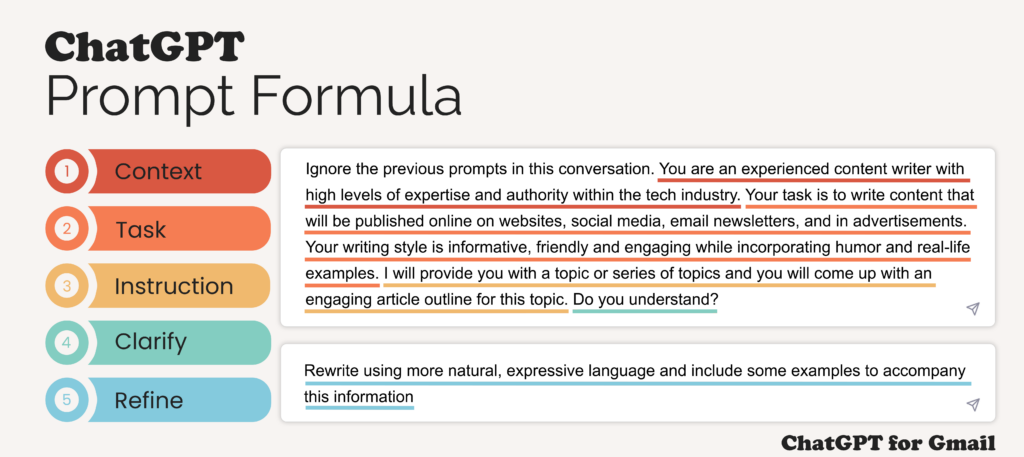
Here is a visual representation of a similar formula, which can serve as a quick reference.
2. Defining Your Brand Voice for the AI
The single most important factor in creating "differentiated" content is establishing a consistent brand voice. Before you can ask an AI to write for you, you must first teach it how you want it to sound. This is done by creating a Brand Voice Guide specifically for your AI assistant.
How Can You Ensure ChatGPT-Generated Content Remains On-Brand?
The article '20+ ChatGPT Prompts for Content Writing' from Juma.ai has an excellent section on this exact topic. We'll focus on the part that explains how to train the AI to stay on-brand.
Read the section titled 'How Can You Ensure ChatGPT-Generated Content Remains On-Brand?'. Focus on the five key methods it outlines: Create a Brand Voice Guide for AI: Note the key components to include (Tone, Sentence Style, Do's & Don'ts, Examples). Techniques for Consistent Tone: How to adapt the voice for different content types (blogs, social posts). Adapting for Different Audiences: How to tweak the message for B2B vs. B2C while keeping the core identity. Methods for Quality Control: Treating AI output as a first draft for human review. Training on Your Existing Content: The powerful technique of feeding the AI your own writing to have it learn your style.
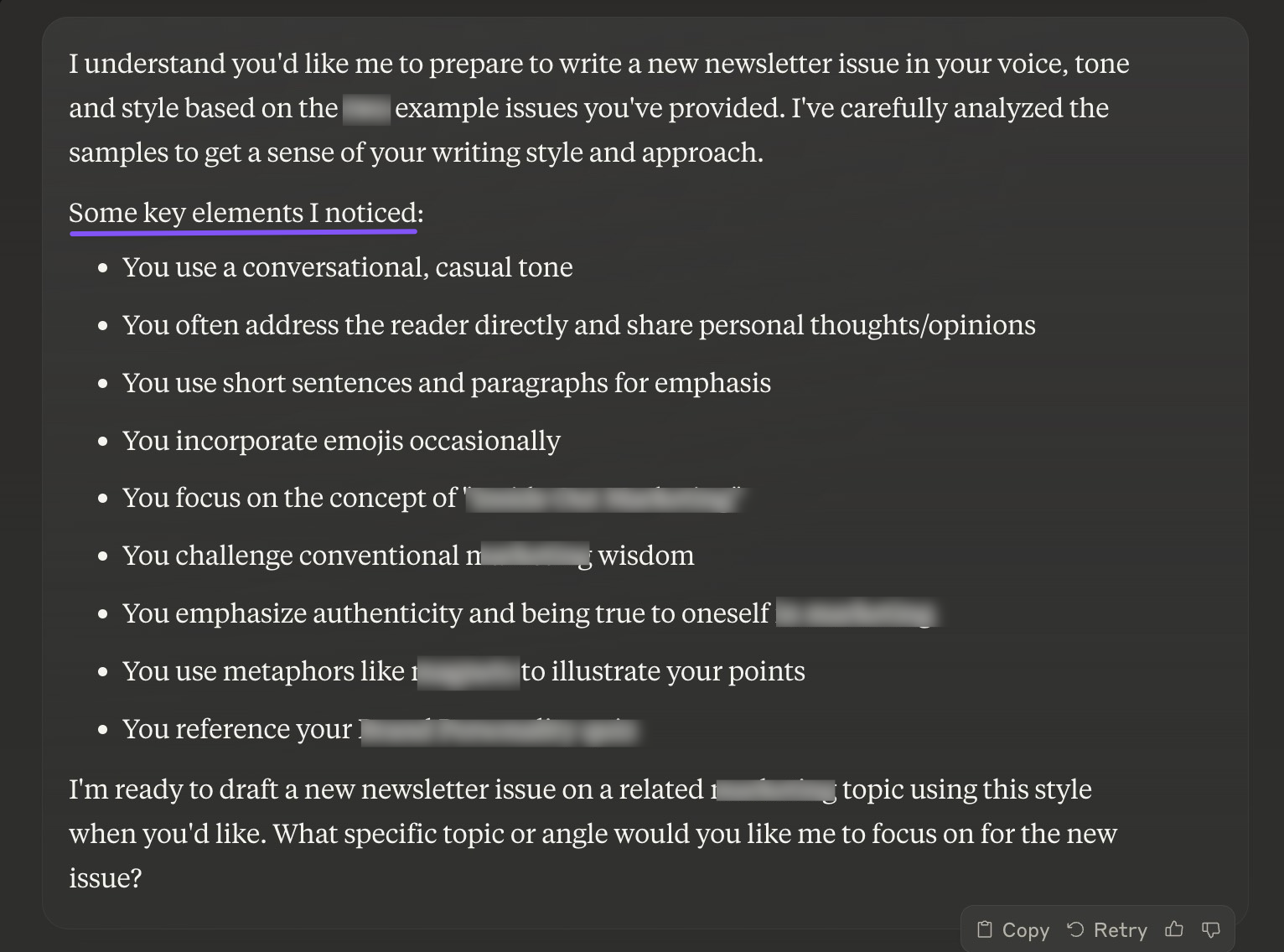
The most powerful technique mentioned is training the AI on your existing content. You can do this with a simple prompt:
Prompt: "Analyze the writing style of the following text and summarize the key elements of its tone, voice, structure, and formatting. Here is the text: [Paste 500-1000 words of your best writing here]"
The AI will then give you a breakdown of your own style, which you can use to build your Brand Voice Guide.
Test your understanding!
Imagine you're creating a SaaS product that helps freelance graphic designers manage their client projects. You want the brand voice to be "empowering, creative, and slightly informal."
Draft a small "Brand Voice Guide" for your AI assistant based on the principles you just learned. Include at least one point for Tone, Sentence Style, and a "Do" and "Don't".
Show answer
Here is an example Brand Voice Guide:
AI Brand Voice Guide: [DesignerFlow SaaS]
- Tone & Personality: Empowering, creative, and slightly informal. Speak to the user like a knowledgeable and supportive peer who understands the freelance hustle. Use "you" and "we" to create a sense of community.
- Sentence Style & Formatting: Use a mix of short, punchy sentences and slightly longer, more descriptive ones. Break up text with bullet points and bolding to highlight key benefits.
- Do's:
- Do use creative and visual language (e.g., "turn your chaotic workflow into a beautiful masterpiece," "paint a clear picture for your clients").
- Do focus on benefits over features (e.g., "Win back your creative time" instead of "Includes time-tracking").
- Don'ts:
- Don't use overly corporate or technical jargon (e.g., "synergize deliverables," "leverage core competencies").
- Don't make promises of overnight success; keep it realistic and encouraging.
3. Building Your Reusable "Super-Prompt"
Now, let's combine the prompt formula with your brand voice guide to create a reusable "super-prompt" for generating long-form content. This template will become the cornerstone of your prompt library.
Real Example: The Reusable Super-Prompt in Action
The article 'AI Writing Prompts for SaaS Content' from HelpSite provides a perfect, real-world example of a super-prompt designed for a SaaS blog post. It demonstrates how to integrate all the key elements we've discussed.
Read the sections 'How to Design Reusable AI Writing Prompts That Actually Work', 'Real Example: The Reusable Super-Prompt in Action', and 'Advanced Prompt Engineering Tips for SaaS Teams'. Pay close attention to: The four key steps: Intent, Context, Examples, and Boundaries. The structure of the example super-prompt and its components (Role, Goal, Specifics, etc.). The advanced tips like Prompt Chaining and using Reusable Variables.
Based on these principles, here is a "super-prompt" template you can adapt for your own SaaS ideas. You'll notice it includes placeholders like {...} which you can easily replace for each new article.
Super-Prompt Template: Long-Form Blog Post
# ROLE
You are an expert SaaS content writer and strategist, specializing in writing insightful, people-first blog posts for a {INDUSTRY} audience.

# CONTEXT
You are writing for my company, {YOUR SAAS NAME}, a tool that helps {YOUR ICP} to {SOLVE A PROBLEM}. Our brand voice is {BRAND VOICE SUMMARY FROM YOUR GUIDE}. I am providing our full brand voice guide below for your reference. The goal of this article is to {ARTICLE GOAL, e.g., educate prospects at the top of the funnel (TOFU)}.

# TASK
Your task is to write a comprehensive, 1,500-word blog post titled "{ARTICLE TITLE}". The primary keyword is "{PRIMARY KEYWORD}". Secondary keywords to include are: {KEYWORD 1}, {KEYWORD 2}, {KEYWORD 3}.

# FORMAT
The article should be structured with a compelling introduction, logical sections using H2s and H3s for sub-headings, and a concluding summary with a clear call-to-action (CTA). The output should be in markdown format.

# EXEMPLAR & CONSTRAINTS
- Model the introduction after this style: [Paste a short, high-performing intro from your own writing or a competitor].
- Subtly weave in a mention of how {YOUR SAAS NAME} helps with {RELEVANT PROBLEM} in one of the sections.
- **Do not** invent statistics or quotes.
- **Do not** use generic platitudes like "In today's fast-paced world...".
- The CTA should be: "{YOUR CTA, e.g., 'Ready to streamline your workflow? Start your free trial of {YOUR SAAS NAME} today.'}"

# BRAND VOICE GUIDE
[Paste your full brand voice guide here]
4. Advanced Technique: Modular Prompting for Long-Form Content
A single, massive prompt is good, but for truly great long-form content, a sequence of prompts is better. This is called modular prompting or prompt chaining. Instead of asking the AI to write a full 1,500-word article in one go, you break the task into smaller, manageable steps. This gives you more control and produces a higher-quality result.
- Prompt 1 (Outline): Use your super-prompt, but change the task to: "Generate a detailed outline for this blog post, including H2s, H3s, and the key points to cover in each section."
- Review & Edit: Manually review and approve the outline. This is your chance to guide the narrative.
- Prompt 2 (Section by Section): Ask the AI to write each section individually. "Using the brand voice guide, write the introduction based on the approved outline." Then, "Now, write the section for the H2: '{Section Title}'."
This modular approach is a professional workflow that significantly improves content quality.
9 ChatGPT & Claude Writing Tips (to get CRAZY GOOD outputs)
To understand the theory behind this and other advanced techniques, let's turn to expert AI writer Nicolas Cole. He explains the critical difference between asking for one big thing versus many small things.
This video is rich with detail, so we'll focus on a few key parts: Singular vs. Modular Prompts (27:37 - 33:57): Watch this section to understand why breaking down a large task like writing a book (or a long blog post) into smaller, sequential prompts is essential for quality. Delivery Instructions (45:00 - 47:07): Learn the importance of being explicit about how you want the AI to present the information back to you. Iterating on Prompts (46:56 - 51:17): Understand that prompt creation is a process of refinement. You run a prompt, see what breaks, and ask the AI how to improve the prompt for the next run.
5. Building Your Prompt Library
The final step is to organize these powerful assets. A "prompt library" is simply a centralized place where you store, categorize, and refine your prompt templates. As you plan to launch 10 SaaS companies, having a well-organized library will be a massive force multiplier.
You can use a tool like Notion (which you used for your content calendar) or Trello.
Here’s a simple structure for your library in Notion:
- Create a new Database page called "SaaS Content Prompt Library."
- Set up the following properties for each entry:
- Prompt Name (Text): e.g., "TOFU Blog Post - Listicle Format"
- Content Type (Select): e.g., Blog Post, LinkedIn Post, Newsletter, Video Script
- Funnel Stage (Select): TOFU, MOFU, BOFU
- Last Updated (Date): To track when you last refined it.
- In the body of each page, use the following template:
- A heading for
## The Promptwhere you paste your super-prompt template. - A heading for
## Instructionsexplaining how to use it (e.g., "Fill in the{...}placeholders"). - A heading for
## Example Outputwhere you can paste a good result for future reference.
- A heading for
This organized system allows you to quickly generate consistent, on-brand content for any project by simply grabbing the right template and filling in the blanks.
Conclusion
Today you've moved from being a simple user of AI to becoming an AI director. You've learned how to systematically instruct language models to generate content that is not only high-quality but also uniquely aligned with a specific brand voice.
Key Takeaways:
- Structure is Everything: Use the TCE-PFT (Task, Context, Exemplars, Persona, Format, Tone) formula to build comprehensive prompts.
- Define Your Voice First: Create a Brand Voice Guide for your AI by analyzing your own writing and setting clear rules. This is the key to differentiation.
- Use "Super-Prompts": Combine the formula and your voice guide into powerful, reusable templates with placeholders for easy adaptation.
- Think Modularly: For long-form content, use prompt chaining. Ask for an outline first, then ask the AI to write each section individually for maximum control and quality.
- Build a Library: Organize your prompts in a system like Notion to create a scalable asset for all your future marketing efforts.
Preview of the Next Lesson:
Now that you know how to structure prompts for long-form content, we'll dive into a specific tool that excels at this. In the next lesson, we will use Claude's long-context capabilities to summarize research and structure comprehensive articles. You'll see how to leverage a large context window to feed the AI all your research from the previous lesson and have it draft an article based on that specific information.