Introduction
In our last lesson, you analyzed the fundamental flaws of static batching. Its rigid, lockstep execution is a poor fit for the highly variable nature of LLM inference workloads, leading to significant waste in both compute and memory. We concluded that the core problem is the batch itself being an indivisible, monolithic unit.
The logical next step, and the focus of this lesson, is to dismantle that rigid structure. We will explore continuous batching, a dynamic scheduling paradigm that operates at the granularity of a single model iteration. Your goal is to design and implement the core logic for a continuous batching scheduler. We will start with the basic concept and then, leveraging your background, move directly to a more sophisticated design that addresses the subtle but critical performance challenges that arise when mixing different types of requests.
1. The Core Insight: From Batch-Level to Iteration-Level Scheduling
The key insight behind continuous batching is that there is no technical requirement forcing requests to stay together for their entire lifecycle. The model only needs valid input tokens and their associated KV caches to proceed. This means that between any two forward passes, we have an opportunity to completely reconfigure which requests are being processed.
This transforms the scheduling problem. Instead of forming a batch and processing it to completion, we maintain a continuously evolving set of active requests. In each iteration:
- Requests that have just finished are removed.
- New requests that are waiting are added.
- A single forward pass is executed for the new set of active requests.
This fluid approach allows the system to maintain high GPU utilization by keeping the batch as full as possible with active work.
To visualize this, watch the following short segment.
Accelerating LLM Inference with vLLM
The video 'Accelerating LLM Inference with vLLM' provides an excellent visual contrast between static and continuous batching.
Watch the clip from 00:21:01 to 00:22:02. Observe how, unlike the static batching diagram from the previous lesson, new sequences (5, 6, and 7) are immediately slotted in as soon as sequences 1, 3, and 4 complete.
Architecturally, the scheduler becomes the central coordinator, managing a pool of requests and deciding which ones to dispatch to the execution engine for the next iteration.

2. A Basic Continuous Batching Algorithm
Let's formalize the logic. A basic continuous batching scheduler manages two primary data structures:
- A waiting queue, typically a FIFO queue holding incoming requests that haven't started processing yet.
- An active batch, a list or array of requests currently being processed by the GPU. The size of this is limited by
max_batch_size.
The scheduler operates in a continuous loop, where each pass through the loop represents one model iteration.
Continuous Batching: Optimizing LLM Inference Throughput
The article 'Continuous Batching: Optimizing LLM Inference Throughput' provides a clear walkthrough of this algorithm and a Python-based simulator. Studying its implementation is a great way to understand the core logic.
Read the section 'Continuous Batching', focusing on the subsection 'How Continuous Batching Works'. Then, carefully examine the ContinuousBatchSimulator class. Pay close attention to the logic within the step(), _fill_batch(), and _process_completions() methods, as they implement the core scheduling loop.
This basic algorithm is a massive improvement over static batching. However, it glosses over a critical distinction in LLM inference: the difference between the prefill and decode phases.
3. The Prefill Problem: Generation Stalls
When a new request is added to the active batch, it must first undergo a prefill step, where its entire prompt is processed at once to generate the first token and populate the KV cache. This is computationally very different from a decode step, which processes only a single token for an ongoing request.
- Prefill: Processes many tokens in parallel. It is compute-bound and can take a long time for long prompts.
- Decode: Processes one token. It is memory-bandwidth-bound and is very fast.
A naive continuous batching scheduler that eagerly schedules a new prefill alongside ongoing decodes will create a "generation stall." The fast decode operations are forced to wait for the slow prefill operation to complete, leading to high and unpredictable time-between-tokens (TBT) for users.
Accelerating LLM Inference with vLLM
The Databricks video touches on this exact problem, illustrating how mixing prefill and decode phases can degrade the user experience.
Watch from 00:22:02 to 00:24:20. The diagram clearly shows gaps in token generation for 'request 1' whenever a new request's prefill (the green boxes) is being processed. This is the 'generation stall' we need to solve.
This trade-off is at the heart of modern scheduler design. Eagerly starting prefills improves overall throughput but hurts the latency of ongoing requests. Delaying prefills protects latency but leaves the GPU underutilized, hurting throughput.
4. Designing a Stall-Free Scheduler
To get the best of both worlds, we need a more sophisticated scheduler. The key ideas, pioneered by systems like Orca and Sarathi-Serve, are chunked prefill and stall-free batching based on a token budget.
- Chunked Prefill: Instead of processing a long prompt in one go, we break it into smaller, more manageable chunks.
- Token Budget: We define a maximum number of total tokens (both prefill and decode) that can be processed in a single iteration. This keeps the iteration time bounded and predictable.
- Hybrid Batching: The scheduler's job is to create a hybrid batch for each iteration by filling the token budget with a mix of single decode tokens and prefill chunks.
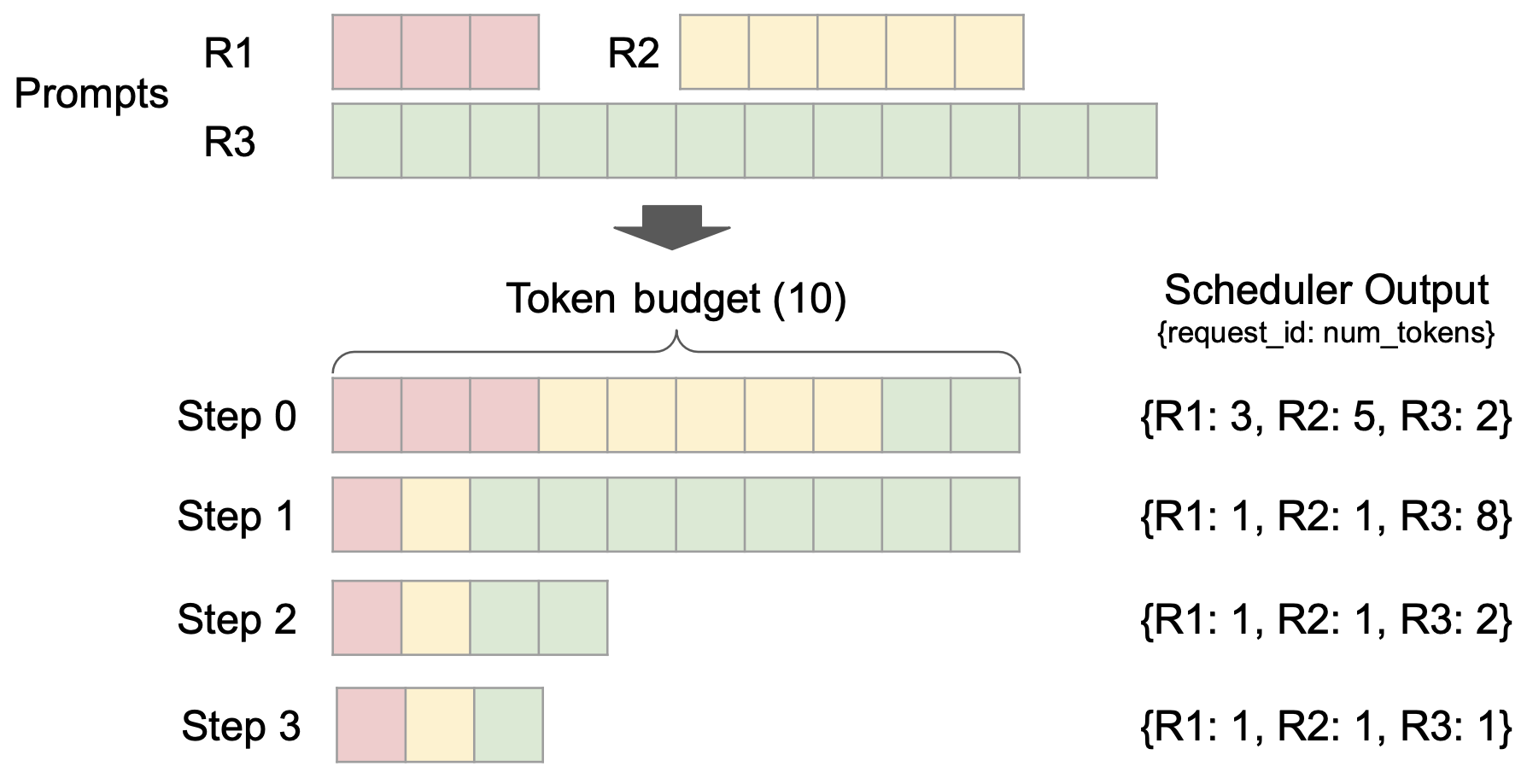
The formal logic for such a scheduler is laid out in the Sarathi-Serve paper. Let's examine its algorithm, which is the blueprint for our implementation.
[PDF] arXiv:2403.02310v3 [cs.LG] 17 Jun 2024
The paper on Sarathi-Serve provides a formal algorithm for a stall-free scheduler. This is the core logic you will be implementing.
Read Section 4, 'Sarathi-Serve: Design and Implementation,' focusing on Section 4.2 'Stall-free batching' and Algorithm 3. Understand the priority order for constructing a batch: first add all running decodes, then any partially completed prefills, and finally, admit new requests by chunking their prompts to fit the remaining token budget.
5. Implementation Exercise: A Stall-Free Scheduler
Now, let's translate Algorithm 3 into a Python implementation. Your task is to design and implement the core logic for this scheduler. We will represent requests as simple objects and focus on the scheduling algorithm itself.
Below is a Python skeleton for a StallFreeScheduler. Your goal is to complete the schedule_next_batch method.
from collections import deque
from dataclasses import dataclass, field
from typing import List, Deque


# A simplified representation of a request
@dataclass
class Request:
    id: int
    prompt_tokens: List[int]


    # How many prompt tokens have been processed
    tokens_processed: int = 0


    # The generated tokens so far
    output_tokens: List[int] = field(default_factory=list)


    # Is the prefill phase done?
    def is_prefill_done(self) -> bool:
        return self.tokens_processed >= len(self.prompt_tokens)


    # Has the request finished generating? (Simplified)
    def is_complete(self) -> bool:


        # In a real system, this checks for EOS token or max_length
        return self.is_prefill_done() and len(self.output_tokens) > 20


# Represents a unit of work for the GPU
@dataclass
class ScheduledSequence:
    request_id: int


    # Tokens to be processed in this iteration
    tokens: List[int]


    # Is this a decode step? (vs. prefill)
    is_decode: bool

class StallFreeScheduler:
    def __init__(self, token_budget: int, max_batch_size: int):
        self.token_budget = token_budget
        self.max_batch_size = max_batch_size
        self.waiting_queue: Deque[Request] = deque()
        self.active_pool: dict[int, Request] = {}

    def add_request(self, request: Request):
        self.waiting_queue.append(request)

    def schedule_next_batch(self) -> List[ScheduledSequence]:
        """
        Implements the core scheduling logic based on Sarathi-Serve's Algorithm 3.

        Returns:
            A list of ScheduledSequence objects representing the hybrid batch.
        """


        # --- YOUR IMPLEMENTATION GOES HERE ---

        next_batch: List[ScheduledSequence] = []
        current_tokens = 0


        # 1. First, evict any completed requests from the active pool
        # and add them to a 'completed' list to be handled later.
        completed_ids = [req_id for req_id, req in self.active_pool.items() if req.is_complete()]
        for req_id in completed_ids:
            del self.active_pool[req_id]


        # 2. Prioritize all ongoing decode requests.
        # These are requests in the active_pool where prefill is done.
        for req_id, req in self.active_pool.items():
            if req.is_prefill_done():
                if current_tokens + 1 <= self.token_budget and len(next_batch) < self.max_batch_size:


                    # In a real system, last_token would be req.output_tokens[-1]
                    last_token = req.output_tokens[-1] if req.output_tokens else req.prompt_tokens[-1]
                    next_batch.append(ScheduledSequence(request_id=req_id, tokens=[last_token], is_decode=True))
                    current_tokens += 1


        # 3. Handle partially completed prefills.
        # There should be at most one of these. Find it and schedule the next chunk.
        for req_id, req in self.active_pool.items():
            if not req.is_prefill_done():
                remaining_prompt = len(req.prompt_tokens) - req.tokens_processed
                chunk_size = min(remaining_prompt, self.token_budget - current_tokens)

                if chunk_size > 0 and len(next_batch) < self.max_batch_size:
                    start = req.tokens_processed
                    end = req.tokens_processed + chunk_size
                    chunk = req.prompt_tokens[start:end]

                    next_batch.append(ScheduledSequence(request_id=req_id, tokens=chunk, is_decode=False))
                    current_tokens += chunk_size


                    # Update the request's state
                    req.tokens_processed += chunk_size
                break # Only one partial prefill at a time


        # 4. Admit new requests from the waiting queue.
        while self.waiting_queue and len(self.active_pool) < self.max_batch_size:


            # Check if we have budget left for at least a minimal chunk
            if self.token_budget - current_tokens <= 0:
                break


            # Peek at the next request
            req = self.waiting_queue[0]


            # Can we fit this new request?
            if len(self.active_pool) + 1 > self.max_batch_size:
                break


            # Move request from waiting to active
            req = self.waiting_queue.popleft()
            self.active_pool[req.id] = req


            # Schedule its first prefill chunk
            chunk_size = min(len(req.prompt_tokens), self.token_budget - current_tokens)

            if chunk_size > 0:
                chunk = req.prompt_tokens[0:chunk_size]
                next_batch.append(ScheduledSequence(request_id=req.id, tokens=chunk, is_decode=False))
                current_tokens += chunk_size
                req.tokens_processed += chunk_size
            else:


                # Can't even fit a minimal chunk, put it back and stop.
                self.waiting_queue.appendleft(req)
                del self.active_pool[req.id] # revert
                break

        return next_batch


# You can test your logic with a simple simulation loop,
# processing the batches and updating request states.
Take your time to implement the schedule_next_batch method. The comments guide you through the priority-based logic. This exercise is central to understanding how a modern scheduler balances the competing demands of throughput and latency.
Conclusion
In this lesson, you designed the core logic for a continuous batching scheduler. You moved beyond a simple model to an advanced, production-inspired design that tackles the critical "generation stall" problem.
Key Takeaways:
- Continuous batching is a dynamic, iteration-level scheduling approach that significantly improves upon static batching by eliminating idle GPU time.
- A naive continuous scheduler can suffer from generation stalls, where long prefill operations for new requests block fast decode operations for ongoing requests.
- Advanced schedulers use chunked prefill and a token budget to create uniform, hybrid batches, providing high throughput while maintaining low, predictable latency.
- The scheduler's logic is a priority queue: ongoing decodes are highest priority, followed by partial prefills, and finally new requests from the waiting queue.
Preview of the Next Lesson:
A scheduler does not operate in a vacuum. It must constantly interact with the memory manager to know if there is enough KV cache space to admit a new request or add tokens to an existing one. In our next lesson, you will design the data structures and interface for communication between the scheduler you just designed and the paged KV cache manager you've worked with previously, creating a more complete and realistic serving system.