Hello and welcome back to the course!
In our last lesson, you launched your first Google Shopping campaign, a critical step in capturing high-intent customers from Google Search. Now, we're shifting our focus to a different but equally powerful channel: TikTok. While Google Ads excel at capturing existing demand, TikTok is unparalleled for creating new demand and driving impulse purchases through engaging, short-form video.
Today's lesson directly addresses the learning outcome: Set up and launch an initial TikTok Ads campaign for a TikTok Shop product. We will walk through the entire hands-on process, from connecting your accounts to creating the ad creative and launching a campaign designed for in-app sales. Your experience with Facebook Ads will be helpful here, as the campaign structure (Campaign > Ad Group > Ad) is conceptually similar.
1. The Foundation: Connecting Your Shop to Ads Manager
Before you can run ads for your TikTok Shop products, you must link your TikTok Seller Center to the TikTok Ads Manager. This is a crucial first step that streamlines the entire process, as it allows the Ads Manager to pull product information directly from your shop without needing any complex pixel setup.
Complete TikTok Shop Ads Masterclass (step by step)
This video from Trevin Peterson, 'Complete TikTok Shop Ads Masterclass,' clearly shows how to navigate from your Seller Center to the Ads Manager to establish this connection.
Watch the segment from 00:28 to 01:16. The key action is going to the 'Marketing' tab in your Seller Center, clicking 'Shop Ads', and then 'Go to TikTok Ads Manager'. This will prompt you to link your accounts.
For a static, step-by-step reference with screenshots, you can also consult TikTok's official guide.
This official TikTok Seller University guide, 'How to Set Up Shop Ads,' provides screenshots for the account connection process.
Review 'Step 1: Connect your existing Business Center account or create a new one'. This visual guide confirms the steps shown in the video.
With your accounts linked, you are now ready to build your first campaign.
2. Building Your First TikTok Shop Ad Campaign
We will now walk through the three levels of creating a campaign: Campaign, Ad Group, and Ad. The following video provides an excellent, concise walkthrough of the entire process. We will use it as our primary guide, and I will add extra detail on key settings.
The EASY WAY to Create TikTok Shop Ads (Full Guide)
The video 'The EASY WAY to Create TikTok Shop Ads' by Chase Chappell is a fantastic, practical guide that we will follow step-by-step to build your campaign.
We will reference different parts of this video as we build each component of the campaign. You can watch it from 01:02 to 05:39 for a complete overview.
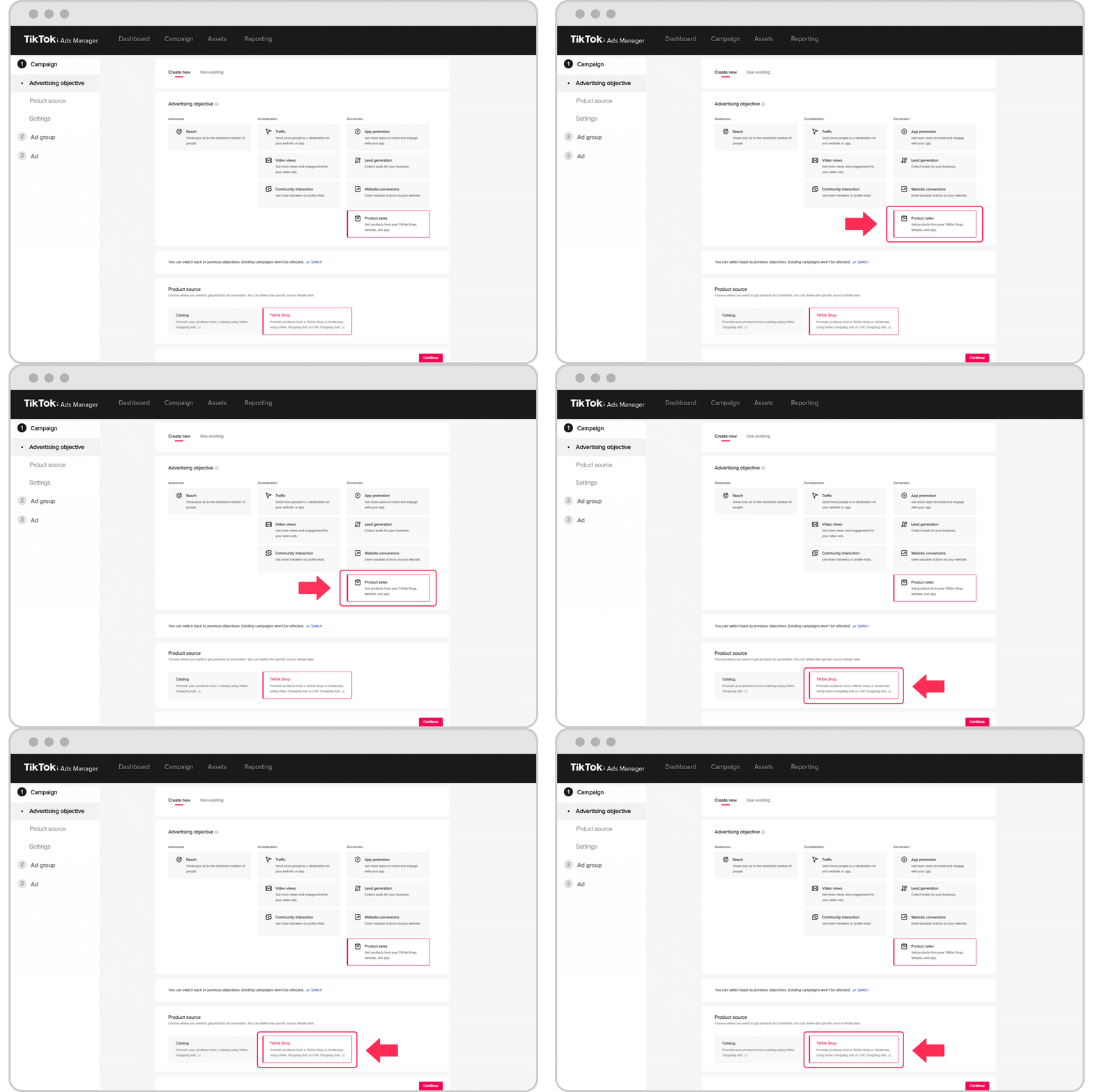
Step 1: The Campaign Level (Objective)
This is the highest level, where you define the main goal of your ad.
- In the TikTok Ads Manager, click Create Campaign.
- For the Advertising Objective, you must select Product Sales.
- For the Product Source, select TikTok Shop.
This combination tells TikTok you want to drive sales for products listed in your shop, enabling the in-app checkout experience.
Step 2: The Ad Group Level (Targeting, Budget, & Placement)
Here, you define who will see your ads and how much you're willing to spend.
-
Shop Ads Type: Select Video Shopping Ads. This means you will use a video creative to promote your products.
)
At the ad group level, ensure 'Video Shopping Ads' is selected for this campaign type. -
Audience Targeting:
- Demographics: Set your target Location (e.g., United States) and ensure the Age is set to 18+. You can leave Gender and Language open unless your product is highly specific.
- Interests & Behaviors: This is where you narrow your audience. Add interests and user behaviors relevant to your product. For example, if you sell dog collars, you would add interests like "Dogs," "Pet supplies," "Dogs of TikTok," etc. Start with 5-10 relevant interests.
-
Daily Budget:
- Start with a modest daily budget for testing, such as $20 - $50. The goal is to gather enough data to see what works. You can scale the budget up later for winning ads.
-
Optimization Goal:
- The Chase Chappell video recommends optimizing for Maximize the number of purchases. This is an excellent starting point, as it tells TikTok's algorithm to find users most likely to buy your product.
- Another option you might see is Gross Revenue (ROAS). This is a more advanced goal focused on return on ad spend, which you can explore after you have initial sales data. For your first campaign, stick with maximizing purchases.
Step 3: The Ad Level (The Creative)
This is the most important part. A strong creative is what makes a TikTok ad successful.
-
Identity: Select the TikTok account you want the ad to run from.
-
Product Selection: Click + Add to choose the specific product(s) from your TikTok Shop that you want to feature in the ad.
-
Ad Creative: You have a few options for your video:
- Upload a new video: This could be a user-generated content (UGC) style video you've created or commissioned.
- Use a TikTok Post: Select a video that has already been posted to your linked TikTok account.
- Use an Affiliate Post (Spark Ad): This is a powerful strategy. If you have affiliates creating content for your products, you can run their high-performing organic videos as ads. This leverages social proof and authenticity. We will cover recruiting affiliates later in the course, but it's a key strategy to keep in mind.
-
Ad Copy (Text): Keep it very brief and punchy. The video has limited space. Focus on the offer, not a long product description. Example:
Free Shipping + 20% Off!. -
Interactive Add-on (CRITICAL): This is the feature that makes your video "shoppable."
- Click Interactive Add-on and choose Product Card.
- This will display your selected product as a clickable card directly on your video ad, allowing users to tap and buy without leaving the app. Do not skip this step! The Chappell video highlights its importance at timestamp
04:17.
-
Call to Action: The default Shop Now is the best choice.
Finally, give your ad a name, duplicate it 1-2 times to test different video creatives, and click Submit. Your campaign will then be sent for review before going live.
Test your understanding!
You have launched a TikTok Shop ad, but you notice that users who click on it are being sent to your product's page and have to go through several steps to buy. They aren't seeing a quick "buy" option directly on the video. What critical ad-level feature did you most likely forget to add?
Show answer
You most likely forgot to add the Interactive Add-on. Specifically, you need to add a Product Card to your ad. This feature overlays a clickable link on your video that allows users to purchase the product directly within the TikTok app, creating a seamless shopping experience.
Conclusion
Congratulations! You have just learned the practical, step-by-step process for launching your first ad campaign specifically designed for TikTok Shop. By following this structure, you create a seamless path from discovery to purchase, all within the TikTok app.
Key Takeaways:
- Campaign Goal is King: Always start with the Product Sales objective and select TikTok Shop as the source.
- Video Creative is Everything: Your success on TikTok is heavily dependent on having an engaging, native-looking video. Test multiple creatives.
- Make it Shoppable: The Interactive Product Card is not optional; it is the essential feature that connects your video directly to an in-app purchase.
- Targeting Strategy: Start with broad interests related to your product niche and let TikTok's algorithm find your customers.
Next Up:
Launching the campaign is just the beginning. The real work starts with analyzing its performance. In our next lesson, we will focus on how to analyze TikTok Ads performance data and optimize campaigns for conversions, turning your initial data into profitable results.