
Hello, and welcome. This course treats Notion as a company operating system, not a collection of disconnected templates. We will model how a small e-commerce business really works, then build a workspace that makes ownership, work, decisions, and exceptions visible.
In this first module, you will establish the company’s operating logic before designing detailed databases. Today’s goal is to map the daily flow of an eight-person online retailer: how marketing creates demand, how orders become shipments, how support and cash collection fit in, and how inventory is replenished. The output will be a practical Notion Operating Flow Map with clear owners, handoffs, and exception routes.
Start with a realistic eight-person company
Assume a small direct-to-consumer business selling physical products through its online store. At this size, people wear more than one hat; a role is not necessarily a full-time department.
Here is a workable operating structure for the company we will model:
| Role | Main responsibility in the daily flow |
|---|---|
| Founder / General Manager | Sets priorities, approves material decisions, resolves escalations |
| Operations & Finance Manager | Oversees operating health, supplier commitments, cash visibility, and exceptions |
| E-commerce & Marketing Lead | Owns the storefront, campaigns, promotions, and demand plan |
| Content & Performance Marketer | Produces content and manages campaign execution and ad performance |
| Customer Experience Lead | Owns service standards, recurring customer issues, and returns policy decisions |
| Customer Support Specialist | Handles customer questions, order changes, and first-line return requests |
| Fulfillment & Inventory Lead | Owns stock accuracy, daily fulfillment queue, warehouse performance, and replenishment signals |
| Fulfillment Associate / Purchasing Coordinator | Picks and packs orders; supports receiving and supplier follow-up |
A useful distinction:
- Owner: accountable for the result. If the work is stuck, this person makes sure it moves.
- Doer: performs a task within the work.
- Handoff: one role has completed a defined piece of work and another role now has enough information to act.
For example, the Fulfillment Associate may pack an order, but the Fulfillment & Inventory Lead owns the outcome “orders leave on time and inventory records remain reliable.”
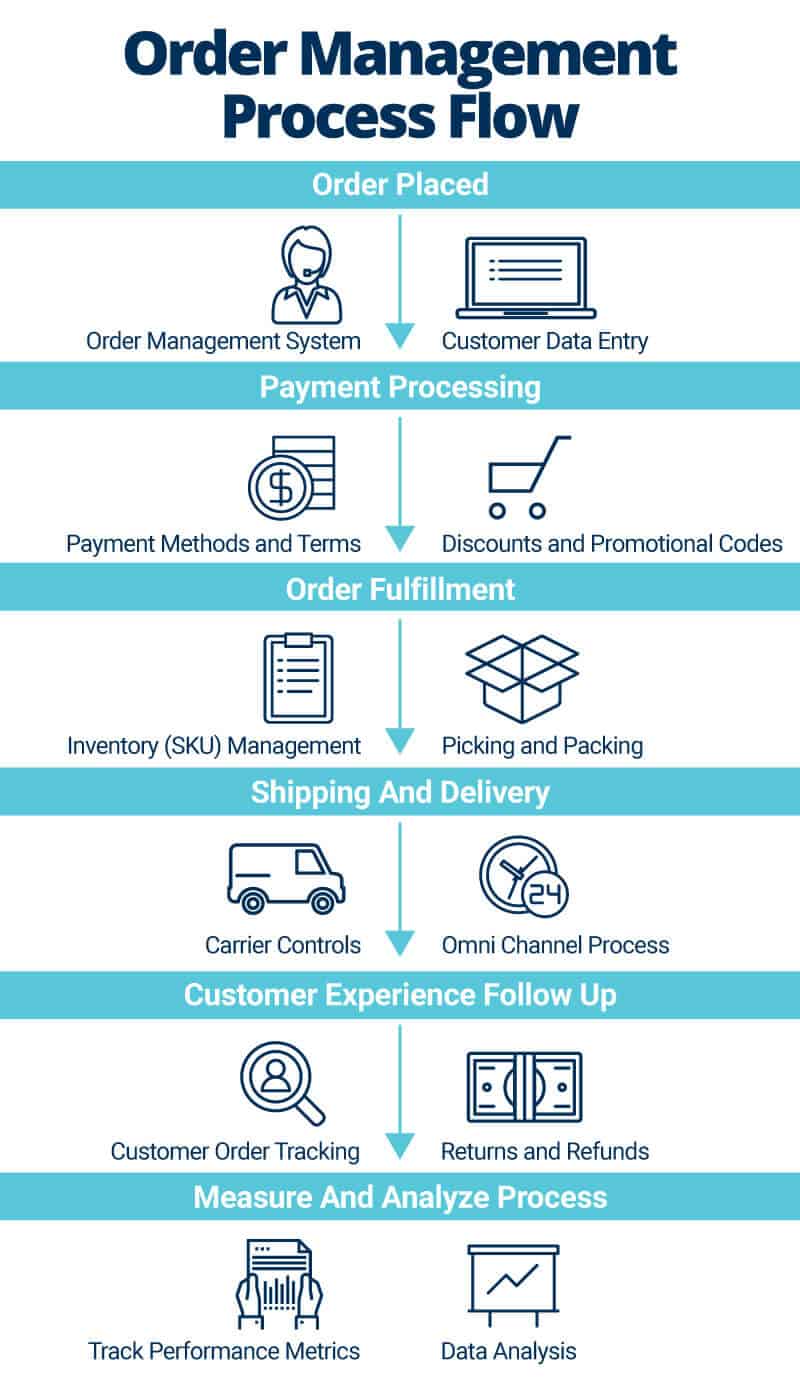
The operating flow: one customer promise, several connected loops
It is tempting to think an e-commerce company is just “sell products, ship products.” In practice, every order is a customer promise that crosses several functions:
- Marketing creates or captures demand.
- The store records an order and confirms payment.
- Inventory is allocated so the business does not promise stock it cannot deliver.
- The warehouse picks, packs, and ships.
- The customer receives tracking and can ask for help.
- The business confirms that payment activity ultimately becomes cash in the bank.
- Inventory and demand signals trigger purchasing before stock becomes a problem.
These are not isolated departments. A carrier delay becomes a customer-service issue; a return affects inventory and cash; a promotion can create demand faster than the warehouse can fulfill it. Your Notion system should make these connections visible.
Ecommerce Order Management: Software & How it Works (2026) - Shopify
Read Shopify’s explanation of the order lifecycle. It provides a useful operational backbone: order capture, inventory availability, fulfillment, tracking, and returns.
In the section “How the ecommerce order management process works,” read all five subsections in order: “Order capture and confirmation,” “Inventory allocation and available-to-sell visibility,” “Order routing and fulfillment,” “Shipping, tracking, and customer communication,” and “Returns, exchanges, and reverse logistics.” Begin with order capture. Notice the information an order needs to carry, and why a single order record is useful across fulfillment and support. Then read available to sell. Focus on the difference between physical stock and stock that can safely be promised to the next customer. In “Order routing and fulfillment,” read routing logic; even if this small company has only one warehouse, it clarifies why fulfillment needs a defined assignment rule. Finish with post purchase communication, then read the full returns subsection. Track how a return changes both customer experience and inventory availability.
The normal operating path
Use the following table as the first version of your company’s daily flow. The “completion signal” is crucial: it tells the receiving person that the handoff is real, rather than an assumption that someone else will handle it.
| Stage | Accountable owner | What starts the work | Completion signal for the handoff | Receiving role |
|---|---|---|---|---|
| Demand generation | E-commerce & Marketing Lead | Campaign calendar, content plan, promotion, or stock availability | Campaign is live; offer, audience, budget, and expected demand are recorded | Operations & Finance Manager and Fulfillment & Inventory Lead are informed |
| Order intake | E-commerce & Marketing Lead | Customer completes checkout | Order has an order number, customer details, items, address, payment status, and confirmation message | Fulfillment & Inventory Lead |
| Payment and risk check | Operations & Finance Manager | New order has a payment event | Payment is accepted or the order is held, cancelled, or escalated | Fulfillment & Inventory Lead or Customer Support Specialist |
| Inventory allocation | Fulfillment & Inventory Lead | Paid order enters fulfillment queue | Each item is confirmed available or an exception is raised | Fulfillment Associate / Purchasing Coordinator |
| Pick, pack, and dispatch | Fulfillment & Inventory Lead | Order is assigned to the warehouse queue | Parcel is packed, shipping label is created, and carrier handoff is recorded | Customer Support Specialist can see shipment status |
| Tracking and delivery follow-up | Customer Experience Lead | Shipment confirmation or carrier update | Customer receives tracking; delivery status is monitored when needed | Customer Support Specialist |
| Customer support and returns | Customer Experience Lead | Customer question, complaint, address change, return request, or delivery problem | Case is resolved, escalated, refunded, exchanged, or routed to operations | Relevant owner, depending on the issue |
| Cash collection visibility | Operations & Finance Manager | Payment processor creates a payout or bank deposit appears | Payout is expected, received, or flagged for review | Founder / General Manager for material discrepancies |
| Replenishment | Fulfillment & Inventory Lead | Stock reaches a reorder signal or demand plan changes | Purchase need is recorded and supplier action is assigned or approved | Operations & Finance Manager |
Two observations matter here:
- Order intake is not fulfillment. A customer can place and pay for an order that cannot yet be shipped because of stock, fraud review, an address problem, or warehouse capacity.
- Dispatch is not the end of responsibility. Tracking, delivery failures, returns, refunds, and chargebacks remain part of the company’s operating reality.
Cash collection: paid orders are not the same as bank cash
For a beginner, this is one of the most important business distinctions to learn.
When a customer pays by card, several events may occur on different dates:
- The payment gateway authorizes or captures the payment.
- The order is marked paid in the store.
- The payment provider deducts fees, refunds, or other adjustments.
- The provider groups transactions into a payout.
- The bank receives the net deposit.
So a paid order means the company has recorded a sale and expects cash, but it does not automatically mean the same amount has reached the bank account.
For today’s flow map, do not build a full accounting system. Simply include a cash-control handoff:
- The Operations & Finance Manager reviews expected payouts and actual bank deposits.
- A mismatch becomes an exception, not an invisible spreadsheet problem.
- The map links cash visibility back to orders, refunds, and payment issues.
Later in the course, you will build the detailed reconciliation workflow that matches orders, refunds, processor fees, chargebacks, payouts, and bank deposits.
Replenishment is a forward-looking loop, not a final step
Replenishment belongs in the daily flow because stock affects every customer promise. If a campaign increases demand, the business may need to order more stock before the next week’s fulfillment queue is affected.
The Fulfillment & Inventory Lead watches for signals such as:
- a SKU’s available quantity falling below its reorder threshold;
- faster-than-planned sales after a campaign;
- damaged, missing, or quarantined stock;
- a supplier delay that threatens future availability;
- a return rate that suggests a product-quality issue rather than normal demand.
At this stage, keep the replenishment signal simple:
“This product needs a purchasing decision by this date to avoid a likely stockout.”
The purchasing workflow, supplier records, lead times, safety stock, and purchase orders will be designed in a later module. For now, your map only needs to show that replenishment is owned, triggered, and connected to sales demand.
Ecommerce Fulfillment Automation: Types + Tips (2026) - Shopify
Use this Shopify article to identify the operational connections that create exceptions: payment-risk holds, inventory changes, fulfillment activity, tracking, returns, and support.
In “Types of ecommerce fulfillment automation,” read the subsections “Order capture and order processing,” “Inventory management,” “Tracking, notifications, and returns management,” and “Customer service and support.” In the first subsection, focus on the payment hold example. A hold is a good example of an order that must leave the normal fulfillment path. In “Inventory management,” read the stock update and purchase planning passage. Relate this to the replenishment signal in your own map. Finally, read the support exception passage. Notice that customer support needs current operational information, not merely a generic inbox.
Map exceptions deliberately
A reliable company is not one with no exceptions. It is one where exceptions are noticed early, owned by someone, and brought back to a clear outcome.
For a small company, an exception record should answer five questions:
- What happened?
- Which order, product, shipment, or payment is affected?
- Who owns the next action?
- What is the customer or financial impact?
- What must happen before the issue can be closed?
Here are the common exceptions to include in the first map.
| Exception | First owner | Immediate action | Escalate when |
|---|---|---|---|
| Payment failed or appears risky | Operations & Finance Manager | Put order on hold; do not release it to fulfillment | High value, suspected fraud, or repeated payment issue |
| Oversold or unavailable item | Fulfillment & Inventory Lead | Stop the fulfillment promise; confirm real availability | Customer needs a substitute, split shipment, refund, or decision on delay |
| Invalid or incomplete address | Customer Support Specialist | Contact customer before dispatch | No response risks missing the promised shipment date |
| Pick or packing error | Fulfillment & Inventory Lead | Correct before dispatch; record cause if it repeats | The error has already reached the customer or indicates stock-record inaccuracy |
| Carrier delay, loss, or damage | Customer Experience Lead | Check tracking, inform customer, initiate carrier process | Replacement, refund, or goodwill decision is required |
| Return or refund request | Customer Experience Lead | Check policy and order; issue return instructions or resolve request | High-value, repeated, or suspected-abuse case |
| Payout does not match expectation | Operations & Finance Manager | Mark for review and preserve references to payout, orders, and bank deposit | Difference remains unexplained or affects cash planning |
| Reorder signal or supplier delay | Fulfillment & Inventory Lead | Create purchasing action and estimate stockout risk | Spending approval or customer-facing stock decision is needed |
Avoid a vague exception status such as “problem.” Use a controlled set of states:
- New: the issue has been detected but not yet assessed.
- Investigating: an owner is finding facts or waiting for information.
- Waiting externally: the customer, carrier, supplier, or payment provider must respond.
- Action agreed: a decision exists and work is underway.
- Resolved: the customer, stock, shipment, or financial record has reached a documented outcome.
Build the Notion Operating Flow Map
Create a top-level page called Company Operating Flow. This is not yet a database of every order or every inventory movement. It is a model of how the business runs and where work should go when something needs attention.
Create one database called Operating Flow Map. Each row represents a stage in the company’s operating flow, not an individual transaction.
Use these properties:
| Property | Purpose |
|---|---|
| Flow step | Name of the stage, such as “Inventory allocation” |
| Sequence | A number that keeps the normal operating path in a sensible order |
| Area | Marketing, Orders, Fulfillment, Customer Experience, Finance, or Purchasing |
| Accountable role | The role responsible for the stage’s outcome |
| Supporting roles | Roles that contribute but are not accountable |
| Trigger | Event that starts the work |
| Entry condition | What must be true before the step can start |
| Completion signal | The record, status, or evidence that proves the stage is complete |
| Handoff recipient | The role that receives the work or information |
| Customer promise | The expectation being protected, such as accurate delivery or timely response |
| Common exceptions | A short list of failures that can interrupt the normal path |
| Escalation owner | Who decides if the normal owner cannot resolve it |
| Cadence | Per order, daily, weekly, or triggered by a threshold |
Populate it with the nine rows from the normal operating-path table above.
Connect roles without overbuilding the org chart
Create a small Roles database with the eight roles listed at the start of this lesson. For now, it only needs:
- Role name
- Current person
- Manager or escalation point
- Active / vacant status
Relate Operating Flow Map to Roles through the Accountable role, Supporting roles, Handoff recipient, and Escalation owner properties.
The next lessons will expand this into a proper role directory with responsibilities, recurring outputs, reporting lines, and backup coverage. At this point, the objective is simply to ensure the flow is owned by roles, rather than by an unnamed “team.”
Add an Exception Log
Create a second database called Operational Exceptions. It tracks actual cases that depart from the normal path.
Use these properties:
- Exception title
- Exception type
- Status
- Related flow step — relation to Operating Flow Map
- External reference — order number, shipment number, payout reference, or SKU
- Primary owner — relation to Roles
- Customer impact — none, low, medium, high
- Financial impact — estimated amount, if known
- Next action
- Decision needed
- Escalation owner
- Resolved date
- Root cause note — only when the issue is resolved
Create three useful views:
- Daily Operations Watchlist: open exceptions sorted by customer impact and age.
- Fulfillment Blockers: exceptions related to allocation, picking, packing, dispatch, and stock.
- Leadership Escalations: issues needing a decision from the Founder / General Manager.
A practical rule: create an exception record when the problem needs ownership across a handoff, affects a customer promise, creates meaningful financial risk, or may reveal a recurring process weakness. Do not create one for every tiny correction that a single person can complete immediately.
Test the map with a short scenario
Imagine the marketing team launches a promotion for a popular bundle on Monday morning. Orders rise quickly. The fulfillment lead discovers that one component is lower in stock than expected.
A useful Operating Flow Map makes the situation legible:
- The demand-generation stage shows that the campaign owner should alert operations and fulfillment about the promotion.
- The inventory-allocation stage identifies the Fulfillment & Inventory Lead as owner of the stock issue.
- An Operational Exception records the affected SKU, the number of impacted orders, the estimated stockout date, and the next action.
- The customer-experience owner is prepared to communicate if existing orders may be delayed.
- The Operations & Finance Manager and Founder receive an escalation only if a supplier order, substitution, or customer-compensation decision is required.
Without this map, the company may still eventually solve the problem—but by searching through chats, asking who owns what, and reacting after customers complain. The map converts that ambiguity into a repeatable operating response.
Key takeaways
A small e-commerce company runs on a connected operating flow, not separate departmental checklists. The essential path covers demand generation, order intake, payment and risk review, stock allocation, fulfillment, tracking, customer support, cash visibility, and replenishment.
For each stage, record:
- one accountable role;
- a trigger and entry condition;
- a concrete completion signal;
- the receiving role for the handoff;
- likely exceptions and an escalation owner.
Your Notion Operating Flow Map should coordinate this logic without pretending to replace the online store, payment gateway, warehouse tool, or accounting system. In the next lesson, you will decide which system should be the source of truth for each important record—and how Notion should connect to those records without creating duplicate, unreliable data.
Can't find a good explanation? Sign up and we'll make it for you
Sign up