
Hello again. In the previous lesson, you mapped the company’s operating flow: demand creates orders; orders require stock, fulfillment, customer support, and ultimately cash control. That map answers, “Who does what, and what happens when something goes wrong?”
This lesson answers the next question: where does each fact live? A useful Notion workspace coordinates the company, but it should not become a second, unreliable version of Shopify, the warehouse system, the payment gateway, or the accounts. By the end, you will have a Source-of-Truth Map that makes this boundary explicit, plus a practical plan for Notion databases, identifiers, and relations.
One company, several kinds of truth
A source of truth is the system that has the final authority for a particular fact. If two systems disagree, the source of truth is the one the company trusts and corrects.
For example:
- A warehouse team physically counts 18 units of a SKU. Its warehouse or inventory system should be authoritative for that number.
- A customer places order #10482 in the online store. The e-commerce platform should be authoritative for the order itself.
- The payment processor calculates its fee and groups transactions into a payout. The payment gateway should be authoritative for those payment events.
- The accounting system determines the official ledger balance and tax liability. It should be authoritative for the financial books.
- A manager assigns an owner to resolve a delayed shipment. Notion can be authoritative for that internal action and its decision trail.
The crucial idea is that a company does not need one tool containing every piece of data. It needs one clear authority per data domain. In practice, a small company usually has a federated setup: each specialist system owns the reality it is designed to manage, while Notion connects people, policies, decisions, and follow-up work.
A Practical 7-Step Guide to Ecommerce Data Integration (2026) - Shopify
Read Shopify’s explanation of how commerce, warehouse, and finance systems work from the same facts. It provides a useful distinction between operational records that must be current and reporting copies used for analysis.
In “What is ecommerce data integration?”, begin with the definition, then read through the distinction between operational and analytical data flows. Notice that a store records customer intent, whereas warehouse and financial systems govern physical and financial reality. Then, in “Establish your source of truth (SoT),” read the authority rule and the examples for inventory, customers, products, and price. Treat these as a decision pattern rather than a universal tool prescription. Finally, in “Establish the data contract,” read from the identifier guidance. Focus especially on the difference between an immutable system ID and a human-readable SKU.
A source of truth is therefore not “the system people happen to use most.” Nor is it necessarily “the system with the nicest dashboard.” It is the system allowed to make the final correction.
A simple rule for your workspace:
Do not manually repair a source-system fact in Notion. Record the issue and assign the repair to the system and owner that govern that fact.
If the warehouse says a SKU has zero available units but someone changes a copied Notion number to ten, the problem has been hidden, not solved.
The map for the eight-person e-commerce company
For this course, assume the company uses:
- an e-commerce platform such as Shopify for the storefront and customer orders;
- an inventory system, WMS, or 3PL portal for physical stock and fulfillment;
- an accounting system for the books, supplier bills, tax records, and official financial reporting;
- a payment gateway for card transactions, refunds, fees, disputes, and payouts;
- a bank feed or online bank for actual cash deposits and payments;
- a communication tool such as Slack or email for conversations;
- Notion for the operating system: work, ownership, policies, decisions, planning, and management visibility.
The exact software can change. The principle should not: decide the authority first, then connect systems around it.
Your first Source-of-Truth Map
Create a top-level Notion page named Company Data Map. Inside it, create a database called Source-of-Truth Map.
Each row represents a data domain—a coherent category of business facts—not a single field or a software integration.
Use these properties:
| Property | Why it matters |
|---|---|
| Data domain | The category of facts, such as Orders or Physical inventory |
| Authoritative system | The system with final authority |
| Authority type | Master data, transaction, financial record, operational event, or internal work |
| Primary business owner | The role responsible for data quality and correct use |
| Primary identifier | The stable ID used to identify the record |
| Human reference | A readable reference, such as an order number or SKU |
| Notion treatment | Canonical in Notion, reference mirror, summary, linked record, or not stored |
| Notion database | Where the internal record or reference belongs, if applicable |
| Write rule | Who may edit which fields, and in which system |
| Refresh expectation | Real time, daily, weekly, or on demand |
| Connected domains | Other records this domain must be linked to |
| Data-quality check | A regular check that detects drift or missing data |
| Notes / exception route | What to do if records disagree |
Populate it with the following starting rows. Adapt the system names to the tools a real company uses, but keep one authority for each domain.
| Data domain | Authoritative system | Primary owner | Notion treatment | Key rule |
|---|---|---|---|---|
| Product and variant catalogue | E-commerce platform for a small company without a PIM | E-commerce & Marketing Lead | SKU reference mirror plus Notion-only planning fields | Product title, variant, weight, selling status, and SKU are changed in the catalogue system |
| Pricing, discounts, and promotions | E-commerce platform for direct-to-consumer sales | E-commerce & Marketing Lead, with finance approval where needed | Campaign and approval records in Notion | Checkout price is never recalculated manually in Notion |
| Customer profile | E-commerce platform | Customer Experience Lead | Reference mirror only when a case or marketing workflow needs it | Customer ID is primary; email is useful but not a guaranteed unique key |
| Customer order | E-commerce platform | E-commerce & Marketing Lead | Order reference mirror for coordination and exceptions | Order status, line items, totals, and shipping address are corrected in the store |
| Physical stock by location | WMS, inventory system, or 3PL portal | Fulfillment & Inventory Lead | Snapshot or reference mirror for planning | The system that handles the boxes has final authority over quantity |
| Fulfillment and shipment events | WMS, 3PL portal, or carrier-connected fulfillment tool | Fulfillment & Inventory Lead | Shipment reference attached to support cases and exceptions | Dispatch and tracking status are updated at the fulfillment source |
| Supplier and purchase-order commitments | Purchasing tool or accounting system; a Notion workflow is acceptable initially if neither exists | Fulfillment & Inventory Lead | Canonical Notion workflow if Notion is the agreed purchasing tool | One purchase-order number is assigned before supplier confirmation |
| Payment events, fees, refunds, chargebacks, payouts | Payment gateway | Operations & Finance Manager | Reference records used in reconciliation | Gateway amounts and payout status are not edited in Notion |
| Bank deposits and payments | Bank feed / bank account, then accounting system after posting | Operations & Finance Manager | Reconciliation reference or summarized view | The bank confirms whether cash actually arrived |
| Ledger, supplier bills, tax payable, and statutory reporting | Accounting system | Operations & Finance Manager | Summaries for management reporting | Notion does not replace official accounting records |
| Customer-service case | Support tool if one exists; otherwise Notion | Customer Experience Lead | Canonical in the chosen case system | A case may link to an external order but is its own work record |
| Operational exception | Notion | Owner named in the exception | Canonical Notion record | It documents coordination, impact, decision, and closure |
| Campaign plan and content workflow | Notion | E-commerce & Marketing Lead | Canonical Notion record | The plan lives in Notion; actual store sales still originate externally |
| SOP, internal decision, meeting action, and project | Notion | Named role owner | Canonical Notion record | Important decisions must leave chat and be recorded here |
| Chat messages and email threads | Communication tool | Sender or conversation owner | Store only a link or short context in Notion | Do not treat scattered chat as the official decision log |
This table may feel strict, but it removes an expensive kind of confusion: two people “fixing” the same fact in two different tools.
Inventory shows why record boundaries matter
The provided Product Variant, Inventory Item, and Location diagram illustrates an important structure: a sellable product variant is connected to an inventory item, while stock is held as an inventory level at a particular location.
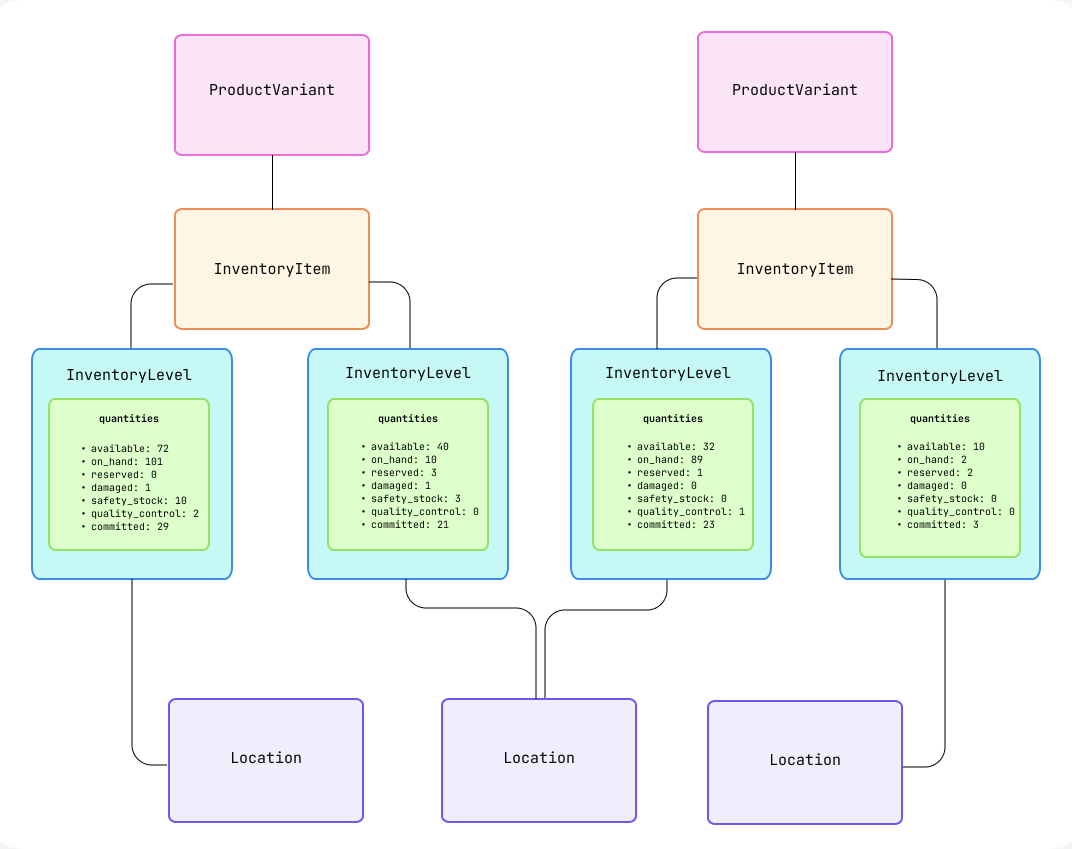
A T-shirt in size M and navy blue is a variant. Its SKU may be TSHIRT-NVY-M. But the question “How many do we have?” is incomplete until you add a location:
- 12 units might be available at the main warehouse.
- 4 may be available at a 3PL.
- 3 may be damaged or quarantined and therefore unavailable.
- 5 could be allocated to paid orders and no longer available to promise new customers.
This is why an inventory number typed into a general Notion product page quickly becomes unreliable. Inventory is not just a product attribute; it is a changing operational state that depends on physical location and order commitments.
In your Source-of-Truth Map, use the following language precisely:
- SKU / variant: the sellable version of a product.
- Inventory item: the stock-tracked object behind that SKU.
- Inventory level: a quantity for one inventory item at one location.
- Available quantity: stock that can currently be promised, according to the authoritative inventory system.
- Notion inventory view: a planning or monitoring copy, clearly labelled with its last refresh time and source.
Later, you will build a Notion inventory-planning view. It will help the team decide what to reorder, but the calculations must begin with authoritative quantities from the inventory system.
Notion’s proper role: canonical internal work, connected external facts
“Canonical” means the trusted, official home for a record. In Notion, some databases should be canonical because Notion is where the company actually creates and manages that work.
Examples include:
- Operating Flow Map
- Roles
- Operational Exceptions
- Projects
- Tasks and work requests
- SOPs
- Campaign plans and content workflow
- Decision Log
- Meeting cadence and follow-up actions
- Hiring pipeline and onboarding checklist, if Notion is chosen for that workflow
Other Notion databases should be treated as reference mirrors. They expose enough external context to coordinate work, but their copied external fields are read-only in practice.
Examples include:
- SKU Reference
- Order Reference
- Inventory Snapshot
- Shipment Reference
- Payment/Payout Reference
- Customer Reference
This distinction can exist even within one Notion page. Consider an Order Reference record:
| Field | Authority |
|---|---|
| Store order ID | E-commerce platform |
| Order number | E-commerce platform |
| Order date, line items, paid status, total | E-commerce platform |
| Current external fulfillment status | WMS or fulfillment system |
| Linked delayed-shipment exception | Notion |
| Internal owner of the exception | Notion |
| Customer communication decision | Notion |
| Link back to the external order | Notion, pointing to the e-commerce platform |
The record lets the team discuss and resolve the order without pretending Notion is the order-management system.
A practical visual safeguard is to group properties in every reference database:
- Source fields — do not edit
- Notion coordination fields
- Sync/audit fields
For example, add Last synced at, Source URL, and Sync status to mirrored records. If you are entering information manually at first, write Manual reference in Sync status rather than implying that it is live data.
Identifiers: the threads that make cross-system records reliable
A database relation in Notion is useful only when it connects the correct records. Names are poor identifiers: “Navy T-shirt,” “Sarah Jones,” and “May payout” can easily occur more than once or change over time.
Use two kinds of identifiers:
- System IDs are stable, technical identifiers created by the source system. They are the safest key for synchronization and matching.
- Human-readable references help people work quickly: SKU, order number, purchase-order number, tracking number, or a Notion exception code.
A SKU matters enormously in operations, but it is still a business label. It can be mistyped, reused poorly, or changed after a catalogue cleanup. Keep the source platform’s permanent variant or inventory-item ID alongside it.
Identifier standards to add to your map
Create a second database on Company Data Map called Identifier Register. This is your small-company version of a data contract: a shared agreement about what each identifier means.
Use these properties:
| Property | Example |
|---|---|
| Entity | Product variant |
| Authoritative system | E-commerce platform |
| System ID field | External Variant ID |
| Human reference | SKU |
| Format / example | TSHIRT-NVY-M |
| Unique? | Yes, among active sellable variants |
| May it change? | Avoid changing; system ID never changes |
| Stored in Notion database | SKU Reference |
| Used to connect | Inventory snapshots, purchase orders, campaign analysis |
| Data owner | E-commerce & Marketing Lead |
Start with these identifiers:
| Entity | Stable system identifier | Human-readable reference | Important warning |
|---|---|---|---|
| Product | External product ID | Product title or handle | Titles change; never match products by title alone |
| Variant / SKU | External variant ID or inventory-item ID | SKU | A product can have several variants and several SKUs |
| Inventory location | External location ID | Location code, such as MAIN-WH | “Warehouse” is not specific enough if locations multiply |
| Inventory level | Inventory-item ID plus location ID | SKU plus location code | The pair identifies stock at a specific location |
| Customer | External customer ID | Name and email | Email may change or be shared by a household |
| Order | External order ID | Order number, such as #10482 | Keep both; the order number is best for people |
| Order line | External order-line ID, if available | Order number plus line position | One order can contain multiple SKUs |
| Shipment / fulfillment | External fulfillment ID | Tracking number | A single order may have more than one shipment |
| Supplier | Supplier system ID or internal supplier code | Supplier name | Names can vary in spelling and legal form |
| Purchase order | Purchase-order ID | PO number, such as PO-2026-014 | Assign before confirming an order with a supplier |
| Payment transaction | Gateway transaction or charge ID | Customer order number | One order can have several payment-related events |
| Refund | Gateway refund ID | Refund reference | Do not identify a refund only by its amount |
| Chargeback | Gateway dispute ID | Dispute reference | It may occur long after the original order |
| Payout | Gateway payout ID | Payout date/reference | One payout usually groups many transactions |
| Bank deposit | Bank transaction ID | Deposit date and amount | Same amount can occur more than once |
| Internal exception | Notion page ID | EXC-0001 | The Notion code helps people refer to it in meetings |
For internal records, use a readable convention. For instance, create an ID property for exceptions such as EXC-0001, EXC-0002, and for decisions such as DEC-0001. The exact format matters less than using it consistently.
Design the essential Notion relations
Relations should reflect the business logic from the previous lesson. They are not decoration; they let one issue reveal its operational context.
Build the following core relation plan. You do not need to populate every database with live data today. The goal is to establish a stable design before adding records.
| Database in Notion | Relate it to | Why the relationship exists |
|---|---|---|
| Roles | Operating Flow Map, Operational Exceptions, Projects, Tasks, SOPs | Every important outcome has an accountable role and often a backup or contributor |
| Operating Flow Map | Roles, Operational Exceptions, SOPs | A flow step has owners, known exceptions, and documented standard procedures |
| SKU Reference | Inventory Snapshot, Supplier, Purchase Order, Campaign, Operational Exception | One SKU links product demand, stock, purchasing, and problems |
| Inventory Snapshot | SKU Reference and Location Reference | Each snapshot describes one SKU at one location at one point in time |
| Order Reference | Customer Reference, SKU Reference or Order Lines, Shipment Reference, Operational Exception, Customer Case | One customer order can create fulfillment, support, or payment follow-up |
| Shipment Reference | Order Reference, Customer Case, Operational Exception | A delivery delay should lead back to the order and customer impact |
| Operational Exceptions | Roles, Flow Map, Order Reference, SKU Reference, Shipment Reference | The exception carries ownership and links directly to affected reality |
| Purchase Orders | Supplier, SKU Reference, Roles, Operational Exception | A purchase commitment is tied to supplier, products, approval, and any discrepancy |
| Payment Reconciliation | Order Reference, Refund Reference, Chargeback Reference, Payout Reference, Bank Deposit Reference | Future finance work must explain how gross sales became net cash |
| Campaigns | SKU Reference, Roles, Projects, Decisions | Marketing demand should be visible alongside the products and capacity it affects |
Keep relations proportional
A common Notion design mistake is creating every possible relation on day one. Instead, add a relation when it answers a recurring operational question.
For example:
- “Which open exceptions affect this order?” requires an Order Reference–Operational Exceptions relation.
- “Which SKUs are threatened by a supplier delay?” requires a Purchase Order–SKU Reference relation.
- “Who owns the next action?” requires a relation to Roles.
- “What campaign may have caused the demand spike?” may later require a Campaign–SKU Reference relation.
A relation is probably unnecessary when it only makes the page look complete but will not change a decision, handoff, or report.
Add ownership and data-quality rules
Clear data authority requires a person, not merely a tool. A warehouse system can be authoritative for stock, but the Fulfillment & Inventory Lead must still investigate a mismatch. Likewise, the e-commerce platform may be authoritative for product catalogue fields, but someone must approve and maintain those fields.
Master Data Management Single Source of Truth: How to Build (2026) - Shopify
Read Shopify’s practical explanation that a source of truth can be distributed across specialist systems, provided ownership and data-quality rules are explicit.
In “Why SSOT and MDM matter for ecommerce data quality,” read the practical example beginning with the domain examples. The key point is that a single source of truth does not mean forcing every record into one platform. Then move to “A governance starter kit: Five rules for organizations to implement within 30 days.” Read from the ownership rule, followed by the system-of-record rule. Translate “team” into one accountable role for this eight-person company.
Add a Data-quality check to every row of your Source-of-Truth Map. Keep the first checks simple and operational:
| Domain | Check | Owner | Initial cadence |
|---|---|---|---|
| Product/SKU | Active SKU is unique and has weight, supplier, and selling status | E-commerce & Marketing Lead | Before publication |
| Inventory | Available quantity in the store agrees with the inventory authority, or a difference is explained | Fulfillment & Inventory Lead | Daily |
| Orders | Paid orders not dispatched within the service target appear in an exception view | Fulfillment & Inventory Lead | Daily |
| Customer cases | Open high-priority cases have an owner and next action | Customer Experience Lead | Daily |
| Payments and payouts | Each expected payout has a received, pending, or investigated status | Operations & Finance Manager | Weekly |
| Accounting | Monthly management summary is traceable to accounting reports | Operations & Finance Manager | Monthly |
| Decisions | Material decisions are recorded outside chat, with an owner and follow-up action | Founder / General Manager | Weekly |
These checks do not require sophisticated automation. At a company of eight people, a clear 15-minute daily review is more valuable than a fragile “fully automated” dashboard with unclear ownership.
Build the page structure now
Your Company Data Map page should contain:
- Source-of-Truth Map — the domain-level table built in this lesson.
- Identifier Register — definitions, formats, and usage of important IDs.
- Systems Directory — a short database or table listing each tool, its purpose, primary owner, login/access owner, and source URL.
- Data-quality Checks — either a linked view of recurring tasks or a compact table linked to the map.
- Design principles — a short callout containing the rules below.
Use this wording for the principles:
- Every core fact has one authoritative system.
- Notion owns internal coordination records, not external operational reality.
- A copied record retains its source ID and source link.
- Source fields are corrected in the source system.
- Human-readable references help people; stable IDs help systems.
- When systems disagree, create an exception, identify the authoritative record, and document the resolution.
- Each domain has a role accountable for data quality.
Finally, return to the Operational Exceptions database from the prior lesson and add optional relations to Order Reference, SKU Reference, and Shipment Reference. Do not create fake sample transaction data just to fill these relations. It is enough to establish the connections and test them later with realistic scenarios.
Key takeaways
A source of truth is an authority for a category of facts, not a claim that one platform contains the whole company. For this small e-commerce company:
- the e-commerce platform governs storefront orders and customer intent;
- the WMS, inventory system, or 3PL governs physical stock and fulfillment events;
- the payment gateway governs payment events, fees, refunds, disputes, and payouts;
- the bank confirms actual deposits;
- the accounting system governs the financial books and tax records;
- Notion governs internal plans, ownership, exceptions, decisions, SOPs, and follow-up work.
Your Notion workspace should use external records as connected references, preserving source IDs and links, while keeping its own internal workflow records canonical. The identifiers and relations you designed here will prevent the company from building disconnected databases later.
In the next lesson, you will expand the initial Roles database into a proper role directory: reporting lines, responsibilities, recurring outputs, and backup coverage.
Can't find a good explanation? Sign up and we'll make it for you
Sign up