
Hello! Welcome to the first lesson in our module on connecting product data.
In the previous modules, you learned how to query, filter, and sort data within a single table. This is great for answering simple questions like "How many users signed up yesterday?" from a users table.
However, as a product designer, you'll often need to answer more complex questions that involve multiple sources of information. For example, "What are the most common actions taken by users who signed up in the last week?" To answer this, you'd need to connect your users table with an events table.
This lesson focuses on the fundamental concept that makes these connections possible: primary and foreign keys. We will explore their role in linking tables like users and events, which is the essential groundwork for our next topic: writing JOIN queries.
1. Why Not Just One Big Table?
Before we dive into keys, let's address a logical question: why do we even need to link tables? Why not just store all our data—user profiles, events, subscriptions, etc.—in one massive spreadsheet-like table?
The short answer is that this approach, while simple at first, quickly becomes inefficient and prone to errors. This is a core principle of database design. To understand why, let's watch a short video that illustrates the problem of data redundancy.
This video from Eddie Woo provides a great visual explanation of why keeping all your data in a single file is a bad idea and why relational databases use multiple tables instead.
Please watch from the beginning until 05:47. Pay attention to the problems he describes with having a single table for orders (data redundancy, risk of inconsistency) and how splitting the data into two tables—Orders and Customers—solves this.
As the video explains, splitting data into separate, related tables solves two major problems:
- Data Redundancy: You don't have to repeat a user's information (like their email or country) for every single event they generate. You store it once in a
userstable. - Data Integrity: If a user updates their email, you only need to change it in one place. This prevents inconsistencies where an old email might linger in some records but not others.
So, we have separate tables for different "entities" (like users, events, orders). Now, how do we connect them? This is where keys come in.
2. The Keys to a Relationship: Primary and Foreign Keys
To link tables, we need a way to uniquely identify rows and then reference those unique identifiers across tables. This is done using primary keys and foreign keys.
Let's start with some formal definitions and examples.
What is a foreign key? (with SQL examples)
This article from Cockroach Labs, titled 'What is a foreign key?', clearly defines primary and foreign keys using a relatable online bookstore example. It also has some great visuals to help.
Please read the sections 'Our example database', 'What is a primary key?', 'What is the difference between primary keys and foreign keys?', and 'So what is the actual benefit of using foreign keys?'. Focus on understanding the definition and purpose of each key type.
Primary Key (PK)
As the article explains, a primary key is a column (or set of columns) that contains a unique identifier for each row in a table. Think of it as the official ID for that record.
- It cannot have duplicate values. Every row's primary key must be unique.
- It cannot be empty (
NULL). Every row must have a primary key.
In a typical users table for a product, the user_id is the primary key. Even if two users have the same name, their user_id will always be different.
Foreign Key (FK)
A foreign key is a column in one table that refers to the primary key of another table. It's the "bridge" that connects the two tables.
Let's visualize this with a product-centric example. Imagine we have a Customer table and a CustomerOrder table.
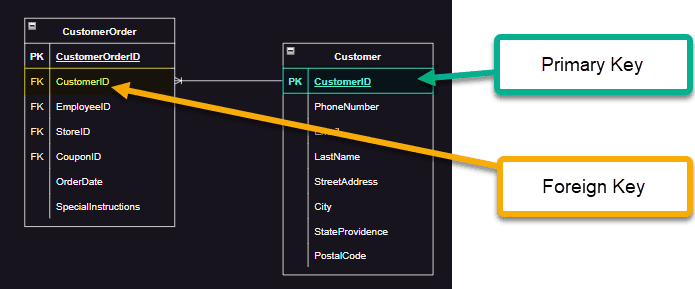
Here, the CustomerOrder table doesn't need to store the customer's name, email, and address for every order. It just needs the CustomerID (the foreign key), which acts as a pointer to the correct record in the Customer table.
This relationship enforces what's called referential integrity. It means the database will not allow you to create an order with a CustomerID that doesn't already exist in the Customer table. This prevents "orphan" records—like an order with no customer—and ensures your data is clean and reliable.
3. A Product Analytics Scenario
Let's map this directly to a scenario you'd encounter as a product designer. You have two main tables:
users: Contains information about each person who has signed up.events: A log of every action users take in your app.
Here's what they might look like:
users table
| user_id (PK) | signup_date | country | |
|---|---|---|---|
| 101 | ana.g@email.com | 2023-01-15 | Spain |
| 102 | ben.c@email.com | 2023-01-16 | USA |
| 103 | chloe.d@email.com | 2023-01-18 | France |
events table
| event_id (PK) | user_id (FK) | event_name | timestamp |
|---|---|---|---|
| 5001 | 102 | app_open | 2023-02-20 09:00 |
| 5002 | 101 | project_created | 2023-02-20 09:05 |
| 5003 | 102 | button_click | 2023-02-20 09:07 |
| 5004 | 101 | project_shared | 2023-02-20 09:12 |
Notice a few key things:
- In the
userstable,user_idis the primary key. Each value is unique. - In the
eventstable,event_idis the primary key for that table, butuser_idis a foreign key. It refers back to theuserstable. - The
user_idcolumn in theeventstable can (and does) have duplicates. This makes sense, because one user can perform many events.
This structure allows you to store user data once and event data separately, creating an efficient and reliable system.
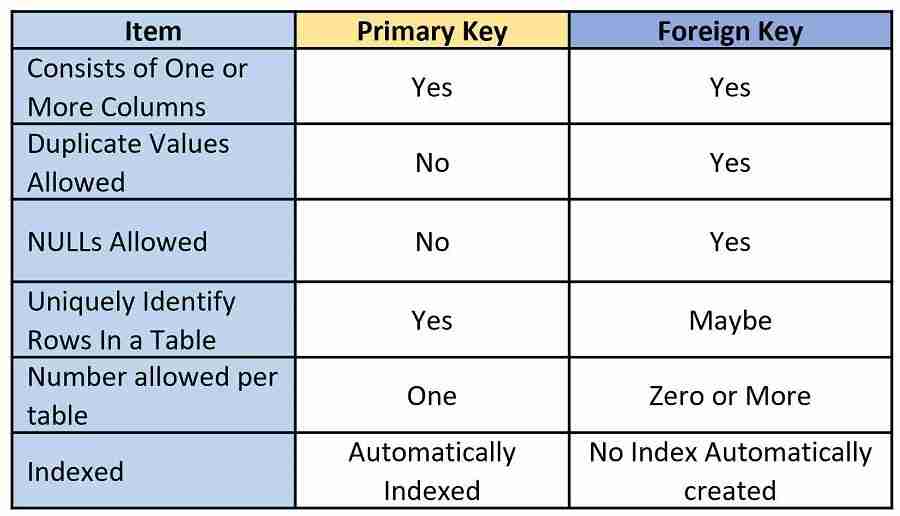
The table below provides a concise summary of the differences between primary and foreign keys.
Conclusion
In this lesson, we've covered the conceptual backbone of relational databases. Understanding this is crucial before you can start combining data.
Key Takeaways:
- We split data into multiple tables (e.g.,
users,events) to avoid redundancy and ensure data integrity. - A Primary Key (PK) is a column that uniquely identifies every row in a table. For example,
user_idin auserstable. - A Foreign Key (FK) is a column in one table that points to the primary key in another table, creating a logical link. For example,
user_idin aneventstable. - This PK-FK relationship enforces referential integrity, preventing invalid data like an event that isn't associated with a real user.
Preview of the Next Lesson
Now that you understand how tables are related, you're ready to learn how to combine them in a query. In our next lesson, we will use the INNER JOIN clause to pull data from both the users and events tables simultaneously, allowing you to start answering much more powerful product questions.
Can't find a good explanation? Sign up and we'll make it for you
Sign up