
Hello! Welcome to your next lesson.
Introduction
In our last session, we established the conceptual foundation for connecting data: primary and foreign keys. You learned that these keys create a structural relationship between tables, like linking a users table to an events table using a common user_id. This structure is what ensures your data is organized and reliable.
Today, we'll build directly on that foundation. This lesson is about putting those relationships to work. You will learn how to use the INNER JOIN clause to combine rows from two different tables based on their matching key. This is the first and most common type of JOIN, and it's the key to unlocking much deeper insights by answering questions that span multiple datasets—for example, linking a user's signup information to the specific actions they take in your product.
1. The Concept: Finding the Overlap
Imagine you have your users table and your events table. A common product question is: "Show me the email addresses of users who performed an action, and what action they performed."
The user emails are in the users table, and the actions are in the events table. INNER JOIN is the tool that lets you bring these two pieces of information together.
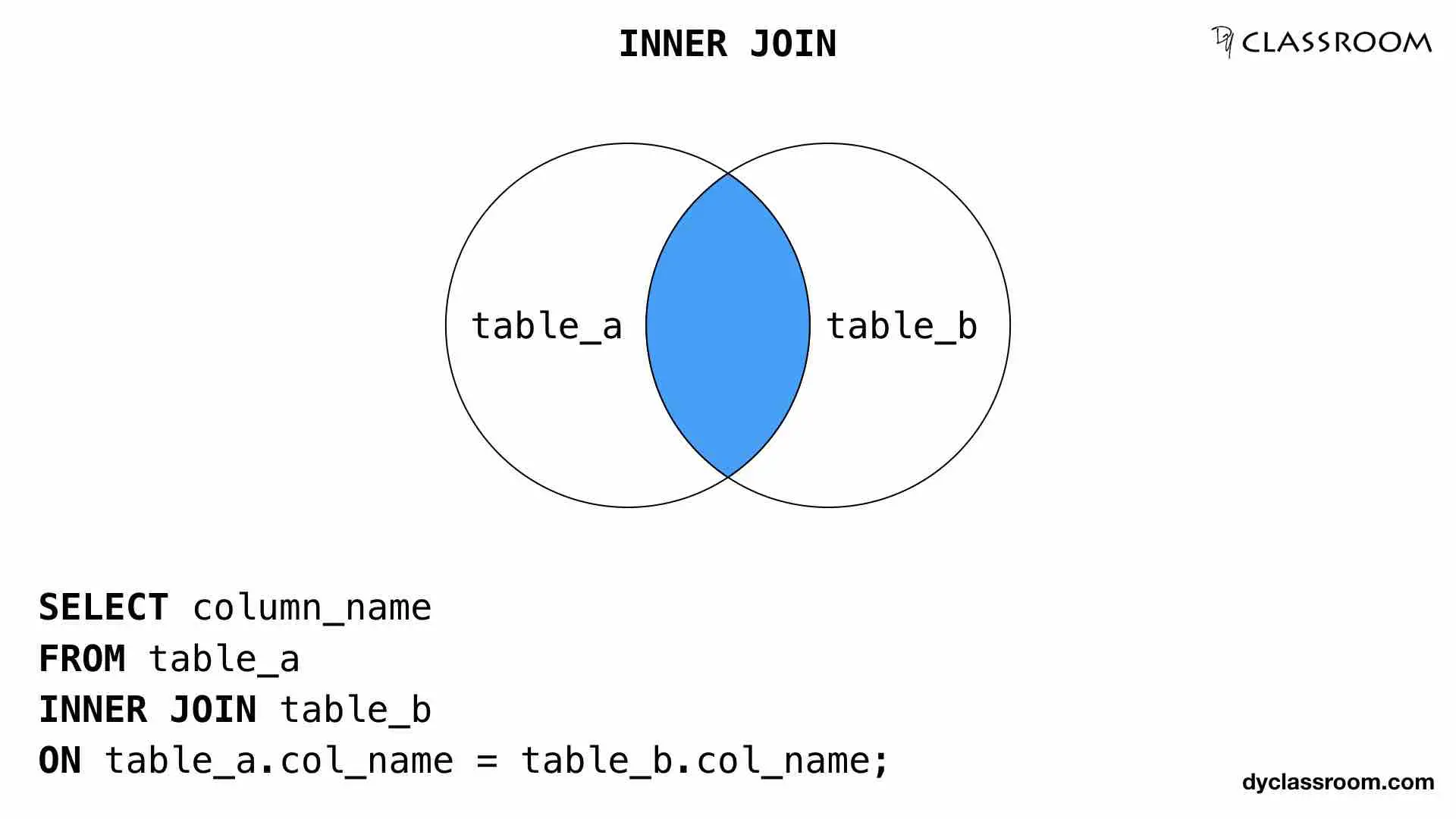
Conceptually, an INNER JOIN finds the intersection between two tables. It looks at every row in the first table, every row in the second table, and combines them only when the value in the linking column (our key) is the same in both.
This Venn diagram is a classic way to visualize it. The INNER JOIN returns only the data in the overlapping section.
2. How an INNER JOIN Works
Let's make this more concrete. How does the database actually perform this "join"? It's a matching game. For each row in the first table, it scans the second table for a row with a matching key. If it finds a match, it creates a new, combined row in the result. If there's no match, it discards the row.
To see this in action, let's watch a short video.
SQL Joins Explained |¦| Joins in SQL |¦| SQL Tutorial
The video 'SQL Joins Explained' by Socratica provides an excellent, clear visualization of how an INNER JOIN works by matching rows one by one.
Please watch from 01:52 to 02:54. This segment visually demonstrates how rows from a 'Martian' table are combined with rows from a 'Base' table using a matching base_id. Notice how it only includes rows that have a match.
The key takeaway from the video is that INNER JOIN only returns records that have a corresponding record in the other table. In their example, the Martian "John Carter" was left out because he didn't have a matching base_id in the Base table. In a product context, this means if you join users and events, a user who has signed up but never performed an event would not appear in the results.
3. Writing Your First INNER JOIN
Now that you understand the concept, let's look at the SQL syntax. An INNER JOIN query has four main parts:
SELECT: The columns you want to see.FROM: The first (or "left") table.INNER JOIN: The second (or "right") table you want to connect.ON: The rule for connecting them, specifying which key to match.
Let's use a practical example from the world of product analytics.
SQL JOINS Tutorial With Practice Exercises
The article 'SQL JOINS Tutorial With Practice Exercises' from DataLemur uses a great case study from Spotify to explain how to write a JOIN. This is a perfect example of how you'd use joins in a real-world product setting.
Please read the section 'SQL JOIN Example', starting from the 'Example Input' tables for 'artists' and 'songs'. Focus on the three steps they outline for building the query: selecting columns, specifying tables, and defining the relationship with the ON clause.
As the article demonstrates, the syntax is logical. You tell SQL which tables to look at and exactly how they are related.
Here is the basic structure:
SELECT table1.column_name, table2.column_name
FROM table1
INNER JOIN table2
ON table1.common_key = table2.common_key;
Notice the table_name.column_name notation. This is important. When you join tables, you might have columns with the same name in both (like artist_id in the Spotify example, or user_id in our product tables). You need to tell SQL which table's column you're referring to, both in the SELECT statement and the ON clause, to avoid ambiguity.
Let's apply this to our familiar users and events tables from the last lesson.
users table
| user_id (PK) | |
|---|---|
| 101 | ana.g@email.com |
| 102 | ben.c@email.com |
| 103 | chloe.d@email.com |
events table
| event_id (PK) | user_id (FK) | event_name |
|---|---|---|
| 5001 | 102 | app_open |
| 5002 | 101 | project_created |
| 5003 | 102 | button_click |
To get a list of user emails and the events they performed, the query would be:
SELECT
    users.email,
    events.event_name
FROM
    users
INNER JOIN
    events
ON
    users.user_id = events.user_id;
The result would be:
| event_name | |
|---|---|
| ben.c@email.com | app_open |
| ana.g@email.com | project_created |
| ben.c@email.com | button_click |
User 103 (Chloe) does not appear in the result because they don't have any matching records in the events table. This is the core behavior of an INNER JOIN.
4. Practice Exercise
Now it's your turn. Let's try the practice exercise from the DataLemur article you just read. It involves a scenario at the trading app Robinhood, where you need to join user data with their trade data. This is a classic product analytics task: linking users to their actions.
Scenario:
You have two tables: trades and users.
trades table:
| order_id | user_id | price | quantity | status |
|---|---|---|---|---|
| 100102 | 111 | 10.00 | 10 | Completed |
| 100259 | 148 | 5.10 | 35 | Completed |
| 100305 | 300 | 10.00 | 15 | Completed |
users table:
| user_id | city | |
|---|---|---|
| 111 | San Francisco | rrok10@gmail.com |
| 148 | Boston | sailor9820@gmail.com |
| 178 | San Francisco | harryfan@gmail.com |
| 300 | San Francisco | cowboy@hotmail.com |
Your Task:
Write a SQL query to join the trades and users tables to see which user made which trade. For now, select all columns using SELECT * to see the full combined result. What is the common key you should join ON?
Take a moment to write down the query you think would work.
Click here to see the solution
SELECT *
FROM trades
INNER JOIN users
ON trades.user_id = users.user_id;
Explanation:
The query joins the trades table with the users table. The ON clause correctly identifies that the user_id column is the key that links them. The result will be a wide table containing all columns from trades and users for every trade that has a matching user. User 178 would not be in the output because they have no trades in the trades table.
Conclusion
Great work today! You've learned the most fundamental and widely used type of JOIN. This is a huge step forward in your ability to analyze product data.
Key Takeaways:
INNER JOINis used to combine rows from two tables based on a matching key.- It only returns rows where the key exists in both tables (the "intersection").
- The syntax involves
FROM table1,INNER JOIN table2, and anONclause to specify the matching keys (table1.key = table2.key). - You must use the
table_name.column_nameformat to specify columns that have the same name in both tables.
Preview of the Next Lesson
INNER JOIN is perfect for analyzing activity that has occurred. But what about analyzing inactivity? As a product designer, you often need to ask questions like, "Which users signed up but never created a project?" or "Which users have an account but haven't logged in this month?". An INNER JOIN can't answer this, because it excludes users with no matching events.
In our next lesson, we will explore LEFT JOIN, a different type of join that allows you to answer exactly these kinds of questions by keeping all records from the "left" table, even if they don't have a match in the right one.
Can't find a good explanation? Sign up and we'll make it for you
Sign up