
Welcome. This module focuses on the security controls that let a production platform remain operable without making every engineer, pipeline, or container effectively an administrator. For a senior AWS DevOps role, the important shift is from “writing an IAM policy that works” to designing an access model that is auditable, scoped by environment, resistant to privilege escalation, and practical during incidents.
This lesson builds a least-privilege model for three different identities:
- Engineers, who need federated, temporary access and tightly controlled production privileges.
- CI/CD systems, which need non-human deployment access without stored AWS keys.
- Workloads, which need narrowly scoped runtime permissions and managed access to secrets.
By the end, you should be able to describe this model clearly in an architecture interview and defend the main trade-offs.
1. Treat IAM as an access-design problem, not a policy-writing exercise
Every AWS request can be reduced to four questions:
| Dimension | Question | Example |
|---|---|---|
| Principal | Who is making the request? | Engineer role, GitHub Actions role, ECS task role |
| Action | What API operation is requested? | s3:GetObject, ecs:UpdateService, secretsmanager:GetSecretValue |
| Resource | Which concrete asset is affected? | A production object prefix, a specific secret, a named ECS service |
| Condition | Under what contextual constraints? | Production environment, approved GitHub repository, resource tag, source VPC endpoint |
This is commonly called the PARC model: Principal, Action, Resource, Condition. It prevents a common failure mode: starting with an AWS service name and granting a broad managed policy such as AmazonS3FullAccess or AdministratorAccess.
A senior-level starting point is instead:
“For each actor, I define the smallest set of actions required against named resources in a specific account and environment. I then add conditions where AWS supports them, and use organization-level guardrails to prevent classes of unsafe access.”
Two policies, two distinct questions
An IAM role has two conceptually separate policy types:
- Trust policy: Who is allowed to assume this role?
- Permissions policy: What may this role do after it is assumed?
For example:
- A GitHub Actions OIDC trust policy should permit only a particular repository and production deployment environment to assume the production deploy role.
- The permissions policy on that role should allow deployment only to the intended AWS account, ECS service, ECR repository, state backend, and supporting services.
A correct permissions policy does not help if the trust policy lets an unintended principal assume the role. Conversely, a carefully constrained trust policy is insufficient if the role receives broad administrator permissions.
How AWS decides
The most useful mental model is:
- Every request starts as implicitly denied.
- An applicable explicit deny wins over any allow.
- Organization guardrails such as Service Control Policies (SCPs) constrain what can ever be allowed in an account.
- A permissions boundary, if attached, constrains the maximum permissions an identity policy can grant to a role.
- Identity-based and, where applicable, resource-based policies must provide the needed authorization.
- For role assumption, the role’s trust policy must authorize the caller.
This is why an AccessDenied incident needs systematic diagnosis: identify the caller, exact action, resource ARN, request context, and every policy layer that could restrict it. Do not begin by adding a broad permission.
AWS re:Invent 2021 - A least privilege journey: AWS IAM policies and Access Analyzer
Watch the AWS Events session “A least privilege journey: AWS IAM policies and Access Analyzer.” It gives a concise, authoritative overview of the permission mechanisms and the evaluation model that interviewers expect you to distinguish.
Watch permission mechanisms for the difference between identity policies, resource policies, SCPs, and permissions boundaries. Then watch policy evaluation for the default-deny model, request context, trust policies, and cross-account implications. Focus on selecting the correct control for the problem rather than treating every IAM problem as an identity-policy problem.
2. Establish a layered access model
For an exchange or fintech-style platform, avoid a single shared production account and avoid using static IAM users for normal operation. A defensible structure separates blast radius and separates human access, automation access, and runtime access.
A practical account model could include:
- Security and log archive accounts for centralized audit trails, security tooling, and restricted security administration.
- Shared services account for centrally governed artifacts or common tooling where appropriate.
- Separate development, test, staging, and production accounts.
- A distinct production account per major system or domain when risk, ownership, or compliance justifies it.
Within this structure, the normal access paths look different:
| Actor | Authentication method | Typical production authority |
|---|---|---|
| Engineer | Corporate identity provider through IAM Identity Center | Read-only, incident investigation, or time-bound operational role |
| Platform administrator | Federated privileged role with MFA and approval controls | Limited platform administration; tightly audited |
| CI/CD pipeline | OIDC federation to AWS STS | Deploy only approved artifacts to the intended environment |
| ECS application | ECS task role | Call only its required AWS APIs at runtime |
| EKS application | Per-workload pod identity, such as IRSA or EKS Pod Identity | Call only its required AWS APIs at runtime |
| AWS service | Service-linked or service role | AWS service performs its narrowly defined operation |
The core principle is separation of duties. Developers should not need unrestricted production-console access in order to release. The deployment system should not be able to change unrelated production infrastructure. The application should not inherit the CI/CD role’s authority.
Security best practices in IAM - AWS Identity and Access ...
Read the relevant AWS IAM best-practice sections to establish the baseline architecture: federated human access, role-based workload access, iterative least privilege, and guardrails across accounts.
In “Require human users to use federation with an identity provider to access AWS using temporary credentials,” read the federation guidance. Note why centralized federation is preferable to individual IAM users and access keys. In “Require workloads to use temporary credentials with IAM roles to access AWS,” read the AWS workload pattern, then the external workload options. Connect this directly to CI/CD OIDC federation. In “Apply least-privilege permissions,” read the least-privilege lifecycle, including the recommendation to use CloudTrail activity and IAM Access Analyzer to refine policies. Finally, in “Establish permissions guardrails across multiple accounts” and “Use permissions boundaries to delegate permissions management within an account,” read organization guardrails and the boundary model.
Engineers: temporary credentials and purpose-specific roles
Engineers should authenticate through the corporate IdP and IAM Identity Center, not with shared IAM users or locally stored access keys. IAM Identity Center maps groups to permission sets or approved roles in target accounts.
A sensible production role catalogue is more useful than one generic ProductionAdmin role:
- ProductionReadOnly: CloudWatch, logs, traces, ECS/EKS status, RDS metrics, and configuration inspection.
- IncidentResponder: A narrow set of reversible actions, such as changing ECS desired count within limits, restarting a known service, or invoking a predefined Systems Manager automation document.
- DatabaseOperator: Database diagnostics and approved operational procedures, not unrestricted data extraction or schema ownership.
- BreakGlassAdmin: Exceptional, time-bound, MFA-protected access with mandatory alerting, ticket linkage, and post-use review.
The trade-off is deliberate: narrower roles require more upfront design and occasional access escalation during an incident. They substantially reduce the probability that a compromised engineer session, mistaken console action, or phishing event becomes a full-account compromise.
A senior answer should add that break-glass access is not a substitute for normal operational permissions. If it is used regularly, the standard role design is inadequate.
3. Permissions boundaries and organization guardrails prevent escalation
A permissions boundary is a managed IAM policy attached to a role that sets the maximum permissions its identity policies may grant. It does not grant access by itself.
This is valuable when a platform team delegates limited IAM creation to application teams. For example, developers may be allowed to create ECS task roles, but every created role must carry a boundary that prohibits:
- IAM administration outside approved role paths
- Disabling CloudTrail, Config, GuardDuty, or security controls
- Modifying organization-wide controls
- Creating unrestricted public S3 or networking exposure
- Assuming platform administration or break-glass roles
- Passing arbitrary roles to AWS services
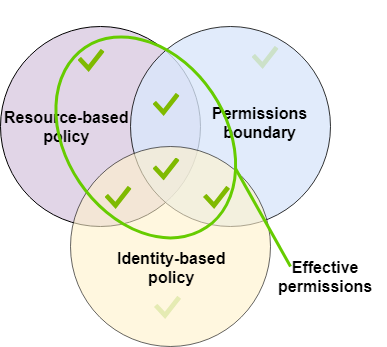
The diagram is useful as a guardrail intuition, but do not state in an interview that AWS always performs a simple three-circle intersection. Actual evaluation depends on the principal, whether a resource-based policy grants access, role-session behavior, SCPs, and explicit denies. The robust statement is:
“A boundary limits what the role’s identity policies can grant. It does not grant permission, and an explicit deny still overrides any allow. I validate the effective decision for the specific principal, action, resource, and request context.”
A guardrail pattern for delegated role creation
A platform team can combine controls:
- SCPs prevent account-wide dangerous actions, such as disabling critical security services or leaving approved regions.
- An IAM policy permits application teams to create roles only under a naming path such as
/application/. - That same policy requires a specified permissions boundary through the
iam:PermissionsBoundarycondition. iam:PassRoleis allowed only for exact approved application roles and only to specific AWS services.- CI validates policy syntax and security findings before infrastructure code can be applied.
The most dangerous permission to review is often iam:PassRole. A principal that can pass a highly privileged role to Lambda, ECS, EC2, CloudFormation, or another service may be able to obtain the role’s power indirectly. Restrict it to named roles and, where available, constrain the destination service with iam:PassedToService.
4. Design CI/CD access around OIDC, not access keys
A deployment pipeline is a privileged non-human identity. It needs AWS access, but it should never use a permanent AWS_ACCESS_KEY_ID stored in GitHub, Jenkins, GitLab, or a local credential file.
For GitHub Actions, use OpenID Connect (OIDC):
- A job requests a signed OIDC JSON Web Token from GitHub.
- AWS STS validates that token against the IAM role’s trust policy.
- If the claims match, STS issues short-lived role credentials.
- The job uses those temporary credentials only for the role’s permitted AWS operations.
- The session expires automatically.
Keep a critical distinction clear: the OIDC trust-policy conditions determine whether GitHub may assume the role. A permissions boundary, if attached to the role, determines the maximum permissions available after assumption.
Configuring OpenID Connect in Amazon Web Services
Read GitHub’s OIDC guidance for AWS. This is directly applicable to replacing stored AWS deployment credentials with tightly scoped, short-lived credentials.
In “Configuring the role and trust policy,” read the trust-policy warning. Then review the examples that constrain the sub claim to a repository, a branch, or a protected deployment environment. For production, prefer an exact match for the approved repository and protected prod environment rather than a wildcard for every branch. In “Updating your GitHub Actions workflow,” read the workflow configuration. Note that id-token: write allows the workflow to request an OIDC token; it does not itself grant AWS resource permissions.
A production OIDC trust policy
The following trust policy permits only the payments-api repository to assume a production deployment role through a protected GitHub environment named prod.
{
  "Version": "2012-10-17",
  "Statement": [
    {
      "Sid": "TrustGitHubProductionEnvironment",
      "Effect": "Allow",
      "Principal": {
        "Federated": "arn:aws:iam::123456789012:oidc-provider/token.actions.githubusercontent.com"
      },
      "Action": "sts:AssumeRoleWithWebIdentity",
      "Condition": {
        "StringEquals": {
          "token.actions.githubusercontent.com:aud": "sts.amazonaws.com",
          "token.actions.githubusercontent.com:sub": "repo:exchange-org/payments-api:environment:prod"
        }
      }
    }
  ]
}
In practice, pair this with GitHub environment protection rules:
- Only approved branches or release tags can deploy.
- Production requires designated reviewers.
- Deployment concurrency prevents simultaneous conflicting production releases.
- The role is in the production account, not reused in development.
- The workflow receives only
id-token: writeand the minimum GitHub repository permissions required.
Split pipeline roles by responsibility
A single pipeline role that can build images, manage Terraform state, alter all infrastructure, retrieve all secrets, and deploy to production has an unnecessarily large blast radius. Separate roles according to the job being performed:
| Pipeline stage | Example role | Narrow authority |
|---|---|---|
| Build and package | BuildArtifactRole | Write a versioned image to one ECR repository; write build outputs to one artifact bucket |
| Infrastructure plan | TerraformPlanRole | Read state and describe relevant resources; no production mutation |
| Production deploy | ProductionDeployRole | Update named ECS services or approved CloudFormation/Terraform resources |
| Database migration | MigrationRole | Invoke a controlled migration process; no direct unrestricted database administration |
| Security validation | PolicyValidationRole | Run policy checks and report findings; no deployment rights |
This makes approval meaningful. An approval should govern an actual privileged transition: the assumption of a production deployment role or the release promotion of an immutable artifact.
For Terraform, the deployment role also needs carefully scoped access to:
- The Terraform state bucket and only its relevant state prefix
- The state encryption key
- The locking mechanism where used
- The precise AWS resources managed by that stack
Do not solve an unexpected Terraform authorization error by adding AdministratorAccess. Determine whether the pipeline needs a missing dependent API action, access to a state object, kms:Decrypt, a PassRole allowance, or a role trust-policy adjustment.

IAM Access Analyzer should be used in two complementary ways:
- Policy validation during pull requests or CI to catch errors, overly permissive constructs, and security warnings before deployment.
- Policy generation from a representative CloudTrail window to identify actions actually used by a role, followed by human review and testing before reducing permissions.
Generated policies are evidence, not an automatic final answer. A two-week traffic window may omit a monthly reconciliation, a disaster-recovery action, or a rare failover path.
5. Give workloads their own runtime identity
For containers, distinguish the identity required to start a workload from the identity the workload uses to run the business logic.
ECS: execution role versus task role
For ECS:
- The task execution role is used by the ECS agent for activities such as pulling an image from ECR, writing logs, and retrieving startup configuration where required.
- The task role is provided to the application container and should contain only the application’s runtime permissions.
For example, an order-processing service may need:
- Read/write access only to
s3://exchange-order-documents/orders/* GetSecretValueonly forprod/orders/db-credentialskms:Decryptonly for the KMS key protecting that secret, constrained to the Secrets Manager service where appropriatePutEventsonly to a named EventBridge bus, orSendMessageonly to a named SQS queue
It should not receive the broad ECS execution role, generic S3 access, or access to all secrets in the account.
For EKS, apply the same principle with a workload-level identity such as IAM Roles for Service Accounts (IRSA) or EKS Pod Identity. Avoid placing application permissions on the worker-node role; otherwise, every pod able to reach node credentials may inherit excessive authority.
Example application permissions policy
This illustrative policy scopes an application to one secret, one document prefix, and one KMS key rather than granting account-wide service access.
{
  "Version": "2012-10-17",
  "Statement": [
    {
      "Sid": "ReadDatabaseCredential",
      "Effect": "Allow",
      "Action": "secretsmanager:GetSecretValue",
      "Resource": "arn:aws:secretsmanager:ap-south-1:123456789012:secret:prod/orders/db-credentials-*"
    },
    {
      "Sid": "DecryptOnlyThroughSecretsManager",
      "Effect": "Allow",
      "Action": "kms:Decrypt",
      "Resource": "arn:aws:kms:ap-south-1:123456789012:key/11111111-2222-3333-4444-555555555555",
      "Condition": {
        "StringEquals": {
          "kms:ViaService": "secretsmanager.ap-south-1.amazonaws.com"
        }
      }
    },
    {
      "Sid": "ManageOrderDocumentsOnly",
      "Effect": "Allow",
      "Action": [
        "s3:GetObject",
        "s3:PutObject"
      ],
      "Resource": "arn:aws:s3:::exchange-order-documents/orders/*"
    }
  ]
}
The precise KMS permissions depend on the KMS key policy and service integration. That is why you should test the exact call path rather than adding broad kms:* permissions.
6. Use managed secrets without turning secrets into environment configuration
A secret is sensitive material such as a database password, third-party API credential, signing key, or private certificate. It should not be committed to Git, embedded in a container image, copied into Terraform state, or sent in chat or tickets.
Use:
- AWS Secrets Manager for application secrets that need managed rotation, lifecycle support, resource policies, and retrieval auditing.
- SSM Parameter Store SecureString for lower-complexity encrypted configuration and secret-like values when its capabilities fit the requirement.
- AWS KMS to control encryption and key access, while recognizing that a KMS key policy is also part of the effective authorization path.
A practical runtime pattern is:
- Store the secret in Secrets Manager, encrypted with an approved KMS key.
- Grant the specific workload role
secretsmanager:GetSecretValueon that secret only. - Grant the necessary KMS decrypt authority only on the required key and path.
- Retrieve the secret through the AWS SDK at startup or on a controlled refresh interval.
- Cache carefully to avoid excessive API calls, and never log the secret or expose it in metrics.
Injecting a secret as an environment variable can be convenient, but it increases exposure through process inspection, debugging tooling, accidental dumps, and configuration surfaces. In ECS, secrets injected at task startup do not automatically refresh in a running task after rotation; a controlled redeploy or runtime retrieval pattern is needed. For a high-risk credential, this operational detail matters as much as the initial IAM policy.
Also keep deployment secrets separate from runtime secrets:
- A CI pipeline may need a signing credential or registry access, but it should not automatically be able to read every application database credential.
- The running
ordersworkload may need its own database secret, but it should not be able to retrieve the payment service’s secret. - An engineer investigating an incident may inspect secret metadata and rotation status without being able to retrieve secret values.
7. A concise interview-ready security design answer
For a prompt such as, “How would you design IAM and secret access for a production ECS platform?”, a strong answer is:
“I would use a multi-account AWS Organization with separate production, non-production, security, and log archive accounts. Engineers federate from the corporate identity provider through IAM Identity Center and use short-lived, purpose-specific roles. Production access is mostly read-only or incident-scoped; privileged break-glass access is time-bound, MFA-protected, alerted, and reviewed.
CI/CD uses OIDC federation to STS rather than stored AWS keys. The production deployment role trust policy is restricted to the exact repository and protected production environment, and the role has only the permissions needed to promote an immutable artifact and update the intended services. I separate build, plan, deployment, and migration roles to reduce blast radius.
Each ECS service has a dedicated task role. The task execution role is separate and contains only agent-level startup permissions. Task roles access named S3 prefixes, queues, and Secrets Manager secrets, with KMS access scoped to the required key. Secrets are stored in Secrets Manager, rotated where appropriate, never committed to source control, and not broadly exposed through pipeline credentials.
At the governance layer, SCPs prevent prohibited account-wide actions, and permissions boundaries limit delegated role creation. I restrict
iam:PassRole, validate policies in CI using IAM Access Analyzer, review Access Analyzer findings for public or cross-account exposure, and use CloudTrail evidence to refine policies over time.”
This answer demonstrates architecture ownership because it connects identity design, deployment safety, workload runtime behavior, governance, and operational verification.
Key takeaways
- Use federated IAM roles and short-lived credentials for engineers, CI/CD, and workloads; avoid long-lived AWS access keys.
- Separate role trust policies from permissions policies. The first controls who can assume; the second controls what they can do.
- Use SCPs for organization-wide guardrails and permissions boundaries to cap delegated permissions. Neither grants access by itself.
- Use OIDC for GitHub Actions or other external CI/CD systems, and constrain the trusted repository, branch, or protected environment through token claims.
- Give each ECS task or EKS workload a dedicated runtime role. Do not put application permissions on an ECS execution role or Kubernetes node role.
- Store sensitive values in Secrets Manager or appropriate encrypted Parameter Store entries, and scope both secret and KMS permissions tightly.
- Make least privilege iterative: validate policies before deployment, inspect Access Analyzer findings, use CloudTrail-based policy generation as evidence, and test uncommon but legitimate operational paths.
Next, the course moves from access control to operational control: defining service SLIs and SLOs, connecting them to metrics, logs, and traces, and using error-budget and burn-rate signals to make production decisions.
Can't find a good explanation? Sign up and we'll make it for you
Sign up