
Hello. In the previous lab, you used a controlled Net change collection to prove that a changed purchase order reached the Planning Data Repository. That established an important principle: a successful collection status is not enough; the specific planning record must be validated.
This lesson turns that principle into a production-support diagnostic method. You will resolve two closely related symptoms:
- an item is missing from Plan Inputs or cannot be used in Planning; and
- a collection request ends in Warning, Error, or completes without bringing in the expected records.
The goal is to isolate the failure point systematically: collection request parameters, child-process logs, Planning Source System configuration, source master-data dependencies, and finally repository evidence. This is the level of reasoning expected in a senior functional-consultant interview.
Start with the collection pipeline, not the plan
A plan cannot use data that never reached the Planning Data Repository. Therefore, when an item, purchase order, calendar, or supplier is missing, avoid changing plan options first. Diagnose the collection path.
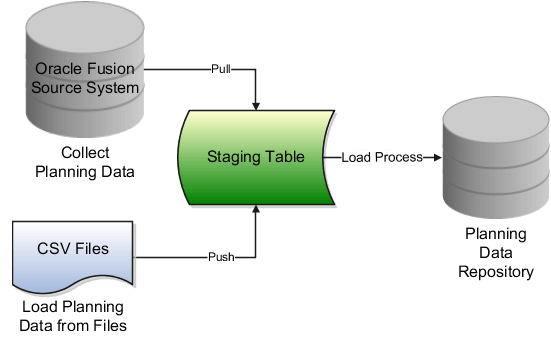
A collection problem can occur at several points:
| Diagnostic layer | Question to answer | Typical evidence |
|---|---|---|
| Repository | Is the item or transaction actually absent? | Plan Inputs seeded table results |
| Collection request | Did the request select the correct source, mode, filters, and entities? | Request parameters and submission notes |
| Child jobs | Which extraction or load step failed or warned? | Scheduled Processes status, log, output |
| Source setup | Is the Fusion source system enabled and configured for the required data? | Manage Planning Source Systems |
| Source master data | Is the item, organization, catalog, calendar, supplier, or location valid and eligible? | Source application setup and transaction record |
The direction matters. Start by proving the symptom in the repository, then trace backward toward the source. This prevents a common support mistake: treating a broad re-collection as a solution before knowing what was wrong.
Oracle describes the key request parameters and several common collection failures in its Collection Job Set reference.
Read Oracle Help Center's “Collection Job Set” reference as the technical checklist for request setup and job-level troubleshooting.
First review the parameter table in the Collection Job Set reference, especially Source System, Select Collection Filters, Collection Type, Reference Data, and Supply Planning Data. Note that Demand Planning mode is restricted: do not expect a Net change run to resolve an omitted demand-history collection. Then read the troubleshooting table, concentrating on blocked jobs, missing Items UI records, calendar failures, and the instruction for Net change diagnosis. Treat the listed resolutions as hypotheses to verify with your own request and log evidence.
The senior-consultant triage model
Use the following classification before touching configuration.
Symptom A: the item is absent from Plan Inputs
In the Planning work area, open Plan Inputs in Full Pane and query the Items table using:
- item number;
- inventory organization;
- master organization, if known;
- item description only as a secondary search value.
If the item is absent, you have a master-data collection problem. Do not begin by investigating purchase orders, forecasts, or plan output. Those records depend on the item being available in the repository.
Oracle identifies an especially important condition: the master organization must be included in collection. An item can exist in a child inventory organization in the source, but remain unavailable in Planning when its master organization was omitted from the item and item-structure collection scope.
Symptom B: the item exists, but its transaction is absent
If the item appears in the Items table, but a purchase order, sales order, transfer order, on-hand balance, or work order is missing, master item collection may be correct. Focus on:
- the selected Supply Planning Data entity;
- the transaction-organization collection filter;
- source transaction status and planning eligibility;
- dependent master data, such as supplier, supplier site, customer, location, calendar, or resource;
- the child job that collected that transaction entity.
For example, a purchase order may not appear because its supplier or supplier site dependency failed collection. That is different from an item-master issue.
Symptom C: the request ends in Warning, Error, Blocked, or no expected records arrive
A parent Collection Job Set can show Succeeded while an individual child job warns or while the expected record is absent. Treat the parent status as an entry point, not a conclusion.
A reliable diagnosis has four parts:
- Identify the exact missing business key: item, organization, document number, line, supplier, or calendar.
- Confirm the submitted collection scope.
- Read the relevant child-job log rather than only the parent status.
- Validate the corrected result in Plan Inputs after the rerun.
Lab scenario: missing item after a targeted collection
Use an actual test item in your 26B student environment. Do not deliberately corrupt production-like master data. If you do not already have a missing item, choose one that exists in Product Management or Inventory but is outside a known collection filter, such as a catalog or organization filter.
Record these values before investigating:
| Evidence field | Your value |
|---|---|
| Item number | |
| Item description | |
| Inventory organization | |
| Master organization | |
| Item catalog | |
| Source system | |
| Collection request ID | |
| Collection type | Targeted or Net change |
| Parent job status | |
| Relevant child job status | |
| Exact log message, if any |
The business key is not merely the item number. For troubleshooting, use the item and organization combination. The same item number can legitimately behave differently across organizations.
Oracle’s missing-item guidance is concise but important: absence in the repository is usually caused by setup, catalog configuration, or source-system collection enablement.
Resolve the Issue About Items Not Being Collected
Read Oracle Help Center's missing-item troubleshooting note before beginning the lab. It distinguishes a true collection issue from an item that merely cannot be found by an imprecise search.
Read the complete topic, beginning with the symptom that the item is absent from the Items table in Plan Inputs. Pay particular attention to Oracle's setup signal, then read the final diagnostic branch for silent failure clues. If you use the Supply Chain Planning Items FBDI template in another implementation, also note its reminder to populate required Item tab attributes.
Step 1: prove the repository symptom
Navigate to Supply Chain Planning, then open Plan Inputs.
- Open the Tasks panel.
- Select Open Full Pane if the seeded tables are not already visible.
- Search for and open Items.
- Query item and organization .
- If no result appears, try the master organization .
- Save a screenshot or export of the empty result, including the search criteria.
- If the item is present, stop calling this a missing-item issue. Move to the relevant transaction table, such as purchase orders, on-hand, sales orders, or transfer orders.
If you have authorized technical access, Oracle notes that a truly uncollected item is also absent from the MSC_SYSTEM_ITEMS repository table. For a functional investigation, Plan Inputs is normally the primary validation point because it confirms what Planning can use.
Interpret the result carefully
| Repository result | Meaning | Next focus |
|---|---|---|
| Item is absent in both inventory and master organization searches | Likely item master, catalog, source-system, or collection-scope issue | Collection parameters, source setup, item setup |
| Item appears in master organization but not inventory organization | Organization assignment or item-organization scope issue | Item assignment and organization filters |
| Item appears, but PO or sales order is absent | Transaction-specific issue | Supply entity selection, status, dependency data |
| Item appears, but a plan does not use it | Not a collection failure by itself | Plan scope and plan-input analysis later |
Step 2: inspect the original collection request parameters
Navigate to Tools, then Scheduled Processes. Search for the request using the request ID, submission notes, and a narrow submission-time range.
Open the parent Collection Job Set and record the submitted parameters. Do not rely on what you intended to select; verify what the request actually used.
Check these fields in order:
| Parameter or selection | What to verify for a missing item |
|---|---|
| Source System | It is the intended Oracle Fusion source system, not another instance or an obsolete test source. |
| Collection Type | Use Targeted for initial collection, changed filters, or a missing master-data investigation. |
| Collection Filters | The item’s catalog is included, and the master organization is included in the organization filter for items and item structures. |
| Reference Data | The item-related reference entity was selected; do not submit only transactional supply data when the item itself is absent. |
| Supply Planning Data | Select this only when also diagnosing the missing transaction, such as Purchase Orders or On Hand. |
| Submission Notes | They clearly identify the test scope and make the request traceable. |
A practical targeted request note is:
MISS_ITEM_R2_I1_MO1_O1_catalog_C1
Why Targeted collection is normally the corrective test
A Net change collection is incremental. It is appropriate only after a successful baseline and cannot be used to redesign collection filters. If your item was excluded because its master organization or catalog was not in the original scope, submit a Targeted collection after correcting the scope.
For an interview, phrase this precisely:
“Because the missing item indicates a master-data scope or setup problem, I would validate the original request parameters and correct the item master-organization or catalog scope. I would then run a Targeted collection for the required reference entities. A Net change request is not a substitute for correcting the baseline.”
Step 3: read parent and child jobs as a hierarchy
The collection request is a job set. Its child processes extract and load selected entities. Open the parent job details and inspect every child with Warning, Error, Blocked, or an unusually long duration.
Use this sequence:
- Confirm the parent job’s final status.
- Open the job details to see child processes.
- Identify the child associated with the failing entity, such as items, calendars, suppliers, purchase orders, or load master.
- Open the Log and Output for that child.
- Read the first meaningful warning or error in context; later messages can be consequences.
- Match the item, organization, source system, or entity name in the log to your incident key.
- Record the message verbatim in the evidence sheet.
Do not simply re-submit the request while a failure is unexplained. A repeat run can overwrite useful evidence or produce additional blocked jobs.
This video gives a visual walkthrough of monitoring collection jobs and explains the dependency order between master data and transactions. Its screens may differ slightly from 26B, so use Oracle documentation and your pod for exact field names.
Oracle Fusion planning training | Collection process in oracle Fusion Cloud planning central
Watch “Oracle Fusion planning training | Collection process in oracle Fusion Cloud planning central” from MY TECHNO JOURNAL for visual orientation on job monitoring and common collection dependencies.
Watch job monitoring to see the Scheduled Processes navigation, log inspection, and the reason master entities must be collected before dependent transactions. Then watch common failures for examples involving missing purchase orders, supplier data, resource availability, customers, and drop-ship transactions. Focus on the diagnostic order, not on copying every release-specific screen.
Common child-job patterns
| Child-job evidence | Probable root cause | Correct response |
|---|---|---|
| Blocked load job | Another collection or load is running | Wait for the active load to complete; avoid stacking collection submissions. |
| Item-related warning or item-ID derivation error | Item and organization combination is not in the repository | Check source item assignment, master organization, catalog, and reference-data scope. |
| Calendar load error and organization is absent | The organization’s assigned calendar is not eligible for collection | Check the source calendar assignment and pattern. Oracle notes that only schedules with a seven-day pattern string are collected as calendars. |
| Supplier or site warning | Dependent location or geography setup is incomplete | Check supplier site, internal or external location, location status, and required geography setup. |
| Purchase-order child succeeds but PO is missing | Wrong transaction entity, filter scope, status, or supplier dependency | Validate the PO source state, organization transaction filter, supplier, and item presence. |
| Net change completes but brings no expected data | Delta baseline or delta eligibility is inadequate | Run a Targeted collection to test whether the expected data can be collected. |
A warning is neither automatically harmless nor automatically a failure of every selected entity. Validate the specific item or transaction that your incident concerns.
Step 4: inspect Planning Source System configuration
After confirming the request and log evidence, inspect the source system that the request used.
- Open Setup and Maintenance.
- Search for Manage Planning Source Systems.
- Query the source system code used in collection request .
- Confirm that the source is the intended Oracle Fusion instance.
- Verify that its collection indicators show it is active for the required planning data.
- From the source system’s Actions menu, select Select Data Sources.
- Review the selected source-data configuration for the entities relevant to your incident.
- Save evidence of the source-system code and configuration state before changing anything.
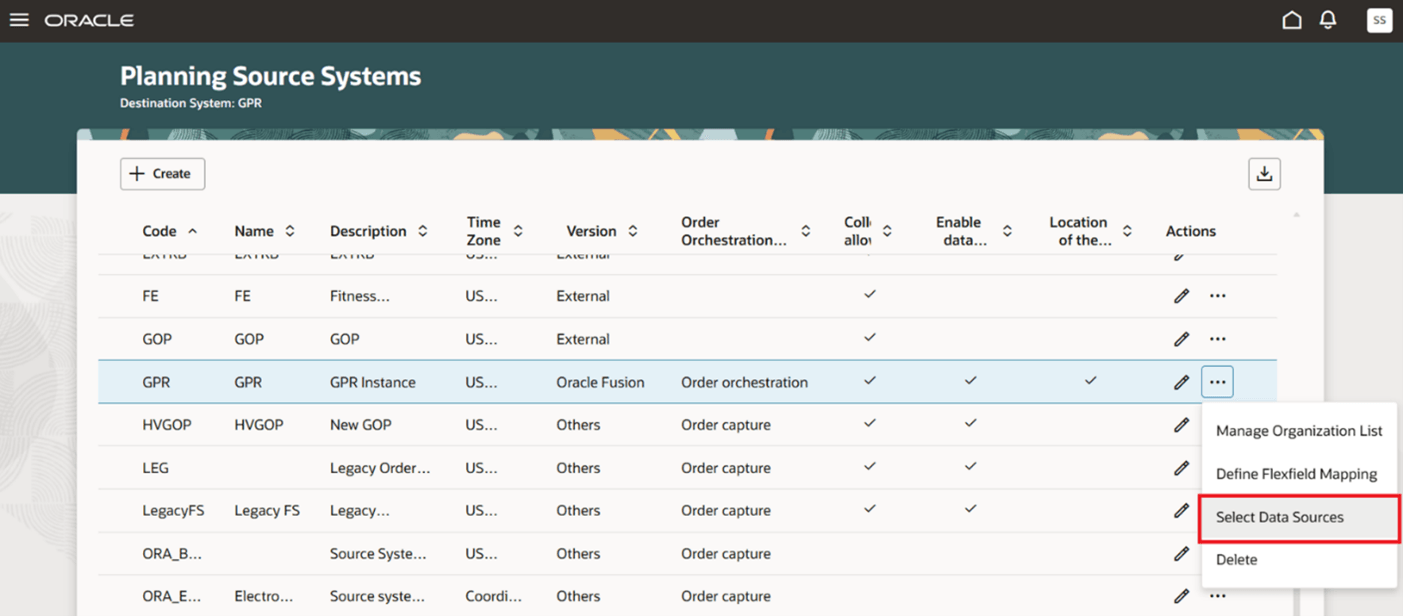
For a missing item with no clear log error, source-system enablement is a high-priority check. Oracle specifically identifies source-system enablement and proper catalog assignment as likely causes when no error message is logged.
Keep two concepts separate:
- Source system selection identifies where the collection request pulls data from.
- Collection filters and selected entities determine which organizations, items, and business objects the request attempts to collect.
A correct source system does not compensate for an excluded catalog or omitted master organization. Conversely, a well-designed filter cannot collect data from a disabled or incorrectly configured source system.
Step 5: validate source master-data dependencies
Now inspect the source application for the business key that is missing. For item , verify:
- The item exists in the source and is assigned to inventory organization .
- Its master organization is identified correctly.
- The master organization is included in the item and item-structure collection filter.
- The item is assigned to a catalog that is properly configured and included in the item filter, if catalog filtering is used.
- The source item setup is complete for collection.
- The item is not being confused with an inactive, expired, or similarly named item record.
- The collection request uses the same Fusion source system in which you verified the item.
For a missing transaction, first prove that the item exists in Plan Inputs, then validate the source transaction:
- correct item and organization;
- open and planning-relevant status;
- correct source document and line;
- selected transaction entity;
- supplier, customer, site, calendar, or other required dependency available in Planning.
A useful diagnostic distinction
Suppose purchase order , line , is missing.
- If item is missing in Plan Inputs, resolve item collection first.
- If exists but supplier is absent, investigate supplier and supplier-site collection.
- If both and exist, investigate the purchase-order entity selection, organization filter, source transaction status, and PO child-job log.
This dependency-based reasoning is much stronger than stating, “I would rerun collections.”
Step 6: correct, rerun, and prove the resolution
Apply the smallest correction supported by evidence. Then choose the collection type based on what changed.
| Confirmed cause | Correction | Collection and validation |
|---|---|---|
| Master organization omitted from item scope | Add the required master organization to the items and item-structures scope | Run Targeted collection for the necessary reference data; verify item in Plan Inputs |
| Catalog filter excludes the item catalog | Correct the catalog configuration or collection filter | Run Targeted collection; verify item and organization |
| Source system is not enabled or incorrect source was selected | Correct source-system configuration or choose the correct source | Run Targeted collection and verify source-system code in the request |
| Child log shows dependent calendar, supplier, or site issue | Correct the underlying dependency in the source | Recollect prerequisite reference data before dependent transactions |
| Transaction entity was omitted | Select the required supply entity, such as Purchase Orders | Run Targeted or Net change only if an appropriate baseline and scope already exist; verify the transaction |
| Net change returns no expected data | Establish whether a valid baseline/scope exists | Run Targeted collection as the diagnostic test; then reassess Net change use |
| Job is blocked | Resolve concurrency; do not create more overlapping jobs | Allow the active job to finish and monitor the blocked request |
After the rerun completes, return to Plan Inputs and query the same business key used at the start:
- item ;
- master organization ;
- inventory organization ;
- transaction document and line, where applicable.
Your resolution is complete only when the corrected repository result matches the source and the relevant collection child job succeeds.
A concise incident conclusion might read:
“Item was absent from Plan Inputs for organization . The parent Collection Job Set completed with Warning, and the item-related child log showed that the item-organization combination was not collected. The request’s organization filter excluded master organization . I corrected the scope, ran a Targeted reference-data collection, and verified that now appears for and in Plan Inputs. The corrected parent and item-related child processes completed successfully.”
Retain the minimum evidence pack
For each collection defect, retain:
- source item or transaction screenshot, including organization and status;
- original collection request ID and submitted parameters;
- parent and relevant child-job statuses;
- relevant warning or error log excerpt;
- Planning Source System configuration evidence;
- Plan Inputs result before correction;
- corrected request ID and Plan Inputs result after correction;
- one-sentence root cause and corrective action.
This evidence supports system-integration testing, defect closure, cutover readiness, and interview explanations.
Key takeaways
- Diagnose missing planning data from the repository backward to the source, not from the plan backward.
- Distinguish a missing item master from a missing transaction. The former commonly involves master organization, catalog, source enablement, or reference-data scope.
- Inspect the submitted collection parameters; intended scope and submitted scope are not always the same.
- The parent Collection Job Set status is insufficient. Read the relevant child-process log and connect its message to the affected business key.
- Use Targeted collection to correct missing baseline master data, changed filters, and Net change cases that return no expected data.
- Prove the correction in Plan Inputs with the exact item-organization or transaction-line key.
The next module moves from reliable planning inputs into Demand Management configuration, beginning with creation of a demand plan and its scope, horizon, calendar, time levels, and demand options.
Can't find a good explanation? Sign up and we'll make it for you
Sign up