
Good to continue from the repository-validation lab. You previously proved that a controlled item-organization scenario exists in the Planning Data Repository: its master data, on-hand position, and at least one open supply or demand transaction were reconciled to source.
This lesson adds the operational pattern used between broader targeted collections: make one controlled source change, run a Net change collection, and demonstrate—with before-and-after evidence—which repository records were refreshed. For an implementation interview, the distinction matters: a successful job status alone does not prove that the intended planning input changed.
By the end, you will be able to run a Net change collection safely and produce a concise evidence trail for one changed transaction and one unchanged control record.
Net change collection: purpose, boundary, and prerequisite
A targeted collection establishes the initial repository baseline for selected entities. A Net change collection is an incremental collection used after that baseline exists, normally to keep fast-changing planning inputs such as supplies and demands current without reloading the complete selected data set.
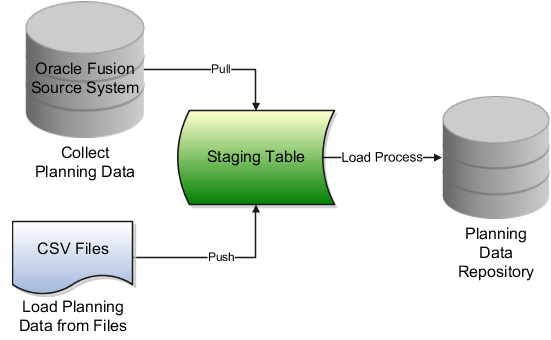
The distinction is operationally important:
| Collection type | Main use | Evidence you expect |
|---|---|---|
| Targeted | Initial load, periodic broader refresh, changes to defined collection scope, or recovery when Net change returns no expected data | Selected entity population is refreshed within the specified collection scope |
| Net change | Faster recurring updates after a successful targeted baseline | The source records changed since the relevant baseline are reflected in the repository |
| Plan run | Uses repository data to calculate a plan | New recommendations, exceptions, or measure values—not proof of collection by itself |
For this lab, do not make a broad set of unrelated source changes. A controlled transaction change gives you a defensible conclusion.
Study Oracle’s procedure first. It confirms the prerequisite targeted collection and the restrictions of the Net change submission page.
Collect Data Using the Net Change Collection Type
Read Oracle’s official procedure to anchor the lab in the 26-series process flow and parameters.
Read the full procedure under “Collect Data Using the Net Change Collection Type.” Begin with the prerequisite. Then follow steps 1 through 6, especially the instruction to select Net change, the note that filter criteria and Demand Planning data cannot be changed in this mode, and the final steps for Scheduled Processes and Plan Inputs review.
Two restrictions should shape your approach:
- The selected entities must already have a successful targeted-collection baseline. If the item, organization, or transaction class was never brought into the repository by targeted collection, Net change is not your initial-load mechanism.
- Do not use Net change to redesign collection scope. Oracle states that you cannot change filter criteria or Demand Planning data in this mode. If your test requires a new organization, catalog, or changed Demand Planning data selection, return to Targeted collection.
Also remember that only one collection can run at a time. Starting a second collection while another is running can produce blocked jobs and misleading troubleshooting noise.
Design a controlled delta test
Use the same scenario from the preceding lesson. In the template below, replace the labels with actual values from your pod:
- Item:
- Organization:
- Purchase order and line: -
- Supplier:
- Collection request baseline:
- Net change request:
- Unchanged control transaction: -, or a sales order -
A purchase order line is often a practical test object because it gives you a stable business key and planning-relevant values to compare. If your environment makes it easier to update a sales order, transfer order, work order, or on-hand balance, use that instead—but keep the test to one clear change.
Choose one meaningful source change
Prefer a change that Planning needs to recognize, such as:
- changing an open purchase order’s remaining quantity;
- changing its promised or need-by date;
- changing an open sales order’s requested date or remaining quantity;
- changing on-hand quantity through a valid inventory transaction.
Avoid using an ambiguous change such as editing description text or an attribute that is not collected for the entity. Also avoid closing or canceling the only transaction in your scenario during interview practice; status-driven eligibility can complicate the evidence. First practice a straightforward quantity or date update.
Capture the before-state
Before modifying source data, record both the source value and the current repository value in Plan Inputs. This prevents a common weak test:
“I changed the PO, ran collection, and the PO is visible.”
Its visibility proves only that the record exists. It does not prove that the current repository version reflects your change.
Use a simple test-evidence sheet:
| Evidence point | Before source change | Before repository value | Expected after Net change |
|---|---|---|---|
| - open quantity | 100 Each | 100 Each | 125 Each |
| - promised date | 15 May | 15 May | 20 May |
| - open quantity, control | 50 Each | 50 Each | Remains 50 Each |
| Collection status | succeeded | Data reconciled | succeeds; relevant child job succeeds |
Use your actual values rather than the example values. For dates, compare the same business-date meaning: promised to promised, need-by to need-by, and requested to requested. Do not compare a business date with the collection completion time.
Lab: modify the source record
Perform the update in the source application where the transaction is maintained. The exact navigation varies with your selected object and role, so the key requirement is the transaction state, not a memorized menu path.
For a purchase-order example:
- Locate - in the Procurement work area.
- Confirm it is for item , destination organization , and supplier .
- Confirm it is still an open planning-relevant line.
- Change one value, preferably either open quantity or promised/need-by date.
- Submit or save the source transaction according to your environment’s process.
- Re-query the transaction to confirm the change was committed.
- Record the source document number, line, old value, new value, update time, and status.
Do not make a second change while the collection is running. Otherwise, you cannot confidently associate the collected value with a specific source state.
Expected repository behavior
After the Net change collection, the repository should show the changed planning record with the revised quantity or date. The unchanged control record should remain available with its prior value.
That does not mean Oracle necessarily displays an easy row-level label saying “refreshed by request .” Your primary proof is the controlled comparison:
- the source transaction was changed and committed;
- the matching repository record shows the new business value;
- the collection job set and relevant children completed successfully;
- the unchanged control did not acquire an unexplained change.
The following short video provides useful visual context for the difference between targeted and incremental collection and for monitoring the scheduled process. Treat the Oracle documentation as the authority for exact release-specific fields.
Oracle Fusion planning training | Collection process in oracle Fusion Cloud planning central
Watch MY TECHNO JOURNAL’s “Oracle Fusion planning training | Collection process in oracle Fusion Cloud planning central” for a visual walkthrough of collection types and Scheduled Processes monitoring.
Watch collection types to reinforce why Targeted collection establishes a full selected-entity refresh while Net change is used for incremental updates. Then watch job monitoring for the navigation pattern into Scheduled Processes and the use of status, output, and logs.
Lab: submit the Net change collection
Step 1: open Collect Planning Data
Use either route:
- In a Supply Chain Planning work area, open the Tasks panel.
- Select Collect Planning Data.
Or use Setup and Maintenance:
- Open Setup and Maintenance.
- Set Offering to Supply Chain Planning.
- Set Functional Area to Supply Chain Planning Configuration.
- Open the Collect Planning Data task.
Use the Planning-work-area route for this lab because you will next validate the result in Plan Inputs.
Step 2: enter parameters deliberately
Complete the process parameters as follows:
| Parameter | Lab value and decision rule |
|---|---|
| Submission Notes | Use a traceable note, such as NET_R2_I1_O1_PO1_qty_100_to_125 |
| Source System | Select the Oracle Fusion source system used for your successful targeted baseline |
| Collection Type | Select Net change |
| Collection Templates | Use only if the template represents the already-tested entity scope |
| Collection Filters | Review what is displayed, but do not expect to change filter criteria in Net change mode |
| Reference Data | Select only the required entity or entities relevant to the intended collection design and existing baseline |
| Supply Planning Data | Select the applicable changed transaction entity, such as Purchase Orders |
| Schedule | Select As soon as possible for this controlled lab |
Your environment’s labels can vary slightly. The important design decision is to include the entity type containing your changed object. A PO update cannot be validated if you omit the Purchase Orders collection entity.
When you select Submit, record the request identifier as , along with the submission timestamp. That identifier links all later evidence.
Step 3: avoid a scope mistake
Before submitting, use this quick decision check:
| Question | If the answer is “no” |
|---|---|
| Was the relevant entity successfully collected in Targeted mode before this test? | Run or correct a Targeted collection first. |
| Is the changed transaction’s organization within the established filter scope? | Correct scope with a Targeted collection; do not attempt to alter it through Net change. |
| Does the selected supply entity correspond to the changed transaction? | Select the appropriate entity before submitting. |
| Is another collection running? | Wait for it to finish; only one collection can run at a time. |
| Did you capture before-values? | Stop and capture them in Plan Inputs before proceeding. |
Monitor the parent job and child jobs
Navigate to Tools and then Scheduled Processes. Search using the request ID, submission note, process name, and a narrow submission-time range.
The parent process is typically the Collection Job Set. Its status is necessary but not sufficient: inspect its children because each selected entity can have a separate extraction or load step.
Work through this sequence:
- Confirm the parent Collection Job Set reaches Succeeded.
- Open its details and identify the child processes associated with your selected entities.
- Confirm the child responsible for the changed transaction class, such as Purchase Orders, is Succeeded.
- If any child is Warning or Error, open its log and output before checking Plan Inputs.
- Record the parent and relevant child status in your evidence sheet.
A useful way to interpret statuses is:
| Status | Meaning for your lab | Next action |
|---|---|---|
| Succeeded | The process completed technically | Validate the revised business record in Plan Inputs |
| Warning | Some processing completed, but data may be incomplete | Review the warning text and validate the specific - record |
| Error | The collection or a required entity failed | Diagnose logs; do not call repository data current |
| Blocked or long-running | Often indicates collection concurrency or load contention | Check for another collection job before restarting anything |
Oracle’s Collection Job Set reference describes the normal rhythm and key failure responses. It is particularly useful for interview answers because it distinguishes operational frequency, concurrency, and the “no data collected” Net change scenario.
Read Oracle’s Collection Job Set reference to connect the lab procedure with practical scheduling and troubleshooting decisions.
In “Specifications,” read the operating pattern, noting the periodic targeted refresh, more frequent transaction updates, and one-collection-at-a-time constraint. Then review the parameter table beginning with the submission parameters. Finally, in the issue-resolution table, read from the Net change troubleshooting guidance.
Verify exactly what refreshed in Plan Inputs
Once the parent job and relevant child process have completed, return to Plan Inputs in Full Pane. Use the same seeded transaction table and filters that you used in the previous lesson.
For the purchase-order scenario:
- Open the purchase-order supply table.
- Filter first by PO number .
- Narrow by line , item , and organization .
- Expose columns needed for comparison: quantity, UOM, date, status, supplier, item, and organization.
- Compare the repository value to the committed new source value, not to a memory of the old value.
- Search separately for the unchanged control, -.
- Capture the filtered results and the request status.
Classify the result
Use the following outcome matrix rather than relying on “job succeeded.”
| Result | Interpretation | Next action |
|---|---|---|
| - shows the exact changed value; control remains unchanged | Successful controlled Net change refresh | Record the evidence and proceed to plan testing when needed |
| - exists but still shows the old value | The delta was not reflected, or the source update was not committed/eligible when extracted | Re-check source state and update time; inspect relevant child logs |
| - is absent | Scope, eligibility, entity selection, or collection processing issue | Check organization filter, source status, selected entity, baseline, and logs |
| Quantity differs but is explainable by UOM conversion | Potentially valid refresh | Validate the conversion and retain the explanation |
| Date differs | It may be a different date semantic rather than a failed refresh | Compare promised, need-by, and requested dates like-for-like |
| Parent succeeded but a child warned | Success is incomplete evidence | Read the child log and validate the precise affected entity |
What counts as proof?
A concise, high-quality validation statement is:
“I updated purchase order , line , for item in organization , from 100 Each to 125 Each. Before the update, Plan Inputs showed 100 Each. I submitted Net change collection request against the existing Fusion source-system baseline, with Purchase Orders selected. The Collection Job Set and the relevant child job succeeded. After completion, Plan Inputs showed 125 Each for the same PO line, item, and organization, while control PO remained at 50 Each. Therefore, the changed purchase-order planning record was refreshed.”
Notice what this statement does not claim: it does not say that every repository record was reloaded. It identifies the records for which you have evidence.
Root-cause analysis when the changed record does not refresh
Troubleshoot from source change through collection scope and job logs to repository. Do not start by changing plan options; plan configuration cannot repair an uncollected transaction.
1. Verify the source change
Confirm all of the following:
- the update was saved or submitted successfully;
- you are looking at the correct PO/order/work-order line;
- the item and organization match the prior collection scope;
- the record remains planning-eligible and open where applicable;
- you allowed any relevant source-side processing to complete before collection.
2. Verify baseline and selected entity
Net change requires the prior targeted baseline for selected entities. Check whether:
- the original targeted collection included the changed entity;
- the master dependencies—organization, item, UOM, supplier where applicable—were already present;
- the changed transaction type was selected under Supply Planning Data;
- the source system is the same one used by the baseline;
- the transaction organization is included in the established filter.
A transaction can fail to appear even though its master data exists, simply because the wrong transaction entity or organization scope was used.
3. Inspect child-process logs before rerunning
Search Scheduled Processes for . Open the parent job set, then identify the child associated with the transaction class. Read warning or error messages in the log in context.
Common interpretations include:
| Symptom | Likely cause | Corrective response |
|---|---|---|
| No changed data appears, but jobs succeeded | No usable delta was identified, wrong entity selected, or change occurred outside the established scope | Confirm source update time and entity selection; validate with a Targeted collection if needed |
| Transaction child job warns | Referential or source-data dependency issue | Check item, organization, supplier/site, UOM, and transaction status |
| Job is blocked | Another load or collection is in progress | Let the existing job complete; do not stack collection requests |
| Item is missing in the transaction result | Item or master organization was not correctly included in the baseline | Correct master-data scope and run Targeted collection |
| Net change still returns no expected data after checks | The baseline or delta processing is not adequate for the case | Run a Targeted collection to determine whether the expected data can be collected at all |
Oracle’s explicit guidance for “No data is collected with Net Change Collection” is to run a targeted collection and check whether the expected data is collected. Treat that as a diagnostic branch, not as an automatic response to every discrepancy. First make sure your controlled source update and Net change scope are valid.
Retain a compact implementation evidence pack
For this lab, retain:
- source-record screenshot or export showing the changed value and status;
- before and after Plan Inputs results for -;
- the unchanged control result;
- request ID, submission notes, and completion time;
- parent and relevant child process status;
- any warning/error log used in diagnosis;
- a one-sentence conclusion identifying the refreshed planning record.
A practical filename convention is:
NET_R2_I1_O1_PO1L1_before_after_YYYYMMDD.xlsx
This is enough evidence to support a test script, a defect update, or an interview explanation without exporting unnecessary repository data.
Key takeaways
- Run Net change only after a successful Targeted collection baseline for the selected entities.
- Make one controlled source change, capture repository before-values, then prove the revised business value in Plan Inputs after collection.
- Net change is appropriate for incremental supply and reference-data updates; Oracle notes that Demand Planning data can only be collected in Targeted mode.
- A Succeeded parent job is not complete validation. Check the relevant child process, then reconcile the precise item, organization, document line, quantity/UOM, date meaning, and status.
- When a delta is missing, investigate source commitment and eligibility, existing scope, selected entity, and child logs before changing plan configuration.
- If Net change collects no expected data, use a Targeted collection as the diagnostic test Oracle recommends.
Next, you will practice a production-style missing-item or failed-collection scenario, using collection parameters, child-process logs, source setup, and repository evidence to isolate the root cause.
Can't find a good explanation? Sign up and we'll make it for you
Sign up