
Welcome to the second module of our course, "The Physics of Digital Sound." Having established a foundation in music theory, we now shift our focus from the "what" and "why" of music—scales, chords, and rhythm—to the "how." How is the physical phenomenon of sound captured, stored, and manipulated within a computer? Your background in engineering and quantitative fields will be a significant asset here, as we delve into the technical principles that underpin modern music production.
In this first lesson, we'll tackle the most fundamental process in digital audio: the conversion of a continuous analog sound wave into a discrete series of numbers. We will explore the two key parameters that define this process: sampling rate and bit depth. Understanding these concepts is essential, as they dictate the fidelity and characteristics of every sound you will record, synthesize, and process in Ableton Live.
From Analog Wave to Digital Data
Sound in the physical world is an analog signal—a continuous wave of pressure that varies over time. A microphone converts this acoustic pressure into a continuously varying electrical voltage. However, a computer cannot store a continuous signal; it operates on discrete data—finite sequences of numbers. The process of converting the analog electrical signal into a digital format is called Analog-to-Digital Conversion (ADC).
This conversion process can be broken down into three core stages, as illustrated in the diagram below.
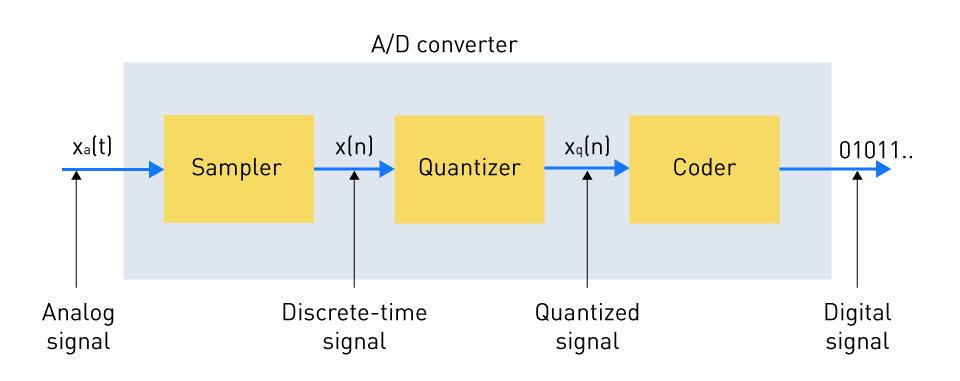
- Sampling: The ADC takes snapshots, or "samples," of the analog signal's amplitude at fixed, regular time intervals. This discretizes the signal along the time axis.
- Quantization: For each sample, the measured amplitude (voltage) is rounded to the nearest value on a predefined grid of discrete levels. This discretizes the signal along the amplitude axis.
- Coding: Each quantized amplitude value is assigned a unique binary number (a string of 1s and 0s), which can be stored and processed by a computer.
The two parameters that govern this process, sampling rate and bit depth, correspond directly to the first two stages. Let's examine each in detail.
Sampling Rate and the Frequency Domain
The sampling rate defines how frequently the ADC takes snapshots of the analog signal. It is measured in Hertz (Hz), or more commonly kilohertz (kHz), representing thousands of samples per second. A standard CD, for instance, uses a sampling rate of 44,100 Hz, or 44.1 kHz.
The crucial question is: how fast do we need to sample to create a faithful digital representation of the sound? The answer lies in one of the most important theorems in signal processing, which should be familiar from your engineering studies.
Shannon Nyquist Sampling Theorem
The video "Shannon Nyquist Sampling Theorem" by Professor Steve Brunton provides a clear and mathematically grounded explanation of this critical concept.
First, watch the section that defines the theorem. The core principle is that to perfectly reconstruct a signal, you must sample it at a rate at least twice its highest frequency component. He directly relates this to the standard audio sampling rate of 44.1 kHz, which is used to capture the full range of human hearing (up to ~20-22 kHz). Next, watch the following segment on aliasing. This explains the consequence of sampling too slowly: high-frequency information is misinterpreted as lower frequencies, a form of distortion known as aliasing.
As the video explains, the Nyquist-Shannon Sampling Theorem dictates the minimum sampling rate required. To capture a frequency of , you need a sampling rate of at least . Since the upper limit of human hearing is approximately 20 kHz, a sampling rate of at least 40 kHz is required.
To prevent aliasing, any frequencies above half the sampling rate (known as the Nyquist frequency) must be removed from the analog signal before sampling. This is done using a steep low-pass filter called an anti-aliasing filter. The standard rate of 44.1 kHz (and others like 48 kHz) provides a small buffer zone above 20 kHz, which allows for the use of more practical, less aggressive filters.
A common misconception is that higher sampling rates result in a "smoother" or more detailed waveform, often visualized with stair-stepped diagrams. This is incorrect. As long as the sampling rate is above the Nyquist rate, the original band-limited waveform can be perfectly reconstructed.
Nyquist-Shannon; The Backbone of Digital Sound
The video "Nyquist-Shannon; The Backbone of Digital Sound" from the Technology Connections channel offers an excellent practical demonstration that debunks the "stair-step" myth.
Watch the section beginning at this timestamp. It explains that while an intermediate stage in a Digital-to-Analog Converter (DAC) might produce a step-like signal, a final output-smoothing filter ensures perfect reconstruction. Pay close attention to the oscilloscope demonstration from this point, where a 10 kHz sine wave, represented by very few samples, is flawlessly reconstructed into a smooth wave.
Bit Depth and the Amplitude Domain
While sampling rate discretizes the time axis, bit depth discretizes the amplitude axis. It determines the number of bits used to store the amplitude value of each sample. This directly corresponds to the resolution, or number of steps, available during the quantization stage.
The number of possible amplitude values is given by the formula , where is the bit depth.
- 16-bit audio (the CD standard) provides discrete amplitude levels.
- 24-bit audio (the standard for professional recording) provides levels.
The most important consequence of bit depth is its effect on the dynamic range—the difference between the quietest and loudest possible sounds the system can represent. The process of rounding a sample's true analog amplitude to the nearest available digital level introduces a small error, known as quantization error. This error manifests as a low-level hiss called quantization noise, which defines the system's noise floor.
A higher bit depth means more, and therefore finer, steps. This results in smaller rounding errors and a lower noise floor. The following article provides a clear, quantitative explanation.
Digital audio basics: audio sample rate and bit depth
The sections on bit depth in this iZotope article offer an excellent breakdown of how it relates to dynamic range and the noise floor.
Start by reading the section titled What is bit depth in audio?. This part explains the exponential increase in values with bit depth and introduces the difference between fixed-point and floating-point numbers. Then, continue with the subsequent paragraphs starting from the discussion of quantization. This is the most crucial part, as it explains how quantization error leads to noise and provides the simple rule of thumb: each additional bit adds approximately 6 dB of dynamic range. This gives us the theoretical dynamic ranges of ~96 dB for 16-bit audio and ~144 dB for 24-bit audio.
It's also important to know that modern Digital Audio Workstations (DAWs) like Ableton Live perform all internal calculations using 32-bit floating-point numbers. Unlike the fixed integer formats of 16-bit and 24-bit, a floating-point system offers a practically infinite dynamic range. This means that within your Ableton project, it's virtually impossible for a signal to "clip" internally, which provides enormous flexibility during mixing. The conversion to a fixed bit depth (like 24-bit or 16-bit) happens only when you export your final file.
Putting It All Together
Sample rate and bit depth define the two dimensions of digital audio resolution.
- Sample Rate defines the resolution on the time axis and determines the maximum frequency that can be captured.
- Bit Depth defines the resolution on the amplitude axis and determines the dynamic range and noise floor.

Practical Recommendations for Production:
- Sample Rate: While 44.1 kHz is sufficient for high-quality audio, many producers work at 48 kHz or 96 kHz. Higher rates can sometimes reduce aliasing artifacts generated by certain plugins during processing. For our purposes, starting projects at 48 kHz is a robust choice.
- Bit Depth: Always record and work at 24-bit. This provides a very low noise floor and ample headroom, making level management much more forgiving. You will only convert to 16-bit as the final step when preparing music for distribution.
Conclusion
In this lesson, we have dissected the fundamental process of converting sound from the analog to the digital domain. You now understand how the two cornerstone parameters, sampling rate and bit depth, govern this translation.
Here are the key takeaways:
- Digital audio is created by sampling (slicing in time) and quantizing (rounding in amplitude) a continuous analog signal.
- Sample rate determines the highest frequency that can be captured, governed by the Nyquist-Shannon theorem. Its primary role is defining the audio's bandwidth.
- Bit depth determines the number of amplitude steps, which sets the system's dynamic range and noise floor. Its primary role is defining the audio's precision.
- For modern production, working at 24-bit / 48 kHz is a common and reliable standard.
With this foundational knowledge of digital representation, we are now ready to look at how we can visualize and analyze this data. In the next lesson, we will explore waveforms and spectrograms, the two primary tools for interpreting the amplitude and frequency content of your digital audio.
Can't find a good explanation? Sign up and we'll make it for you
Sign up