Hello! Welcome to your sixth lesson in the "High-Load Distributed Systems" course.
In our last lesson, we configured PostgreSQL streaming replication, establishing a foundation for high availability and read scalability. We saw that while replicas can handle read queries, managing a large number of client connections to both primary and standby nodes presents a significant challenge. A naive approach where each client process opens its own connection can quickly overwhelm the database.
Today, we will directly address this challenge. The learning outcome for this lesson is to configure connection pooling with PgBouncer for high-concurrency scenarios. We will explore why connection pooling is critical for PostgreSQL, how to configure PgBouncer's different pooling modes, and analyze the profound architectural trade-offs involved, particularly when aiming for massive concurrency.
1. The Problem: PostgreSQL's Connection Overhead
PostgreSQL uses a process-per-connection model. For every new client connection, the main postmaster process forks a new backend process to handle it. While robust, this model has significant overhead in high-concurrency environments.
To understand the performance implications, let's start with a video that explains the cost of creating a new PostgreSQL connection and introduces PgBouncer as a solution.
Watch the first 3 minutes and 18 seconds of the 'PgBouncer Tutorial' (00:00 - 03:18). Focus on the explanation of the fork() system call and the role PgBouncer plays as a lightweight proxy.
As the video explains, the overhead of forking a process—creating an address space, copying memory segments, and managing file descriptors—is non-trivial. For applications with many short-lived connections (common in web services and serverless functions), the time spent establishing connections can dominate the time spent executing queries.
This leads to a practical limit on the number of active connections a PostgreSQL server can efficiently handle.
PgBouncer is useful, important, and fraught with peril
This article, 'PgBouncer is useful, important, and fraught with peril', provides context on the community-accepted connection limits for PostgreSQL.
Read the section 'Why do I need a separate tool from Postgres?'. Pay attention to the connection count guidelines from managed services and community benchmarks. This reinforces why a separate pooling tool is not just an optimization but a necessity at scale.
The consensus is that beyond a few hundred active connections (typically 300-500), performance degrades significantly. This is often a surprisingly low number for architects accustomed to handling tens of thousands of client requests per second. PgBouncer is the industry-standard tool to bridge this gap.
2. PgBouncer Architecture and Configuration
PgBouncer acts as a proxy that sits between your application and the PostgreSQL server. It maintains a pool of actual connections to the database and hands them out to clients as needed, avoiding the expensive connection setup process for each client request.
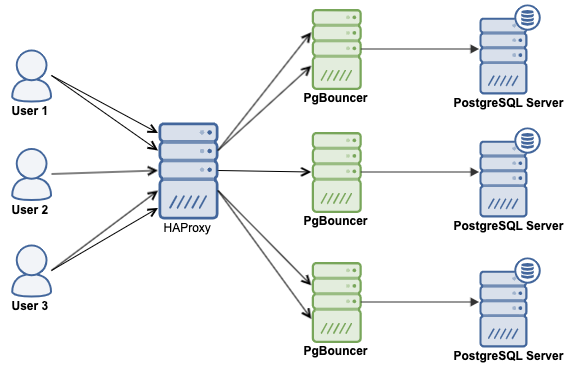
Basic Setup
Setting up PgBouncer involves creating a configuration file, pgbouncer.ini, that defines the connection pools and server settings.
The 'PgBouncer Tutorial' video provides a practical walkthrough of installing and configuring PgBouncer for the first time.
Watch the segment from 05:23 to 10:16. This will guide you through: The structure of the pgbouncer.ini file. Configuring the [databases] section to point to your PostgreSQL instance. Setting up a basic authentication mechanism. Starting PgBouncer and connecting to the database through the pooler.
The core of the configuration lies in two sections:
[databases]: Defines aliases for your database connections. Each entry specifies the host, port, and database name of the actual PostgreSQL server.[databases] mydb = host=127.0.0.1 port=5432 dbname=production_db[pgbouncer]: Contains global settings for the PgBouncer process, such as the listening address and port, log file location, and authentication settings.[pgbouncer] listen_addr = * listen_port = 6432 auth_type = md5 auth_file = /etc/pgbouncer/userlist.txt
3. The Key to Concurrency: Pooling Modes
PgBouncer's real power comes from its different pooling modes, which determine when a server connection is returned to the pool. This choice is the most critical configuration decision you will make.
Let's review the three pooling modes. The tutorial video offers a clear and concise explanation of each.
Watch the section on pool modes from 13:08 to 15:16. Focus on the lifecycle of a connection in each mode: session, transaction, and statement.
Here is a summary of the modes:
| Mode | Description | Use Case | Concurrency Gain |
|---|---|---|---|
| Session (default) | A server connection is assigned to a client for the entire duration of the client's connection. It's returned to the pool only when the client disconnects. | Safest mode. Good for reducing connection churn but does not increase concurrency. | Low. 1 client connection uses 1 server connection. |
| Transaction | A server connection is assigned to a client only for the duration of a transaction. Once the transaction is committed or rolled back, the connection is immediately returned to the pool. | The standard for high-concurrency applications. Allows a small pool of server connections to serve thousands of clients. | High. Many client connections share a few server connections. |
| Statement | A server connection is returned to the pool after each individual SQL statement. Multi-statement transactions are disallowed. | Very aggressive. For autocommit-style workloads where transactions are not needed. | Very High. |
For most high-load systems, Transaction mode is the goal. It allows you to scale beyond PostgreSQL's connection limit by sharing a limited number of real database connections among a much larger number of clients. The application thinks it has a persistent connection, but PgBouncer is cleverly multiplexing the underlying server connections between transactions.
4. Tuning for High-Concurrency
With transaction pooling, you can configure PgBouncer to handle tens of thousands of client connections. This requires tuning several key parameters.
The official PgBouncer documentation is the definitive source for configuration parameters. We'll use it to understand the most important tuning knobs.
Skim the 'Generic settings' section of the documentation. You don't need to memorize everything, but locate and understand the purpose of the following parameters: pool_mode max_client_conn default_pool_size min_pool_size reserve_pool_size
Here are the essential parameters for a high-concurrency setup:
pool_mode = transaction: This is the foundational setting.max_client_conn: The maximum number of clients that can connect to PgBouncer. You can set this to a high value (e.g., 10000) to accommodate all your application instances.default_pool_size: The maximum number of server connections allowed per user/database pool. This is your primary control over the load on the actual database. A typical value might be 20-50.min_pool_size: Keeps a minimum number of server connections open and ready, even during idle periods. This reduces latency when traffic suddenly spikes, as PgBouncer doesn't have to create new connections from scratch.reserve_pool_size: An extra pool of connections that can be used if the main pool is exhausted and clients are waiting. This acts as a safety valve during unexpected load spikes.
The tuning process is a balancing act. default_pool_size must be kept low enough to not overwhelm PostgreSQL, while max_client_conn can be set high to serve all clients. The ratio of max_client_conn to default_pool_size represents the multiplexing factor you achieve.
5. The Perils of Transaction Pooling
Transaction mode is powerful, but it comes with significant caveats because it breaks the assumption of a persistent session state. Your experience with state management in distributed systems is directly applicable here.
PgBouncer is useful, important, and fraught with peril
The article 'PgBouncer is useful, important, and fraught with peril' provides an excellent discussion of the non-obvious implications of transaction pooling.
Read the 'Perils' introduction and the subsection 'Pool throughput / Long running queries'. This section highlights two critical real-world issues you will face.
Here are the most critical "perils" to be aware of:
-
Loss of Session State: Any command that modifies the connection state for the duration of a session will not work reliably. This includes:
SETcommands (e.g.,SET statement_timeout = '5s')- Session-level advisory locks
- Temporary tables
LISTEN/NOTIFY(in some contexts)
Since a different server connection may serve each transaction, there is no guarantee that a state set in one transaction will be present in the next. All necessary state must be set within the transaction itself.
-
Prepared Statements: Historically, prepared statements were incompatible with transaction mode. Modern PgBouncer versions can handle them by tracking statements internally (
max_prepared_statementssetting), but it adds overhead and requires careful application design. Many frameworks are configured to disable server-side prepared statements when using PgBouncer in transaction mode. -
Long-Running Queries and Pool Starvation: This is a crucial point. While PgBouncer can queue thousands of clients, you still only have
default_pool_sizeactual server connections. If a few long-running queries (e.g., a 15-second analytics query) occupy all available server connections, the entire pool is starved. Thousands of clients waiting to run quick 10ms queries will be blocked, and latency will skyrocket. Vigilant monitoring for slow queries is non-negotiable when using transaction pooling.
6. Verification and Monitoring
How do you confirm that PgBouncer is providing a benefit? A benchmark is the most direct way.
The 'PgBouncer Tutorial' concludes with a compelling pgbench demonstration that quantifies the performance gain.
Watch the final segment on benchmarking from 15:16 to 19:05. Note the dramatic difference in transactions per second (TPS) and average connection time when connecting directly versus through PgBouncer.
The benchmark shows an order-of-magnitude improvement, which is typical for connection-heavy workloads.
In a production environment, you need continuous monitoring.

Monitoring these metrics is essential for tuning your pool sizes. A consistently high cl_waiting count indicates that your server pool (default_pool_size) is too small for your workload, or you have long-running queries causing pool starvation.
Conclusion
In this lesson, you learned how to use PgBouncer to overcome PostgreSQL's inherent connection scaling limitations. We moved from the "why" (process-per-connection overhead) to the "how" (configuration and tuning) and, most importantly, to the architectural trade-offs and operational risks.
Key Takeaways:
- Connection pooling is mandatory for high-concurrency PostgreSQL workloads due to the server's process-per-connection model.
- Transaction mode is the key to scaling, allowing a few hundred server connections to serve thousands of clients by sharing connections between transactions.
- This power comes at a cost: session state is not preserved. Applications must be designed to be stateless between transactions.
- Tuning
max_client_conn,default_pool_size, andmin_pool_sizeis a critical balancing act between client capacity and database load. - Long-running queries are the primary threat to a transaction pool's throughput, as they can lead to pool starvation and block all other clients.
Preview of the Next Lesson:
We have now addressed scaling connections to a single database node. The next logical step in designing a high-load system is to scale the data itself when a single node is no longer sufficient. In the next lesson, we will analyze the architectural and operational trade-offs between single-node partitioning and multi-node sharding in PostgreSQL, exploring strategies for distributing data across multiple physical or logical units.