Hello! Welcome to your fifth lesson in the "High-Load Distributed Systems" course.
In our previous lesson, we explored PostgreSQL's Write-Ahead Log (WAL), the mechanism that underpins durability. We saw how tuning WAL and checkpoint parameters allows us to manage the trade-off between I/O performance and crash recovery time. We also noted that setting wal_level = replica is the first step toward building a high-availability database cluster.
Today, we will build directly on that foundation. The learning outcome for this lesson is to configure PostgreSQL streaming replication with synchronous and asynchronous modes. You will learn how to create a read-only replica of a primary database and understand the critical architectural choice between prioritizing performance and guaranteeing zero data loss.
1. The Architecture of Streaming Replication
PostgreSQL's streaming replication enables a standby server to maintain a near-real-time copy of a primary server. This is fundamental for achieving both high availability (through failover) and read scalability (by offloading queries to replicas).
The mechanism relies on the WAL stream we discussed previously:
- The Primary server (read-write) runs a WAL Sender process.
- The Standby server (read-only, also called a replica) runs a WAL Receiver process.
- The WAL Sender streams WAL records over the network to the WAL Receiver, which writes them to disk and applies them to the standby's data files.
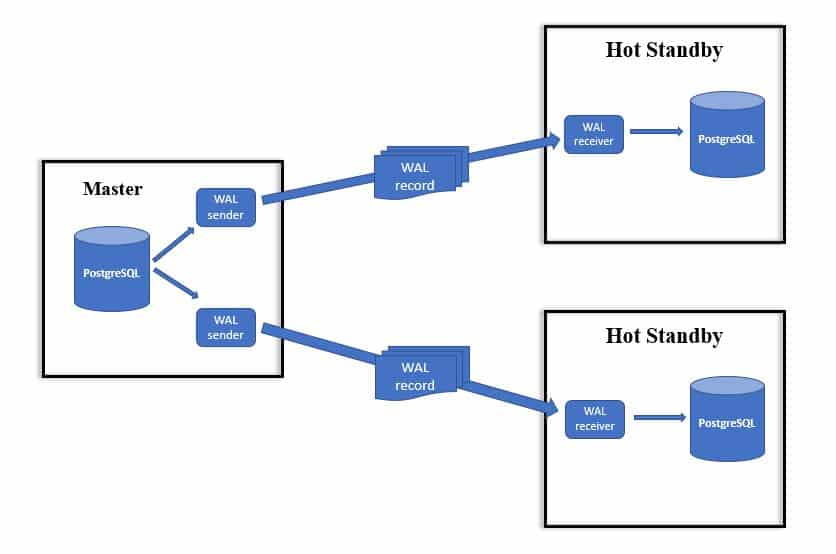
There are two main modes for this process, which define the durability guarantee.
A Practical Guide to PostgreSQL Replication with Both Asynchronous and Synchronous Standbys
To start, let's get a clear definition of the two replication modes. This article from Percona provides a concise explanation.
Read the introductory section, 'There are two primary modes of PostgreSQL streaming replication'. Focus on the distinction between when a transaction is considered committed in each mode.
As the reading explains, the core difference is:
- Asynchronous Replication (Default): The primary commits a transaction and responds to the client without waiting for the standby to confirm receipt of the WAL record. This is fast but risks data loss if the primary crashes before the WAL record reaches the standby.
- Synchronous Replication: The primary waits for confirmation from at least one standby that the WAL record has been received and written to disk before it considers the transaction committed and responds to the client. This guarantees zero data loss (RPO=0) at the cost of increased write latency.
2. Configuring Asynchronous Replication
Let's walk through the practical steps to set up a standard asynchronous replica. This is the foundation for any replication topology.
The process involves configuring the primary to allow replication connections, then creating a copy of the primary to serve as the standby.
A Practical Guide to PostgreSQL Replication with Both Asynchronous and Synchronous Standbys
The Percona article provides a detailed, step-by-step guide for this process. We will follow its instructions to configure both the primary and the asynchronous replica.
Please read the sections 'Configure primary PostgreSQL server' and 'Configure the asynchronous replication'. Follow the steps closely, paying attention to: Primary (postgresql.conf): Key parameters like listen_addresses, wal_level, max_wal_senders, and wal_keep_size. Primary (pg_hba.conf): The rule required to allow the replicator user to connect from the standby's IP address. Standby (pg_basebackup): The use of the -R flag to automatically generate the necessary replication configuration on the standby. Verification: How to use pg_is_in_recovery() on the standby and pg_stat_replication on the primary to confirm the setup.
Key Configuration Steps Summary:
-
On the Primary Server:
- Edit
postgresql.confto setlisten_addresses,wal_level = 'replica', and ensuremax_wal_sendersis sufficient.wal_keep_sizeis also important to prevent the primary from discarding WAL files too quickly if a replica falls behind. - Edit
pg_hba.confto add a line allowing a specific user with thereplicationprivilege to connect from the standby's IP address.# TYPE DATABASE USER ADDRESS METHOD host replication replicator [replica_ip]/32 md5 - Create the replication user:
CREATE ROLE replicator WITH REPLICATION LOGIN PASSWORD '...'; - Restart the primary server.
- Edit
-
On the Standby Server:
- Ensure the data directory is empty.
- Run
pg_basebackupto clone the primary. The-Rflag is crucial as it automatically creates thestandby.signalfile (which tells PostgreSQL to start in recovery mode) and appends the connection info topostgresql.auto.conf.pg_basebackup -h [primary_ip] -D /path/to/data -U replicator -P -R - Start the standby server. It will connect to the primary and begin streaming WAL changes.
Monitoring Replication
Once set up, you can monitor the replication status.
PostgreSQL Streaming Replication Tutorial
This video gives a quick demonstration of the key monitoring views in action.
Watch the section from 13:05 to 14:40. Observe the queries against pg_stat_replication (on the primary) and pg_stat_wal_receiver (on the standby) and the information they provide.
On the primary, SELECT * FROM pg_stat_replication; will show you connected standbys, their state (streaming), and their sync_state (which will be async for this setup).
3. The Asynchronous Trade-Off: A Practical Demonstration
Asynchronous replication is fast, but what happens if the standby is disconnected while the primary continues to accept writes?
Understanding Synchronous and Asynchronous Replication in PostgreSQL – What is Best for You?
The article 'Understanding Synchronous and Asynchronous Replication' from Stormatics provides a powerful demonstration of the risk of data loss.
Read the 'Asynchronous Replication' section, paying special attention to the 'Drawback' subsection. The author stops the standby, inserts 50 million rows on the primary, and shows the standby's log files upon restart. Note the error: requested WAL segment ... has already been removed.
This demonstrates a critical real-world failure mode. The primary, unaware of the standby's status, recycled the WAL files the standby needed to catch up. The result is a broken replication stream and potential data loss.
The standard solution to this is using replication slots, which you saw as an option in the pg_basebackup command from the first video (--slot). A replication slot forces the primary to retain WAL files until the designated standby has consumed them. While this prevents data loss, it introduces a new risk: if the standby is down for a long time, WAL files can fill up the primary's disk.
4. Configuring Synchronous Replication
Now, let's enforce a zero-data-loss policy by switching to synchronous replication. This ensures a transaction is confirmed on at least one standby before it's considered complete on the primary.
A Practical Guide to PostgreSQL Replication with Both Asynchronous and Synchronous Standbys
We'll return to the Percona guide, which explains how to enable synchronous mode on top of our existing setup.
Read the section 'Configure the synchronous replication'. Focus on these two critical steps: Setting application_name on the replica: This gives the replica a unique identifier. Setting synchronous_standby_names on the primary: This tells the primary which replica(s) it must wait for.
The key configuration change is on the primary's postgresql.conf:
# The 'application_name' must match what the standby sets in its primary_conninfo.
# '1 (...)' means wait for any 1 of the replicas in the list.
synchronous_standby_names = '1 (replica_app_name)'
After restarting the primary, you can verify the change using pg_stat_replication. The sync_state for the designated standby will now show sync.
5. The Synchronous Trade-Off: A Practical Demonstration
Synchronous replication provides the strongest durability guarantee, but it comes at a price: the primary's availability is now tied to the standby's.
Understanding Synchronous and Asynchronous Replication in PostgreSQL – What is Best for You?
The Stormatics article also has an excellent demonstration of this trade-off.
Read the 'Synchronous Replication' section. Note what happens when the author stops the standby node and then tries to issue an INSERT on the primary. The write query hangs indefinitely.
This behavior is the crux of the synchronous replication trade-off. By waiting for the standby, the primary guarantees that a committed write is durable on multiple servers. However, if the standby becomes unavailable (due to a crash or network partition), the primary can no longer commit new write transactions, effectively blocking write operations.
This has direct parallels to your experience in financial systems. A system processing high-frequency trades might require synchronous replication to a disaster recovery site to guarantee no trades are lost (RPO=0), accepting the latency overhead and the risk of a trading halt if the DR site is unreachable.
6. Summary and Use Cases
Choosing between asynchronous and synchronous replication is a fundamental architectural decision based on your application's specific requirements (the "CAP theorem" in practice).
| Mode | Pros | Cons | Typical Use Cases |
|---|---|---|---|
| Asynchronous | - High performance / low write latency on primary. - Primary is not blocked if standby fails. |
- Potential for data loss on primary failure (RPO > 0). | - Read scaling. - Reporting/analytics databases. - Systems where losing a few seconds of data is acceptable (e.g., logging, metrics). |
| Synchronous | - Guarantees zero data loss (RPO = 0). - Data is consistent across primary and standby. |
- Increased write latency on primary. - Primary write operations will block if the synchronous standby is unavailable. |
- Mission-critical financial systems. - Healthcare applications. - Any system where data loss is unacceptable. |
As the Percona article demonstrates, it's also common to use a hybrid approach: a local synchronous standby for high availability and zero data loss, combined with a remote asynchronous standby for disaster recovery.
Conclusion
In this lesson, we moved from the theory of WAL to the practice of replication. You learned how to configure both asynchronous and synchronous standbys and, more importantly, the critical trade-offs each mode entails.
Key Takeaways:
- Streaming replication uses the WAL stream to keep standby servers in sync with a primary.
- Asynchronous replication is the default, offering high performance at the risk of minor data loss in a failover scenario.
- Synchronous replication is configured via
synchronous_standby_nameson the primary and guarantees zero data loss by making the primary wait for standby confirmation, which increases latency and couples the primary's availability to the standby's. - The choice between modes is a trade-off between performance/availability and data consistency/durability.
Preview of the Next Lesson:
Now that we have a replicated cluster with read-only standbys, a new challenge emerges: how do applications efficiently manage connections to both the primary (for writes) and the standbys (for reads)? A naive approach can quickly exhaust database connection limits under high load. In our next lesson, we will address this by learning how to configure connection pooling with PgBouncer for high-concurrency scenarios.