
Hello, and welcome to the first module of the course. We will begin by building a practical mental model of the Android platform before writing Kotlin or configuring tooling. That model will make later topics—activities, permissions, lifecycle, Google Play delivery, Play Games Services, and debugging—feel like parts of one system rather than separate APIs.
This lesson explains how an Android app sits on top of the operating system: what the framework gives your code, where Android Runtime (ART) fits, and why the app sandbox is the default security boundary.
Android is a layered platform, not a single library
An Android game is not given direct control of the device. It runs within a platform that mediates access to the screen, storage, network, audio, notifications, Bluetooth, sensors, and other apps. Android is built as a Linux-based software stack: each layer provides an abstraction to the layers above it.
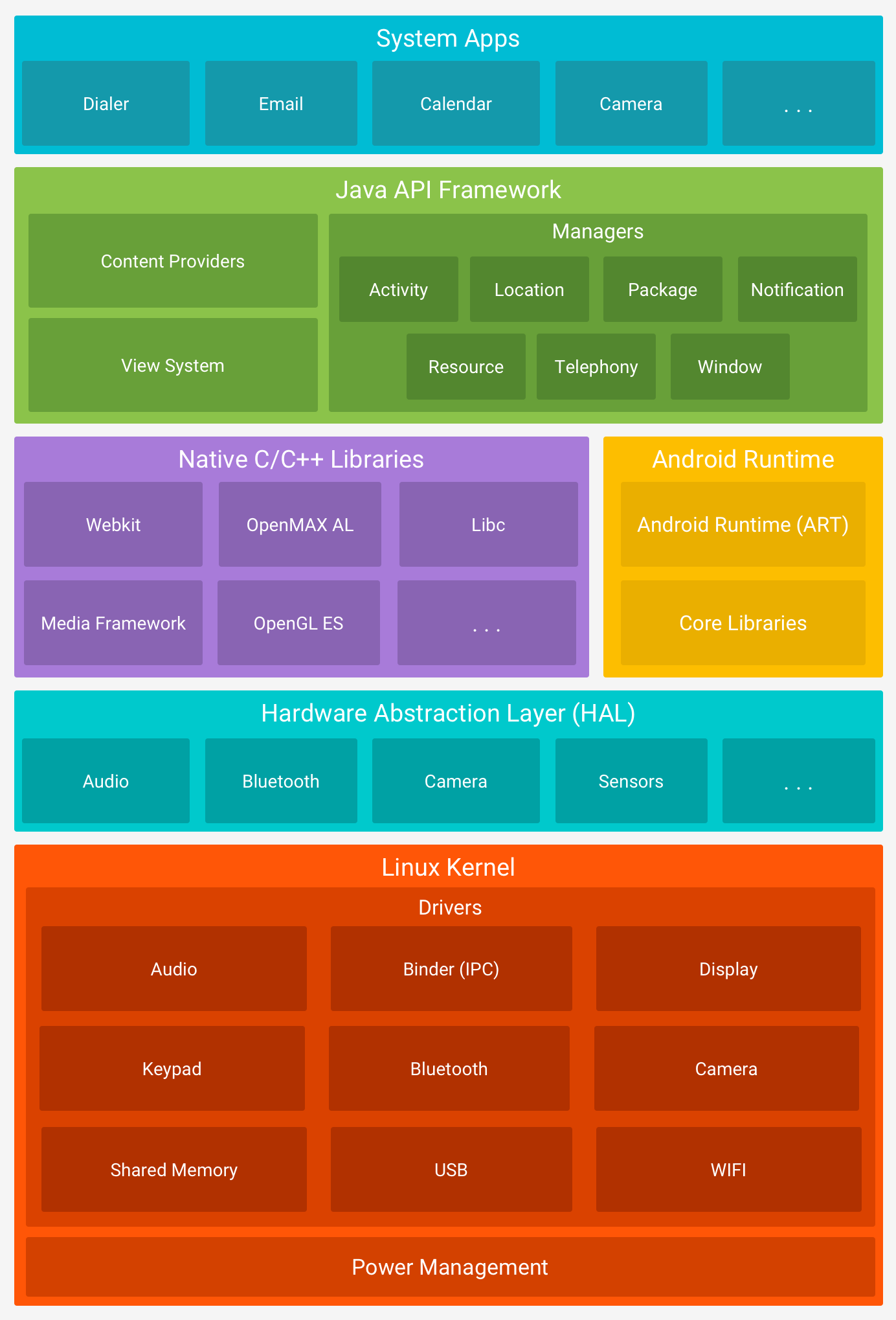
The diagram is best read from bottom to top:
| Layer | Primary responsibility | What an app developer usually sees |
|---|---|---|
| Linux kernel | Processes, memory, scheduling, networking, power, device drivers, core security enforcement | Usually indirect effects: process behavior, threading, memory pressure, permissions |
| Hardware Abstraction Layer (HAL) | A standard boundary between Android system software and vendor-specific hardware implementations | Framework APIs such as camera, Bluetooth, and audio APIs |
| Native C/C++ libraries | Performance-sensitive platform capabilities, including graphics and media | Mainly framework APIs; sometimes direct use through the NDK |
| Android Runtime (ART) | Executes the app’s DEX code, manages memory, and provides core libraries | Your Kotlin and Java code running in an app process |
| Application framework | High-level APIs and system services: activities, windows, notifications, packages, locations, resources | The Android SDK APIs used by most app code |
| System apps and third-party apps | User-facing applications, including the game you build | App components, UI, services, and intents |
The layers are not a rigid sequence in which every app request descends one layer at a time. They are a division of responsibility. A simple call such as showing a notification can involve your app, a framework manager object, a system service running elsewhere, security checks, and ultimately the system UI. The important point is that your app asks the platform to do work; it does not assume authority to do that work itself.
Platform architecture | Android Developers
Read Android Developers’ official overview to establish the canonical meaning of the stack layers. It is especially useful for separating ART, native libraries, the HAL, and the Java API framework.
Read the “Linux kernel” section first, from the platform overview. Then read the complete “Hardware abstraction layer (HAL)” section, focusing on why a camera or Bluetooth framework call can work across devices with different vendor hardware. Continue through “Android runtime” and “Native C/C++ libraries.” In the ART section, begin at the per-app runtime description; note the relationship among an app process, DEX bytecode, ART, and core runtime libraries. Finally, read “Java API framework” and “System apps”, from the framework API discussion. Focus on the idea that Android system apps use the same broad framework APIs available to third-party apps.
The bottom layers: kernel, drivers, and HAL
The Linux kernel is the operating system foundation. It schedules processes and threads, manages low-level memory, operates the network stack, manages power, and communicates with hardware through drivers. It also supplies essential enforcement mechanisms behind Android security.
Device manufacturers produce hardware-specific pieces: a particular camera sensor, GPU, modem, or Bluetooth chip cannot be driven by a completely generic implementation. Android avoids exposing those differences directly to ordinary apps through the Hardware Abstraction Layer, or HAL.
A HAL defines standard interfaces for a category of hardware. Android’s higher-level framework can ask for a camera capability in a standard way; the HAL module for that device translates the request to its particular hardware implementation. This keeps app code portable across Android devices. As an application developer, you generally program against the framework API, not against the HAL or kernel driver.
Native libraries, largely written in C and C++, support Android itself and performance-sensitive features such as media and graphics. A game may eventually use native code through the Android NDK, but Kotlin plus Android framework and Jetpack APIs is the appropriate starting point for this course. Direct native access does not bypass Android’s security model or turn an app into a system-level process.
ART: where your Kotlin code executes
Kotlin is a language; ART is the execution environment for Android app code. They are not alternatives.
When you build an Android app, Kotlin source is compiled and ultimately transformed into DEX (Dalvik Executable) bytecode. DEX is an Android-specific format designed for the constraints of mobile devices. ART executes and optimizes that code and provides services such as garbage collection and core runtime libraries.
A useful conceptual chain is:
- You write Kotlin source code.
- Android build tools compile it and package the executable code as DEX.
- Android installs the app package.
- When Android starts your app’s process, ART provides the managed runtime in which its code executes.
- ART relies on kernel facilities for threads and low-level memory management.
For Android 5.0 and later, apps normally run in their own process and each such process has its own ART instance. That isolation matters both for resilience and for security: one crashing app generally does not take down another app’s code execution environment.
ART is not the same as a browser-style virtual machine that makes the operating system irrelevant. ART sits on top of Android’s Linux foundation. A coroutine, a UI event, and an allocation in your game are all ultimately backed by OS-managed threads, scheduling, memory, and process boundaries.
For day-to-day Kotlin Android development, the most relevant practical implication is simple: memory allocation, main-thread responsiveness, lifecycle, and process death are platform concerns. ART helps execute and manage your code, but it cannot preserve all in-memory game state forever or make blocking work acceptable on the UI thread. We will address those consequences later through ViewModels, coroutines, and persistent storage.
The application framework: your app’s controlled entry point to Android
The Android application framework is the high-level API surface that lets apps use Android capabilities without controlling the operating system. It includes familiar concepts such as activities, resources, notifications, packages, windows, locations, and content providers.
Consider an app calling a framework API to post a notification. Your app holds a framework-facing NotificationManager object. But the system-wide rules and actual notification handling live outside your app, in a system service. The app asks; Android decides whether the request is valid and performs the work.
This pattern—an app-local API object communicating with a system-wide service—explains why the framework is much more than a collection of utility methods.
Digging Into Android System Services
Watch Dave Smith’s “Digging Into Android System Services” for a precise view of what framework APIs often represent internally: a client-side manager that communicates with a system service across a process boundary.
Watch the stack overview to connect the familiar Android stack diagram to the application framework. Then watch managers and services. Focus on the distinction between a manager object in an app process and the usually single underlying system service, often hosted in system_server. Finish with Binder IPC. You do not need to learn AIDL implementation details now. Retain the architectural point: calls across processes require Binder IPC, while framework APIs make that communication feel like ordinary method calls.
System services and Binder IPC
A system service is a privileged Android component that manages a shared system capability. Examples include notification, alarm, package, window, and power services. Apps use framework “manager” APIs to request those capabilities.
Because your app and the service are often in different processes, they cannot safely share ordinary in-memory objects. Android’s primary interprocess communication mechanism is Binder. Binder transports calls and data across process boundaries and, critically, carries information about the caller’s identity. That allows the receiving system service to enforce permissions and policies.
The conceptual request path is:
- Your game calls a framework API.
- A framework manager represents that API in your app process.
- Binder carries the request to the relevant system service.
- The service checks the calling app’s identity and applicable permissions or policy.
- If allowed, the service performs or coordinates the requested work and returns a result.
The exact classes involved vary by API, but this pattern is common enough to guide debugging. If a framework call fails with a permission-related exception or produces behavior controlled by the OS, the relevant decision is often happening in a system service—not inside the manager object visible to your app.
For example, a future game might request notification permission and then ask Android to display a gameplay reminder. The framework API is the doorway, but Android’s notification service owns the cross-app, user-visible notification space. Your process never gets unrestricted access to it.
The app sandbox: isolation by default, sharing by explicit contract
Android’s application sandbox is the security model that assumes installed apps should not trust one another by default.
Each app is assigned its own Linux identity, typically a distinct UID, and runs in an isolated environment. As a result, an app does not automatically have access to:
- another app’s private files or in-memory data;
- protected device capabilities, such as camera or precise location;
- privileged system functions;
- system services’ internal state;
- arbitrary hardware interfaces.
This is not merely a developer convention. It is enforced at several levels, including the Linux kernel and Android’s security policies. The sandbox is why a game cannot scan another app’s private data directory, silently turn on a camera, or directly manipulate sensitive telephony functions simply because its code can compile.
Read the Android Open Source Project’s security overview for the application-sandbox model and the approved paths by which apps can access protected capabilities or communicate with one another.
In “Android permission model: Access protected APIs,” read from the sandbox and permissions discussion. Focus on the distinction between declaring a capability in the manifest and receiving user approval where Android requires runtime permission. Next, read the complete “Interprocess communication” section, beginning at the IPC overview. Identify the separate roles of Binder, intents, services, and content providers. Finally, in “App signing,” read from the signing and sandbox passage. The key idea is that signing establishes an app’s update identity and contributes to the platform’s trust and isolation model.
Permissions: consent and enforcement, not a declaration checklist
The sandbox would make Android apps too limited if there were no controlled way to request protected capabilities. Android solves this with the permission model.
At a high level:
- The app declares needed permissions in its manifest.
- For certain sensitive permissions, especially “dangerous” permissions, the app must also request approval at runtime when the user takes an action that needs the capability.
- Android’s system service checks whether the caller has the required permission before performing protected operations.
A manifest declaration is therefore not an authorization token. Declaring camera permission does not grant camera access; it describes what the app may request. Similarly, user permission is not a universal privilege—it permits specified operations under the rules of the platform.
The user-facing implication is least privilege: request only what a feature genuinely needs, at the point where the user understands why. For a tap-to-dodge game, baseline gameplay should not need camera, contacts, or location access. If a future feature requires notifications, the request should be connected to an understandable player benefit rather than appearing on the first launch without context.
App signing and stable identity
Every Android app must be signed to install. The signing certificate gives Android a way to recognize that an update comes from the same app author as the already installed version. It also underpins important relationships in the security model, such as signature-level permissions that can be limited to apps signed by the same key.
For Play distribution, signing and package identity will become important when we discuss Android App Bundles, Google Play delivery, and Play Games Services configuration. For now, keep the core relationship clear:
- Package identity and signing establish who an app is across installs and updates.
- Sandbox identity constrains what that app can access locally.
- Permissions and IPC define the controlled exceptions through which the app can ask for protected capabilities or communicate beyond its sandbox.
Putting the layers together: a game-level example
Imagine that the finished game wants to save a local best score, render frames, vibrate when the player collides with an obstacle, and later submit a score to Play Games Services.
While the exact APIs will come later, the architectural roles are already visible:
| Need | App-level action | Platform responsibility |
|---|---|---|
| Render game UI | Kotlin and Compose code create UI and drawing requests | Framework/window system coordinates display work; native graphics stack and drivers support rendering |
| Store a best score | App writes data in its own app storage | Sandbox protects that private storage from other apps |
| Provide haptic feedback | App requests haptic feedback through a framework API | System checks policy and communicates with device hardware through lower layers |
| Post a notification | App calls notification APIs, subject to permission and user settings | System notification service owns the shared notification experience |
| Communicate with a separate service or app | App uses an explicit framework IPC contract | Binder transports calls; Android enforces caller identity and access rules |
This separation is productive rather than restrictive. It lets a game run on many devices without writing a driver, prevents unrelated apps from casually reading player data, and gives users a consistent place to review or revoke sensitive access.
A concise model to retain is:
ART runs your app code in a process; the application framework gives that code controlled access to Android services; the Linux-based OS and sandbox enforce the boundaries; permissions and secure IPC enable explicitly authorized exceptions.
Key takeaways
Android is a Linux-based, layered platform. The kernel provides fundamental process, memory, driver, networking, power, and security capabilities; the HAL hides vendor hardware differences; native libraries support core platform work; and ART executes DEX code for each app process.
Your Kotlin app normally interacts with Android through the application framework, often by using manager APIs backed by system services. Those services can live outside the app process, with Binder carrying requests across the boundary.
The application sandbox isolates apps by default. App signing establishes a stable app identity, while permissions and Android IPC mechanisms provide controlled, enforceable ways to access protected capabilities or communicate with other components.
Next, we will distinguish an APK from an Android App Bundle and trace how Google Play turns a bundle into device-specific app delivery.
Can't find a good explanation? Sign up and we'll make it for you
Sign up