
Hello, and welcome to the first lesson in Reproducible Quantitative Data Workflows. This module establishes the engineering habits that make quantitative research credible: another person — or your future self — should be able to obtain the same code, install the same software, and rerun the same analysis without guessing.
For a quant portfolio, an internship handoff, or a master’s application project, “the notebook ran on my laptop” is not enough. You will build a small Python research repository whose interpreter version, package versions, and code history are all recorded. The same structure can later support your market-data pipeline, backtests, statistical models, and synthetic NIFTY 50 experiments.
What “reproducible environment” means
A Python research project depends on more than the .py or notebook files you write:
- a particular Python interpreter version;
- third-party libraries such as NumPy and pandas;
- the libraries those libraries depend on;
- the exact code version used to generate a result.
If any of these changes silently, results can change or code can fail. For example, a new pandas release might alter a default behavior, or a dependency might no longer support your installed Python version. Different projects may also require incompatible library versions.
A reproducible setup therefore separates three jobs:
| Job | Artifact | Purpose |
|---|---|---|
| Isolate project software | .venv/ | Keeps this project’s packages separate from global Python packages |
| Declare and lock dependencies | pyproject.toml, uv.lock | Records what the project needs and the exact resolved package set |
| Track research evolution | Git repository | Records meaningful snapshots of code, configuration, and documentation |
The virtual environment is deliberately local and disposable. You recreate it from the tracked dependency files rather than committing it.
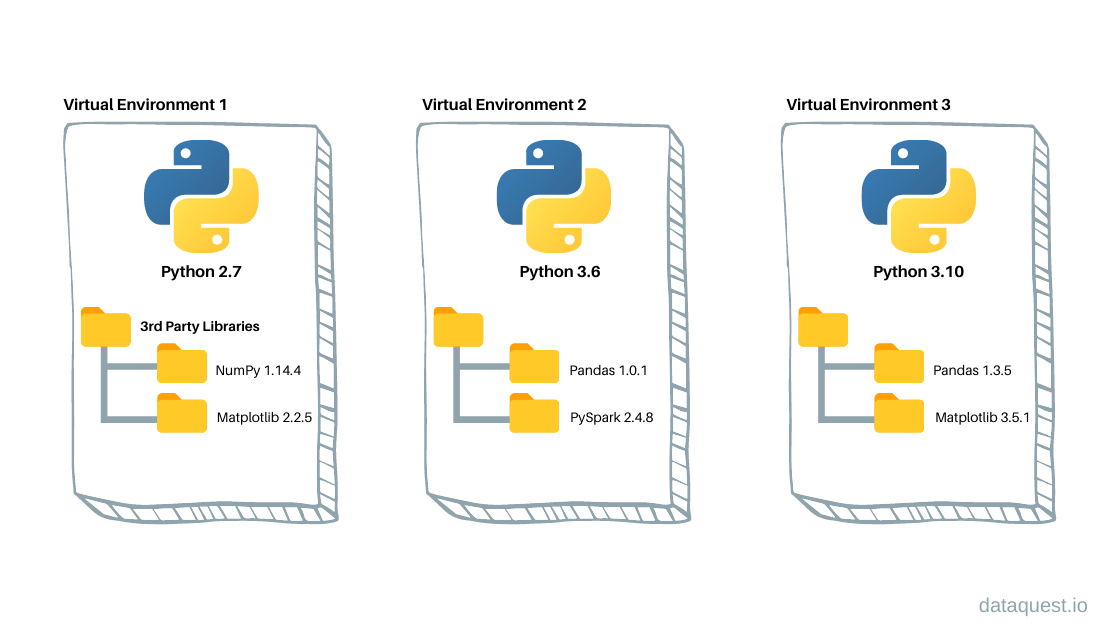
This distinction matters for your future work. A volatility-regime model developed with one PyTorch and NumPy combination is not fully specified by its model code alone. The environment is part of the experimental record.
Understand Python's Virtual Environments, Pinning, Lock Files, pip, uv | In One Video
Watch “Understand Python's Virtual Environments, Pinning, Lock Files, pip, uv | In One Video” by codingjerk for a concise explanation of why direct dependencies alone are insufficient and why environments must be isolated.
Watch pinning and freezing to see why an exact direct dependency version does not by itself control transitive dependencies. Then watch environment isolation for the practical reason each project needs its own virtual environment.
A useful distinction:
- A version constraint expresses what versions your code is intended to work with. For example,
numpy==2.2.0requests exactly one version. - A lockfile records the complete resolved environment: direct dependencies, indirect dependencies, versions, and package metadata.
- A lockfile gives a collaborator a concrete environment to reproduce today’s result. When you choose to upgrade, you update the lockfile deliberately and rerun the relevant checks.
A practical standard: uv, pyproject.toml, and uv.lock
For this course, use uv as the primary project manager. It creates and maintains a project virtual environment while keeping the project specification in standard files. You will generally run code with uv run, rather than relying on whether a terminal happens to have the correct environment activated.
Read the uv documentation to see the project files that together capture a reproducible Python setup. Focus on the distinction between the human-maintained project specification and the generated lockfile.
In “Creating a new project,” read from project creation through the initial generated-project example. Then read all of “Project structure,” especially the subsections on pyproject.toml, .python-version, .venv, and uv.lock. In the uv.lock subsection, focus on the lockfile explanation.
The key files have different responsibilities:
pyproject.tomlis the project’s readable specification: project metadata, supported Python version, and direct dependencies..python-versionstates the Python version the project should use.uv.lockrecords the exact package resolution. Do not hand-edit it..venv/contains installed packages on your machine. Do not commit it.
This is more reliable than keeping only a list of package names in a notebook header. It also gives reviewers of a GitHub portfolio repository immediate evidence that you can package research rather than merely write isolated scripts.
Build your first research repository
Open a terminal in the folder where you keep projects. The following commands create a minimal repository for the data-workflow module. The package versions below are an example baseline; the essential discipline is to choose versions intentionally and commit the lockfile that uv generates.
uv init nifty50-research
cd nifty50-research

uv python pin 3.12.8

uv add "numpy==2.2.0" "pandas==2.2.3" "matplotlib==3.10.0"

mkdir scripts data configs
If you work in PowerShell and mkdir receives several names differently than expected, create the folders individually. The aim is simply to obtain this kind of layout:
nifty50-research/
├── .python-version
├── .gitignore
├── README.md
├── pyproject.toml
├── uv.lock
├── scripts/
│   └── check_env.py
├── configs/
└── data/
After uv add, inspect pyproject.toml and uv.lock.
In pyproject.toml, you should see your direct dependencies. In uv.lock, you will see a much larger set because each direct package can require other packages. That apparent complexity is precisely why a generated lockfile is valuable. You would not want to manually discover and recreate every transitive package requirement before an interview demo or a research deadline.
Create scripts/check_env.py:
import sys

import matplotlib
import numpy as np
import pandas as pd

print(f"Python: {sys.version.split()[0]}")
print(f"NumPy: {np.__version__}")
print(f"pandas: {pd.__version__}")
print(f"matplotlib: {matplotlib.__version__}")
Run it through the locked project environment:
uv run python scripts/check_env.py
uv run makes the project workflow less error-prone: it verifies that the environment matches the project’s dependency state before running the command. If the printed versions do not match what you intended, resolve that before you start producing research outputs.
Isolation with venv and pip: the portable foundation
You may encounter repositories that use requirements.txt rather than uv, particularly in coursework, legacy codebases, or interview tasks. The underlying idea is the same: create an isolated environment, install exact dependencies into it, and record them.
Install packages in a virtual environment using pip and venv - Python Packaging User Guide
Read the Python Packaging User Guide as the tool-independent foundation beneath the uv workflow. This is useful when you inherit a project that uses pip and requirements.txt.
In “Create and Use Virtual Environments,” read the “Create a new virtual environment” and “Activate a virtual environment” subsections. Focus on the isolation rationale and the instruction to exclude .venv from version control. Then read the complete “Using a requirements file” and “Freezing dependencies” material. Locate the paragraph beginning freeze explanation; notice that pip freeze captures installed package versions for rebuilding an environment.
The conventional venv and pip workflow looks like this:
python -m venv .venv
Activation is shell-specific:
# macOS or Linux
source .venv/bin/activate

# Windows PowerShell
.venv\Scripts\Activate.ps1
Then, inside the activated environment:
python -m pip install --upgrade pip
python -m pip install "numpy==2.2.0" "pandas==2.2.3" "matplotlib==3.10.0"
python -m pip freeze > requirements.txt
A fresh machine can rebuild that environment with:
python -m pip install -r requirements.txt
Use python -m pip, not a bare pip, when possible. It makes explicit that the pip being run belongs to the same interpreter as python, avoiding a common “installed but cannot import” mistake.
For your own new projects, prefer the uv workflow above. You do not need to maintain both requirements.txt and uv.lock for the same small project unless a collaborator, platform, or assignment explicitly requires requirements.txt. One authoritative dependency workflow is clearer than two files that can drift apart.
Git: turning a folder into a research record
An environment lets someone recreate your software. Git lets them identify which version of your code and project specification produced a result.
A Git repository contains a sequence of commits. Each commit is a named snapshot of selected files. A useful commit answers: what changed, and why?
For example, these messages preserve research context:
Initialize reproducible Python environmentAdd validation for duplicate market timestampsUse adjusted close for daily return calculationDocument NIFTY 50 data source and date range
Messages such as changes, final, or new code create a history but not an intelligible research record.
Git and GitHub Tutorial for Beginners
Watch the selected portions of “Git and GitHub Tutorial for Beginners” by Kevin Stratvert to establish the everyday Git commands needed for a solo quantitative project.
Watch Git’s purpose for the idea of commits as recoverable history. Watch identity setup to configure the author information attached to your commits. Then watch repository basics, covering git init, git status, .gitignore, staging, and the first commit. You do not need the later branching and collaboration sections yet.
First configure Git once, substituting your own name and an email address you control:
git config --global user.name "Your Name"
git config --global user.email "your-email@example.com"
git config --global init.defaultBranch main
Inside nifty50-research, initialize version control:
git init
git status
Before staging files, create a .gitignore file. This tells Git what not to track:
# Local Python environment
.venv/
__pycache__/
*.py[cod]

# Notebook editor state
.ipynb_checkpoints/

# Secrets and local settings
.env

# Large or restricted raw data
data/raw/

# Regenerable outputs
outputs/
The .gitignore reflects a research principle:
- Commit code, small configuration files, documentation, and small synthetic or sample datasets.
- Do not commit virtual environments, API keys, passwords, or large/restricted raw market data.
- Document where legitimate raw data came from and how to obtain it. Ignoring raw data does not mean pretending it is irrelevant.
Important: .gitignore does not protect a secret already committed. If you accidentally commit an API key, treat it as exposed, revoke or rotate it, and remove it through the appropriate repository-cleanup procedure.
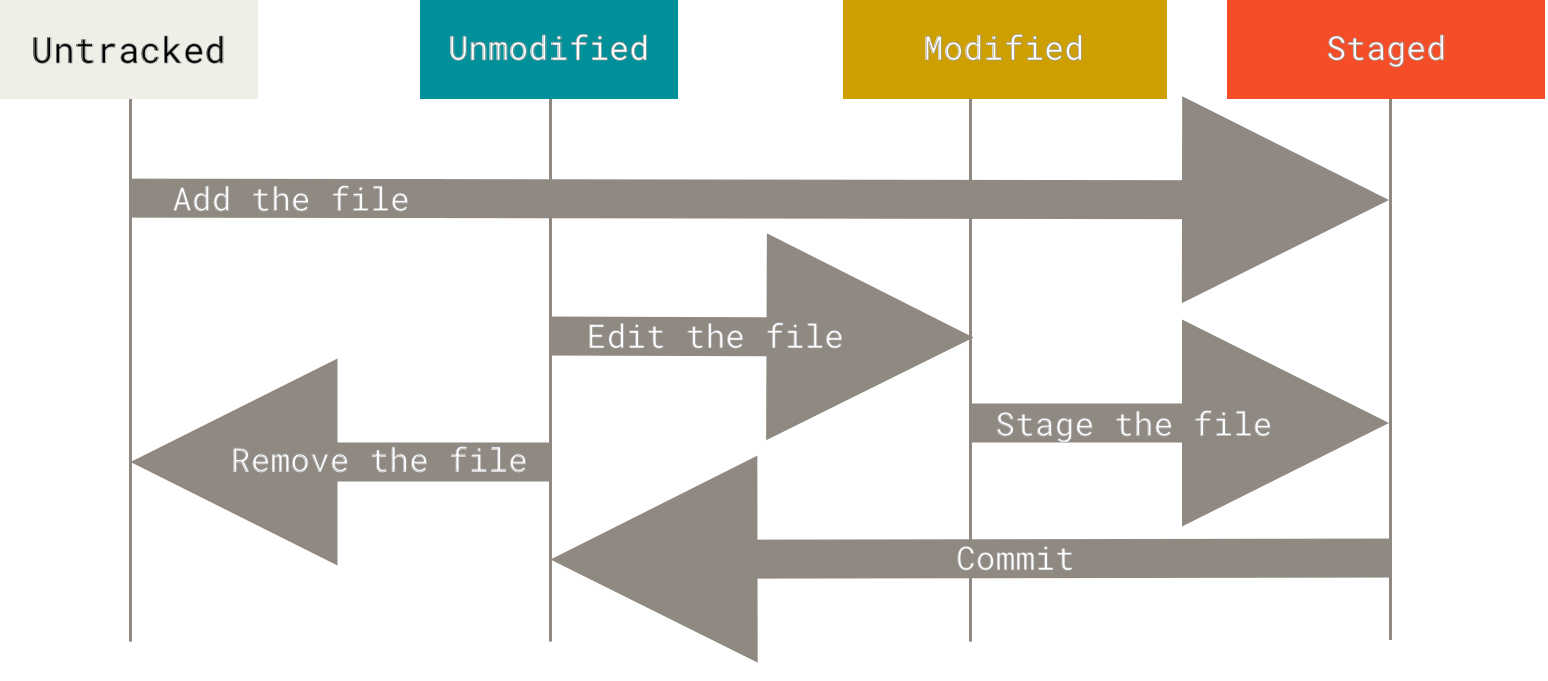
The staging area is useful in research because a single working session can contain unrelated changes. Suppose you both fix a data-cleaning function and alter a plot title. Stage and commit the data fix separately, then make a second documentation or visualization commit. This creates a history that can be audited and reverted meaningfully.
Create the initial record:
git add pyproject.toml uv.lock .python-version README.md .gitignore scripts
git status
git commit -m "Initialize reproducible Python research environment"
Run these commands often:
git status
git diff
git log --oneline
They answer three different questions:
| Command | Question answered |
|---|---|
git status | What has changed, and what is staged? |
git diff | What are the unstaged line-by-line changes? |
git log --oneline | What snapshots have I recorded? |
The reproducibility check that matters
A lockfile is only useful if it can rebuild an environment. Before relying on a project for a portfolio, verify its setup from a clean environment.
- Commit
pyproject.toml,.python-version, anduv.lock. - Delete the local
.venv/folder. On macOS/Linux, userm -rf .venv; in PowerShell, useRemove-Item -Recurse -Force .venv. - Recreate the environment from the existing lockfile.
- Run the environment check script again.
With uv:
uv sync --locked
uv run python scripts/check_env.py
The --locked option is intentional: it asks uv to use the existing lockfile rather than silently resolve a different package set. If the project configuration and lockfile disagree, treat that as a problem to resolve explicitly, not something to bypass.
This environment test is a modest but real piece of evidence in a portfolio repository. In your README.md, record:
- the project’s purpose;
- the pinned Python version;
- the installation commands;
- the command that runs a minimal check;
- the expected high-level output.
A minimal README command sequence might be:
uv sync --locked
uv run python scripts/check_env.py
Later lessons will add data validation and analytical code to this repository. Keep the same standard: commit code and configuration together, regenerate outputs when assumptions change, and make each result traceable to a specific commit.
If you publish the project to a remote Git hosting service, create an empty remote repository and connect it after your initial local commit:
git remote add origin <repository-url>
git push -u origin main
A remote is useful both as backup and as a reviewable portfolio artifact. Never push secrets or data you lack permission to distribute.
Key takeaways
A reproducible Python research environment has four core elements:
- An isolated project environment, stored locally in
.venv/. - A pinned Python version, recorded in
.python-version. - Explicit dependencies in
pyproject.tomland an exact, committed resolution inuv.lock. - Git history that tracks code, configuration, documentation, and meaningful research decisions — but excludes environments, secrets, and inappropriate data.
Your practical routine is simple: add a dependency deliberately, let uv update the lockfile, run the project through uv run, inspect changes with git status and git diff, then make a focused commit.
Next, you will begin working with the content that runs through the rest of the course: imperfect market time-series data. You will audit missing observations, duplicate timestamps, corporate-action artifacts, and anomalous values before calculating any returns or fitting any model.
Can't find a good explanation? Sign up and we'll make it for you
Sign up