
Good to see you again. Your dependency map identified who knows about whom in the current engine. This lesson changes perspective: we will follow one concrete unit of execution—one frame—and record both the calls made and the state that changes along the way.
For your current prototype, a useful frame to trace is one in which the player holds a movement key, moves the mouse, presses jump while grounded, and perhaps holds Shift for the speed boost. That one scenario crosses the important boundaries you need to understand: input, player behavior, transforms, collision, camera behavior, and OpenGL rendering.
By the end, you will have a frame-trace document grounded in the code you have now—not a proposed architecture—and a way to identify where ordering assumptions are hiding.
A frame is a sequence of observations and state changes
A game appears continuous, but the CPU-side game logic runs as a sequence of discrete steps. During a frame, code reads external state, decides what should happen, modifies world state, and submits a picture for the GPU to draw.
At this stage, do not assume your engine follows a textbook ordering. Your trace must show the order actually implemented in your main loop and component updates. Still, the following conceptual stages give you a reliable lens for reading it:
| Stage | Main question | Typical state read or changed |
|---|---|---|
| Platform/event processing | What did the OS/window library report? | Window events, keyboard/mouse state, focus, resize |
| Input interpretation | What actions does that raw input mean? | Move intent, look delta, jump request, speed modifier |
| Gameplay update | How does the player or game react? | Velocity, jump state, desired movement |
| Collision/physics | Which movements are permitted? | Contact state, corrected position, grounded state |
| Transform update | Where are actors, colliders, and cameras now? | Position, rotation, scale, local/world matrices |
| Rendering | What world state is drawn this frame? | Camera matrices, mesh/material data, draw commands |
| Presentation/UI | How does the completed frame reach the player? | ImGui draw data, buffer swap, visible image |
These names are conceptual categories, not necessarily class names. In your code, Scene::Update() may currently contain several of them, and a single component might simultaneously read keyboard input, move an actor, query collision, and update a transform. That is useful evidence for later lessons.
The central tracing rule is:
For every stage, write down both the call path and the state transition.
A call trace alone says that PlayerControllerComponent::Update() ran. A state trace explains that it changed a desired velocity, that collision adjusted the resulting displacement, and that the player transform became the source of truth used by the camera and renderer.
Update Method · Sequencing Patterns
Read “Update Method” from Game Programming Patterns. It gives a compact model of a world repeatedly simulating its objects, then explains why the exact update order changes what each object observes.
In “The Pattern,” read the core definition. Then, in “Objects all simulate each frame but are not truly concurrent,” read the discussion of sequential updates. As you read, keep one question in mind: when one component reads another object’s transform or grounded state, is it seeing this frame’s value or the prior frame’s value?
The source’s warning about sequential updates applies directly to an actor-component engine. Even if your player, camera, collision, and renderer all conceptually operate “at once,” the program visits them in a particular order. That order becomes an unstated contract.
For example, if rendering reads the player transform before collision resolves the player’s motion, the frame can display an old or invalid position. If a jump controller checks isGrounded before collision updates contact state, jumping may feel delayed by one frame. Neither result necessarily crashes; both can become subtle gameplay bugs.
Start the trace at the platform boundary
Your frame begins outside gameplay. GLFW, or whichever windowing layer you use, receives operating-system messages and exposes information such as key states, mouse position, window focus, and resize events.
Input can arrive in two broad forms:
- Events report that something happened, such as a key press, key release, mouse movement, or a window resize.
- Polling asks what is true now: whether
Wis currently held, whether Shift is held, or what the current mouse position is.
Movement and free-look cameras commonly use polling because they need a current continuous state, not only a one-time press notification. A jump may be represented either as a one-frame action generated from a press event or as a state checked while a key is held; your trace should record which approach your engine uses.
Input Polling | Game Engine series
Watch “Input Polling | Game Engine series” by The Cherno for the distinction between event-driven input and polling, followed by an example of keeping platform-specific GLFW calls behind an input-facing interface. This is a boundary to observe in your own code, not a requirement to copy the video’s static-singleton design.
Begin with polling and events, focusing on why camera controls often need current key and mouse state. Then watch the input boundary. Notice the separation between an engine-facing input API and the platform-specific implementation that calls GLFW.
When tracing your own project, distinguish these three facts:
- Where the platform is pumped. Find the main-loop call that invokes GLFW event processing, or its equivalent.
- Where raw state is captured or queried. Find direct calls such as
glfwGetKey,glfwGetCursorPos, callbacks that write key state, or your input wrapper. - Where raw state becomes game meaning. Find the code that turns
W, Shift, Space, and mouse delta into “move forward,” “sprint,” “jump requested,” and “rotate camera.”
That third point is often easy to miss. W is not inherently “move forward”; it is a platform-level input. “Move forward relative to the active camera” is gameplay meaning.
For the frame scenario you are tracing, start a record like this:
Frame N: player is standing on the ground.
External input: W and Shift are held; Space transitions from up to down;
mouse moves 12 pixels horizontally.

Platform/input evidence:
- [actual function/file] processes window events.
- [actual function/file] exposes held-key state and mouse data.
- [actual function/file] identifies the active input receiver:
  player controller, editor camera, or ImGui.
That last line matters because your engine has both a character camera and an editor camera. If both can read the same raw input in one frame, write that explicitly. It may be intended, but it is a behavior rule that should not remain accidental.
Follow intent through gameplay, collision, and transforms
The cleanest way to understand the middle of the frame is to distinguish intent, simulation state, and spatial state.
- Intent is what the player asked for: movement axes, jump request, look delta, sprint held.
- Simulation state is what gameplay has decided so far: velocity, acceleration, jump timer, movement mode, grounded state.
- Spatial state is where something is: transform position, rotation, scale, and derived world matrix.
Your existing implementation may keep these values together, perhaps in a movement component or directly on an actor. That is acceptable for this tracing task. The important point is to write the value that changes and identify the function that has authority to change it.
Component · Decoupling Patterns
Read the relevant part of Component from Game Programming Patterns. It starts with a single method that handles input, movement/collision, and drawing, then separates these concerns into components while preserving the data dependencies between them.
In “A monolithic class,” inspect the sample update() function and the surrounding explanation beginning at the monolithic example. Then read “Splitting out a domain” and “Splitting out the rest,” especially the separated components. Finally, in “How do components communicate with each other?”, read the ordering warning. Focus on the chain of shared state: input changes velocity, physics uses velocity to change position, and graphics reads position.
The resource’s example has the same key issue your project faces: separating code into components does not eliminate the need for an order. It makes that order less visually obvious unless you document it.
A practical movement frame
For the player scenario, your trace may resemble the following. Treat it as a checklist of things to locate, not a description of what your code necessarily does.
| Moment in the frame | Find the code that… | Record the resulting state |
|---|---|---|
| Input is available | polls keys/mouse or consumes queued input events | W = held, Shift = held, jumpPressed = true, mouse delta |
| Controller runs | converts input into movement direction and a jump/speed request | desired direction, target speed, requested jump |
| Movement runs | applies acceleration, gravity, or direct displacement logic | tentative velocity or tentative displacement |
| Collision runs | tests the moving collider against ground/world colliders | hit/contact information, ground normal, isGrounded |
| Resolution runs | accepts, constrains, or cancels the tentative movement | corrected displacement; possibly zeroed vertical velocity |
| Transform is committed | writes final position and rotation to the actor/component transform | new local transform and/or dirty world transform |
| Camera rig runs | follows the target, applies look input, possibly checks spring-arm obstruction | camera transform and active view |
| Rendering reads state | gathers final transforms plus camera data | model, view, projection data for draw calls |
Two details deserve close attention.
Collision is not merely “a check”
Collision often has at least two logically different operations:
- A query asks what would happen if a collider moved along a displacement.
- A resolution decides the final movement and changes authoritative gameplay state.
For a grounded player who presses Space, resolution may establish that the player is grounded, allow a jump impulse, or determine that upward movement is blocked. The trace should identify whether collision writes directly to TransformComponent, returns a result to a movement component, or is embedded in the movement component itself.
That distinction becomes important later because a component that both decides player behavior and directly mutates every collider in the scene is carrying more responsibility than its name may suggest. For today, simply record the truth.
Transform updates need an explicit source of truth
A transform can be represented as local position/rotation/scale and a derived world matrix. A child object, camera mount, or spring arm may depend on a parent transform. Therefore, look for the exact point where matrices are recomputed or marked dirty.
Ask these concrete trace questions while reading code:
- Does movement write a position directly, or does it set a velocity that another system later integrates?
- Is collision using the transform from the previous frame, a tentative transform, or a separately maintained collider position?
- When does the spring arm read the player transform?
- Does the camera follow the resolved player position this frame, or one frame later?
- Does the renderer call
GetWorldMatrix()lazily, or does some update step compute matrices for all actors first?
Do not label any answer as wrong solely because it differs from an idealized sequence. A one-frame camera lag might be intentional; a lazy matrix calculation may be entirely valid. The task is to expose the contract.
Trace rendering as a consumer of world state
Rendering should be traced after you have followed the final game-world state for the frame. It does not need to own movement or collision decisions to draw their result. Its immediate work is generally to gather renderable data, choose an active camera, bind graphics resources, and submit draw commands to OpenGL.
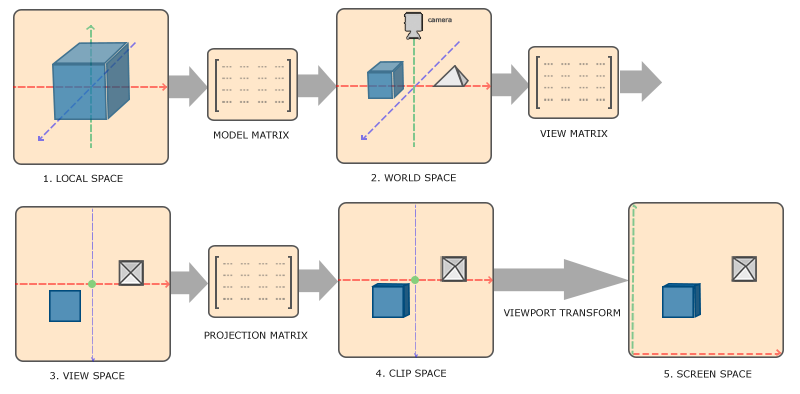
For a mesh vertex, the familiar coordinate transformation is:
Here, is a vertex in the mesh’s local coordinates; , , and are the model, view, and projection matrices; and is the clip-space result. In your frame trace, this equation helps turn rendering into identifiable data provenance:
- Model matrix: Which
TransformComponentor actor supplied the mesh’s final world transform? - View matrix: Which camera was active—character camera or editor camera—and when was its transform updated?
- Projection matrix: Where does camera lens/FOV and window aspect ratio live, and what happens after a resize?
- Mesh/material: Which code selects the VAO/VBO, shader, textures, and material settings?
- Draw submission: Which method issues
glDraw*calls, directly or through a renderer wrapper?
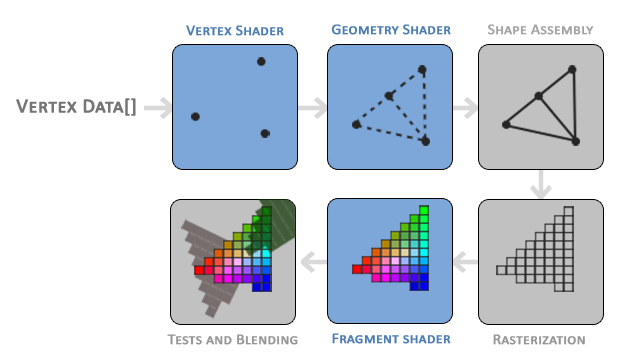
The rendering-pipeline image includes a geometry shader, but that does not mean your engine uses one. In a basic mesh renderer, the essential path is typically vertex data, vertex shader, primitive assembly, rasterization, fragment shader, then depth/blending tests. Keep your trace concrete: list only stages and resources your shader setup actually uses.
Your world render and editor UI may be separate render passes in practice. Commonly, the engine draws the 3D world, then submits ImGui’s draw data, then swaps the window buffers. Locate the exact order in your code. If ImGui receives input before gameplay, or captures keyboard/mouse focus, record that as well; UI capture can change whether a player controller should react to a key press.
Build your current-frame trace document
Create a second observation document next to the dependency map:
docs/architecture/current-frame-trace.md
Use one reproducible scenario. The player’s grounded jump while moving is a strong choice because it tests movement, speed boost, collision, transforms, camera behavior, and rendering without adding multiplayer complexity.
Start with this structure:
# Current frame trace: grounded player moves, jumps, and looks

## Preconditions
- Current mode: [Play / Edit]
- Active camera: [actual camera name]
- Player state at frame start: grounded, position, velocity
- Input scenario: W + Shift held, Space pressed this frame, mouse moved

## Main-loop entry
- Entry function:
- Delta-time source:
- Platform event-processing call:
- Networking or callback pump, if present:

## Input
- Raw input source:
- Input receiver selection:
- Gameplay actions produced:
- Editor/ImGui capture rule:

## Gameplay and movement
- Update entry point:
- Actor/component iteration order:
- Controller method:
- Values changed:
- Jump decision:

## Collision and transform
- Collision query:
- Collision resolution:
- Grounded-state update:
- Final transform write:
- World-matrix update or dirty propagation:

## Camera
- Character-camera or spring-arm update:
- Editor-camera update, if applicable:
- Active-camera selection:

## Rendering and presentation
- Render entry point:
- Renderable collection/iteration:
- Model matrix source:
- View/projection matrix source:
- World draw calls:
- ImGui draw call:
- Buffer swap/present:
For each bullet, add file and function evidence. For example:
- `Application::Run()` calls `glfwPollEvents()` — Application.cpp:line
- `Scene::Update(dt)` calls `Actor::Update(dt)` — Scene.cpp:line
- `PlayerMovementComponent::Update(dt)` reads W/Shift/Space — file:line
- `CollisionSystem::MoveAndSlide(...)` returns final displacement — file:line
- `TransformComponent::SetPosition(...)` commits player location — file:line
- `Renderer::Render(scene, activeCamera)` submits meshes — file:line
If your call path crosses an interface or virtual function, include both levels. For example, write that Actor::Update() invokes Component::Update(dt), then note that the concrete call for the player reaches PlayerMovementComponent::Update(dt). This preserves the architectural fact that the actor knows the component interface, even though the observed behavior comes from a particular implementation.
Record state transitions, not just calls
Beside the call list, create a compact mutation ledger:
| State | Value at start | Written by | Value used later by |
|---|---|---|---|
| Player input/action state | no jump request | input/controller code | movement or jump logic |
| Player velocity | previous velocity | movement/jump/collision code | position integration |
| Player grounded state | prior contact result | collision resolution | jump decision next frame or later in this frame |
| Player transform | previous position | movement/collision resolution | spring arm, renderer |
| Camera transform | previous camera pose | camera/spring-arm code | view matrix creation |
| Active camera | current mode selection | scene/editor logic | renderer |
Use actual field names once you find them. If isGrounded is set after jump logic runs, write that order exactly. It is one of the most valuable discoveries this document can produce.
Include branches rather than forcing a fictional straight line
Your engine can follow different paths within the same nominal “frame”:
- In edit mode, editor camera controls may receive input while player gameplay does not update.
- In play mode, character input and the character camera may become active.
- When ImGui wants keyboard or mouse focus, gameplay controls may be suppressed.
- A collision may be absent, may resolve against the ground, or may trigger a jump/landing transition.
- Photon callbacks may create or update remote-player state. Record where their callback pump occurs and separately note the callback’s effects; do not silently treat it as an ordinary component update.
A useful trace explicitly says, “This branch was not taken in the observed frame.” That is more honest than omitting it.
Avoid refactoring while creating this document. Add breakpoints at the main-loop update call, the player movement update, the collision-resolution function, the transform setter, active-camera selection, and the first world-render call. Step through one frame or use a temporary log with a frame number. The objective is not performance measurement; it is dependable evidence of sequence and authority.
Key takeaways
A frame trace makes the engine’s execution order visible. Start at the platform boundary, separate raw input from gameplay intent, then follow the values that become velocity, collision results, final transforms, camera state, and draw calls.
The most important artifact is an evidence-backed document for one concrete scenario. It should show both the call path and the state transitions, including branches for play mode, editor mode, UI input capture, and any network callbacks. Do not assume the conventional order is your engine’s order—trace what the source and debugger show.
Next, you will use the dependency map and this frame trace to assign one primary responsibility to each major class or subsystem.
Can't find a good explanation? Sign up and we'll make it for you
Sign up