
Hello! Welcome back to our module on Production-Ready Testing.
In the last lesson, we established the fundamental difference between unit and feature tests. We learned that feature tests are a form of integration test that examines a piece of functionality from the outside in, just like a user or an API client. They are crucial for ensuring that all the different parts of your application—controllers, models, database, etc.—work together correctly.
Today, we will put that theory into practice. This lesson is dedicated to one of the most common and critical tasks for a backend developer: testing API endpoints. Our goal is to write feature tests for API endpoints, asserting status codes and JSON structure. By the end of this lesson, you'll be able to create tests that give you high confidence in the reliability and correctness of your application's API.
1. The Anatomy of an API Feature Test
Before we write code, let's understand the process. When testing an API endpoint, we follow the same "Arrange, Act, Assert" pattern we discussed previously, but with a specific focus:
- Arrange: Prepare the application state. This usually involves using model factories to create specific data in our test database.
- Act: Make an HTTP request to the API endpoint. Laravel provides a suite of helper methods like
getJson(),postJson(), etc., to simulate these requests without actually hitting a web server. - Assert: Examine the response. We will check two main things:
- The HTTP Status Code: Was the request successful (
200 OK,201 Created)? Did it fail as expected (404 Not Found,422 Unprocessable Entity)? - The JSON Response: Does the response body contain the correct data? Does it have the right structure (the expected keys and nesting)?
- The HTTP Status Code: Was the request successful (
Let's look at the kind of response we aim to verify.
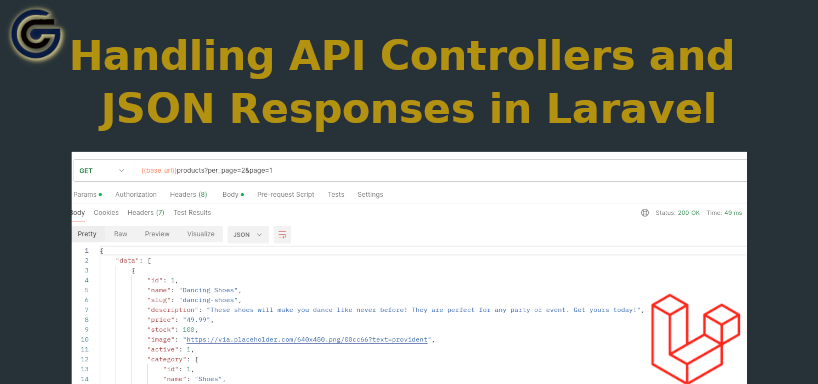
Creating the Test File
To begin, you generate a new feature test file using an Artisan command. By convention, test file names often mirror the controller they are testing. For example, to test ProductController, you would run:
php artisan make:test ProductApiTest
This command creates a new file in tests/Feature/ProductApiTest.php. Inside your tests, you'll typically use the RefreshDatabase trait, which ensures your database is reset to a clean state before each test runs. This is essential for preventing tests from interfering with one another.
<?php

namespace Tests\Feature;

use Illuminate\Foundation\Testing\RefreshDatabase;
use Tests\TestCase;

class ProductApiTest extends TestCase
{
    use RefreshDatabase;

    // Our tests will go here...
}
2. Testing Core API Endpoints
Let's see this in action by testing the two most fundamental API actions: retrieving a list of resources (GET) and creating a new resource (POST).
Laravel Testing 16/24: Testing APIs and JSONs
The following video from the Laravel Daily channel provides a clear, practical walkthrough of testing a simple API for products. It covers getting a list, creating a product successfully, and handling a failed creation due to validation errors.
Watch from 00:56 to 05:36. Pay close attention to the methods being used: getJson() and postJson() to make the requests. Model factories (Product::factory()->create()) to arrange the data. Assertions like assertStatus() and assertJson() to verify the response.
Let's break down the key takeaways from that video.
Testing a GET Endpoint (List/Index)
When testing an endpoint that returns a list of items, you typically want to check:
- The request is successful (Status 200).
- The JSON response contains the data you created in the "Arrange" step.
Here is a code example that captures the essence of the video's first test:
use App\Models\Product;

test('api returns a list of products', function () {
    // Arrange: Create a product in the database.
    $product = Product::factory()->create();

    // Act: Make a GET request to the API endpoint.
    $response = $this->getJson('/api/products');

    // Assert
    $response
        ->assertStatus(200) // Or ->assertOk()
        ->assertJson([       // Assert the response contains this JSON fragment.
            'data' => [
                [
                    'name' => $product->name,
                    'price' => $product->price,
                ]
            ]
        ]);
});
Note: The exact JSON structure ('data' => [...]) depends on how you've set up your API Resources, which we'll cover in a later module. The principle remains the same.
Testing a POST Endpoint (Create/Store)
Testing a creation endpoint involves a "happy path" (successful creation) and an "unhappy path" (validation failure).
-
Happy Path:
- Send valid data using
postJson(). - Assert for a
201 Createdstatus code. - Assert that the response contains the data of the newly created resource.
- (Optional but recommended) Assert that the data now exists in the database using
assertDatabaseHas().
test('api can create a new product', function () { $productData = [ 'name' => 'New Awesome Gadget', 'price' => 199.99 ]; $this->postJson('/api/products', $productData) ->assertStatus(201) // Or ->assertCreated() ->assertJsonFragment($productData); // Checks if this fragment exists in the response }); - Send valid data using
-
Unhappy Path (Validation):
- Send invalid data (e.g., a missing required field).
- Assert for a
422 Unprocessable Entitystatus code, which Laravel uses for validation errors. - Assert that the response includes a specific validation error message.
test('api returns validation error if name is missing', function () {
    $productData = ['price' => 99.99]; // Missing 'name'

    $this->postJson('/api/products', $productData)
        ->assertStatus(422) // Or ->assertUnprocessable()
        ->assertJsonValidationErrorFor('name');
});
3. Deep Dive into JSON Assertions
Laravel's testing tools provide a rich set of assertions specifically for JSON responses. While assertJson is a good start, there are more precise tools available.
HTTP Tests - Testing JSON APIs
The official Laravel documentation is the best place to explore the full range of possibilities for testing JSON APIs. Please read the following sections to understand the different assertion methods available to you.
Read the sections titled 'Testing JSON APIs', 'Asserting Exact JSON Matches', 'Asserting on JSON Paths', and 'Fluent JSON Testing'. Focus on the differences between assertJson, assertExactJson, and the powerful fluent interface provided by AssertableJson.
Here's a summary of the key methods you just read about:
| Method | Purpose |
|---|---|
assertJson($array) |
Asserts that the response contains the given JSON fragment. The response can have extra keys. |
assertExactJson($arr) |
Asserts that the response JSON exactly matches the given array. No more, no less. |
assertJsonPath($path, $value) |
Asserts that a specific key (using dot notation) has a specific value. Example: assertJsonPath('data.0.name', 'My Product'). |
assertJsonCount($count, $key) |
Asserts that a JSON array at a given key has a specific number of items. Example: assertJsonCount(5, 'data'). |
assertJson(fn...) |
The fluent JSON assertion, which gives you an AssertableJson object for powerful, chainable assertions on structure, types, and values. |
4. Asserting JSON Structure
Sometimes, you care more about the shape of your API response than its specific content. You want to guarantee that your API contract is being upheld—that is, it always returns the expected fields. This is the job of assertJsonStructure().
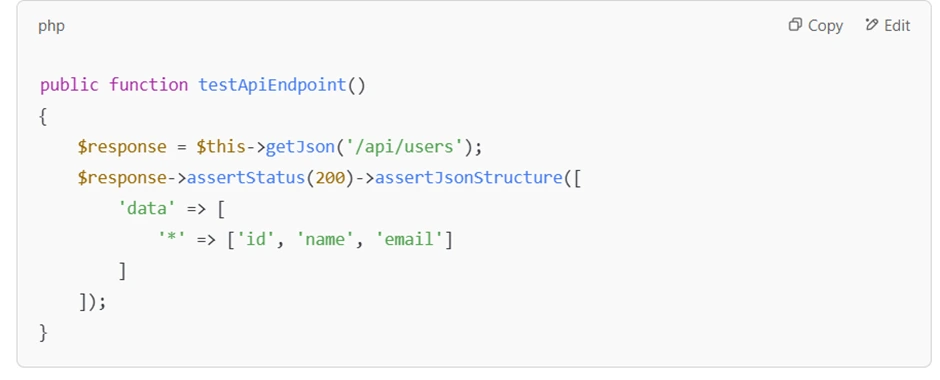
This is especially powerful when testing collections, where you can use a wildcard (*) to specify the structure for every item in an array.
Asserting a JSON Response Structure in Laravel
This article from Laravel News provides an excellent, focused look at how and why to use assertJsonStructure and how it complements other assertions.
Read the full article. It's short and will clarify how to use assertJsonStructure for collections and how to use whereType assertions to make your tests even more robust.
As the article explained, you can combine these techniques. A comprehensive test for a list endpoint might look like this:
use Illuminate\Testing\Fluent\AssertableJson;

test('api for products has the correct structure and types', function () {
    // Arrange: Create 3 products
    Product::factory()->count(3)->create();

    // Act & Assert
    $this->getJson('/api/products')
        ->assertOk()
        ->assertJsonCount(3, 'data')
        ->assertJsonStructure([
            'data' => [
                '*' => [ // The '*' means "every item in this array"
                    'id',
                    'name',
                    'price',
                    'created_at',
                    'updated_at',
                ]
            ]
        ])
        ->assertJson(fn (AssertableJson $json) =>
            $json->whereType('data.0.id', 'integer')
                 ->whereType('data.0.name', 'string')
                 ->etc() // etc() allows other keys to be present
        );
});
This test confirms:
- The request was successful.
- There are exactly 3 products in the
dataarray. - Every product object in the
dataarray has the expected keys. - The data types for the first product's
idandnameare correct.
This layered approach gives you extremely high confidence in your API's output.
Conclusion
In this lesson, you've moved from theory to practice, learning how to write robust feature tests for your Laravel API endpoints. This is a non-negotiable skill for building professional, maintainable applications.
Key Takeaways:
- API Testing Workflow: Follow the Arrange, Act, Assert pattern by creating data with factories, making requests with
getJson/postJson, and asserting the response. - Status Code Assertions: Use methods like
assertOk(),assertCreated(),assertNotFound(), andassertUnprocessable()to verify the HTTP status. - JSON Content Assertions: Use
assertJson()for partial matches,assertExactJson()for strict matches, andassertJsonFragment()to find data anywhere in the response. - JSON Structure Assertions: Use
assertJsonStructure()with wildcards (*) to enforce your API contract and ensure consistency in your responses. - Type Assertions: Add another layer of validation by using
whereType()within a fluent JSON assertion to check data types.
Up Next:
We've now mastered testing our application from the "outside-in" with feature tests. In the next lesson, we will zoom in and focus on the "inside." You will learn how to write unit tests for individual classes and methods, isolating their logic. This will equip you with the skills to test complex business logic and helper functions quickly and efficiently, completing the foundation of your testing knowledge.