
Good to see you again. In the previous lesson, you built gateway-probe with the Yocto SDK environment and verified that the compiler used the AArch64 target sysroot rather than Ubuntu headers and libraries. You also established the basic runtime contract: an ARM64 executable may depend on a target dynamic loader and target shared libraries even though it was produced on an x86-64 workstation.
Now we inspect that contract inside the executable. By the end of this lesson, you will be able to take an unfamiliar ARM64 ELF file and determine its architecture and broad ABI identity, its executable and data layout, the loader it requests, libraries it needs, symbols it defines or imports, and relocation work deferred to the dynamic loader. This is a core bring-up skill: it turns errors such as “Exec format error,” “No such file or directory,” and “undefined symbol” into evidence-driven diagnoses.
ELF: one file, two complementary views
ELF means Executable and Linkable Format. Linux uses it for relocatable object files, executable programs, shared libraries, and core dumps. It is not merely a sequence of ARM instructions. It is a structured container that tells tools, the kernel, and the dynamic loader how to interpret its contents.
For the gateway project, use the ARM64 binary from the prior lesson:
cd ~/gateway-private/labs/02-cross-sysroot
BIN=gateway-probe
If you are in a new terminal, first source the same Yocto SDK environment script used to build the program. Then derive the matching target-aware binutils:
READELF="$(${CC} -print-prog-name=readelf)"
OBJDUMP="$(${CC} -print-prog-name=objdump)"
NM="$(${CC} -print-prog-name=nm)"

printf 'READELF=%s\n' "$READELF"
printf 'OBJDUMP=%s\n' "$OBJDUMP"
printf 'NM=%s\n' "$NM"

"$READELF" --version | head -n 1
"$OBJDUMP" --version | head -n 1
"$NM" --version | head -n 1
A native Ubuntu readelf can often parse an AArch64 ELF file, because ELF parsing is largely architecture-independent. Nevertheless, using the SDK’s matching tools is a sound default: it avoids surprises with older host binutils or unsupported architecture-specific decoding.
There are two views of every executable that must remain distinct:
| View | Primary consumer | Main structures | Question answered |
|---|---|---|---|
| Sections | Linker, debugger, static-analysis tools | .text, .rodata, .data, .symtab, .rela.dyn | How was the file logically organized while built and analyzed? |
| Segments | Kernel and dynamic loader at process startup | PT_LOAD, PT_INTERP, PT_DYNAMIC, PT_GNU_RELRO | Which bytes are mapped into memory, where, and with what permissions? |
Sections often overlap with segments, but they are not interchangeable. A loadable segment can contain portions of several sections. Conversely, debugging and symbol-table sections might exist in the file yet never be mapped into the running process.
In-depth: ELF - The Extensible & Linkable Format
Watch “In-depth: ELF - The Extensible & Linkable Format” from stacksmashing for a visual explanation of the distinction between sections and segments, followed by the ELF header and its two tables of descriptors.
Watch the overview to establish ELF’s three common uses and the essential link-time versus run-time distinction. Then watch the ELF header, focusing on class, byte order, file type, machine, entry point, and the offsets to the program- and section-header tables. Continue with program headers to see why LOAD, INTERP, and DYNAMIC matter at execution time. Finish with section headers, paying particular attention to symbol tables, string tables, relocation sections, and NOBITS.
The following structural diagram is useful as a conceptual map. Its vertical arrangement is not a promise that every ELF file stores every area in exactly that visible order; use readelf to learn the actual offsets and mappings of a particular file.
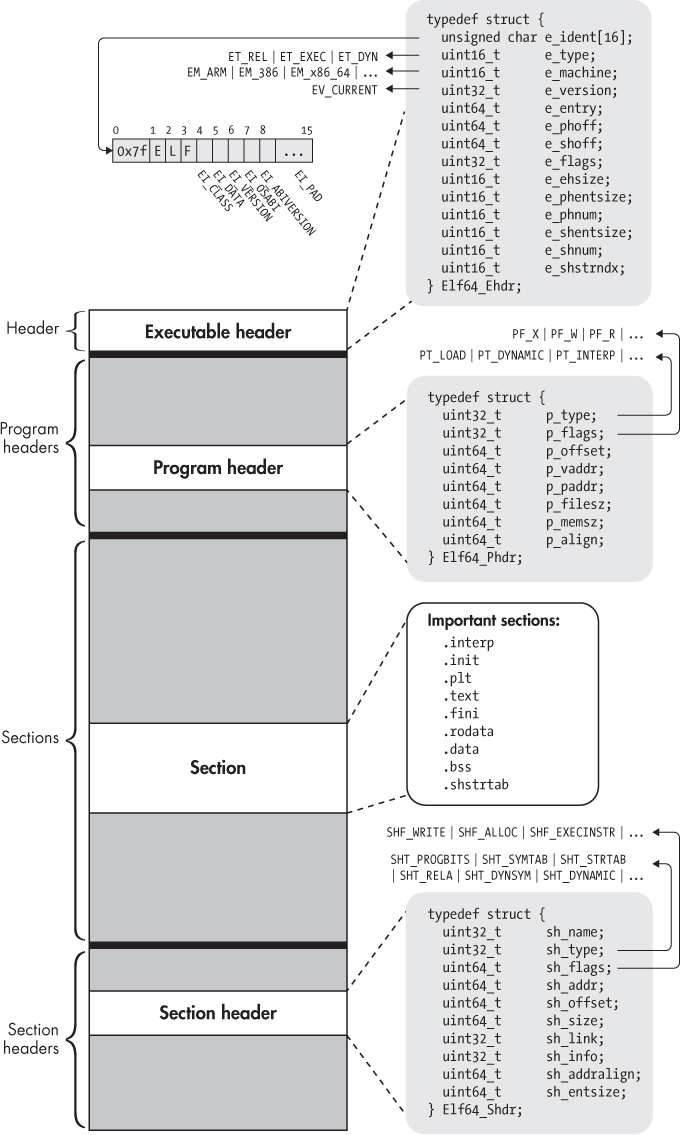
Establish the ELF identity and ABI evidence
Start with the fast triage command:
file "$BIN"
A representative result for the expected build is similar to:
gateway-probe: ELF 64-bit LSB pie executable, ARM aarch64,
version 1 (SYSV), dynamically linked, interpreter
/lib/ld-linux-aarch64.so.1, with debug_info, not stripped
Exact wording varies by the version of file and the build flags. Extract the important claims:
- ELF 64-bit means this is an ELF64 container.
- LSB means little-endian byte order.
- ARM aarch64 means AArch64 machine code, not AArch32 and not x86-64.
- PIE executable normally indicates a position-independent executable.
- dynamically linked indicates that startup will involve a dynamic loader.
- not stripped means ordinary symbol and debug information is probably still present.
file is an excellent initial answer, but readelf is the evidence source when you need precise fields:
"$READELF" -hW "$BIN"
Focus on these lines:
| ELF header field | Expected ARM64 result | Interpretation |
|---|---|---|
Magic | Begins with 7f 45 4c 46 | The literal ELF signature. The final three bytes correspond to ELF. |
Class | ELF64 | ELF addresses and several metadata fields use the 64-bit form. |
Data | 2's complement, little endian | Multi-byte metadata values use little-endian representation. |
OS/ABI | Often UNIX - System V | This field is not reliable proof that the application is or is not Linux. |
Type | Commonly DYN | For a program with an interpreter segment, this normally means PIE. |
Machine | AArch64 | The instruction-set architecture required to execute it. |
Entry point address | A virtual address | The first instruction the kernel transfers control to after mappings are prepared. |
Start of program headers | File offset | Location of segment descriptors. |
Start of section headers | File offset | Location of section descriptors. |
Two subtleties are worth retaining.
First, main() is not the ELF entry point. The entry address normally identifies the C runtime startup routine, often named _start in an unstripped program. That startup code prepares process state and invokes libc startup code, which eventually calls main().
Second, an ELF header does not directly declare “this binary follows AAPCS64” or “this binary uses glibc.” The practical ABI evidence is a combination of:
ELF64, little-endian encoding, andMachine: AArch64;- the selected compiler and sysroot from the matched SDK;
- the requested program interpreter;
- required libraries and symbol versions.
For this project, that combined evidence supports an AArch64 Linux userspace ABI using glibc, with the normal AAPCS64 calling convention selected by the AArch64 toolchain. In contrast to 32-bit ARM, you will generally not use a single ELF header flag to distinguish hard-float and soft-float variants on AArch64.
readelf (GNU Binary Utilities)
Read the GNU Binutils readelf reference to connect the commands in this lesson to their official option meanings. It is especially useful as a compact command reference when a field or output column needs checking during a bring-up investigation.
In the readelf manual, begin with the introductory paragraph and the option entries for -h, -l, -S, and -s. Read the introduction, then locate the listed option entries immediately below it. In the later option list, find -r and -d; read the entries describing relocation and dynamic-section display, including dynamic metadata. Use this as a reference rather than trying to memorize every available switch.
Inspect sections, then relate them to loaded segments
List the section headers in a wide format:
"$READELF" -SW "$BIN"
The -S option lists sections; -W avoids abbreviated names and line wrapping. The output includes each section’s name, type, virtual address, file offset, size, entry size, and flags.
You will probably see many more sections than were written explicitly in main.c. The compiler, linker, C runtime, and dynamic linker contract all contribute metadata.
The most useful sections to recognize are these:
| Section | Typical contents | Why it matters during investigation |
|---|---|---|
.interp | Path of the dynamic loader | Missing or wrong loader path prevents program startup. |
.text | Executable machine instructions | Contains code such as _start and main. |
.rodata | Read-only constants and string literals | May reveal version strings, hard-coded paths, or accidental secrets. |
.data | Initialized writable global data | Occupies file storage and writable process memory. |
.bss | Zero-initialized or uninitialized global data | Occupies memory but normally no file bytes. |
.dynsym, .dynstr | Dynamic symbols and their names | Required for runtime linking. |
.rela.dyn | Dynamic relocations | Addresses and data references resolved during process loading. |
.rela.plt | Often function-call relocations | Used with the PLT/GOT mechanism on many dynamic builds. |
.dynamic | Dynamic-linking tags | Contains library requirements and search-path metadata. |
.symtab, .strtab | Full static symbol table and names | Very useful for debugging; often absent after stripping. |
.debug_* | DWARF debugging information | Supports GDB source-level debugging; not required to run. |
Section flags matter:
Ameans allocatable: the section participates in the process memory image.Wmeans writable.Xmeans executable instructions.
Therefore .text usually has AX, .rodata usually has A, and writable globals typically have WA.
A .bss section commonly has type NOBITS. It reserves memory, but the bytes are not stored in the ELF file. This explains a common embedded sizing observation: a program can have a significantly larger RAM footprint than its on-storage file size.
Now inspect the program headers, which describe runtime segments:
"$READELF" -lW "$BIN"
Look for:
INTERP: carries the loader pathname for a dynamically linked executable.LOAD: defines a file range the kernel maps into virtual memory, plus its read, write, and execute permissions.DYNAMIC: points the loader to dynamic-linking metadata.GNU_STACK: records requested stack permissions.GNU_RELRO: identifies data the loader can make read-only after relocations finish.
At the bottom of the readelf -lW output, find “Section to Segment mapping.” This is the bridge between the two views. It will show, for example, that a loadable read-execute segment can include .init, .plt, .text, and .fini, while a writable segment can include .dynamic, .got, .data, and .bss.
A useful operational rule is:
When diagnosing what the kernel can load and map, inspect program headers. When locating code, data, symbols, relocations, or debug metadata, inspect sections.
For a second view of section sizes and file offsets, use objdump:
"$OBJDUMP" -h "$BIN"
Unlike readelf -S, objdump -h presents a compact section-oriented summary that is convenient when comparing .text, .rodata, .data, and .bss sizes across builds.
Identify the interpreter and shared-library contract
A dynamically linked executable does not begin by directly executing main(). The kernel maps the executable, sees its PT_INTERP program header, and starts the requested dynamic loader. The dynamic loader then loads required libraries, resolves dynamic relocations, performs runtime initialization, and transfers control toward the application’s startup path.
Display the requested interpreter in two ways:
"$READELF" -lW "$BIN" | grep 'Requesting program interpreter'
"$READELF" -p .interp "$BIN"
For the selected glibc-based gateway baseline, expect a path similar to:
/lib/ld-linux-aarch64.so.1
This pathname is evaluated in the target’s root filesystem. It is not a path to the SDK installed on Ubuntu.
Now inspect the dynamic section:
"$READELF" -dW "$BIN"
To focus on deployment-relevant entries:
"$READELF" -dW "$BIN" \
    | grep -E 'NEEDED|SONAME|RPATH|RUNPATH'
For the small gateway-probe program, you will normally see at least:
Shared library: [libc.so.6]
The NEEDED entry says that the dynamic loader must locate a compatible library whose SONAME is libc.so.6. It does not say exactly where that file will be found. Actual lookup is determined by the loader, loader configuration, default library directories, and—if present—an embedded RUNPATH or legacy RPATH.
The interpreter itself is not normally presented as a NEEDED library. It is selected separately by the PT_INTERP segment.
Inspect the corresponding libc and loader files in the target sysroot:
find "$SDKTARGETSYSROOT" \
    \( -name 'ld-linux-aarch64.so.1' -o -name 'libc.so.6' \) \
    -print
This confirms that the SDK can satisfy the runtime contract during development. It does not prove that a separately assembled target root filesystem contains those files. That distinction will become central when you boot the minimal BusyBox system later in this module.
You can also inspect required glibc symbol versions:
"$READELF" -VW "$BIN" | sed -n '/Version needs section/,/Version definition section/p'
An imported symbol may appear with a suffix such as @GLIBC_2.34. That is a compatibility requirement: the target’s libc.so.6 must provide a suitable version of that symbol. Matching a library by filename alone is not enough.
Do not use ldd on this AArch64 binary from the x86-64 workstation. It cannot validate normal target resolution there, and it is not appropriate for untrusted binaries because it can cause loader-related execution behavior. readelf -d and readelf -l safely inspect the declared contract without running the file.
Use symbols to connect ELF metadata to source-level intent
A symbol is a named entity associated with an address, size, binding, type, and section. Functions, global variables, imported library functions, and startup routines can all appear as symbols.
First inspect the normal symbol table:
"$NM" -nS "$BIN" | less
The options mean:
-nsorts symbols by address.-Sincludes symbol sizes where available.
To focus on familiar program-entry names:
"$NM" -nS "$BIN" | grep -E '(^| )(_start|main)$'
You should find both _start and main when the binary remains unstripped. _start is the startup entry associated with the ELF entry-point address; main is the C function eventually invoked after runtime initialization.
nm uses one-letter type codes. The following are most useful initially:
nm letter | Meaning | Typical section |
|---|---|---|
T / t | Defined executable code | .text |
D / d | Initialized writable data | .data |
B / b | Zero-initialized data | .bss |
R / r | Read-only data | .rodata |
U | Undefined in this ELF file | Resolved from another object or shared library |
Uppercase normally means a global symbol, while lowercase usually means a local symbol. A U symbol in a dynamically linked executable is not automatically an error. It is often the expected marker that the dynamic loader must resolve a function from libc or another shared object.
Display only the dynamic symbols that remain unresolved in the executable:
"$NM" -D --undefined-only "$BIN"
Depending on optimization and glibc version, expect imported interfaces related to the program’s code, such as uname, printf, perror, and libc startup functions. They may include version suffixes.
Compare the full and dynamic symbol views:
"$READELF" -sW "$BIN" | less
"$READELF" --dyn-syms -W "$BIN" | less
The full symbol table, commonly in .symtab, is useful to developers and debuggers but may be removed by stripping. The dynamic symbol table, commonly in .dynsym, must retain the symbols needed for runtime dynamic linking.
objdump can expose the static symbol table in another format:
"$OBJDUMP" -t "$BIN" | grep -E '(_start|main)$'
Use objdump when you want to move from named symbols to the actual instructions:
"$OBJDUMP" -d --disassemble=main "$BIN" | less
On AArch64, look for instructions and calls generated for the body of main. Calls to imported functions often reference a PLT entry, such as printf@plt, rather than directly embedding the final libc address. That indirection supports dynamic binding.
For read-only data inspection, including the string literals from gateway-probe, use:
"$OBJDUMP" -s -j .rodata "$BIN" | less
This is a practical security reminder for the gateway: an ordinary compiled ELF binary does not protect embedded plaintext secrets. API tokens, fixed passwords, private URLs, and production keys should never be treated as safe merely because they were compiled into an executable.
Read relocations as deferred address work
A relocation records an address-dependent value that the linker or dynamic loader must fix up. During ordinary static linking, many relocations are resolved before the final ELF is produced. A dynamically linked PIE executable retains dynamic relocations because its final load address and imported-library addresses are not known when it is built.
Inspect the relocation sections:
"$READELF" -rW "$BIN"
Then narrow the output to AArch64 relocation types:
"$READELF" -rW "$BIN" | grep 'R_AARCH64'
A typical PIE executable has a .rela.dyn section and often a .rela.plt section. The exact mix depends on compiler and linker flags, so do not treat absence of one particular relocation type as a defect.
Common relocation types include:
| Relocation type | Typical purpose |
|---|---|
R_AARCH64_RELATIVE | Adjusts an internal address based on the random runtime load base. No external symbol lookup is needed. |
R_AARCH64_GLOB_DAT | Fills a Global Offset Table entry with the address of a resolved symbol. |
R_AARCH64_JUMP_SLOT | Resolves an imported function called through the Procedure Linkage Table. |
For a relative relocation, the loader conceptually computes:
This is one reason a PIE can support address-space layout randomization: the program can be placed at different virtual addresses on different executions, while the loader adjusts the appropriate references.
For an imported function, such as a libc call, the loader must additionally identify the provider symbol in a required shared library. That is why three pieces of evidence belong together:
.dynsymidentifies imported or exported dynamic symbols..dynamicidentifies required shared libraries..rela.dynand.rela.pltidentify locations needing loader resolution.
Use readelf as the primary relocation tool. objdump -d helps correlate a call instruction with its PLT stub, but readelf -rW presents the complete relocation records more directly.
A repeatable ELF inspection record
Create an inspection report beside your cross-build evidence. This record is useful when a Yocto image later fails due to a missing loader, an incompatible library version, or a wrong-architecture executable.
{
    printf 'File identity:\n'
    file "$BIN"

    printf '\nELF header:\n'
    "$READELF" -hW "$BIN" \
        | grep -E 'Class:|Data:|OS/ABI:|Type:|Machine:|Entry point'

    printf '\nInterpreter:\n'
    "$READELF" -lW "$BIN" \
        | grep 'Requesting program interpreter'

    printf '\nDynamic dependencies:\n'
    "$READELF" -dW "$BIN" \
        | grep -E 'NEEDED|SONAME|RPATH|RUNPATH' || true

    printf '\nSelected sections:\n'
    "$READELF" -SW "$BIN" \
        | grep -E '\.(interp|text|rodata|data|bss|dynamic|dynsym|rela\.dyn|rela\.plt|symtab|debug_)' || true

    printf '\nImported dynamic symbols:\n'
    "$NM" -D --undefined-only "$BIN"

    printf '\nAArch64 relocations:\n'
    "$READELF" -rW "$BIN" \
        | grep 'R_AARCH64' || true
} > elf-inspection.txt
Keep this full report in the private implementation repository because absolute build paths, internal version strings, and debug metadata may be sensitive. A sanitized public showcase can report the resulting facts without publishing the binary or its full metadata.
Your evidence checklist is now:
-
fileidentifies an ELF64 AArch64 executable. -
readelf -hWconfirmsMachine: AArch64. -
readelf -lWidentifies the program interpreter. -
readelf -dWlists required shared libraries. -
readelf -SWidentifies the key sections. -
nmdistinguishes defined symbols from imported dynamic symbols. -
readelf -rWdisplays AArch64 dynamic relocations. -
objdumpmakes the compiled instructions and raw section content inspectable.
Key takeaways
An ELF executable is both a link-time object organized into sections and a runtime image organized into segments. file provides rapid triage, while readelf provides the precise ELF fields needed for diagnosis.
For the AArch64 gateway binary, the strongest ABI and deployment evidence is the combination of ELF64 class, little-endian encoding, Machine: AArch64, the requested glibc loader, required shared libraries, and dynamic-symbol versions. The OS/ABI header field alone is not sufficient proof of the complete Linux userspace ABI.
Use:
readelf -hW,-SW,-lW,-dW,-sW, and-rWfor authoritative ELF metadata;nmfor a compact symbol-focused view;objdumpfor section sizes, raw data, symbol tables, and AArch64 disassembly.
Next, you will compare static, dynamic, PIC, and PIE builds. You will use the inspection workflow from this lesson to measure changes in file layout, runtime dependencies, and relocation behavior rather than treating linker flags as abstract options.
Can't find a good explanation? Sign up and we'll make it for you
Sign up