
Welcome back. In the last lesson, you selected the AM62x gateway’s baseline platform: AArch64 Linux using glibc, built and maintained through a Yocto-generated SDK matched to the image. You also separated the cross-compiler’s build/host/target terminology from the everyday “development host and target board” vocabulary.
This begins the practical portion of the cross-toolchain work. The goal is not merely to produce an AArch64 binary: it is to establish evidence that the compiler consumed target headers and libraries from the SDK sysroot, rather than silently borrowing incompatible files from Ubuntu. That discipline becomes essential once the gateway uses external libraries, vendor components, and reproducible Yocto builds.
This module now moves from silicon and toolchain concepts toward a bootable minimal Linux system. Today’s result is a small AArch64 program, built through a controlled SDK environment and accompanied by an audit trail.
What “correct cross-compilation” means
A successful build has three distinct artifacts and responsibilities:
| Item | Runs on | Must be built for |
|---|---|---|
| Cross-compiler executable | Ubuntu workstation | x86-64 Linux |
| SDK sysroot headers and libraries | Used during compilation and linking | AArch64 Linux |
gateway-probe executable | AM62x board or AArch64 emulator | AArch64 Linux |
The cross-compiler itself is an ordinary x86-64 program. It may use Ubuntu’s host libraries merely to run on your workstation. That is expected and harmless.
The critical constraint is different:
The AArch64 application must not compile against Ubuntu’s headers or link against Ubuntu’s libraries.
For example, Ubuntu’s /usr/include/stdio.h and /usr/lib/x86_64-linux-gnu/libc.so describe an x86-64 glibc environment. They cannot define the ABI or runtime contract of the AArch64 gateway.
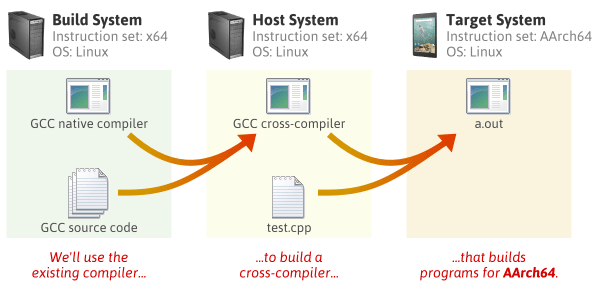
A sysroot supplies the target-facing view of /. Conceptually, if an SDK exposes its target sysroot at:
/opt/gateway-sdk/sysroots/aarch64-poky-linux
then these target paths are found on the workstation at:
/opt/gateway-sdk/sysroots/aarch64-poky-linux/usr/include/stdio.h
/opt/gateway-sdk/sysroots/aarch64-poky-linux/usr/lib/libc.so
/opt/gateway-sdk/sysroots/aarch64-poky-linux/lib/ld-linux-aarch64.so.1
The path inside the executable remains target-relative, such as /lib/ld-linux-aarch64.so.1. The SDK installation path itself is never expected to exist on the AM62x board.
Let the SDK configure the environment
A Yocto SDK is designed to configure more than a compiler path. Its environment script normally establishes:
CC,CXX,AR,LD, and related AArch64 tools;- target CPU and ABI flags;
--sysroot=...for the selected target sysroot;SDKTARGETSYSROOT, the target development filesystem;PKG_CONFIG_*variables sopkg-configresolves target.pcfiles;- compiler and linker search paths consistent with the image and SDK.
This is why the preferred workflow is to source the SDK environment script, rather than manually assembling compiler flags.
4 Using the SDK Toolchain Directly — The Yocto Project ® 6.0-tip documentation
Read the Yocto Project documentation section on Makefile-based projects. It demonstrates the central risk in this lab: a Makefile or command-line assignment can override the SDK-provided cross-compiler without an obvious error.
In Section 4.2, “Makefile-Based Projects,” read the variable-precedence explanation. Then continue from “In a new shell environment variables are not established for the SDK until you run the setup script” through the setup result. The examples use an older 32-bit target; focus on the mechanism, not their target architecture or literal installation path.
For this course, replace the illustrative SDK location below with the location of the prepared AArch64 SDK when it is supplied. In a production project, use an SDK generated from the same pinned Yocto release, layer revisions, machine, distribution, and image configuration as the deployed gateway.
Create a clean lab directory in the private implementation repository:
mkdir -p ~/gateway-private/labs/02-cross-sysroot
cd ~/gateway-private/labs/02-cross-sysroot
Set the SDK installation directory. This is an example only:
export SDK_ROOT="$HOME/sdk/gateway-aarch64-sdk"
Locate the environment script:
find "$SDK_ROOT" -maxdepth 1 -type f \
    -name 'environment-setup-aarch64*-poky-linux*' -print
A typical result resembles:
/home/your-user/sdk/gateway-aarch64-sdk/environment-setup-aarch64-poky-linux
Source the exact path returned on your system:
source "$SDK_ROOT/environment-setup-aarch64-poky-linux"
source runs the script in the current shell, allowing it to set environment variables for later commands. Opening a new terminal creates a new shell, so you must source the script again there. Do not run this command through sudo; the SDK belongs in your regular development workspace.
Now inspect the most important variables:
printf 'CC=%s\n' "$CC"
printf 'CXX=%s\n' "$CXX"
printf 'SDKTARGETSYSROOT=%s\n' "$SDKTARGETSYSROOT"
printf 'PKG_CONFIG_SYSROOT_DIR=%s\n' "$PKG_CONFIG_SYSROOT_DIR"
For a Yocto SDK, CC often contains both the compiler name and target-specific flags. A representative value might look like:
aarch64-poky-linux-gcc -mcpu=cortex-a53 --sysroot=/opt/.../sysroots/aarch64-poky-linux
The exact triplet and tuning flags vary with the SDK. Do not substitute a guessed aarch64-linux-gnu-gcc merely because it looks plausible. The environment script is the platform contract.
Use the configured compiler to confirm its target identity and sysroot:
${CC} -dumpmachine
${CC} -print-sysroot
The first command should report an AArch64-oriented triplet. The second should identify the same target sysroot as SDKTARGETSYSROOT, perhaps after resolving symbolic links.
Finally, confirm the sysroot actually contains target development content:
test -r "$SDKTARGETSYSROOT/usr/include/stdio.h" \
    && echo "Target stdio.h found"

find "$SDKTARGETSYSROOT" -type f \
    \( -name 'ld-linux-aarch64.so.1' -o -name 'ld-musl-aarch64.so.1' \) \
    -print
With the selected glibc-based gateway baseline, expect to find an AArch64 glibc dynamic loader, normally named ld-linux-aarch64.so.1. A musl SDK would have a different loader name; that difference is evidence of a distinct platform contract, not a harmless file-name variation.
Build a small target program
Create main.c:
#include <stdio.h>
#include <sys/utsname.h>

int main(void)
{
    struct utsname system_info;

    if (uname(&system_info) != 0) {
        perror("uname");
        return 1;
    }

    printf("Gateway probe running on: %s\n", system_info.machine);
    printf("Pointer width: %zu bits\n", sizeof(void *) * 8U);

    return 0;
}
This small program deliberately includes:
stdio.h, supplied by the target C library;sys/utsname.h, a target-facing POSIX interface;uname(), which exercises the libc interface to the Linux kernel.
Next, create a Makefile. Make recipe lines below must begin with a literal tab, not spaces.
APP := gateway-probe
SRC := main.c

ifndef SDKTARGETSYSROOT
$(error SDK environment is not active; source environment-setup-aarch64-poky-linux first)
endif

CFLAGS ?= -O2 -g -Wall -Wextra -Werror

.PHONY: all clean

all: $(APP)

$(APP): $(SRC)
	$(CC) $(CPPFLAGS) $(CFLAGS) $(LDFLAGS) -o $@ $<

clean:
	rm -f $(APP) headers.trace linker.trace
This Makefile intentionally does not assign CC = gcc. When the sourced SDK exports CC, GNU Make imports it. The compiler command printed by make should therefore include an AArch64 compiler and a --sysroot argument.
Build the program:
make clean
make
Read the command emitted by Make. You should see an AArch64 compiler command, typically with target tuning and --sysroot=....
Two common failures are worth recognizing immediately:
| Symptom | Likely cause | Correct response |
|---|---|---|
Makefile: ... missing separator | A command recipe begins with spaces instead of a tab. | Replace the leading spaces with one tab. |
SDK environment is not active | The environment script was not sourced in this shell. | Source the AArch64 environment script, then run make again. |
The command begins with gcc or cc | A Makefile, command-line override, or inactive SDK selected the host compiler. | Stop; do not deploy the output. Fix the compiler selection and rebuild. |
stdio.h: No such file or directory | The SDK/sysroot is incomplete or CC is not the intended compiler command. | Recheck CC, SDKTARGETSYSROOT, and the SDK installation. |
Do not “fix” the missing-header case by adding -I/usr/include. That would explicitly force the build to see host headers and would violate the purpose of the sysroot.
Prove the output is AArch64 and uses target inputs
First, establish the binary’s architecture:
file gateway-probe
The result should identify an ELF 64-bit executable or PIE executable for ARM aarch64. It must not say x86-64.
Obtain the SDK’s matching ELF inspection tool through the compiler:
READELF="$(${CC} -print-prog-name=readelf)"
printf 'READELF=%s\n' "$READELF"
Then inspect only the properties relevant to this lesson:
"$READELF" -h gateway-probe | grep -E 'Class:|Machine:'
"$READELF" -l gateway-probe | grep 'Requesting program interpreter'
"$READELF" -d gateway-probe | grep NEEDED
For the glibc gateway baseline, the expected interpretation is:
| Inspection | Expected evidence | Why it matters |
|---|---|---|
| ELF header | Class: ELF64 and Machine: AArch64 | The application is machine code for the target architecture. |
| Program interpreter | An AArch64 glibc loader path such as /lib/ld-linux-aarch64.so.1 | The target filesystem must supply the loader selected at link time. |
| Dynamic dependencies | Normally libc.so.6 for this program | The executable expects target shared libraries at runtime. |
A dynamically linked AArch64 binary will not run directly on the x86-64 Ubuntu workstation. That failure does not invalidate the build. It confirms that its architecture is different. In a later lesson, you will run a minimal AArch64 Linux system under QEMU and diagnose exactly the loader and library failures that occur when this runtime contract is incomplete.
Inspect header resolution
The compiler can print every header it opens during preprocessing. This is a direct audit of the header side of the build:
${CC} -E -H main.c > /dev/null 2> headers.trace
grep -E '^\.+ ' headers.trace | sed -n '1,80p'
The standard-library headers should resolve beneath one of these controlled locations:
$SDKTARGETSYSROOT, for target libc and Linux-facing headers.- A target-specific compiler-private include directory inside the SDK, for GCC-provided headers.
They should not resolve to Ubuntu’s native /usr/include.
The following search is a quick negative check for common Ubuntu host paths:
grep -E '/usr/include|/usr/lib/x86_64-linux-gnu|/lib/x86_64-linux-gnu' \
    headers.trace || echo "No common host header path detected"
Interpret this carefully. A path that contains the text /usr/include may still be valid if it is underneath the SDK sysroot, for example:
/home/your-user/sdk/gateway-aarch64-sdk/sysroots/aarch64-poky-linux/usr/include/stdio.h
The question is not whether the substring exists. The question is which root directory owns the header. It must be the SDK target sysroot, not the Ubuntu filesystem root.
Inspect linker inputs
Now ask the linker to trace the startup objects and libraries it selects:
${CC} -Wl,-t main.c -o gateway-probe-link-audit > linker.trace 2>&1
grep -E 'crt|libc\.so|libgcc' linker.trace
The trace should show target-side startup objects and libraries such as Scrt1.o, crti.o, libgcc, and libc.so, located under the SDK sysroot or its target compiler directories.
A suspicious trace would contain paths such as:
/usr/lib/x86_64-linux-gnu/...
/lib/x86_64-linux-gnu/...
Do not continue from such a result. Even if the linker rejects the incompatible x86-64 library today, relying on that rejection is not a build policy. Fix the toolchain invocation, remove manual host -L flags, and rebuild.
Rules that prevent host contamination
The most important protection is procedural: treat the SDK environment as mandatory and inspect the emitted command line.
For this project, follow these rules:
-
Source the exact SDK environment script in every new terminal.
Do this before callingmake,cmake,meson,configure, orpkg-config. -
Never hard-code
gcc,g++,/usr/include, or/usr/libin target build files.
Such paths select the workstation environment, not the gateway platform. -
Do not copy Ubuntu shared libraries into the target root filesystem.
A host library can have the right filename but the wrong ELF architecture, ABI, glibc version, or dynamic-loader assumptions. -
Use the SDK’s
pkg-configconfiguration for external dependencies.
If a dependency is absent from the SDK sysroot, add the appropriate development package to the SDK or build it through Yocto. Do not make it “work” by pointingpkg-configat host directories. -
Keep target CPU tuning centralized.
The SDK’s compiler flags should express the image’s AArch64 baseline and Cortex-A53 tuning. Do not scatter manual-marchor-mcpusettings throughout application Makefiles. -
Fix build-system overrides rather than masking them.
The Yocto documentation shows that a Makefile assignment such asCC = gcccan override the SDK environment.make -ecan be useful for diagnosis, but production build files should correctly respect externally supplied tool variables.
The target program’s build contract can be summarized as:
Source code
Target compiler from the SDK
Target headers from the SDK sysroot
Target libraries from the SDK sysroot
AArch64 ELF executable
The sysroot is not an optional convenience. It is the boundary that prevents your workstation from silently becoming part of the gateway’s runtime definition.
Preserve compact evidence
Create an evidence file in the private repository that records the build without exposing proprietary SDK contents:
{
    date -Is
    printf 'Compiler: %s\n' "$CC"
    printf 'Target sysroot: %s\n' "$SDKTARGETSYSROOT"
    printf '\nCompiler target:\n'
    ${CC} -dumpmachine
    printf '\nCompiler sysroot:\n'
    ${CC} -print-sysroot
    printf '\nELF identity:\n'
    file gateway-probe
    "$READELF" -h gateway-probe | grep -E 'Class:|Machine:'
    printf '\nInterpreter:\n'
    "$READELF" -l gateway-probe | grep 'Requesting program interpreter'
    printf '\nDependencies:\n'
    "$READELF" -d gateway-probe | grep NEEDED
} > cross-build-evidence.txt
Keep the full file and traces private if they expose SDK installation paths, vendor identifiers, or internal release metadata. Later, a sanitized public portfolio artifact can state:
- the target architecture and ABI;
- that the SDK was image-matched;
- the ELF architecture result;
- the dynamic-loader path and dependency evidence;
- the anti-contamination policy.
Do not publish SDK archives, proprietary sysroot contents, credentials, signing material, or vendor-restricted documents.
Key takeaways
- A Yocto SDK environment script configures a matched AArch64 compiler and its target sysroot; source it before every target build.
- The compiler process may use host libraries to run on Ubuntu, but the generated AArch64 application must use only target headers and target link inputs.
- The emitted compile command should show an AArch64 compiler and a target
--sysrootpath. fileandreadelfprovide immediate evidence that the output is an AArch64 ELF binary with a target dynamic-loader and library contract.-E -Haudits header resolution, while-Wl,-ttraces linker-selected startup objects and libraries.- Hard-coded host paths, host
gcc, and copied Ubuntu libraries are build-contamination defects, not acceptable shortcuts.
Next, you will inspect the resulting ARM64 ELF in more depth: sections, symbols, relocations, the interpreter, and shared dependencies.
Can't find a good explanation? Sign up and we'll make it for you
Sign up