
Hello Alex,
Welcome back. In our last lesson, we introduced the core philosophy of Qubes OS: achieving security by compartmentalization through the use of virtualization. We established that this approach is a response to the inherent weaknesses of traditional, monolithic operating systems.
Today, we will build directly on that foundation. The goal of this lesson is to conduct a formal, structured comparison between the security model of a monolithic OS (like Windows or a standard Linux distribution) and a virtualization-based OS like Qubes. We'll move beyond the general concept and analyze the specific architectural differences that make one model fundamentally more resilient than the other.
Estimated time to complete: 60 minutes.
Recap from the Previous Lesson
- Monolithic OS: All applications, drivers, and system services run in a single, shared environment. A single vulnerability can lead to a total system compromise.
- Security by Compartmentalization: The strategy of isolating different parts of your digital life into separate "compartments" to contain the damage from any single breach.
- Virtualization as the Enforcer: Qubes OS uses a Type 1 (bare-metal) hypervisor (Xen) to create and enforce strong isolation between these compartments, each of which is a Virtual Machine (VM).
1. The Monolithic Security Model: A Single Domain of Trust
In a typical monolithic OS, the architecture is divided into two main privilege levels: user space and kernel space.
- User Space: Where your applications (web browser, word processor, etc.) run. These processes are unprivileged and have restricted access to hardware.
- Kernel Space: The core of the OS. The kernel manages the CPU, memory, and peripherals. It handles all system calls from user-space applications. Critically, in a monolithic design, this single kernel also contains all the device drivers (for networking, graphics, USB), the filesystem logic, and the networking stack.
This design creates a single, massive domain of trust. Any code executing in kernel space is completely trusted and has total control over the system. The security of the entire OS hinges on the integrity of this one, enormous piece of software.
The primary goal of an attacker is privilege escalation: finding a bug in a system call or, more commonly, a bug in one of the tens of millions of lines of code in a device driver, to get their malicious code to run in kernel space. Once they achieve that, it's game over.
To understand this from the perspective of the Qubes OS creators, please read the first section of this foundational blog post by Joanna Rutkowska.
Reading time: ~5 minutes.
How is Qubes OS different from... | The Invisible Things Blog (Monolithic Kernels vs. Qubes OS)
Focus on the critique of monolithic kernels: the huge attack surface presented by APIs and the inclusion of complex drivers (networking, USB) within the kernel itself.
2. The Virtualization-Based Model: A Hierarchy of Trust
Qubes OS fundamentally rejects the idea of a single, all-powerful kernel. Instead, it builds a hierarchy of isolated domains using the Xen hypervisor.

This diagram shows the conceptual model of Qubes OS. The hypervisor creates a foundational layer of isolation, allowing different security domains (like 'Work', 'Shopping', 'Random') to run as separate VMs. A compromise in the 'Random' VM is contained and cannot affect the 'Work' or 'Shopping' VMs.
In this model:
- The Xen Hypervisor runs directly on the hardware. Its only job is to partition hardware resources (CPU cores, memory pages) and ensure no VM can access resources not assigned to it. It is relatively small and simple.
- Everything else—including components traditionally in the kernel—runs inside a set of virtual machines.
- Your user applications run in AppVMs (e.g., 'work', 'personal').
- Device drivers run in isolated Service VMs (e.g.,
sys-netfor networking,sys-usbfor USB devices).
A bug in a Wi-Fi driver doesn't offer a path to compromising the whole system. It offers a path to compromising sys-net, an unprivileged VM that has no access to your files or other VMs. To take over the system, an attacker would need to perform a much more difficult, two-stage attack.
This video segment explains this exact scenario.
Watch from 39:52 to 41:15. Micah Lee clearly explains the two steps required to hack Qubes: 1) hack a VM, and 2) exploit a Xen hypervisor "escape" bug. This highlights the vastly increased difficulty for an attacker compared to a monolithic system.
3. A Formal Comparison: Attack Surface and TCB
To make our comparison more rigorous, let's introduce two critical concepts from computer security:
- Attack Surface: The sum of the different points (the "attack vectors") where an unauthorized user (the "attacker") can try to enter data to or extract data from an environment. A larger attack surface presents more opportunities for exploitation.
- Trusted Computing Base (TCB): The set of all hardware, firmware, and software components that are critical to the system's security. If any component inside the TCB is compromised, the security of the entire system fails. A fundamental principle of security engineering is to keep the TCB as small as possible.
With these definitions, we can now create a direct comparison.
| Feature | Monolithic OS (e.g., Linux, Windows) | Virtualization-Based OS (Qubes OS) |
|---|---|---|
| Architecture | Single, large kernel running all drivers and core services in a privileged space (kernel space). | A minimal hypervisor managing multiple, isolated virtual machines (VMs). |
| Trusted Computing Base (TCB) | The entire kernel, including millions of lines of code for all device drivers and services. Very large. | Primarily the Xen hypervisor and Dom0 (the management VM). Dramatically smaller. |
| Attack Surface | Massive and undifferentiated. A bug in any driver (graphics, USB, network) can lead to total compromise. | Segmented. A bug in a driver compromises only its isolated service VM, not the whole system. |
| Driver Handling | Drivers run with full kernel privileges. | Drivers run in unprivileged, isolated service VMs (e.g., sys-net, sys-usb). |
| Impact of Compromise | Often total system compromise ("Game Over"). | Contained to a single VM. The attacker is still "in a box" and must find another exploit to escape. |
This distinction holds even when comparing Qubes to other systems that use virtualization. Please read the following two sections from the Qubes FAQ, which address common points of confusion.
Reading time: ~5 minutes.
Frequently asked questions (FAQ) (How does Qubes OS compare to using a “live CD” OS?; How does Qubes OS compare to running VMs in a conventional OS?)
Focus on why a "live CD" is still monolithic and how "Type 2" hypervisors (like VirtualBox) are fundamentally different from the "Type 1" hypervisor used by Qubes because they depend on an insecure host OS.
4. An Analogy from Your World: Monolith vs. Microservices
Your experience designing financial systems at Revolut provides a perfect analogy.
A monolithic OS is like building the entire Revolut platform as a single, massive application running on one server. The user-facing web portal, the FX trading engine, the card payment processor, and the global settlement system are all just different modules in the same program. A single vulnerability—say, an SQL injection flaw in the web portal—could potentially give an attacker access to the core trading and settlement logic, allowing them to manipulate trades or redirect funds. The entire system is the TCB.
Qubes OS is analogous to a modern microservices architecture.
- The Xen hypervisor is like the underlying cloud infrastructure and container orchestrator (e.g., Kubernetes). Its job is to run services and keep them isolated.
- Each Qube (
sys-net,work-vm,vault) is a separate microservice in its own container. - The web portal (your
untrustedbrowsing qube) is a distinct service. The FX trading engine (yourworkqube) is another. The cold storage for funds (yourvaultqube) is yet another.
They communicate only through strictly defined, minimal APIs (the Qubes secure copy/paste and file transfer mechanisms). If the web portal service is compromised, the attacker is contained within that service. They cannot directly access the trading engine's database or the cold storage vault. They would need to find a separate, much rarer vulnerability in the underlying container infrastructure itself to break out. The TCB is radically smaller, and the blast radius of a compromise is effectively contained.
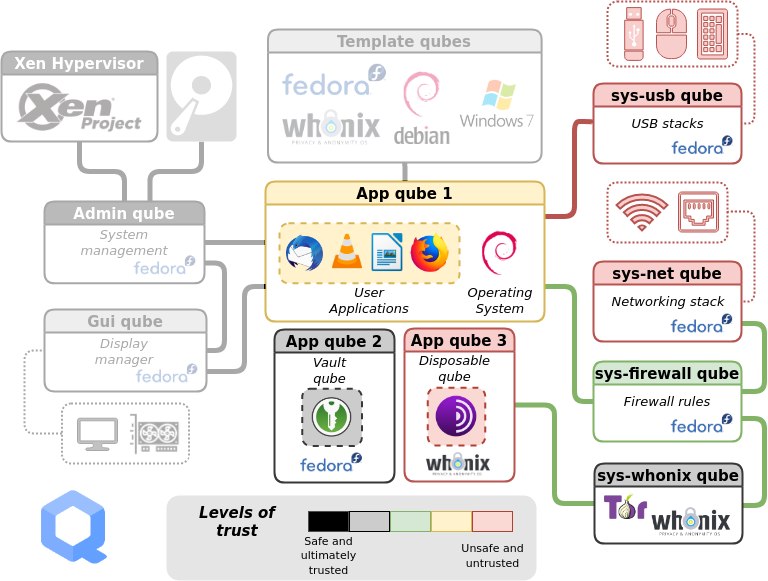
This detailed architectural diagram of Qubes OS visually represents the 'microservices' analogy. The Xen Hypervisor is the foundation. System components like 'sys-usb' and 'sys-net' are isolated service VMs. User activities are separated into App Qubes with different trust levels. A compromise in an 'Untrusted' App Qube is walled off from the 'Vault' or 'Admin' domains.
Conclusion
Today we've moved from the "what" to the "why" of Qubes' security model. By formally comparing it to the monolithic model, the advantages become starkly clear.
Key Takeaways:
- Monolithic Model: Characterized by a large attack surface and a massive Trusted Computing Base (TCB) that includes the entire OS kernel and all its drivers. A single successful exploit often leads to total system compromise.
- Virtualization-Based Model (Qubes): Drastically reduces the TCB to just the hypervisor and a few core management components. It segments the attack surface, isolating drivers and applications into separate VMs.
- Damage Containment: The primary benefit of the Qubes model is not that it's impossible to hack, but that the impact of a successful hack is contained within a single, unprivileged compartment, preventing a catastrophic system-wide failure.
Preview of the Next Lesson
We've now compared the high-level security models. In the next lesson, we will dive deeper into the Qubes architecture itself. We'll examine the diagram above in detail, defining the specific roles of its most important components: Dom0, TemplateVMs, and AppVMs. Understanding this architecture is the final theoretical step before we begin the installation process.
Can't find a good explanation? Sign up and we'll make it for you
Sign up