
Hello Alex,
Welcome to the fifth module of our course. Having successfully secured your x230's firmware with Coreboot, we now shift our focus up the stack to the operating system. This module is dedicated to installing and understanding Qubes OS, a system designed from the ground up for exceptional security.
This first lesson addresses the foundational principle of Qubes OS. We will define the concept of 'security by compartmentalization' and explore how virtualization technology is the key to enforcing it. Understanding this "why" is crucial before we dive into the "how" of installation in the upcoming lessons.
Estimated time to complete: 60 minutes.
Recap from Module 4
In our previous modules, we focused on the hardware and firmware layers. You identified your system's attack surface, formulated a threat model, and took a significant step to mitigate firmware-level threats by replacing the proprietary BIOS with Coreboot and neutralizing the Intel ME. You now have a much more transparent and trustworthy foundation. Our next step is to build an equally secure software environment on top of it.
1. The Problem: The Monolithic Security Model
Most conventional operating systems, like Windows, macOS, and standard Linux distributions (e.g., Ubuntu, Fedora), are built on what is known as a monolithic architecture. From a security perspective, this means all your applications, data, and system processes run in a single, shared space.
Think of it as living in a large, open-plan house. You might have areas for cooking, sleeping, and working, but there are no walls or locked doors between them. If a burglar enters through an unlocked kitchen window (a vulnerability in your web browser), they have immediate access to your bedroom (personal files), your home office (work documents), and everything else in the house.
A single point of compromise can lead to a total system compromise. This is the fundamental weakness that "security by compartmentalization" aims to solve.
To start, please watch the first part of the following video. It provides an excellent overview of this problem and why simply using multiple physical computers isn't a practical solution for most people.
Watch from 00:37 to 03:28. Focus on the explanation of the security problem with traditional operating systems and the concept of using different computers for different tasks.
2. The Strategy: Security by Compartmentalization
If the problem is that a breach in one area gives an attacker access to everything, the logical solution is to build walls. This is the core idea of security by compartmentalization, also known as security by isolation.
The strategy is to divide your digital life into a set of isolated containers, or "compartments," and assign different levels of trust to them. For example:
- Work: High trust, containing sensitive professional data.
- Personal Banking: High trust, for financial activities only.
- General Browsing: Low trust, for reading news and random web surfing.
- Untrusted: Zero trust, for opening suspicious email attachments or visiting dubious websites.
By doing this, if the "Untrusted" compartment is compromised by malware, the "walls" prevent it from accessing or even knowing about your "Work" or "Banking" compartments. The damage is contained.
This approach assumes that vulnerabilities are inevitable. Instead of trying to create a single, perfect, impenetrable fortress (an impossible task), it focuses on limiting the blast radius when a breach inevitably occurs.
Please read these two short excerpts for a formal definition of this principle.
-
First, from the official Qubes OS documentation, which provides a concise technical summary.
Reading time: ~2 minutes.
Security design goals (Security design goals) -
Next, from the Wikipedia entry on Qubes OS, which explains the rationale behind the approach.
Reading time: ~2 minutes.
Qubes OS (Security Goals: Security by Isolation)
Given your background in Multi-Agent Reinforcement Learning, you can think of this in terms of agent design. In a monolithic OS, it's like having a single, complex agent with one unified state. If any part of its state or policy is corrupted, the entire agent is compromised. In a compartmentalized system like Qubes, you have multiple, distinct agents (the compartments), each with its own private information set and state. They can only interact through strictly controlled, limited channels. A compromised agent can't simply read the internal state of another; its influence is contained by the system's rules.
3. The Mechanism: Enforcement through Virtualization
So, how do we build these "walls" between compartments on a single computer? The answer is virtualization.
Virtualization is the process of creating a software-based, or "virtual," representation of something, such as a server, storage device, network, or even an entire computer. The software that creates and runs these virtual computers (called Virtual Machines or VMs) is known as a hypervisor.
Qubes OS uses the Xen hypervisor, a Type 1 (or "bare-metal") hypervisor. This is a critical detail. Unlike Type 2 hypervisors (like VirtualBox or VMware Workstation) that run on top of a conventional OS, a Type 1 hypervisor runs directly on the computer's hardware. The main operating system and all the VMs then run on top of it. This provides a much smaller and more secure foundation for enforcing isolation.
Each compartment in Qubes OS is, in fact, a separate Virtual Machine. The Xen hypervisor acts as a strict gatekeeper, allocating hardware resources (CPU time, memory sections, storage) to each VM and ensuring they remain completely isolated. A process running in one VM has no way to access the memory or files of another VM.
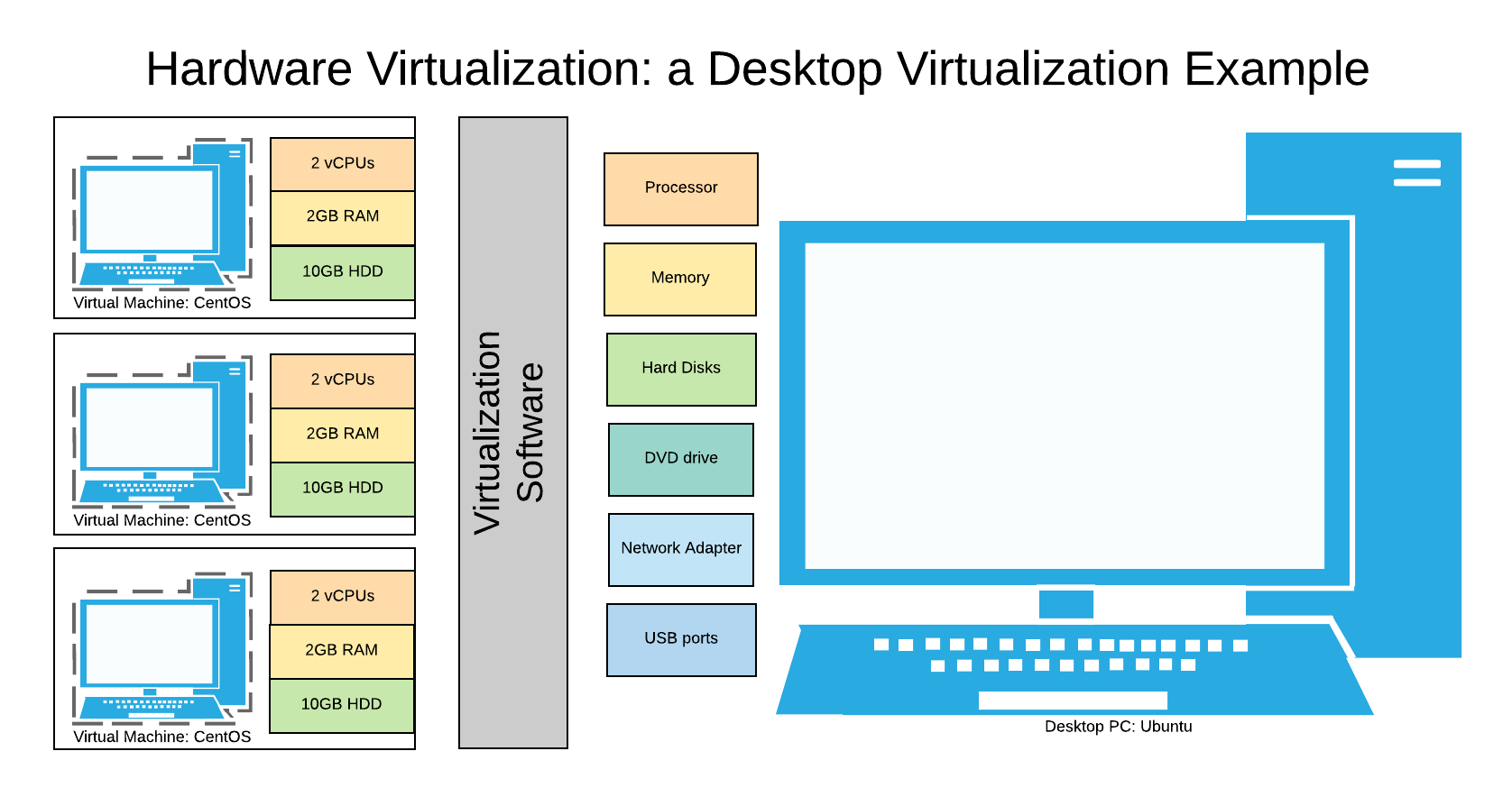
This diagram illustrates the core concept of virtualization. A single physical machine (the 'Host', right) runs virtualization software (a hypervisor). This software carves up the physical hardware resources to create multiple, isolated Virtual Machines (left), each running its own operating system and applications as if it were a separate computer.
The following video clips demonstrate this concept in action within Qubes OS.
First, a quick, energetic overview of how Qubes uses virtualization to create isolated "cubes".
Watch from 00:41 to 00:52 to hear the term "Type 1 hypervisor," then from 01:00 to 02:34 to see a demonstration of how isolated compartments (cubes) work in practice.
Next, a more detailed look at how Qubes OS extends this principle beyond just user applications to isolate critical system components themselves. This is a key part of its security design.
Watch from 03:28 to 05:43. This segment explains how Qubes uses the Xen hypervisor to create separate VMs and how it even isolates system components like networking and USB controllers into their own dedicated VMs.
The power of this approach is that even if an attacker finds a vulnerability in the network driver (a common attack vector), they only compromise the isolated "Networking VM." They are still walled off from your personal files, work data, and the core of the system.
4. A Glimpse of the User Experience
You might be thinking that running dozens of separate virtual machines sounds cumbersome. A major innovation of Qubes OS is how it integrates these isolated compartments into a single, seamless desktop experience. Applications from different VMs appear as regular windows on the same screen, with only a colored border to indicate their security context.
This final video segment demonstrates what this looks like in practice, showing how different "domains" (work, personal, untrusted) can be used side-by-side without compromising security.
Watch from 06:35 to 14:40. This provides a practical demonstration of the different types of VMs, how applications are launched within them, and how the user experience remains seamless despite the underlying isolation.
We will cover the different types of VMs (AppVMs, TemplateVMs, DisposableVMs) and how to manage them in detail in later lessons. For now, the goal is to appreciate how virtualization makes compartmentalization practical for daily use.
Conclusion
In this lesson, we've established the theoretical bedrock for the rest of this module. You now understand the "why" behind Qubes OS.
Key Takeaways:
- Traditional monolithic operating systems are inherently risky because a single breach can compromise the entire system.
- Security by compartmentalization is a strategy that mitigates this risk by isolating different activities into separate, walled-off compartments.
- Virtualization, managed by a hypervisor like Xen, is the core technology used to create and enforce the isolation between these compartments (which are Virtual Machines).
- Qubes OS applies this principle rigorously, isolating not only user applications but also system-level components like networking and USB controllers, all while maintaining a usable desktop environment.
Preview of the Next Lesson
In our next lesson, we will build directly on these concepts to formally "Compare the security models of monolithic OSs with a virtualization-based OS like Qubes OS." We will analyze the architectural differences in more detail and discuss the role of the Trusted Computing Base (TCB) in both models, further solidifying your understanding of why this approach is fundamentally more secure.
Can't find a good explanation? Sign up and we'll make it for you
Sign up