
Hello! Welcome to the tenth module of our course.
In the previous module, we focused on containerizing our Spring Boot application with Docker. You learned how to build images, push them to a registry, and, crucially, how to debug a single running container. While Docker is excellent for packaging and running individual services, modern microservice architectures often involve dozens or even hundreds of services that need to be deployed, scaled, and managed cohesively. Doing this manually with docker run is not feasible.
This is where container orchestration comes in. In this module, we'll dive into Kubernetes, the industry-defining platform for automating the deployment, scaling, and management of containerized applications.
Today's lesson lays the groundwork for everything that follows. Our learning outcome is to explain the fundamental architecture of Kubernetes, including the control plane, worker nodes, and Pods. Mastering this is non-negotiable for any microservices interview, as it provides the "first principles" understanding of how the system works.
The 10,000-Foot View: What is a Kubernetes Cluster?
At its core, a Kubernetes cluster is a set of machines, called nodes, that run your containerized applications. A cluster is divided into two main parts:
- The Control Plane: The "brain" of the cluster. It makes all the decisions about managing the cluster—scheduling applications, maintaining the desired state, scaling, and handling updates.
- The Worker Nodes: The "muscle" of the cluster. These are the machines that do the actual work of running your application containers.
Think of the control plane as the management team that decides what tasks need to be done and which employees are best suited for them. The worker nodes are the employees who execute those tasks.
This diagram provides a great visual overview of the key components and how they fit together.
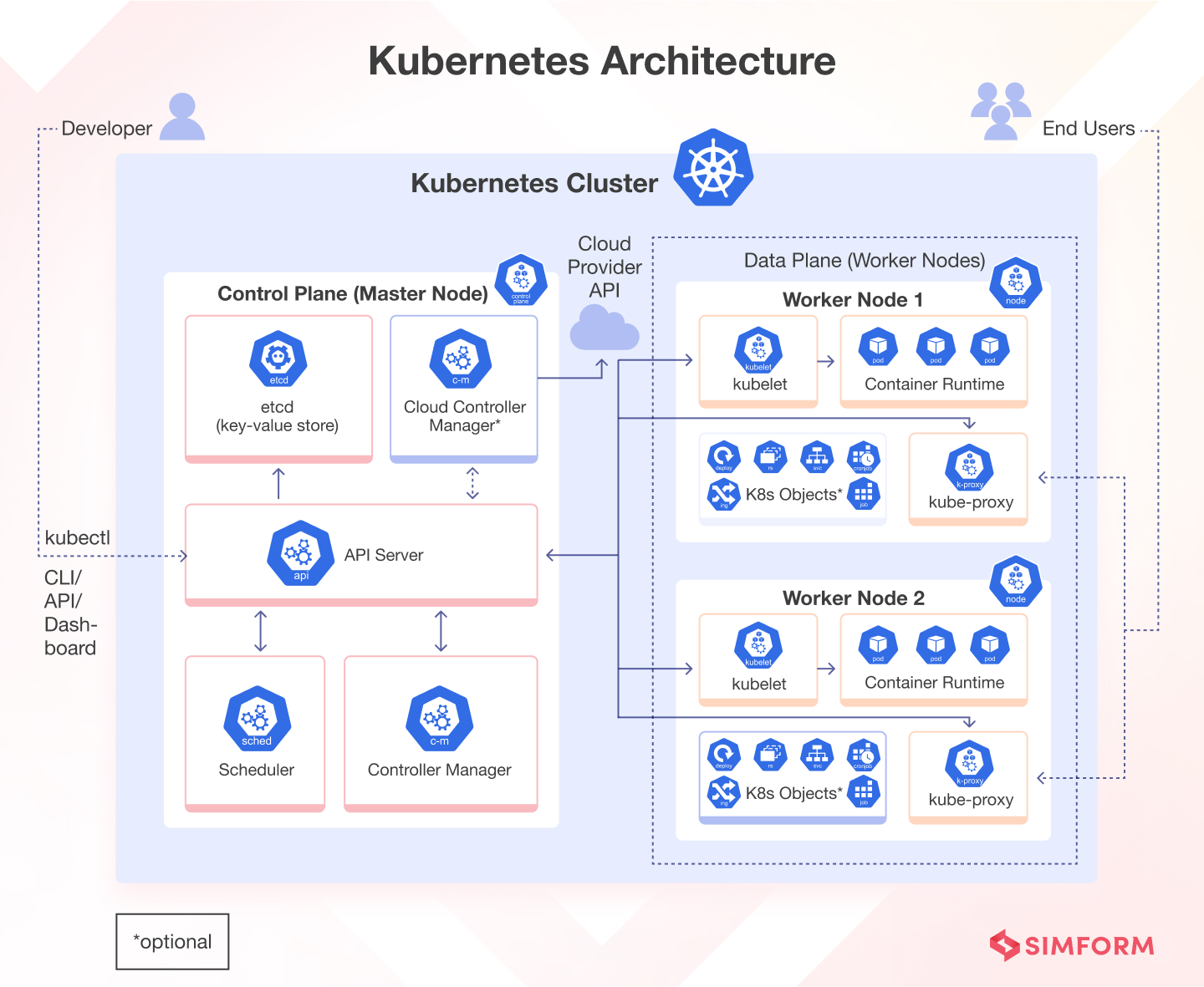
The Control Plane: The Brain of the Operation
The control plane is responsible for maintaining the desired state of the cluster. For example, if you declare that you want three instances of your order-service running, the control plane's job is to ensure that three instances are always running, even if a node fails.
A Deep Dive Into Kubernetes Components
To understand how the control plane achieves this, we need to look at its core components. The article 'A Deep Dive Into Kubernetes Components' from dev.to provides a clear breakdown. Let's start with the control plane.
Please read the introduction and the section 'Control plane'. Focus on understanding the distinct role of each of the four components: API Server, ETCD, Scheduler, and Controller Manager.
As you've just read, the control plane isn't a single entity but a collection of processes, which usually run on dedicated nodes. Let's summarize the role of each component:
-
API Server (
kube-apiserver): This is the front door of the control plane. All communication, whether from a developer using the command-line tool (kubectl) or from other components within the cluster, goes through the API Server. It exposes a RESTful API, validates requests, and then processes them. It's the central hub for all interactions. -
etcd: This is the cluster's database and its single source of truth. It's a consistent and highly-available key-value store where the entire configuration and state of the cluster is stored. When you ask the API server "what's running?", it queries
etcdto find out. -
Scheduler (
kube-scheduler): This component's sole job is to decide which worker node a newly created Pod should run on. It watches for Pods that don't have a node assigned and finds the best fit based on factors like resource availability, labels, and other constraints. It doesn't run the Pod; it just assigns it to a node. -
Controller Manager (
kube-controller-manager): This component acts like a thermostat. It runs various "controller" processes in the background. Each controller is responsible for a specific aspect of the cluster. For example, theNode Controllernotices when nodes go down, and theReplication Controllerensures the correct number of Pods are running for a service. These controllers constantly watch the cluster's state (via the API server) and work to drive the actual state towards the desired state stored inetcd.
A Quick Note on Terminology
You might sometimes hear the control plane nodes referred to as "master nodes." While they mean the same thing, the community has largely moved away from this term.
The Complete Guide to the Kubernetes Control Plane
For a senior-level interview, using precise and current terminology matters. Let's briefly read why 'control plane' is the preferred term.
Read the section 'What Is the Difference between the Master Node and Control Plane in Kubernetes?'. It provides context on the evolution of the term.
Using "control plane" more accurately reflects the distributed nature of these management components and avoids the implication of a single point of failure.
Worker Nodes: Where Your Code Runs
Worker nodes are the workhorses of the cluster. They host the Pods that are the components of your application. Each worker node runs a few key processes to communicate with the control plane and manage the containers.
A Deep Dive Into Kubernetes Components
Now let's look at the components that run on every worker node, using the same 'Deep Dive' article.
Read the section 'Worker nodes' to understand the roles of the Kubelet, Container Runtime, and Kube Proxy.
Here’s a summary of the components on each worker node:
-
Kubelet: This is the primary agent that runs on each worker node. It registers the node with the control plane and watches the API Server for Pods that have been scheduled to its node. It then ensures the containers described in those Pods are running and healthy. It's the local boss, executing orders from the control plane.
-
Container Runtime: This is the software responsible for running containers. While Docker is a well-known example, Kubernetes supports any runtime that adheres to the Container Runtime Interface (CRI), such as
containerdorCRI-O. This is the engine that actually starts and stops your containers. -
Kube Proxy (
kube-proxy): This is a network proxy that runs on each node. It maintains network rules on the node, which allow for network communication to your Pods from both inside and outside the cluster. It's fundamental to the Kubernetes networking model and is what makes it possible to access your services via a stable IP address.
The Smallest Deployable Unit: The Pod
You might have noticed we keep mentioning "Pods" instead of "containers." This is a critical distinction in Kubernetes.
A Pod is the smallest and simplest deployable unit in Kubernetes. A Pod represents a single instance of a running process in your cluster.
Key characteristics of a Pod:
- A Pod wraps one or more containers. The "one container per Pod" model is the most common use case.
- All containers within a single Pod share the same network namespace (they can find each other on
localhost) and can share storage volumes. - Each Pod gets its own unique IP address within the cluster.
Think of a Pod as a logical host for your container. It provides the runtime environment, unique network identity, and storage context. The decision to not deploy containers directly but to wrap them in this Pod object is one of the foundational design choices of Kubernetes, providing a powerful layer of abstraction.
Test your understanding!
A developer notices that newly created Pods for a service are stuck in a Pending state indefinitely. Based on the roles of the control plane components, which one is most likely the bottleneck, and why?
Show answer
The Scheduler is the most likely bottleneck. The Pending state means the Pod has been accepted by the cluster (stored in etcd) but has not yet been assigned to a worker node. The Scheduler's job is to find a suitable node. If it cannot find any node that meets the Pod's resource requests (e.g., CPU, memory) or other constraints, the Pod will remain Pending.
Tying It All Together: From kubectl to Running Container
To see how these components work in concert, let's walk through the lifecycle of a deployment.
A Deep Dive Into Kubernetes Components
This is often a great topic for an interview discussion, as it demonstrates a deep understanding of the system's mechanics. The 'Deep Dive' article has a fantastic section that narrates this process.
Please read the sections 'Pods, Replicasets and Deployments' for a quick primer, and then 'The Prestige' for the step-by-step story of how a Deployment definition becomes a running application.
This sequence of events is a perfect illustration of Kubernetes's declarative and event-driven nature. Each component has a single responsibility and communicates through the API server, reacting to changes in the cluster's state stored in etcd. You don't tell Kubernetes how to do something; you declare the state you want, and the controllers work to make it happen.
Conclusion
In this lesson, we've unpacked the fundamental architecture of Kubernetes. Understanding this separation of concerns between the control plane and worker nodes is essential for troubleshooting, designing, and operating applications at scale.
Key Takeaways:
- A Kubernetes cluster consists of a Control Plane (the brain) and Worker Nodes (the muscle).
- The Control Plane's key components are the API Server (front door), etcd (database), Scheduler (matchmaker), and Controller Manager (thermostat).
- Each Worker Node runs a Kubelet (node agent), a Container Runtime (engine), and a Kube Proxy (network manager).
- The Pod is the smallest deployable unit in Kubernetes, acting as a logical host for one or more containers.
- Kubernetes operates on a declarative model: you define the desired state, and controllers work to achieve it.
Now that you understand the underlying architecture, we can move on to using it. In our next lesson, you will get hands-on and implement a Kubernetes Deployment to manage application replicas and perform rolling updates for zero-downtime deployments. You'll write your first piece of Kubernetes configuration and see these architectural concepts in action.
Can't find a good explanation? Sign up and we'll make it for you
Sign up