
Hello! Welcome back to our series on deploying microservices with Kubernetes.
In our last lesson, we mastered how to route external traffic to our services using Kubernetes Ingress. We can now deploy our applications, expose them internally with Services, and manage external access through a single, intelligent entry point. However, our application pods still have a critical flaw: configuration details like database connection strings or feature flags are likely hardcoded into the container image. This violates a core principle of cloud-native development, specifically the "Config" factor of the Twelve-Factor App methodology, which states that configuration should be strictly separated from code.
Today, we'll fix that. This lesson is focused on how to externalize application configuration using ConfigMaps and inject sensitive data using Secrets. These are Kubernetes' native objects for managing configuration, allowing you to build portable, environment-agnostic applications. Mastering this is essential for production deployments and a frequent topic in system design and microservices interviews.
Why Externalize Configuration?
Before diving into the "how," let's solidify the "why." Storing configuration in the environment enables you to:
- Use the exact same container image across all environments (dev, staging, production).
- Change configuration without rebuilding and redeploying your application image.
- Prevent sensitive data like passwords and API keys from being checked into version control.
- Allow cluster operators to manage configuration and secrets separately from the application developers.
Kubernetes provides two primary resources for this: ConfigMaps and Secrets.
ConfigMaps vs. Secrets: The Fundamental Distinction
At a high level, both ConfigMaps and Secrets are key-value stores. The crucial difference lies in their intended use case and security posture.

As the image shows:
- ConfigMaps are for non-sensitive, plain-text configuration data: feature flags, service URLs, logging levels, etc.
- Secrets are specifically designed for sensitive data: passwords, API keys, TLS certificates, etc.
A common interview question revolves around the security of Secrets. It's critical to know that by default, the data in a Secret is only Base64 encoded, not encrypted. Base64 is a form of encoding, not encryption, and can be easily reversed. The real security benefits of Secrets come from:
- RBAC (Role-Based Access Control): Kubernetes allows you to define strict policies on which users or service accounts can read a particular Secret.
- Separation: It prevents developers from accidentally committing credentials to a Git repository.
- Encryption at Rest (Optional): A cluster administrator can configure Kubernetes to encrypt Secret data when it's stored in its database (etcd).
Let's dig a little deeper into how they work.
The Mechanics of Spring Boot Integration with Kubernetes
The article 'The Mechanics of Spring Boot Integration with Kubernetes' gives a good overview of how ConfigMaps and Secrets function internally. Please read the following sections to understand their structure.
Read the sections 'How ConfigMaps Work in Kubernetes' and 'Secrets for Managing Sensitive Data'. Focus on how they are stored in etcd and the basic structure of their YAML definitions.
Consuming Configuration: Environment Variables vs. Mounted Volumes
Now that we know what ConfigMaps and Secrets are, how does our application, running in a Pod, actually access this data? There are two main methods, and the choice between them involves a significant trade-off that you should be prepared to discuss.
-
Injecting as Environment Variables: You can expose keys from a ConfigMap or Secret as environment variables within the container.
- Pro: Simple to configure and widely understood. Many applications are already built to read configuration from the environment.
- Con: Static. The environment variables are set when the container starts. If you update the ConfigMap or Secret, you must restart the Pod for the changes to be picked up.
-
Mounting as a Volume: You can mount a ConfigMap or Secret as a volume, where each key-value pair becomes a file in a specified directory inside the container.
- Pro: Dynamic. The files in the mounted volume are automatically updated by Kubernetes shortly after you change the ConfigMap or Secret. An application that can watch for file changes can reload its configuration without a restart.
- Con: Requires the application to be able to read configuration from files and potentially reload it at runtime.
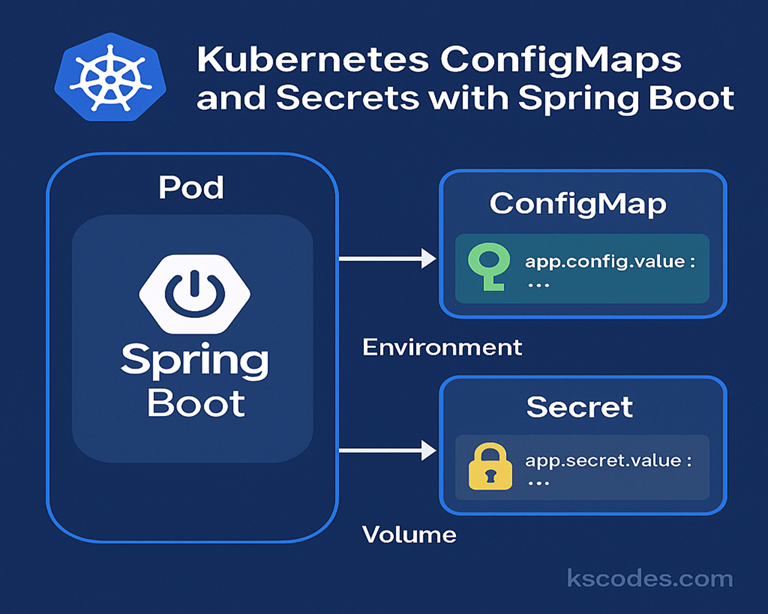
This choice between static (env vars) and dynamic (volumes) configuration is a classic architectural trade-off.
The Mechanics of Spring Boot Integration with Kubernetes
Let's revisit the article to read more about this dynamic update behavior, which is a key advantage of using mounted volumes.
Read the section 'Dynamic Configuration Management'. This section directly contrasts the behavior of mounted volumes and environment variables when a ConfigMap or Secret is updated.
Making it Seamless with Spring Boot and Spring Cloud Kubernetes
As a Spring Boot developer, you might be wondering how to integrate all of this. Do you need to manually read files or parse environment variables? Thankfully, no. The spring-cloud-kubernetes project provides a powerful and transparent integration.
By including the spring-cloud-starter-kubernetes-fabric8-config (or kubernetes-client-config) dependency in your project, your Spring Boot application will automatically:
- Connect to the Kubernetes API at startup.
- Discover ConfigMaps and Secrets relevant to it.
- Make their data available as
PropertySources within the SpringEnvironment, just like properties fromapplication.properties.
This means you can continue using @Value and @ConfigurationProperties as you normally would, without any Kubernetes-specific code.
Using a ConfigMap PropertySource :: Spring Cloud Kubernetes
The official Spring Cloud Kubernetes documentation explains this integration in detail. Let's walk through the most important concepts.
Please read the following parts: Start at the top and read until you see the YAML example for 'my-app'. This introduces the concept and explains that by default, it looks for a ConfigMap with the same name as your spring.application.name. Continue reading the section that explains how properties are loaded from that 'my-app' ConfigMap. Focus on the order of precedence: profile-specific YAML (my-app-k8s.yaml) overrides base YAML (my-app.yaml), and plain key-value pairs override both. Finally, read about how to handle profile-specific configurations, including the example of activating a profile in a Deployment's environment variables. Note that the documentation mentions everything applies to Secrets as well.
To summarize the key takeaways from the documentation:
- Automatic Discovery: Spring Cloud Kubernetes finds ConfigMaps based on
spring.application.name. For an app namedorder-service, it will look for a ConfigMap namedorder-service. - Flexible Content: You can define properties as simple key-value pairs (
some.prop: value) or embed a fullapplication.yamlorapplication.propertiesfile as a single key. - Profile Support: It automatically loads profile-specific sources. If the
k8sprofile is active, it will look fororder-service-k8sin addition toorder-service, with the profile-specific properties taking precedence. This works just like Spring profiles locally.
Test your understanding!
Your Spring Boot application is named payment-service and is deployed with the prod profile active (SPRING_PROFILES_ACTIVE=prod).
You have the following ConfigMap in your cluster:
apiVersion: v1
kind: ConfigMap
metadata:
  name: payment-service
data:
  # A property as a simple key-value
  gateway.timeout.ms: "5000"

  # An embedded application.yaml
  application.yaml: |-
    gateway:
      url: https://api.default-gateway.com
    feature-flags:
      new-checkout: false

  # An embedded profile-specific yaml
  application-prod.yaml: |-
    gateway:
      url: https://api.prod-gateway.com
    feature-flags:
      new-checkout: true
What will be the values of gateway.url, gateway.timeout.ms, and feature-flags.new-checkout in your running application?
Show answer
Based on Spring Cloud Kubernetes's property source ordering:
- It first loads
application.yaml. - Then it loads
application-prod.yaml, which overrides properties from the base file. - Finally, it loads the top-level key-value pairs, which have the highest precedence.
The final values will be:
gateway.url:https://api.prod-gateway.com(fromapplication-prod.yaml)gateway.timeout.ms:5000(from the top-level key-value pair)feature-flags.new-checkout:true(fromapplication-prod.yaml)
Production Considerations and Advanced Patterns
For a mid-senior level interview, you should be aware of more advanced patterns and production best practices.
- Handling Multiple ConfigMaps: What if configuration is split across multiple ConfigMaps?
spring-cloud-kubernetesallows you to explicitly list them. To avoid property name collisions, you can configure it to automatically prefix properties with the name of the source ConfigMap (e.g.,config-map-one.property.name). This is covered in the documentation (LINK) underuseNameAsPrefix. - Secrets Management: While Kubernetes Secrets are a good start, many organizations (especially FAANG and fintech) use dedicated external secret management systems like HashiCorp Vault or cloud-specific services (AWS Secrets Manager, GCP Secret Manager). These tools provide advanced features like dynamic secret generation, automatic rotation, and detailed audit logs. Spring Cloud also has integrations for these systems. Mentioning this shows you're thinking about enterprise-grade security.
- Fail-Fast: What if a required ConfigMap is missing when your application starts? By default, Spring will start with missing properties. For production, you can set
spring.cloud.kubernetes.config.fail-fast=trueto make the application startup fail immediately, which is often safer than running in a misconfigured state.
Conclusion
You've now learned how to decouple your application's configuration from its code, a critical step towards building robust, cloud-native microservices. By using ConfigMaps and Secrets, you can create a single, portable application image that can be deployed across any environment with the appropriate configuration injected at runtime.
Key Takeaways:
- ConfigMaps are for non-sensitive configuration; Secrets are for sensitive data.
- Secrets are Base64 encoded, not encrypted by default. Their security comes from RBAC and separation from code.
- Configuration can be consumed as environment variables (static) or mounted volumes (dynamic). This is a key trade-off.
- Spring Cloud Kubernetes provides seamless integration, automatically creating
PropertySources from ConfigMaps and Secrets, fully supporting Spring's existing profile and property precedence mechanisms.
In our next lesson, we'll address another critical aspect of production readiness: health checks. Now that we can deploy our application with the correct configuration, we need a way to tell Kubernetes whether it's running correctly and ready to receive traffic. We will explore how to implement liveness and readiness probes for automated container health management.
Can't find a good explanation? Sign up and we'll make it for you
Sign up