
Hello! Welcome back.
In our last lesson, we focused on Kubernetes Deployments, learning how to manage application replicas and perform zero-downtime rolling updates. You now have a robust way to run your stateless applications, but a critical piece is still missing: how do clients (either users or other microservices) find and communicate with these Pods? Pods are ephemeral; they come and go, and their IP addresses change. Relying on Pod IPs directly is not a viable strategy.
This lesson directly addresses that problem. Our learning outcome is to expose applications using different Kubernetes Service types (ClusterIP, NodePort, LoadBalancer). A Kubernetes Service provides a stable network endpoint for a set of Pods, decoupling the consumer from the individual, transient Pods that are managed by a Deployment. Understanding how to choose the right Service type is fundamental for building and operating microservices on Kubernetes and a common topic in system design interviews.
The Role of the Kubernetes Service
At its core, a Service is an abstraction that defines a logical set of Pods and a policy by which to access them. It gives you a single, stable DNS name and IP address that front-ends a group of Pods. When a request hits the Service's IP, Kubernetes automatically routes it to one of the healthy backend Pods.
This is made possible by a simple yet powerful mechanism: labels and selectors.
- Your Deployment's Pod template includes labels (key-value pairs), for example,
app: user-service. - Your Service definition includes a selector that matches those labels, for example,
selector: app: user-service.
This link allows the Service to dynamically discover which Pods to send traffic to, no matter how many there are or what their individual IPs are.
Kubernetes offers several types of Services, each suited for a different use case. Let's explore the three most common ones.
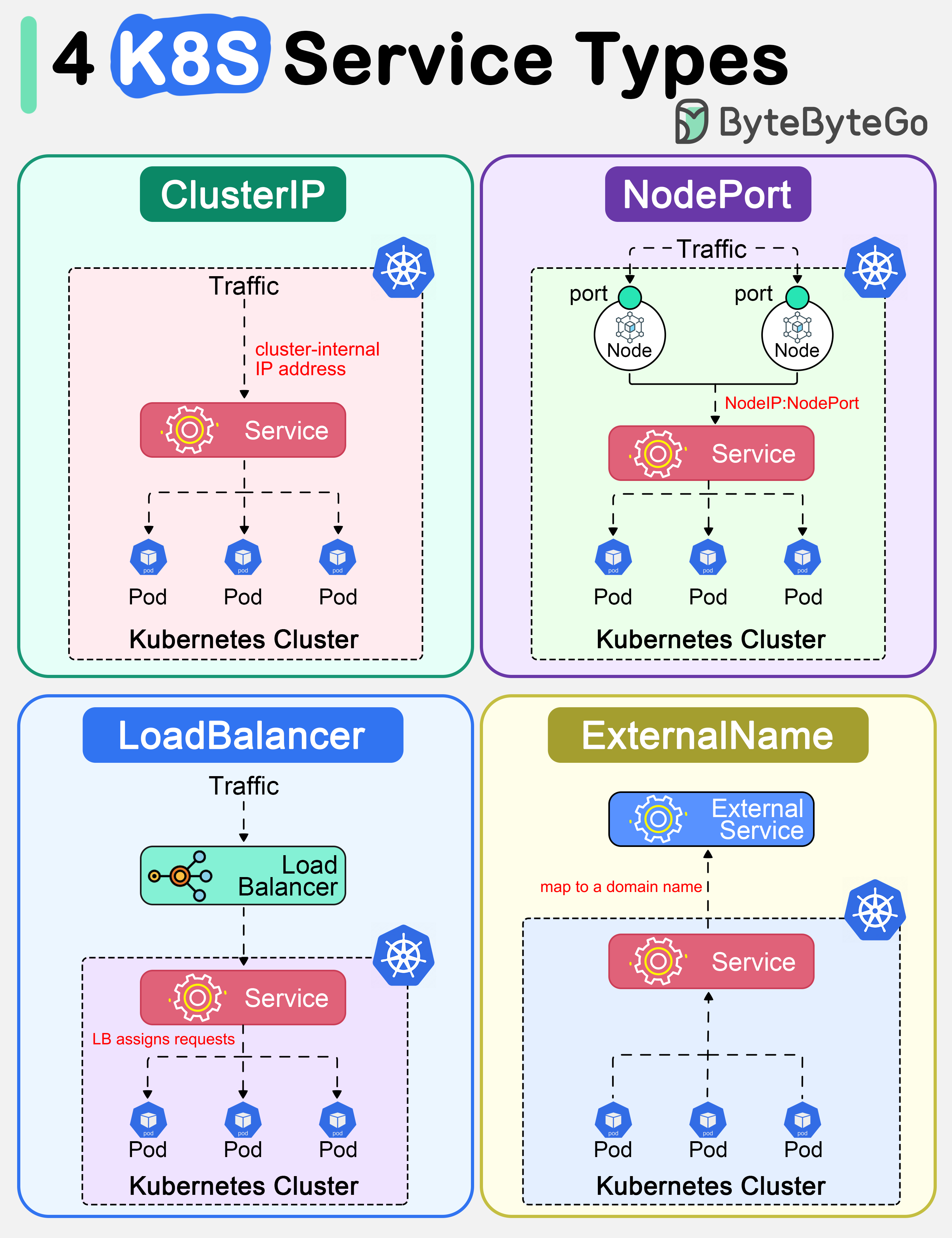
1. ClusterIP: For Internal Communication
The ClusterIP is the default and most basic Service type. It exposes the Service on an IP address that is only accessible from within the cluster. This makes it perfect for communication between different microservices.
For instance, your order-service might need to call your payment-service. You would expose the payment-service using a ClusterIP Service. The order-service can then reliably connect to the payment-service using its stable service name (e.g., http://payment-service), without ever needing to know the individual IP addresses of the payment Pods.
To get a deeper understanding of its mechanics and use cases, let's turn to a detailed guide.
The article 'A Deep Dive into Kubernetes Service Types' provides an excellent, in-depth explanation of ClusterIP. It covers its purpose, how it aids service discovery, and its security benefits.
Please read the sections from 'The Purpose of ClusterIP' up to (but not including) 'The Functionality and Purpose of NodePort'. Focus on understanding why it's the default and its primary role in facilitating secure, internal-only communication.
As you've read, ClusterIP is the workhorse for internal traffic. It provides a natural security boundary by not exposing services to the public internet. Kubernetes handles service discovery automatically through its internal DNS system, which maps the service name to its internal cluster IP.
Here is what a ClusterIP Service definition looks like in YAML.
apiVersion: v1
kind: Service
metadata:
  name: my-backend-service
spec:
  # type: ClusterIP # This is the default, so it can be omitted
  selector:
    app: my-app # This must match the labels on your Pods
  ports:
    - protocol: TCP
      port: 80       # The port the service will be exposed on within the cluster
      targetPort: 8080 # The port on the Pod that the traffic will be forwarded to
In your Spring Boot application, targetPort would typically be the port your application server (like Tomcat) is listening on, which you've configured in application.properties (e.g., server.port=8080).
2. NodePort: Quick External Access for Development
What if you need to access your application from outside the cluster, for example, during development or for a quick demo? This is where the NodePort Service type comes in.
A NodePort Service builds upon ClusterIP. It does everything a ClusterIP Service does, but it also exposes the Service on a specific port on each Node in the cluster. You can then access the Service from outside by hitting <NodeIP>:<NodePort>.
Let's continue with the same article to learn about NodePort.
Now, read the sections from 'The Functionality and Purpose of NodePort' up to (but not including) 'Introduction to LoadBalancer Services'. Pay attention to its use cases and its limitations, such as the dependency on node IPs and the static port range.
Key takeaways about NodePort:
- It exposes a static port (by default from the
30000-32767range) on every node. - Traffic to any node on that port is forwarded to the service.
- It's useful for scenarios where a cloud load balancer isn't available (like on-premise or bare-metal clusters) or for temporary external access.
Here's the YAML for a NodePort service:
apiVersion: v1
kind: Service
metadata:
  name: my-nodeport-service
spec:
  type: NodePort # Explicitly set the type
  selector:
    app: my-app
  ports:
    - protocol: TCP
      port: 80
      targetPort: 8080
      nodePort: 30007 # Optional: you can specify a port, otherwise K8s assigns one
While useful, NodePort is generally not suitable for production public-facing services. Clients would need to know a node's IP, and you'd have to manage what happens if that specific node fails.
3. LoadBalancer: Production-Ready External Access
For production applications running in a cloud environment (like AWS, GCP, or Azure), the LoadBalancer Service type is the standard way to expose a service to the internet.
This Service type builds on NodePort. When you create a LoadBalancer Service, Kubernetes automatically provisions an external load balancer from the underlying cloud provider. This load balancer gets a stable, public IP address and is configured to route traffic to the NodePort on your cluster's nodes.
This completely abstracts away the nodes. Your users and clients connect to the single public IP of the load balancer, which then distributes traffic across your application Pods.
The final service type we'll cover is LoadBalancer. The same article explains how it integrates with cloud providers to offer a robust solution.
Please read from 'Introduction to LoadBalancer Services' up to (but not including) 'Comparison with ClusterIP and NodePort'. Focus on its advantages for production workloads and its main limitation: cost and cloud dependency.
The LoadBalancer type is powerful because of its simplicity from a user's perspective. You declare your intent in YAML, and the cloud platform does the heavy lifting of provisioning and configuring the necessary network infrastructure.
The YAML is straightforward:
apiVersion: v1
kind: Service
metadata:
  name: my-loadbalancer-service
spec:
  type: LoadBalancer # The key change
  selector:
    app: my-app
  ports:
    - protocol: TCP
      port: 80       # The port the external load balancer will listen on
      targetPort: 8080
Upon applying this, kubectl get services would initially show <pending> in the EXTERNAL-IP column. After a minute or two, the cloud provider will finish provisioning, and a public IP address will appear.
Choosing the Right Service Type: An Interview Perspective
In an interview, you'll be expected to justify your architectural choices. Knowing the "what" is good, but knowing the "when" and "why" is what distinguishes a senior developer.
Let's read the final comparison section of the article to solidify our understanding of the trade-offs.
Read the short section 'Comparison with ClusterIP and NodePort'. This summarizes the trade-offs between accessibility and infrastructure dependency.
This comparison table provides an excellent summary of the key differences and is a great resource to have in your mental toolkit.
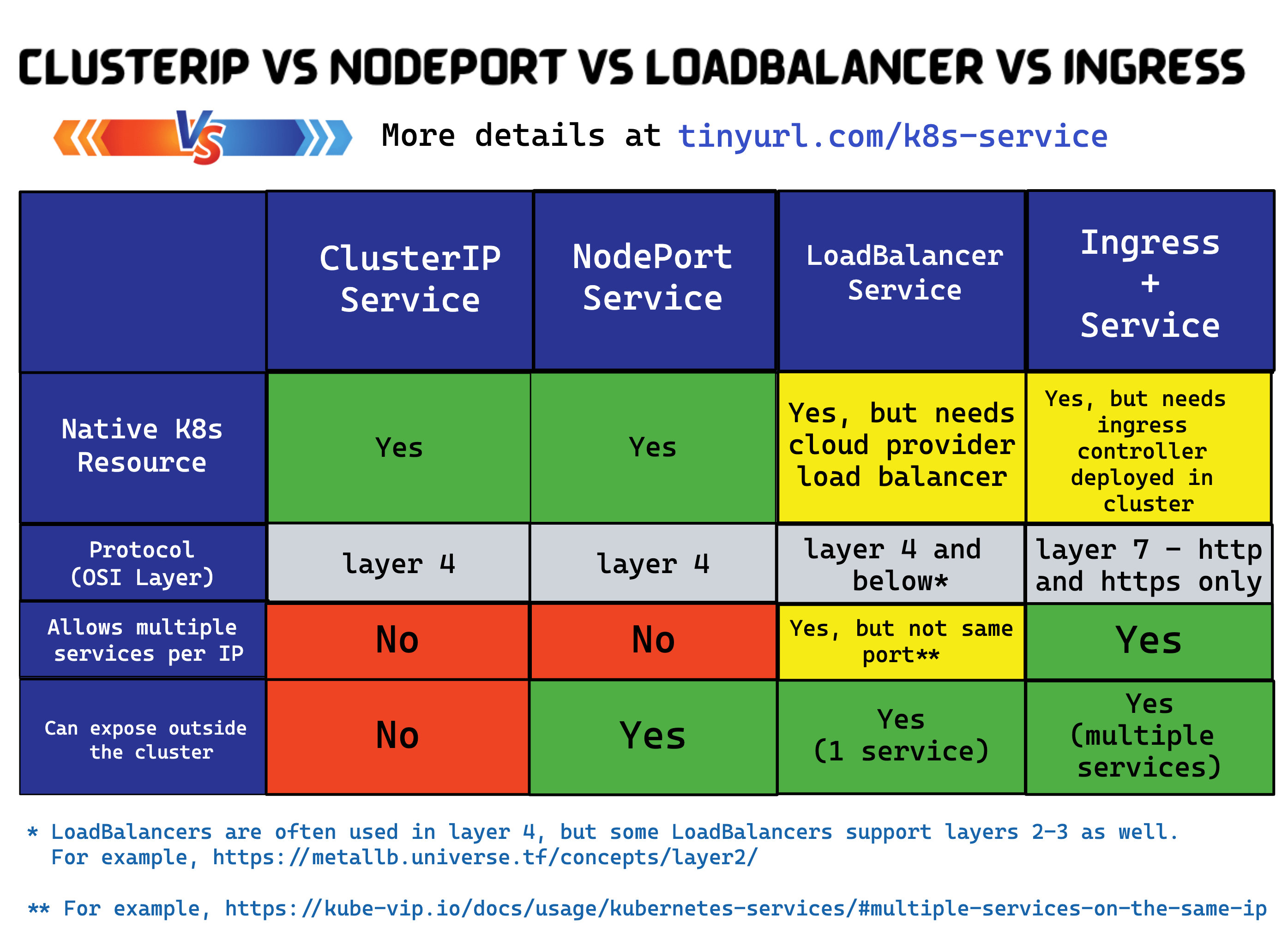
Here's how to think about it for an interview:
- ClusterIP: The default for all internal, service-to-service communication. It's secure and efficient. Use it for backend services, databases, caches, and message queues that should not be exposed to the outside world.
- NodePort: A utility player. Use it for development and testing, for exposing admin dashboards with limited access, or in on-premise environments where you manage your own load balancing hardware. Avoid it for primary, public-facing production traffic.
- LoadBalancer: The go-to for exposing a single, public-facing service in the cloud. It's simple, reliable, and integrates well with the cloud ecosystem. Its main drawback is that each Service of this type provisions a new, often costly, cloud load balancer.
Test your understanding!
You are designing a simple e-commerce application on Kubernetes with three microservices:
- A public-facing
api-gatewaythat handles all incoming user requests. - An internal
product-servicethat manages the product catalog. - An internal
order-servicethat handles order processing.
Which Service type would you choose for each microservice, and why?
Show answer
-
api-gateway:LoadBalancer. This service is the single entry point for all external users. It needs a stable, public IP address that is highly available. ALoadBalancerService is the standard, production-grade way to achieve this in a cloud environment. -
product-service:ClusterIP. This service only needs to be accessed by other services within the cluster (specifically, theapi-gateway). There is no reason to expose it externally.ClusterIPprovides secure, internal-only communication and allows theapi-gatewayto find it via its internal DNS name (http://product-service). -
order-service:ClusterIP. Similar to theproduct-service, this service handles business logic that should only be invoked by trusted services within the cluster. Exposing it externally would be a security risk.ClusterIPis the correct choice.
Conclusion
Today, we've connected the dots between running your application in Pods and making it accessible. You've learned how Kubernetes Services provide a stable networking abstraction over ephemeral Pods using labels and selectors.
Key Takeaways:
- Services provide stable IP addresses and DNS names for accessing groups of Pods.
ClusterIPis the default type for internal-only communication, ideal for backend microservices.NodePortexposes services on a static port on each node, useful for development or non-cloud environments.LoadBalanceris the standard for exposing services to the internet in a cloud environment, automatically provisioning an external load balancer.- Choosing the right Service type involves balancing accessibility, security, and cost—a key architectural trade-off.
We've noted that using a LoadBalancer for every public service can be expensive and inefficient. What if you have dozens of microservices that need to be exposed via HTTP/S? This is a very common scenario. Our next lesson will introduce the solution: implementing HTTP routing to services using an Ingress controller and Ingress resources. Ingress provides a more sophisticated, Layer 7 routing mechanism that allows you to expose many services through a single load balancer.
Can't find a good explanation? Sign up and we'll make it for you
Sign up