
Hello! Welcome back to our module on Event-Driven Architecture with Kafka.
In our previous lessons, we've focused on the "what" of our events—defining their structure with JSON or Avro and managing their evolution safely with a Schema Registry. Now, we shift our focus to the "how"—how we process these events at scale.
Today's lesson addresses a fundamental challenge in distributed systems: achieving both high throughput and correct message ordering. Your learning outcome is to configure Kafka partitions and consumer groups for scalable parallel processing with message ordering guarantees. Mastering this balance is a hallmark of a senior engineer and a frequent topic in microservices interviews.
1. The Foundation: Partitions and Consumer Groups
To understand how Kafka achieves massive scalability, we must first understand its core unit of parallelism: the partition. A Kafka topic is not a single log; it's a collection of one or more independent logs, each called a partition. When a producer sends a message to a topic, it's appended to one of these partitions.
On the other side, we have consumers. To process messages in parallel, we group consumer instances into a consumer group. Kafka's key rule for distributing work is:
Within a consumer group, each partition is assigned to exactly one consumer instance.
This model allows you to scale out your processing by simply adding more consumer instances to the group. Kafka automatically handles distributing the partitions among them.
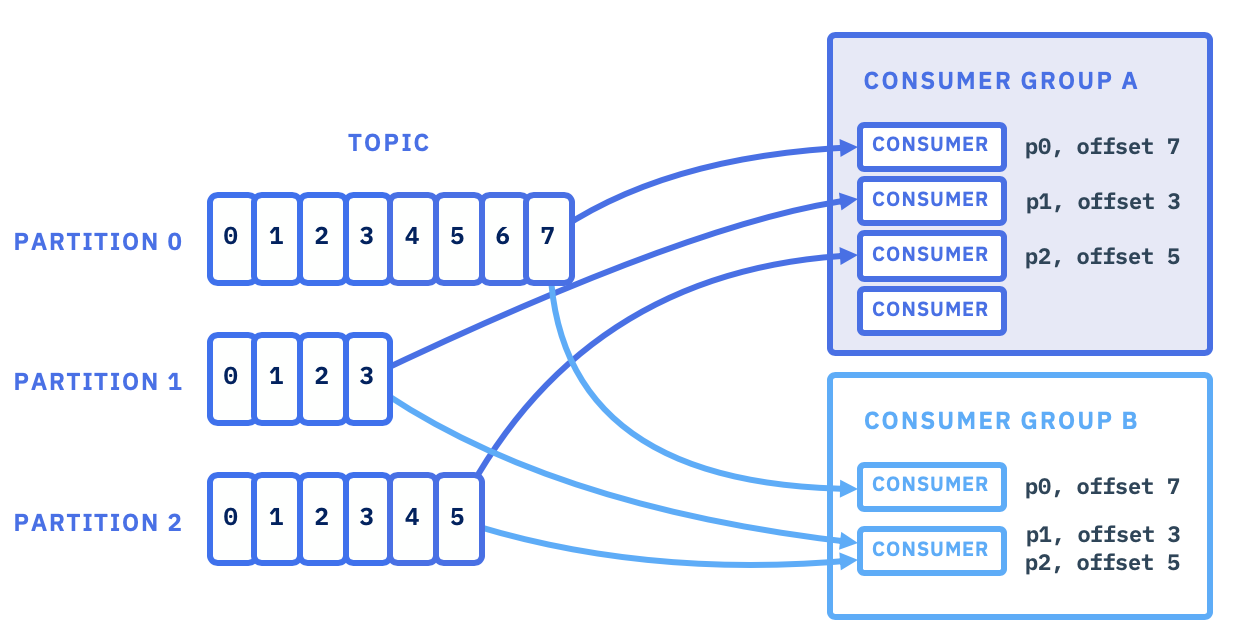
To leverage this, you must create your topic with a sufficient number of partitions. In Spring Boot, you can do this programmatically with a NewTopic bean:
@Bean
public NewTopic orderEvents() {
    // Topic name, number of partitions, replication factor
    return new NewTopic("order-events", 8, (short) 3);
}
Having more partitions than you currently need is a common practice, as it allows for future scaling of consumers without re-partitioning the topic (which is a complex operation).
2. The Scalability vs. Ordering Trade-off
Partitions are great for parallelism, but they introduce a critical trade-off. Kafka makes one firm guarantee:
Kafka guarantees the order of messages only within a single partition.
It does not guarantee any ordering for messages across different partitions. If events related to the same business entity (like a customer order) land on different partitions, consumers might process them in the wrong sequence.
Does Kafka Guarantee Message Ordering? 🤔 Microservices Fix Inside !
To understand this core problem, let's watch a segment from a video by 'Java Techie' that uses an excellent analogy.
Watch from 01:19 to 05:09. Pay attention to the delivery guy analogy and how it maps to Kafka partitions. The video then applies this to an e-commerce example, showing how events for the same order (order-created, payment-processed, etc.) can be processed out of order if they are distributed randomly across partitions.
This is the central problem we need to solve: how can we scale out with multiple partitions while ensuring that logically related events are processed sequentially?
3. Solution Part 1: Producer-Side Partitioning with Keys
The solution lies in controlling which partition a message is sent to. We need to ensure that all messages that require ordering relative to one another are sent to the same partition. We achieve this by assigning a partition key to our messages.
When a producer sends a message with a key, Kafka's partitioner applies a hash function to the key to determine the partition: hash(key) % number_of_partitions. This ensures that messages with the same key will always be routed to the same partition.
For our e-commerce example, the orderId would be the perfect partition key. All events related to a specific order (OrderCreated, PaymentProcessed, OrderShipped) would share the same orderId key, land in the same partition, and therefore be consumed in the correct order.
In Spring Cloud Stream, you can set the key on your outgoing message. The framework then handles the rest.
Partitioning with the Kafka Binder
Spring Cloud Stream provides a declarative way to control partitioning. Let's look at the official documentation for the recommended approach.
Read the initial section of the document. Note the two approaches presented: partition-key-expression: This is a Spring Cloud Stream abstraction. Native Kafka Partitioning: This involves setting the KafkaHeaders.KEY header. This is the more direct and common method for interacting with Kafka's native partitioning logic, which is our focus.
Here is a typical implementation using MessageBuilder to set the native Kafka key:
import org.springframework.kafka.support.KafkaHeaders;
import org.springframework.messaging.Message;
import org.springframework.messaging.support.MessageBuilder;

// Inside your producer/supplier...
public Message<OrderEvent> produceOrderEvent(OrderEvent event) {
    return MessageBuilder.withPayload(event)
                         .setHeader(KafkaHeaders.KEY, event.getOrderId())
                         .build();
}
Now, let's see a practical demonstration of this solving our ordering problem.
Does Kafka Guarantee Message Ordering? 🤔 Microservices Fix Inside !
The same 'Java Techie' video demonstrates how to use a partition key to solve the ordering problem we saw earlier.
Watch from 10:08 to 17:05. The video shows how to modify the producer to send the orderId as the key. Observe in the console logs how all events for the same order now consistently go to the same partition, preserving their sequence.
4. Scaling Consumers and the Rebalancing Protocol
With our producer correctly routing messages, we can now scale our consumer services. When a consumer instance joins or leaves a consumer group, Kafka triggers a rebalance to redistribute the partitions among the available members. This process is automatic but has performance implications that are important to understand for production systems.
Apache Kafka® Consumers and Consumer Group Protocol
To scale our consumers, we run multiple instances of our service within the same consumer group. Kafka then automatically distributes the topic's partitions among them. This process is managed by a sophisticated protocol. The following video from Confluent explains these mechanics in detail.
This video is dense with important concepts for an interview setting. Watch these sections: Consumer Groups and Load Balancing (00:00 - 01:18): Understand how consumer groups enable parallelism. The Group Coordinator (01:18 - 02:55): Learn about the broker-side component that manages the group. Partition Assignment Strategies (04:10 - 06:13): Pay attention to the different strategies like Range, RoundRobin, and Sticky. This is great for discussing trade-offs. Rebalancing and Its Improvements (07:16 - 15:09): This is a critical section. Understand what triggers a rebalance, the problems with 'stop-the-world' rebalancing, and how modern features like cooperative rebalancing and static group membership minimize processing pauses.

Interview Corner: Discussing Rebalancing
- "Stop-the-world" vs. Cooperative Rebalancing: Historically, a rebalance paused all consumers in the group. This "stop-the-world" event could cause significant processing delays. Newer versions of Kafka use a cooperative rebalancing protocol that revokes partitions incrementally, allowing unaffected consumers to continue processing, which dramatically reduces downtime. Knowing this distinction shows you're up-to-date with Kafka's evolution.
- Static Group Membership: In environments like Kubernetes where pods are frequently restarted for updates or node changes, normal rebalancing can be costly. By assigning a stable
group.instance.idto your consumer, you can enable static group membership. This tells the broker to wait a bit (session.timeout.ms) for the specific instance to rejoin, avoiding a full rebalance for transient restarts.
Test your understanding!
You have a Kafka topic with 12 partitions. Your service is configured as a consumer group named payment-processors.
- If you deploy 6 instances of the service, how many partitions will each consumer be assigned (assuming an even distribution)?
- If you deploy 15 instances, how many consumers will be idle?
- An instance crashes. What happens next?
Show answer
- Each consumer will be assigned 2 partitions (12 partitions / 6 consumers).
- 3 consumers will be idle. The 12 partitions will be distributed among the first 12 consumers that join the group. The remaining 3 have no partitions to consume from.
- The Group Coordinator on the broker will detect the crash (via a missed heartbeat). It will trigger a rebalance, and the 12 partitions will be redistributed among the remaining 14 healthy instances.
5. Solution Part 2: Consumer-Side Ordering
There's one final trap. We've ensured messages are ordered correctly in the partition. But what if your consumer logic itself is concurrent? For example, if the Kafka consumer thread hands off each message to a general-purpose thread pool (ExecutorService) for processing, the threads could execute out of order.
Does Kafka Guarantee Message Ordering? 🤔 Microservices Fix Inside !
We have one final challenge. Let's return to the 'Java Techie' video to see how a concurrent consumer can break ordering and, more importantly, how to fix it.
Watch these two segments: The Problem (17:05 - 20:58): See how using a general ExecutorService in the consumer causes messages from the same partition to be processed out of order. The Solution (20:58 - 27:46): The solution is to ensure a dedicated thread per partition. The video shows a clever implementation using a Map to manage a thread pool per partition. This ensures that while you process different partitions in parallel, the messages within each partition are processed sequentially.
This pattern—maintaining a dedicated processing context (like a single thread or a bounded queue) per partition—is a powerful technique for achieving both parallelism across partitions and strict ordering within them.
Conclusion
You have now explored the core mechanics of scalable and ordered message consumption in Kafka. This is a non-trivial aspect of system design, and being able to articulate these concepts clearly is essential for senior-level interviews.
Key Takeaways:
- Partitions are Kafka's unit of parallelism.
- Consumer Groups allow multiple service instances to share the load of consuming from a topic's partitions.
- Kafka guarantees order within a partition, not across them.
- Use partition keys (e.g.,
orderId,customerId) to route related messages to the same partition, thereby preserving their order. - Rebalancing is the automatic process of distributing partitions, but it has a performance cost. Modern Kafka features like cooperative rebalancing and static membership help minimize this.
- Ensure your consumer logic doesn't break ordering. If you process concurrently, dedicate a processing context (like a thread) to each partition.
Next Up
Now that we can process events at scale and in order, what happens when a consumer fails while processing a message? A simple retry might cause the message to be processed more than once, leading to incorrect state (e.g., charging a customer twice). In our next lesson, we will tackle this by learning how to implement idempotent message consumers to ensure events can be safely processed multiple times without harmful side effects.
Can't find a good explanation? Sign up and we'll make it for you
Sign up