
Hello! Welcome back to our module on Event-Driven Architecture with Kafka.
In our last lesson, you learned why a Schema Registry is essential for managing data contracts in a microservices ecosystem. We compared JSON and Avro, concluding that Avro's compact binary format and robust evolution rules make it the superior choice for production-grade, internal communication.
Today, we're putting that theory into practice. Your goal is to implement a backward-compatible schema change for an Avro-serialized event using a schema registry. This is a core skill for any engineer working on event-driven systems. In an interview, demonstrating that you know how to evolve a system's data contracts without causing downtime or data loss is a clear signal of seniority and production experience.
1. What is Schema Evolution?
Schema evolution is the process of managing changes to your event schemas over time. As your application's business requirements change, so will your data. You might need to add new fields, remove obsolete ones, or change data types.
The challenge is to do this without breaking existing producers and consumers. The Schema Registry helps by enforcing compatibility rules. There are several types, but the most common and important one is Backward Compatibility.
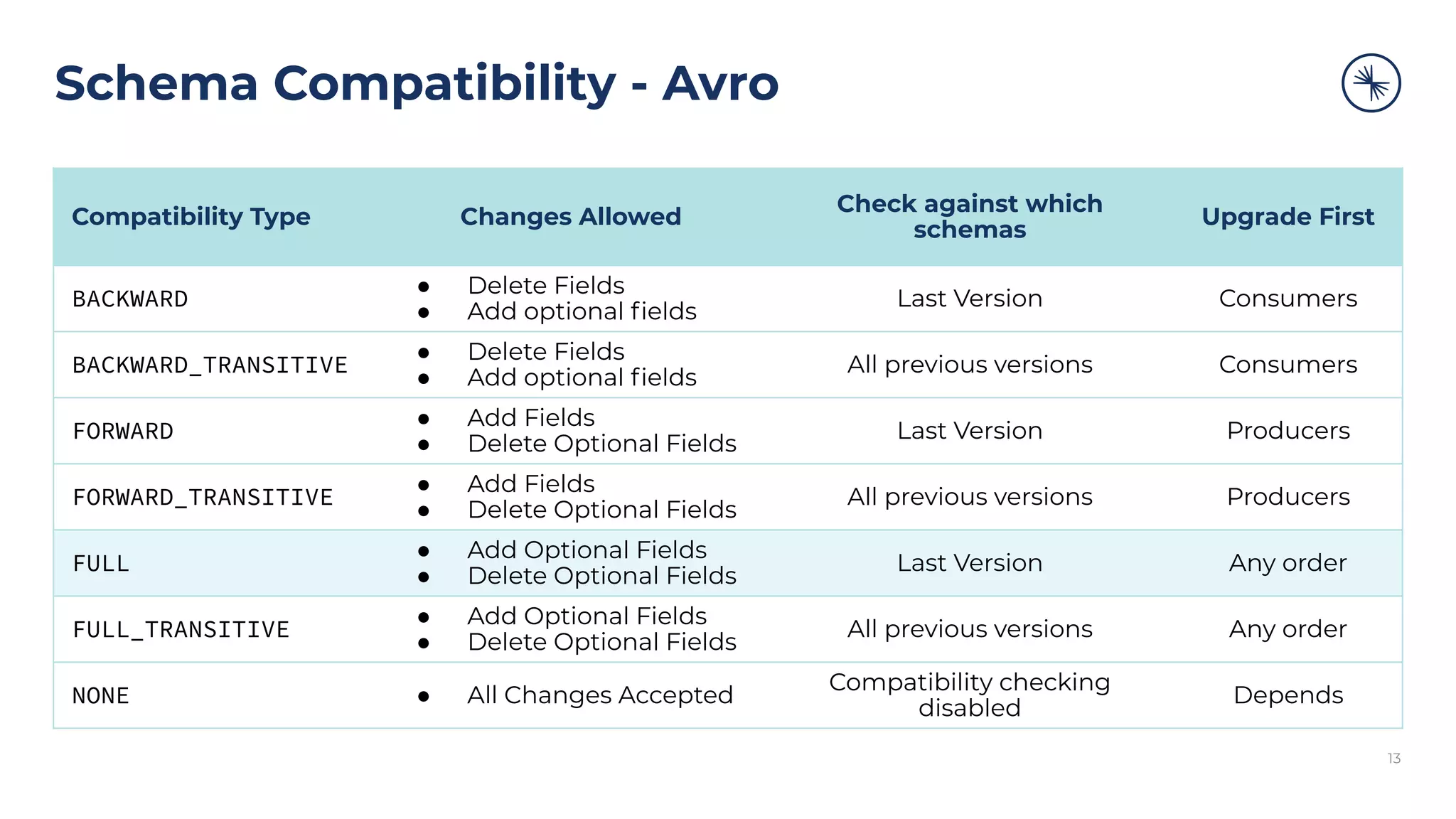
Backward compatibility means that consumers using a newer schema version can still process data produced with an older schema version. This allows you to upgrade your system gracefully:
- Deploy new consumer code: The updated consumers understand both the old and new schema versions.
- Deploy new producer code: The producers can now safely start sending messages with the new schema.
The key rules for a backward-compatible change are:
- You can remove a field.
- You can add a new field, but only if it has a default value.
Let's see how this works in practice.
2. Implementing a Backward-Compatible Change
We will walk through the process of evolving an Employee event schema. This involves defining an initial schema, making a compatible change, and verifying that the system continues to function correctly. The following video provides a complete, hands-on demonstration that we will follow.
Step 1: Project Setup and Initial Schema (V1)
First, let's understand the project structure. A real-world project using Avro typically involves:
- A
docker-compose.ymlfile to run Kafka, Zookeeper, and the Schema Registry locally. - An
.avscfile in your project's resources to define the Avro schema in JSON format. - A Maven or Gradle plugin (
avro-maven-pluginin our case) to automatically generate Java classes from your.avscfile during the build process.
Spring Boot | Kafka Schema Registry & Avro with Practical Example and Implementation | #JavaTechie
The 'Java Techie' video provides a complete walkthrough. Let's start by looking at the setup and the initial schema definition.
Watch from 05:30 to 16:21. You don't need to code along right now, but focus on understanding the key components: The docker-compose.yml file which sets up the Confluent stack (05:30 - 09:51). The creation of the Avro schema file (employee.avsc) and how fields are defined (09:51 - 12:45). The pom.xml configuration, especially the avro-maven-plugin and the Confluent repository, which generates Java classes from the .avsc file (12:45 - 16:21).
Our initial V1 schema (employee.avsc) might look something like this:
{
  "namespace": "com.javatechie.dto",
  "type": "record",
  "name": "Employee",
  "fields": [
    { "name": "id", "type": "string" },
    { "name": "firstName", "type": "string" },
    { "name": "lastName", "type": "string" },
    { "name": "email", "type": "string", "default": "" },
    { "name": "dateOfBirth", "type": "string" },
    { "name": "age", "type": "int" }
  ]
}
When you build your project with mvn clean install, the avro-maven-plugin will generate an Employee.java class in the com.javatechie.dto package. Your Spring Boot application can then use this class to produce and consume type-safe events.
Step 2: Evolving the Schema to V2
Now, let's introduce a backward-compatible change. Imagine the business requirements have changed:
- The
dateOfBirthandagefields are no longer needed. - We need to add a new
departmentfield to track which department an employee belongs to.
To maintain backward compatibility, we will:
- Remove the
dateOfBirthandagefields. - Add the
departmentfield with adefaultvalue. This is crucial. If a new consumer tries to read an old message that doesn't have thedepartmentfield, it will use this default value.
Our new V2 schema (employee.avsc) will look like this:
{
  "namespace": "com.javatechie.dto",
  "type": "record",
  "name": "Employee",
  "fields": [
    { "name": "id", "type": "string" },
    { "name": "firstName", "type": "string" },
    { "name": "lastName", "type": "string" },
    { "name": "email", "type": "string", "default": "" },
    { "name": "department", "type": "string", "default": "General" }
  ]
}
Step 3: Verifying the Change with Schema Registry
What happens when we try to produce a message with this new schema? Let's see it in action. The video demonstrates this perfectly by first trying an incompatible change (adding a field without a default) and then fixing it.
Spring Boot | Kafka Schema Registry & Avro with Practical Example and Implementation | #JavaTechie
Now, let's see how the Schema Registry enforces these rules. The video demonstrates removing fields and then adding a new one, showing both the failure and success cases.
Watch from 39:26 to 49:11. Focus on these key moments: Removing fields (dateOfBirth, age) from the .avsc file (39:26 - 40:45). After regenerating the code, the system continues to work. This is a valid backward-compatible change. Adding a new field without a default value (44:49 - 47:00). Notice that this causes a 409 Conflict: Schema being registered is incompatible with an earlier schema error. The registry rejects the change. Fixing the incompatibility by adding a "default": "..." to the new field in the .avsc file (47:00 - 49:11). This makes the schema change backward-compatible, and the producer can now register the new V2 schema successfully.
This demonstration reveals the power of the Schema Registry. It acts as a gatekeeper, preventing you from deploying code that would break the data contract.
The full workflow is:
- Update the
.avscfile with your changes. - Re-run
mvn clean installto regenerate the Java classes. - Deploy your producer application. On its first attempt to send a V2 message, the Avro serializer will contact the Schema Registry.
- The Schema Registry checks if the new schema is backward-compatible with the previous version.
- If it is compatible, the registry stores the V2 schema, assigns it a new ID, and allows the producer to send the message. If not, it throws an exception, and the message is not sent.
Test your understanding!
You are given the V1 Avro schema for a Product event. The business wants to make several changes for V2.
V1 Schema:
{
  "type": "record",
  "name": "Product",
  "fields": [
    { "name": "productId", "type": "string" },
    { "name": "productName", "type": "string" },
    { "name": "price", "type": "double" }
  ]
}
Which of the following proposed changes for V2 would be accepted by a Schema Registry configured with BACKWARD compatibility?
A. Add a new field: {"name": "category", "type": "string"}
B. Remove the productName field.
C. Add a new field: {"name": "inStock", "type": "boolean", "default": true}
D. Rename the price field to cost.
Show answer
The correct answers are B and C.
- A is incorrect: Adding a new field without a default value is not backward-compatible. A consumer with the V2 schema would not know what value to use for
categorywhen reading a V1 message. - B is correct: Removing a field is a backward-compatible change. A consumer with the V2 schema simply won't have the
productNamefield. When reading a V1 message, it will just ignore theproductNamevalue. - C is correct: Adding a new field with a default value is a valid backward-compatible change. When a V2 consumer reads a V1 message (which lacks the
inStockfield), it will automatically assign the default valuetrue. - D is incorrect: Renaming a field is a breaking change. It is equivalent to removing the old field and adding a new required one. The correct way to handle renaming is by using aliases, which is a more advanced topic.
3. Interview Perspective: Discussing Schema Evolution
In an interview, articulating how and why you make these changes is crucial.
Scenario: "You need to add a 'priority' field to an Order event. How do you do this in a production system with zero downtime?"
Your response should be:
"To add a priority field to the Order event without causing downtime, I would follow a process ensuring backward compatibility.
-
Update the Schema: First, I'd modify the
Order.avscfile. I would add the newpriorityfield and, most importantly, provide adefaultvalue. For example,{\"name\": \"priority\", \"type\": \"int\", \"default\": 5}. This ensures that when new consumers read old messages without this field, they have a sensible value to fall back on. -
Code Generation: I would then rebuild the project, which triggers the
avro-maven-pluginto generate the updatedOrder.javaclass with the new field. -
Deployment Strategy: The deployment must be done in a specific order. First, I would roll out the updated consumer services. Their code now understands both the old schema (without
priority) and the new schema. They can handle both types of messages gracefully. -
Producer Deployment: Once all consumers are updated, I would deploy the updated producer service. When it sends its first message with the new
priorityfield, the Schema Registry will validate the change against the previous version. Since we added a default value, the change is backward-compatible and will be accepted.
This two-step deployment process (consumers first, then producers) combined with a backward-compatible schema change guarantees that the system evolves without any service interruptions or message processing failures."
Conclusion
You have now learned the practical steps to evolve an event schema safely in a running system. This is a fundamental practice for building resilient and maintainable microservices architectures. By mastering schema evolution, you ensure that your services can develop independently while still communicating reliably.
Key Takeaways:
- Backward compatibility is the default and most common strategy for schema evolution, enabling zero-downtime deployments.
- The golden rule for backward compatibility is: add new fields with a
defaultvalue and freely remove old fields. - The Schema Registry acts as a gatekeeper, enforcing compatibility rules and preventing breaking changes from reaching your Kafka topics.
- The correct deployment order is consumers first, then producers.
Next Up
Now that you know how to define and safely evolve events, our next focus will be on processing them efficiently at scale. In the next lesson, we will dive into configuring Kafka partitions and consumer groups for scalable parallel processing with message ordering guarantees. This is the key to unlocking Kafka's massive throughput potential.
Can't find a good explanation? Sign up and we'll make it for you
Sign up