Recommended resources
The freely available resources this lesson will direct you to.
- Instagram Stories Stickers Secrets to Boost Engagementwww.youtube.com
- How to Use Instagram Stories in 2025 for More Sales & Engagementwww.youtube.com
- Instagram Stories: Engagement prompts lesson | Meta Blueprinten-gb.facebook.com
- Instagram Stories: The Complete Guide to Using Stories to Boost ...buffer.com
Introduction
In our last lesson, you learned how to create an Instagram Reel to reach new audiences—a crucial step for growth. But attracting new followers is only half the battle. To build a loyal community that trusts your advice, you need to engage with them directly. That's where Instagram Stories come in.
This lesson focuses on turning passive followers into an active community. Your goal is to use Instagram Stories features (polls, questions, and quizzes) to drive follower engagement. While Reels are for attracting a new audience, Stories are for nurturing your current one. Mastering this will help you build relationships, understand your audience's needs, and ultimately become a trusted voice in the "cheap and cheerful lifestyle" niche.
1. Why Stories Are Your Community-Building Tool
Instagram Stories are photos or videos that disappear after 24 hours. They appear at the top of your followers' feeds, making them perfect for informal, daily check-ins. Unlike polished feed posts or Reels designed for discovery, Stories are meant for conversation with people who already follow you.
To understand the unique role of Stories, let's start with a quick overview.
How to Use Instagram Stories in 2025 for More Sales & Engagement
The video 'How to Use Instagram Stories' by Marketing by Shelby provides a great explanation of what Stories are and why they are so effective for connecting with your existing audience.
Watch from 00:28 to 02:29. Pay close attention to the distinction she makes between using Reels for attracting a new audience and using Stories for engaging with your current community.
When your followers interact with your Stories—by tapping a poll, answering a question, or taking a quiz—it sends a powerful signal to the Instagram algorithm that they value your content. This can increase the visibility of your other posts (like Reels and feed posts) in their feeds.
2. Getting Interactive with Stickers
The key to engagement in Stories is the interactive "sticker" feature. These are elements you add to your Story that prompt your audience to take a specific action. Today, we'll focus on three of the most powerful ones: the Poll, Quiz, and Question stickers.
Let's begin by learning the creative strategies behind using these stickers to make your content more conversational.
Instagram Stories Stickers Secrets to Boost Engagement
The video 'Instagram Stories Stickers Secrets' from Social Media Examiner explains why stickers are so important for stopping the 'speed-tap' and getting your audience to participate in a conversation.
Watch from 00:21 to 04:07. This video covers the strategy for using the Question, Poll, and Quiz stickers. As you watch, think about how you could apply these ideas to your own niche of frugal living.
Now that you understand the strategy, let's break down how to use each sticker with step-by-step instructions.
3. The Poll Sticker: Quick and Easy Feedback
The Poll sticker is perfect for asking a simple question and getting instant feedback. You can present two to four options for your audience to choose from. It's a low-effort way for them to engage with just a single tap.
Here’s a clear, visual guide on how to create one.
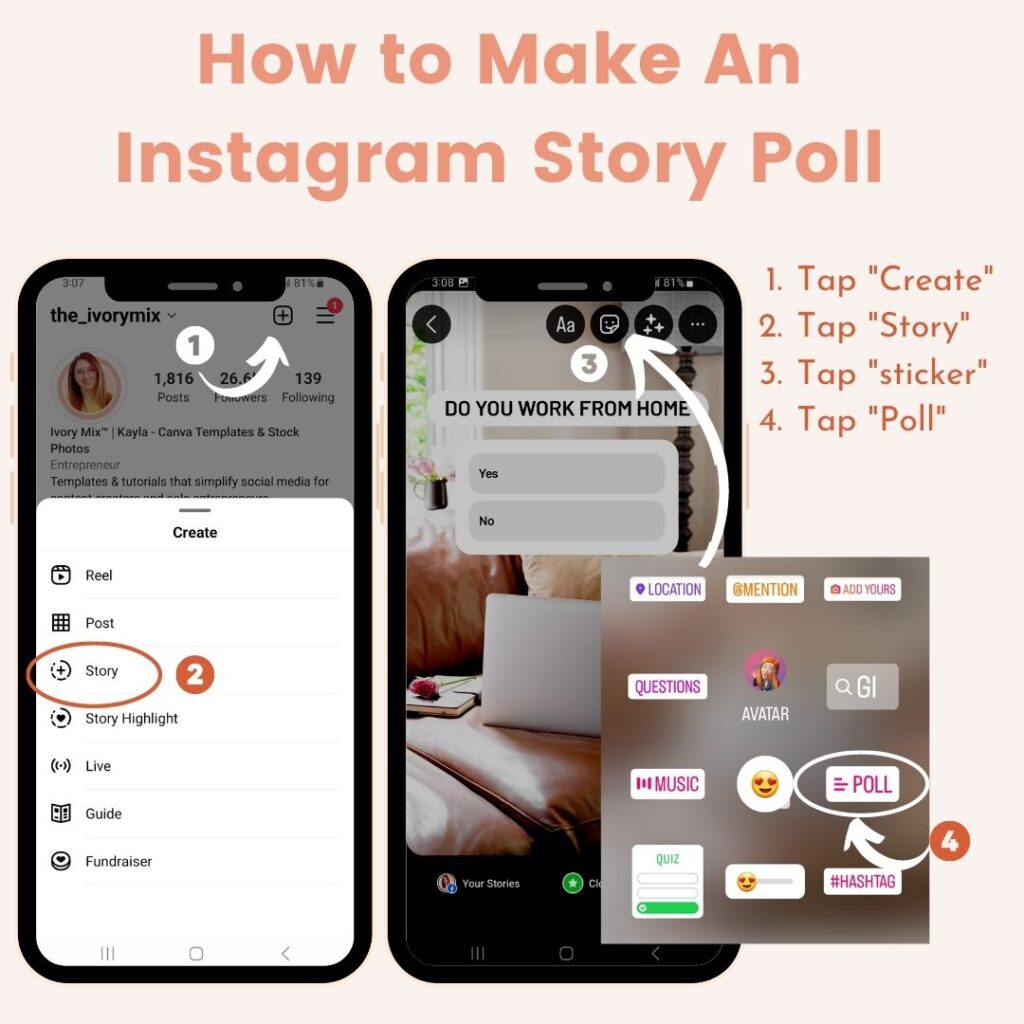
How to create a Poll:
- Open Instagram Stories and take a photo/video or upload one from your gallery.
- Tap the Sticker icon (the smiley face) at the top of the screen.
- Select the "Poll" sticker.
- Write your question and fill in the answer options (you can add more than two).
- Tap "Done" and place the sticker on your Story before sharing.
Ideas for your "Cheap and Cheerful" Niche:
- "This or That": Show a picture of a homemade coffee and a store-bought one. Poll: "Which saves you more? ☕️"
- Gauge Interest: "What kind of budget tips do you need most? [Grocery Savings] / [Reducing Bills]"
- Market Research: "I'm planning a new post! Would you prefer: [10 meals under $10] or [DIY Cleaning Hacks]?"
4. The Quiz Sticker: Educate and Entertain
The Quiz sticker is similar to a poll, but with one key difference: you designate one of the answers as correct. This is fantastic for educating your audience in a fun way, busting common myths, or testing their knowledge.
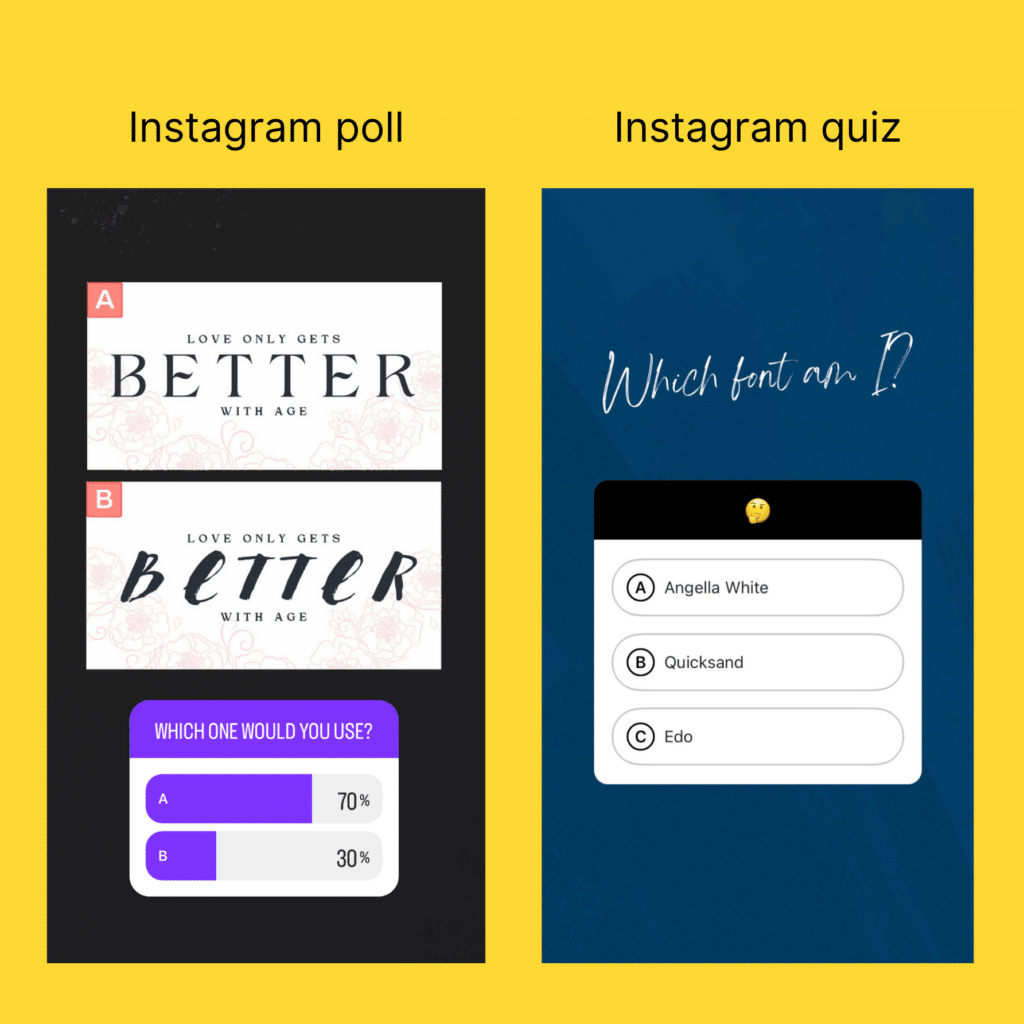
How to create a Quiz:
- In the sticker menu, select the "Quiz" sticker.
- Write your quiz question.
- Fill in the possible answers (up to four).
- Tap the correct answer to highlight it in green. This is what viewers will see after they vote.
- Tap "Done" and place the sticker on your Story.
Ideas for your "Cheap and Cheerful" Niche:
- Myth-Busting: "True or False: You have to cut out all fun to stick to a budget." (Correct answer: False)
- Test Knowledge: "Guess the average cost of this homemade lunch! [$2.50] / [$4.00] / [$5.50]"
- Engaging Trivia: "Which of these subscriptions is easiest to forget you're paying for? [Gym] / [Streaming Service] / [App Trial]"
5. The Question Sticker: Deep Insights and Content Ideas
The Question sticker is arguably the most valuable tool for community building. Instead of giving options, it provides an open text box where your followers can write their own responses. This is your direct line to understanding their struggles, desires, and questions.
For a simple walkthrough, you can refer to Meta's official guide.
Engage your audience with Instagram Stories
Meta's official guide, 'Engage your audience with Instagram Stories,' offers a straightforward, text-based explanation of how to use these features. We'll focus on the 'Learn from your audience' section.
Read the short section titled 'Learn from your audience.' It gives you the simple, step-by-step instructions for adding a Question sticker to your Story.
How to create a Question sticker:
- From the sticker menu, select the "Questions" sticker.
- Type your prompt or question in the box.
- Tap "Done" and place it on your Story.
- After people respond, you can view their answers by swiping up on your Story. You can then tap a response to share it (anonymously) to a new Story and add your answer or comment.
Ideas for your "Cheap and Cheerful" Niche:
- Get Content Ideas: "What's your biggest struggle when it comes to saving money?" (Your next few post ideas are in these answers!)
- Host a Q&A: "Ask me anything about creating your first budget!"
- Crowdsource Tips: "What's your #1 tip for a 'no-spend' weekend?" (Share the best answers to your Story later, tagging the user if you wish).
Your Action Plan: Create an Interactive Story Sequence
Now it's time to put this into practice. Your task is to create a short Story sequence (2-3 slides) that uses at least two different interactive stickers.
Here is a sample idea for your niche:
-
Story Slide 1 (The Poll):
- Visual: Post a picture of your grocery cart or a recent haul.
- Sticker: Use a Poll sticker that asks, "Trying to stick to my grocery budget! What's harder for you?"
- Options: "[Sticking to the list]" / "[Avoiding impulse buys]"
-
Story Slide 2 (The Question):
- Visual: A simple, branded background image (you can create one in Canva!).
- Sticker: Use a Question sticker.
- Prompt: "To help you out, what's one grocery item that always breaks your budget?"
-
Story Slide 3 (The Follow-up - Optional):
- A few hours later, share some of the answers from the Question sticker. You could add your own quick tip in response. For example, if someone said "fresh berries," you could share it and add a text overlay saying, "Tip: Buy them frozen! Just as healthy and way cheaper."
This simple sequence encourages interaction, gathers valuable information about your audience's pain points, and positions you as a helpful resource.
Conclusion
You now have the tools and strategies to transform your Instagram Stories from simple updates into powerful conversations. By consistently using interactive stickers, you build a community that feels heard and valued, which is the foundation of any successful influencer's platform.
Key Takeaways:
- Instagram Stories are for nurturing your existing community, while Reels are for attracting new followers.
- Polls are great for quick, low-effort engagement and gathering simple preferences.
- Quizzes are a fun way to educate your audience and test their knowledge.
- Questions are invaluable for getting deep insights, content ideas, and starting conversations.
Preview of the Next Lesson:
We've now covered core growth and engagement tactics for Instagram. Next, we'll shift our focus to another powerhouse platform for short-form video: TikTok. In the next lesson, you'll learn how to identify and use a trending format on TikTok (e.g., sound, effect) and adapt it to a money-saving tip.