
Hello! Welcome to your seventh and final lesson in the module on OOP Foundations.
In our previous lesson, we explored constructors and their critical role in object initialization. We saw how a private constructor can be used to prevent a class from being instantiated, a technique often used for utility classes like java.lang.Math, which contain only static members.
Today, we'll build directly on that idea. This lesson addresses the learning outcome: Define the purpose and use of static keywords for members and methods. The static keyword is fundamental in Java. It allows you to create members that belong to the class itself, rather than to any individual object. Understanding this is essential for creating utility methods, managing shared state, and grasping how every Java application starts.
1. The Core Concept: Belonging to the Class, Not the Object
In everything we've covered so far, members (variables and methods) have been tied to an object. You create an object using new, and that object gets its own set of instance variables.
The static keyword breaks this rule. When you declare a member static, you are telling Java: "This belongs to the class itself, not to any one object." This has two major implications:
- Shared State: There is only one copy of a static variable, shared across all instances of the class.
- No Instance Needed: You can call a static method without ever creating an object of the class.
Let's start by looking at static variables and how they impact memory.
Java STATIC keyword: Static Variable and Methods Part-1. Object Oriented Java Tutorial #13.1
This video from the Smartherd channel provides an excellent visual introduction to the difference between instance variables and static variables, focusing on the benefit of memory efficiency.
Watch the video from 00:10 to 05:59. Pay close attention to: How instance variables are allocated for each object. How a static variable is allocated only once in a 'class area' and shared by all objects. The syntax for accessing a static variable: ClassName.variableName.
As the video explained, the primary purpose of static variables is to manage properties that are common to all objects of a class. Think of a Car class. Each car has its own color and model (instance variables), but if you wanted to count how many Car objects have been created, you'd use a single, shared counter (a static variable).
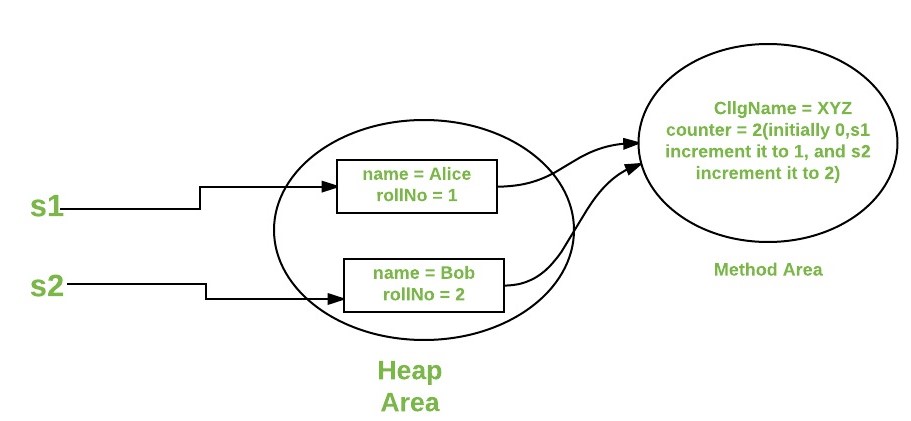
Let's solidify this with a written example.
A Guide to the Static Keyword in Java
The article 'A Guide to the Static Keyword in Java' from Baeldung provides a clear, code-driven explanation. We'll look at its section on static fields.
Read section 2, 'The static Fields (Or Class Variables)'. Notice the numberOfCars example, which is a classic use case for a static variable. Also, note the best practice of accessing static members via the class name (Car.numberOfCars) rather than an object reference (ford.numberOfCars).
2. Static Methods: Utilities and Helpers
Just like static variables, static methods belong to the class and are called directly on the class, not on an instance. This makes them perfect for creating utility or helper functions. You've likely used many already, such as Math.sqrt() or Collections.sort(). You don't need a new Math() object to find a square root; the functionality isn't tied to any object's state.
Java STATIC keyword: Static Variable and Methods Part-1. Object Oriented Java Tutorial #13.1
Let's continue with the Smartherd video to see how static methods are defined and called.
Watch the segment from 05:59 to 08:46. It clearly demonstrates how to define a static method and call it using the class name, without creating an object.
The most important rule to remember about static methods is that they exist in a "static context." Since they aren't associated with any specific object instance, a static method cannot directly access an instance variable or call an instance method.
Why? Imagine a Car class with a static method getTopSpeedLimit(). If this method tried to access an instance variable like currentSpeed, which car's speed would it be? The one you created first? The last one? There's no way to know. The context is the class, not a specific car.
This concept is a common source of confusion and a frequent interview question. Let's watch a video that explains this restriction and how to work with it.
This video from Telusko clearly demonstrates the restriction on static methods and explains the reasoning behind it.
Watch from 00:39 to 03:34. Pay close attention to: The error that occurs when a static method tries to use a non-static (instance) variable. The explanation of why this is not allowed (the ambiguity of which object it belongs to). The workaround: passing an object reference into the static method as a parameter.
This table provides a quick summary of the rules:
Test your understanding!
You are designing a simple AppConfiguration class for a Java application. This class should hold configuration properties. Some properties are specific to a server instance (like port), while others are global for the entire application (like the applicationName).
Your task is to implement the AppConfiguration class with the following members:
- An instance
intvariable namedport. - A static
Stringvariable namedapplicationName, initialized to "MyApp". - A constructor that accepts and sets the
port. - A static method
getAppName()that returns theapplicationName. - An instance method
getDetails()that returns a string like "MyApp is running on port: 8080".
Why can getAppName() be static, but getDetails() cannot?
Show answer
public class AppConfiguration {
    // Instance variable - each object has its own copy
    private int port;

    // Static variable - shared by all objects of this class
    public static String applicationName = "MyApp";

    // Constructor to initialize the instance variable
    public AppConfiguration(int port) {
        this.port = port;
    }

    // Static method - can only access static members
    public static String getAppName() {
        return applicationName;
    }

    // Instance method - can access both static and instance members
    public String getDetails() {
        // Accesses both the static 'applicationName' and the instance 'port'
        return applicationName + " is running on port: " + this.port;
    }

    public static void main(String[] args) {
        // Accessing static member without an object
        System.out.println("Application Name: " + AppConfiguration.getAppName());

        // Creating instances
        AppConfiguration server1 = new AppConfiguration(8080);
        AppConfiguration server2 = new AppConfiguration(9000);

        // Calling instance methods
        System.out.println(server1.getDetails()); // "MyApp is running on port: 8080"
        System.out.println(server2.getDetails()); // "MyApp is running on port: 9000"
    }
}
Explanation:
getAppName()can be static because it only needs to access theapplicationName, which is also static. The application's name doesn't depend on a specific server instance.getDetails()cannot be static because it needs to access theportvariable. The port is an instance variable, meaning its value is specific to eachAppConfigurationobject (server1vs.server2). A static method wouldn't know which object'sportto use.
3. The main Method Explained
Now, the famous public static void main(String[] args) line should make perfect sense.
When the Java Virtual Machine (JVM) starts your program, it needs a universal, predictable entry point. It doesn't have any objects yet; it only knows about the classes you've given it.
public: So it can be called from anywhere, specifically by the JVM.static: So the JVM can call this method on the class (YourClass.main(...)) without needing to create an object ofYourClassfirst. This solves the "chicken-and-egg" problem of how to start the program.void: Themainmethod doesn't return anything to the JVM.main(String[] args): The name the JVM looks for, accepting command-line arguments as an array of strings.
Java STATIC keyword: Static Variable and Methods Part-1. Object Oriented Java Tutorial #13.1
To wrap this up, let's revisit the Smartherd video for a concise explanation of why the main method is static.
Watch from 08:46 to 09:47. This directly connects the concepts we've learned to the main method you've been using all along.
4. Other Uses of static
The static keyword can also be applied to code blocks and nested classes, which are powerful features you will encounter in system design.
A Guide to the Static Keyword in Java
The Baeldung article provides a great overview of these other use cases. This will give you a complete picture of the keyword's capabilities.
Read sections 4 ('The static Code Blocks') and 5 ('The static Inner Classes'). For static blocks, understand their purpose is to initialize complex static variables. For static inner classes, focus on the key difference: they don't have access to the outer class's instance members. This is important for patterns like the Singleton pattern, which you will study later.
- Static Blocks: These are blocks of code that run exactly once, when the class is first loaded into memory. They are perfect for initializing static variables that require more logic than a simple one-line assignment.
- Static Nested Classes: A class defined within another class. Making it
staticmeans it's just a regular class that happens to be namespaced inside another for organizational purposes. It is not tied to an instance of the outer class. This is used extensively in Java, for example inHashMap.Node.
Conclusion
This lesson concludes our foundational module on Object-Oriented Programming in Java. You now have a solid grasp of the static keyword and its role in creating class-level members.
Key Takeaways:
- Class vs. Instance:
staticmembers belong to the class, while non-static (instance) members belong to individual objects. - Static Variables: A single copy is shared among all instances of a class. Ideal for constants, shared flags, or counters.
- Static Methods: Called on the class itself (
ClassName.method()) and do not require an object. Perfect for utility functions. - The Main Rule: A static context (like a static method) cannot directly access instance members.
- The
mainMethod: It isstaticso the JVM can execute it as the program's entry point without first creating an object.
In our next lesson, we will begin a new module: Fundamental Design Principles. We'll start by exploring two of the most important concepts in software design: coupling and cohesion. You'll learn how these principles measure the quality of your design and how they guide you toward creating more maintainable and scalable systems.