
Hello! Welcome to your sixth lesson in our module on OOP Foundations.
In our last lesson, we completed our look at polymorphism by contrasting compile-time polymorphism (method overloading) with runtime polymorphism (method overriding). You learned that overloading is about providing multiple methods with the same name but different parameters within a single class, a concept resolved at compile time.
Today, we'll explore a crucial part of an object's life cycle, a topic where you'll see overloading used frequently. This lesson focuses on the learning outcome: to explain the role of constructors in object instantiation and initialization. Every time you use the new keyword in Java, you are using a constructor. Understanding how they work is absolutely fundamental to building any object-oriented system.
1. The Birth of an Object: Instantiation and Initialization
When you write new MyClass(), two things happen:
- Instantiation: The JVM allocates memory for a new object of type
MyClass. - Initialization: A special method called a constructor is executed to set the initial state of this new object.
Think of it this way: if a class is a blueprint for a house, the new keyword is the act of laying the foundation and reserving the land. The constructor is the construction crew that comes in to build the walls, install the plumbing, and paint the rooms, ensuring the house is in a valid, livable state from the moment it's finished.
Let's watch a video that walks through this process, from what happens without a constructor to how you can define your own.
Java Constructors - Full Tutorial
This video from 'Coding with John' provides a clear, step-by-step introduction to constructors. It explains what they are, how they are invoked, and why they are essential for proper object initialization.
Watch the video from the beginning up to 03:55. Pay close attention to: The definition of a constructor and its syntax (same name as the class, no return type). What the default constructor is and what it does (or doesn't do). How to create a custom constructor with parameters. The use of the this keyword to distinguish between instance variables and parameters.
2. The Different Flavors of Constructors
As you saw in the video, you have several options when it comes to defining constructors. Let's formalize these concepts. A comprehensive article from dev.to, "Java Constructors: A Complete Guide for Beginners & Pros," will serve as our main reference.
Java Constructors: A Complete Guide for Beginners & Pros
This article provides a thorough written guide to Java constructors. We'll start by reading about the main types.
Read the sections 'What is a Constructor in Java? A Formal Definition' and 'The Different Flavors: Types of Constructors'. This will solidify your understanding of the Default Constructor, No-Argument Constructor, and Parameterized Constructor.
Let's summarize the key types of constructors:
- Default Constructor: If you write a class and don't define any constructor, the Java compiler provides one for you automatically. This constructor takes no arguments and initializes instance variables to their default values (e.g.,
0for numeric types,falsefor booleans, andnullfor object references).
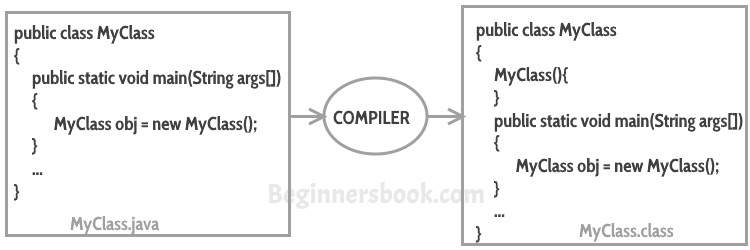
-
No-Argument (or No-Args) Constructor: This is a constructor that you write explicitly, but it takes no arguments. You would use this to provide custom default values or perform setup logic that doesn't require external data.
public class User { private String role; // No-argument constructor public User() { this.role = "GUEST"; // Provide a sensible default } } -
Parameterized Constructor: This is the most common and powerful type. It accepts parameters that are used to initialize the object's state, ensuring the object is created with specific, valid data from the start.
public class User {
    private String username;
    private String email;
    // Parameterized constructor
    public User(String username, String email) {
        this.username = username;
        this.email = email;
    }
}
Important Rule: The moment you define any constructor in your class (parameterized or not), the Java compiler will not provide the default constructor for you. If you still need a no-argument constructor, you must define it yourself.
3. Constructor Overloading and Chaining
Connecting back to our previous lesson, constructors can be overloaded just like regular methods. This is extremely useful as it provides multiple ways to create an object. For example, you might have one constructor for creating a User with just a username, and another for creating a User with a username and an email.
public class User {
    private String username;
    private String email;

    // 1. No-arg constructor
    public User() {
        this.username = "default_user";
        this.email = "default@example.com";
    }

    // 2. Overloaded constructor with one parameter
    public User(String username) {
        this.username = username;
        this.email = "default@example.com"; // Still provide a default for email
    }

    // 3. Overloaded constructor with two parameters
    public User(String username, String email) {
        this.username = username;
        this.email = email;
    }
}
Did you notice the code duplication in the example above? The logic for setting default values is repeated. To adhere to the DRY (Don't Repeat Yourself) principle, we can use constructor chaining. One constructor can call another in the same class using this().
Let's improve our User class:
public class User {
    private String username;
    private String email;

    // The "main" constructor that does the work
    public User(String username, String email) {
        this.username = username;
        this.email = email;
    }

    // Overloaded constructor that chains to the main one
    public User(String username) {
        this(username, "default@example.com"); // Calls the (String, String) constructor
    }

    // No-arg constructor that also chains
    public User() {
        this("default_user", "default@example.com"); // Calls the (String, String) constructor
    }
}
Rule: When using this(), it must be the very first statement inside a constructor.
4. Special Use Cases: Private and Copy Constructors
While most constructors are public, there are important scenarios for other access levels.
Private Constructors
What if you want to prevent a class from being instantiated from the outside? You can make its constructor private. This is a key technique used in two common situations:
- Utility Classes: Classes that only contain
staticmethods and constants (likejava.lang.Math) should not be instantiated. A private constructor prevents this. - Singleton Pattern: A design pattern that ensures a class has only one instance. The private constructor is used to control the creation process, which you'll learn about in a future module.
Let's see a quick example of a private constructor.
Java Constructors - Full Tutorial
The 'Coding with John' video concludes with a great explanation of why and how to use private constructors.
Watch from 05:59 to 07:16. Notice how making the constructor private in the Constants class results in a compile-time error when you try to use new from another class.
Copy Constructors
Although not a built-in feature in Java as it is in C++, you can implement a copy constructor. This is a constructor that takes an object of the same class as an argument and creates a new object by copying the data from the original. This is a common alternative to cloning.
Java Constructors: A Complete Guide for Beginners & Pros
Let's read about constructor chaining and copy constructors to complete our overview.
Read the sections 'Constructor Chaining: Teamwork Makes the Dream Work' and 'The Secret Player: The Copy Constructor'.
Test your understanding!
You are designing a Report class. A report must have a title and author. Optionally, it can have a version number, which defaults to 1 if not provided.
Your task is to implement the Report class with the following requirements:
- It should have instance variables for
title(String),author(String), andversion(int). - Provide two
publicconstructors:- One that accepts a
titleand anauthor. - Another that accepts a
title,author, andversion.
- One that accepts a
- Ensure there is no code duplication by using constructor chaining (
this()).
// Your implementation here
class Report {
    private String title;
    private String author;
    private int version;

    // ...
}
Show answer
class Report {
    private String title;
    private String author;
    private int version;

    // This is the designated constructor that handles all initializations.
    public Report(String title, String author, int version) {
        if (title == null || title.trim().isEmpty()) {
            throw new IllegalArgumentException("Title cannot be empty.");
        }
        if (author == null || author.trim().isEmpty()) {
            throw new IllegalArgumentException("Author cannot be empty.");
        }
        this.title = title;
        this.author = author;
        this.version = version;
    }

    // This constructor chains to the main one, providing a default value for version.
    public Report(String title, String author) {
        this(title, author, 1); // Calls the other constructor
    }

    // Optional: a getter to verify the state
    @Override
    public String toString() {
        return "Report [title=" + title + ", author=" + author + ", version=" + version + "]";
    }
}
In this solution, the two-argument constructor delegates the responsibility of object creation to the three-argument constructor by calling this(title, author, 1). This centralizes the initialization logic and any validation, making the code cleaner and easier to maintain.
Conclusion
You've now explored the fundamental role constructors play in the lifecycle of every Java object. They are the gatekeepers that ensure every object is born in a valid and predictable state.
Key Takeaways:
- Role: Constructors are special methods invoked by the
newkeyword to initialize a newly created object. - Rules: They have the same name as the class and no return type.
- Types: You can use the compiler-provided default constructor, define your own no-argument constructor, or use a parameterized constructor to set initial state.
- Overloading: A class can have multiple constructors with different parameter lists, providing flexible ways to create objects.
- Chaining: Use
this()to call one constructor from another within the same class to reduce code duplication. - Private Constructors: Used to control instantiation, typically for utility classes or implementing the Singleton pattern.
In our next lesson, we will dive deeper into one of the topics we touched on today. We will define the purpose and use of the static keyword for members and methods, which is essential for understanding concepts like utility classes and class-level variables.