Hello! Welcome to the third lesson in our "AI-Powered Product and Niche Discovery" module.
In our last session, we did a deep dive into Helium 10, learning a powerful workflow to generate and validate product ideas using Black Box, Xray, and Cerebro. You learned how to assess a market's demand, competition, and profitability with real data.
Today, we're adding another industry-leading tool to your arsenal: Jungle Scout. The goal of this lesson is to learn how to use Jungle Scout to research market trends and competitor performance on Amazon. While some features overlap with Helium 10, Jungle Scout offers its own unique tools and perspectives. Knowing both platforms allows you to cross-reference data and develop a more nuanced, confident approach to product selection.
We will follow a similar workflow to the last lesson, but tailored to Jungle Scout's specific tools:
- Discover ideas using the Product Database and Opportunity Finder.
- Validate niches with the Chrome Extension.
- Analyze competitors with Keyword Scout and Product Tracker.
1. Product Discovery: Finding Ideas with the Product Database
Just like Helium 10's Black Box, Jungle Scout's Product Database is a massive library of Amazon products that you can search using specific filters. This is our starting point for generating a list of potential product ideas that meet the criteria we established in our first lesson (demand, competition, profitability, logistics).
The following video gives an extremely practical and detailed walkthrough of how to set up your filters to find promising opportunities.
How to Do Amazon FBA Product Research Using Jungle Scout | FULL Tutorial
This video from Crescent Kao provides an excellent, step-by-step guide to using the Product Database. Pay close attention to the logic behind each filter setting, as this is the foundation of effective research.
Watch the video from the beginning until 14:50. Focus on how the instructor uses filters for: Categories: Excluding complex or restricted categories. Price Range: Targeting a profitable sweet spot (e.g., $30-$80). Monthly Revenue & Units Sold: Ensuring there's proven demand. Review Count: Filtering for niches with lower competition. Weight & Product Tier: Keeping logistics and FBA fees manageable. Notice the pro-tip about thinking 'outside the box' with your filter numbers to find products others might miss.
2. Market Validation: Analyzing Trends with the Chrome Extension
Once you have a product idea from the database, your next step is to validate the entire niche on the live Amazon search results page. Jungle Scout's Chrome Extension is the perfect tool for this, providing an instant snapshot of the competitive landscape.
Let's see how this works.
How to Do Amazon FBA Product Research Using Jungle Scout | FULL Tutorial
Continuing with the same video, the instructor now takes a product idea and analyzes the live market using the Chrome Extension. This is where you confirm if the niche is truly viable.
Watch from 15:41 to 27:19. This is a critical section. Pay close attention to the validation checklist he works through: Check for Competition: Manually counting how many top sellers have beatable review counts (e.g., under 300). Check Sales & Profit Goals: Ensuring enough sellers meet your revenue targets and using the built-in profit calculator. Check Listing Age: Avoiding saturated niches where too many new sellers have recently launched. Check for Brand Domination: Making sure no single brand owns the top search results. Check for Seasonality: Using the historical sales graph to ensure year-round demand.
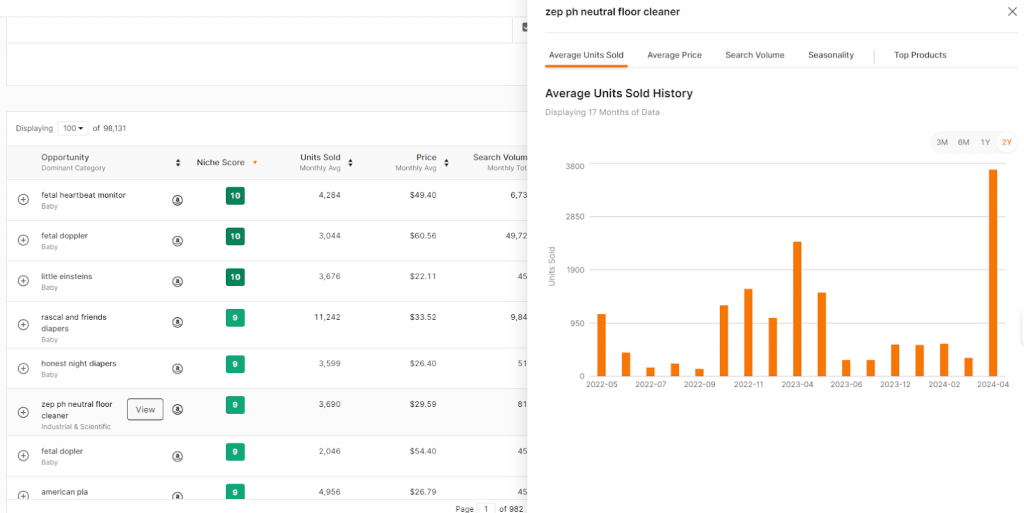
The historical sales data is one of the most important features for understanding market trends. A product might look good today, but seeing its sales history tells you if it's a stable, growing, or declining market.
3. Competitor Analysis: Deconstructing Their Strategy
After validating that a niche has potential, the final step is to dive deep into the top competitors' strategies. How are they getting their sales? What keywords are they targeting? Jungle Scout provides two essential tools for this: Keyword Scout and Product Tracker.
This short video demonstrates these advanced features.
Jungle Scout COMPLETE Tutorial 2024 - How To Use It To Sell On Amazon PROFITABLY
This tutorial from Dan Vas shows how to use Jungle Scout's more advanced tools to 'spy' on your competition.
Watch two key segments from this video: Keyword Scout (26:56 - 28:11): This is Jungle Scout's version of a reverse-ASIN tool, like Helium 10's Cerebro. See how you can input a competitor's ASIN and get a list of the exact keywords they are ranking for. This is invaluable for your own listing optimization and PPC campaigns. Product Tracker (23:07 - 24:38): Learn how to add a group of competing products to the tracker. This allows you to monitor their daily sales, revenue, and pricing over time, giving you the most accurate view of the market's real performance.
Test your understanding!
You're researching "portable blenders" using Jungle Scout. You run the Chrome Extension and see the following for the top 10 organic results:
- Average monthly revenue: $45,000
- Review counts: 8 of the 10 sellers have over 2,000 reviews. Two sellers have around 150 reviews each and are making ~$9,000/month in revenue.
- Historical Sales Trend: Sales are stable year-round with a big spike in January and May.
- Keyword Scout: You analyze one of the low-review competitors and find they are ranking highly for "personal blender for travel" and "rechargeable smoothie maker," but are on page 3 for the main keyword "portable blender."
Based on this analysis, what is your conclusion and what would be your strategy if you decided to enter this niche?
Show answer
Conclusion: This is a high-demand but also highly competitive niche. Trying to compete directly for the main keyword "portable blender" as a new seller would be extremely difficult and expensive.
Opportunity & Strategy: The opportunity lies in the same strategy used by the successful low-review sellers: niche down. Instead of a generic "portable blender," you would focus your product and marketing on a specific use case.
Your strategy would be:
- Product Differentiation: Design your product specifically for one of those sub-niches. For example, a "personal blender for travel" might be extra lightweight, come with a durable travel case, and have a universal USB-C charging port.
- Keyword Targeting: Optimize your product title, bullet points, and description around long-tail keywords like "personal blender for travel," not the main keyword.
- PPC Campaigns: Focus your initial ad spend on these long-tail keywords where competition is lower and the customers have a more specific intent to buy.
4. A Framework for Amazon Competitor Analysis
You now know how to use the tools to gather data. The next step is to organize that data into a structured competitor analysis. This helps you identify weaknesses in your competitors' strategies that you can exploit.
Amazon Seller Competitor Analysis: Step-by-Step Guide
This article from Jungle Scout provides a fantastic step-by-step guide for what to do with all the data you've gathered. It turns raw numbers into actionable business intelligence.
Read the following sections to build your analysis framework: 'How to find and define your competitors on Amazon': Understand the importance of starting with a broad keyword and then niching down to find your true competitors. 'Audit your competitors’ listings': This is a goldmine. Learn what to look for in their titles, images, bullet points, and descriptions. Pay special attention to the 'Reviews' part—your competitors' negative reviews tell you exactly how to make a better product. 'Monitor competitor pricing': Use the data from the Product Tracker to understand if the niche has stable pricing or if it's a race to the bottom. 'Track your competitor’s monthly sales': This reinforces the importance of using the Product Tracker to confirm demand and market health.
Conclusion
You now have a powerful, dual-platform approach to product research. By mastering both Helium 10 and Jungle Scout, you can validate ideas with a much higher degree of confidence.
Key Takeaways:
- Jungle Scout Workflow: A familiar process of discovering with the Product Database, validating with the Chrome Extension, and analyzing competitors with Keyword Scout and Product Tracker.
- Analyze the Whole Picture: Don't just look at revenue. A successful analysis requires evaluating review counts, listing age, brand dominance, and seasonality.
- Track, Don't Guess: The Product Tracker is essential for monitoring competitors over time to get accurate sales data and understand pricing strategies.
- Audit for Weakness: Your competitors' listings and negative reviews are your best source of ideas for creating a superior product and a more compelling offer.
Next Up:
We've spent two lessons focused on Amazon. While the product ideas are often transferable, the tools are not always one-size-fits-all. In our next lesson, we will apply AI-powered tools specifically to discover high-demand, low-competition products suitable for Walmart Marketplace, bringing you one step closer to launching on one of your key target platforms.