Hello! Welcome to your next lesson in the "AI-Powered Product and Niche Discovery" module.
In our last session, we established the crucial four-pillar framework for evaluating any potential product: demand, competition, profitability, and logistics. You learned how to manually assess these factors to form a strong analytical foundation.
Today, we get practical and put that framework into high gear. This lesson is all about using Helium 10, one of the most powerful software suites in e-commerce, to automate and deepen your product research. Your goal is to learn how to use Helium 10's core tools to quickly identify promising product opportunities on Amazon by analyzing real-world data on search volume, competition, and revenue. While we are using Amazon's data due to its sheer volume and quality, the product ideas and research skills you develop here are directly transferable to your ventures on Walmart and TikTok Shop.
1. The Helium 10 Toolkit: Your Research Arsenal
Think of Helium 10 as a collection of specialized tools designed for different stages of the research process. For today's lesson, we'll master the essential tools for product discovery and validation.
How to Conduct Amazon Product Research
To start, let's get a quick overview of the main tools we'll be using. This article from the Helium 10 blog introduces the key players in their product research suite.
Read the section titled 'Which Product Research Tool Is Best for Amazon FBA?'. Focus on the descriptions for Black Box, Cerebro, and the Helium 10 Chrome Extension (Xray). This will give you a mental map of how the tools fit together.
To summarize, here is our workflow for today:
- Black Box: We'll use this vast product database to generate a list of initial product ideas that meet our four-pillar criteria.
- Xray (Chrome Extension): We'll then take those ideas to the Amazon marketplace and use Xray to get a live, instant analysis of the competition and revenue on the search results page.
- Cerebro: Finally, we'll use this powerful "reverse-ASIN" tool to spy on our top potential competitors and uncover the exact keywords that are driving their sales.
2. Step 1: Generating Ideas with Black Box
Black Box is our starting point. It allows us to search through Amazon's entire catalog of millions of products using specific filters that directly align with the framework from our last lesson.
The following video provides a comprehensive, hands-on walkthrough of using Black Box. We'll watch it in two parts, focusing first on the "Products" tab and then the "Keywords" tab.
2025 - Helium 10 Product Research For Beginners (Complete Amazon FBA Tutorial)
This video by e-commerce expert Camron James is an excellent, practical guide to using Helium 10's core research tools. Let's start with his demonstration of the Black Box 'Products' tab.
Watch the segment from 02:16 to 09:29. Pay close attention to how he sets filters for: Categories: Aligning with our 'Logistics' pillar (avoiding complex categories). Price & Monthly Revenue: Aligning with our 'Demand' and 'Profitability' pillars. Review Count: Aligning with our 'Competition' pillar (finding less-saturated markets). Shipping Size: Aligning with our 'Logistics' pillar (preferring smaller, cheaper-to-ship items).
While searching by product is useful, a more advanced technique is to search by keywords. This helps you find opportunities based on what customers are actually searching for, which can lead you to underserved niches.
2025 - Helium 10 Product Research For Beginners (Complete Amazon FBA Tutorial)
Now, let's continue with the same video to see how to use the 'Keywords' tab in Black Box. This is often where you'll find hidden gems.
Watch from 09:29 to 14:30. The most important filter he discusses here is Word Count. Notice how setting a minimum of 3 or 4 words helps you find more specific, 'long-tail' keywords. These often have lower competition because they represent a very specific customer need.
3. Step 2: Validating the Niche with Xray and Cerebro
Once Black Box gives you a promising product idea or keyword, the next step is to validate it on the live Amazon marketplace. This is where Xray and Cerebro come in.
Using Xray for a Quick Market Snapshot
When you have a keyword (e.g., "gymnastic wristband for grips" from the video), you search for it on Amazon and then run the Helium 10 Chrome Extension, called Xray. It lays an overlay on the page showing you the critical data for every product listed.
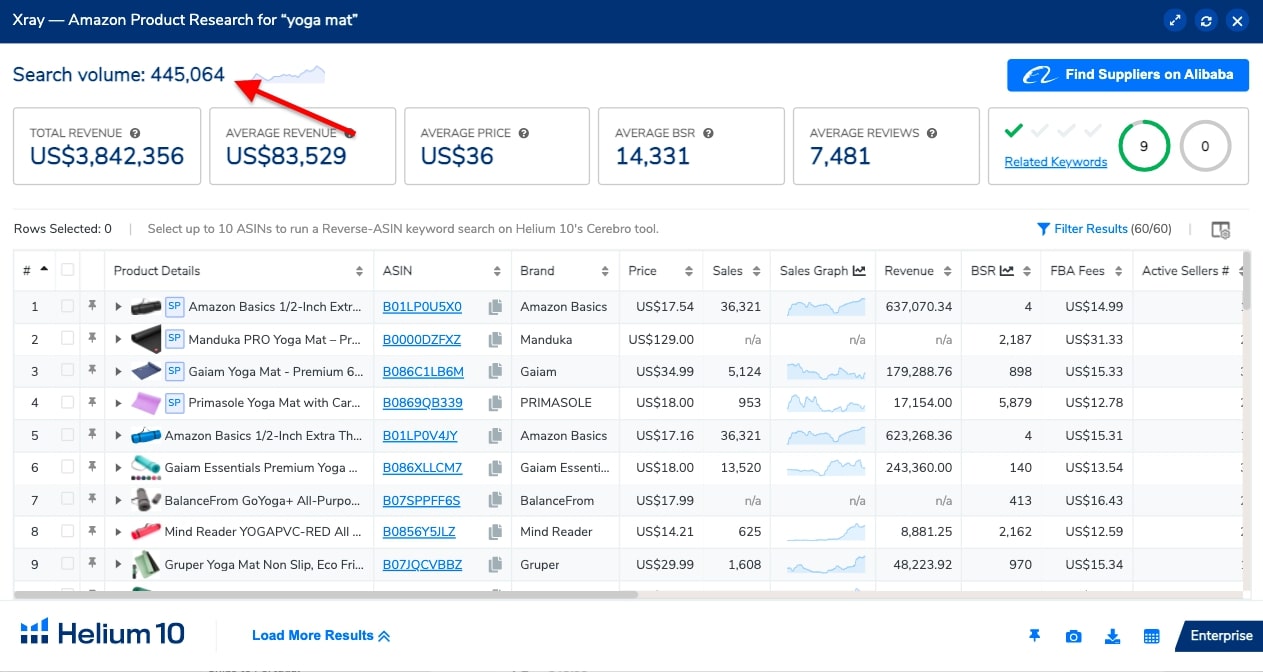
When you analyze the Xray data, you're looking for:
- Healthy Sales Depth: Are multiple sellers making good money, or is all the revenue concentrated in one or two listings? You want to see revenue distributed among several competitors, which indicates a healthy market.
- Beatable Competition: Look at the review counts. If you see several sellers with under 500 reviews doing well, it’s a great sign that a new seller can still enter and compete.
Using Cerebro to Reverse-Engineer Competitors
Xray gives you the "what" (what are they earning), but Cerebro tells you the "how" (how are they getting their sales). Cerebro is a reverse-ASIN lookup tool. You give it a competitor's product ID (their ASIN), and it tells you all the keywords they are ranking for. This is like looking at your competitor's marketing playbook.
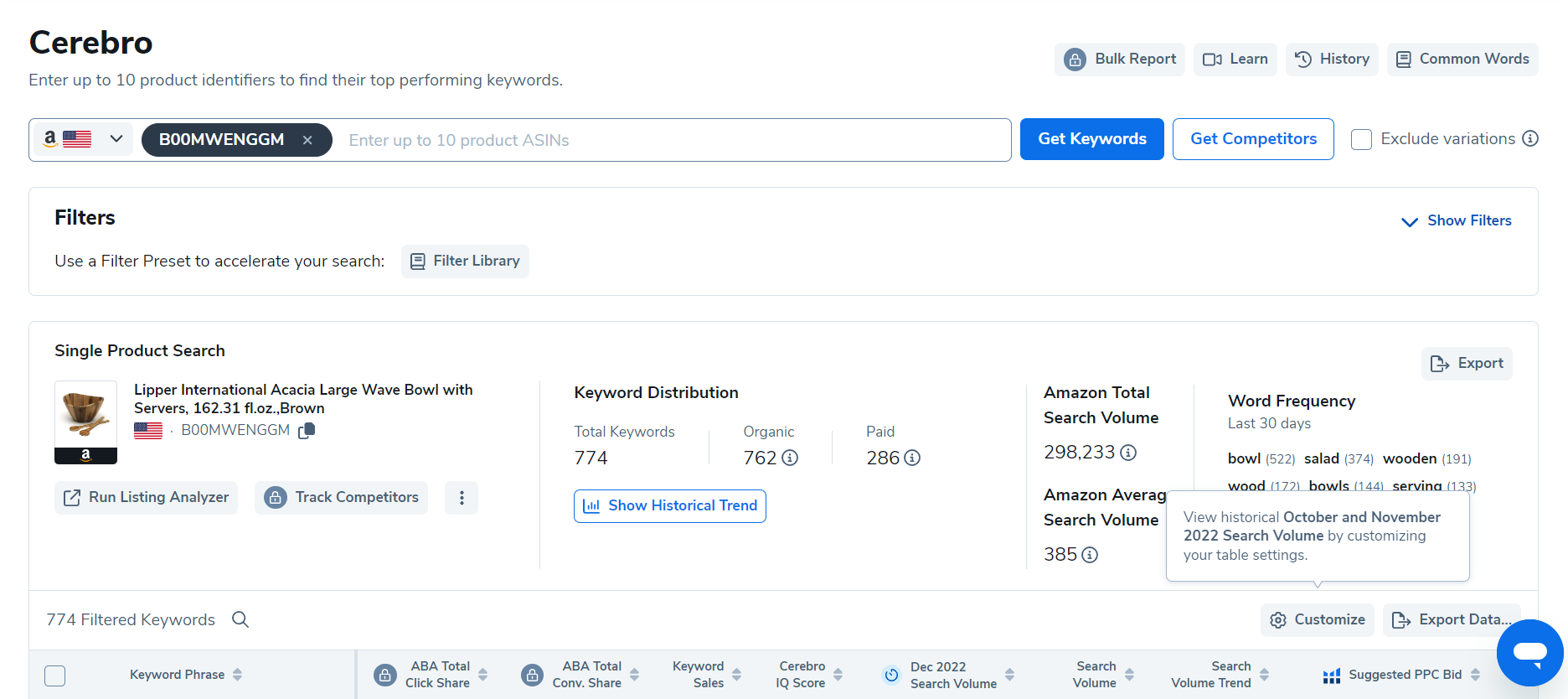
Now, let's see this validation workflow in action.
2025 - Helium 10 Product Research For Beginners (Complete Amazon FBA Tutorial)
Let's return to the Camron James video. He does a fantastic job of demonstrating this exact workflow: finding an idea, analyzing it with Xray, and then diving deep with Cerebro to understand the true market dynamics.
Watch the segment from 14:30 to 25:28. Follow along as he analyzes different products. Pay special attention to the 'marble rolling pin' example (starting around 21:00). He uses Cerebro to discover that the initial keyword was not the main one, and the real market is for the keyword 'rolling pin', which is much more competitive. This is a critical skill: using Cerebro to find the true primary keywords for a niche.
Test your understanding!
You use Black Box and find the keyword "collapsible silicone food containers," which seems promising. You run an analysis on Amazon and gather the following data:
- Xray Data: The top 5 organic results have monthly revenues of $30k, $25k, $19k, $8k, and $22k. Their respective review counts are 2,100, 1,850, 1,500, 95, and 1,300.
- Cerebro Data: You run a Cerebro search on the #4 seller (the one with 95 reviews). You find that while they rank on page 2 for the main keyword, they are on page 1 for more specific keywords like "silicone bento box for kids" (3,000 searches/mo) and "leakproof lunch containers for adults" (5,000 searches/mo).
Based on this information, would you pursue this product niche? Explain your reasoning.
Show answer
This is a potential opportunity, but it requires a specific strategy. Here's the breakdown:
- Demand (Excellent): The high revenues across the board confirm that this is a product people want to buy.
- Competition (High, but with an opening): The main keyword is dominated by sellers with thousands of reviews. Competing head-on would be very difficult. However, the presence of a seller with only 95 reviews earning $8,000/month is a huge green light. It proves that a new seller can enter this market and be successful.
- The Opportunity: The Cerebro data reveals the new seller's strategy. They are not trying to win the main, highly competitive keyword. Instead, they are targeting more specific, long-tail keywords ("silicone bento box for kids," "leakproof lunch containers"). This is where the opportunity lies.
Conclusion: You should consider this niche, but with the strategy of targeting specific sub-niches and long-tail keywords rather than competing directly with the market leaders on the main keyword. Your next step would be to analyze that successful new seller's listing to see how they differentiated themselves (e.g., unique colors, bundle, better photos).
4. The Complete Research Workflow: A Case Study
Now that you understand the individual tools, let's see how they all come together in a fluid, real-world research process. Product research isn't always a linear path; it often involves "going down rabbit trails" where one idea leads to another.
The following case study is a perfect illustration of this process. It shows how to use the data to not only validate ideas but also to pivot when you hit a dead end or uncover a hidden opportunity.
Amazon FBA Case Study: Validate Products OFF Amazon
This case study from Helium 10's blog is an excellent real-world application of the tools we've just learned. It walks through several product ideas, showing you what to pursue and what to avoid.
Read through the case studies in this article. Focus on the process and the reasoning behind the decisions: 'Egg cartons' -> 'Wooden egg holder' (Section: Next product “egg cartons”): See how an initial bad idea (low profitability) leads to a fantastic, untapped niche by noticing a gap between what's popular on Pinterest and what's available on Amazon. 'Burrito blanket' (Section: Third product: “burrito blanket”): This is a classic example of a market to AVOID. Notice how high revenue combined with many manufacturers on Alibaba signals coming saturation. 'Coffin bookshelf' (Section: Fourth product: “coffin bookshelf”): This is a goldmine. Pay attention to how they identify an opportunity because of irrelevant search results and competitors being frequently out of stock—clear signs that demand is higher than supply.
Conclusion
You have now learned the practical, tool-based workflow for modern e-commerce product research. By combining the analytical framework from our last lesson with the data-gathering power of Helium 10, you can move from brainstorming to validation with speed and confidence.
Key Takeaways:
- The H10 Workflow: Start wide with Black Box to generate ideas, get a quick market snapshot with Xray, and then do a deep competitive analysis with Cerebro.
- Look for Sales Depth: A healthy market has multiple sellers succeeding, not just one dominant player.
- Reviews are Your Guide: Low review counts among successful competitors signal an opportunity for a new seller.
- Master Reverse-ASIN: Using Cerebro to find your competitors' top keywords is one of the most powerful strategies for understanding market demand and crafting your own launch plan.
- Follow the Rabbit Trail: Don't be afraid to pivot. Your initial idea might not be the winner, but the research process can lead you to an even better, untapped niche.
Next Up:
You've now got a solid handle on Helium 10. In the next lesson, we will explore Jungle Scout, another industry-leading product research tool. By learning a second tool, you'll not only gain another perspective on market analysis but also be able to cross-reference data and make even more informed decisions.