
Hello! Welcome to the next lesson in our module on model optimization.
In our last lesson, we focused on evaluating the critical trade-offs between model size, inference speed, and performance when applying quantization. You learned how to measure these aspects using metrics like RTF and WER and saw how different techniques, like Quantization-Aware Training, can help manage this balance.
Today, we take the next logical step in preparing a model for the real world. Our goal is to export a trained PyTorch speech model to the ONNX format for framework-agnostic deployment. This process is fundamental to moving a model from a research environment (like a Jupyter notebook with PyTorch) to a production application, which might be written in C++, run on a mobile device, or be served from a cloud environment where you want maximum performance and minimal dependencies.
1. What is ONNX and Why is it Essential?
Before we dive into the "how," let's establish the "what" and "why." You've likely encountered ONNX in your work, but a solid grasp of its purpose is key. ONNX, or the Open Neural Network Exchange, is an open standard for representing machine learning models.
Think of it as a universal file format for deep learning models, similar to how PDF is a universal format for documents.
The primary benefits are:
- Interoperability: You can train a model in one framework (like PyTorch) and run it in another (like TensorFlow or a dedicated C++ inference engine). This frees you from being locked into a single ecosystem.
- Performance: ONNX models can be executed by highly optimized runtimes, such as ONNX Runtime. These runtimes are designed for fast inference and can leverage hardware-specific acceleration libraries (like NVIDIA's CUDA and TensorRT or Intel's OpenVINO) more effectively than general-purpose deep learning frameworks.
- Deployment Simplicity: For production, you can deploy your ONNX model with just the lightweight ONNX Runtime, avoiding the need to install a heavy library like PyTorch (and its dependencies) on your server or device.
To get a quick and clear overview, watch the first few minutes of the following video.
ONNX Explained with Example | Quick ML Tutorial
This video from Daniel Krei provides a concise introduction to ONNX, explaining its core purpose and benefits, which we've just outlined.
Watch the video from the beginning to 02:08. Focus on the two main advantages discussed: model interoperability between frameworks and the performance gains from using dedicated runtimes like ONNX Runtime.
2. The Export Process: From PyTorch Graph to ONNX Graph
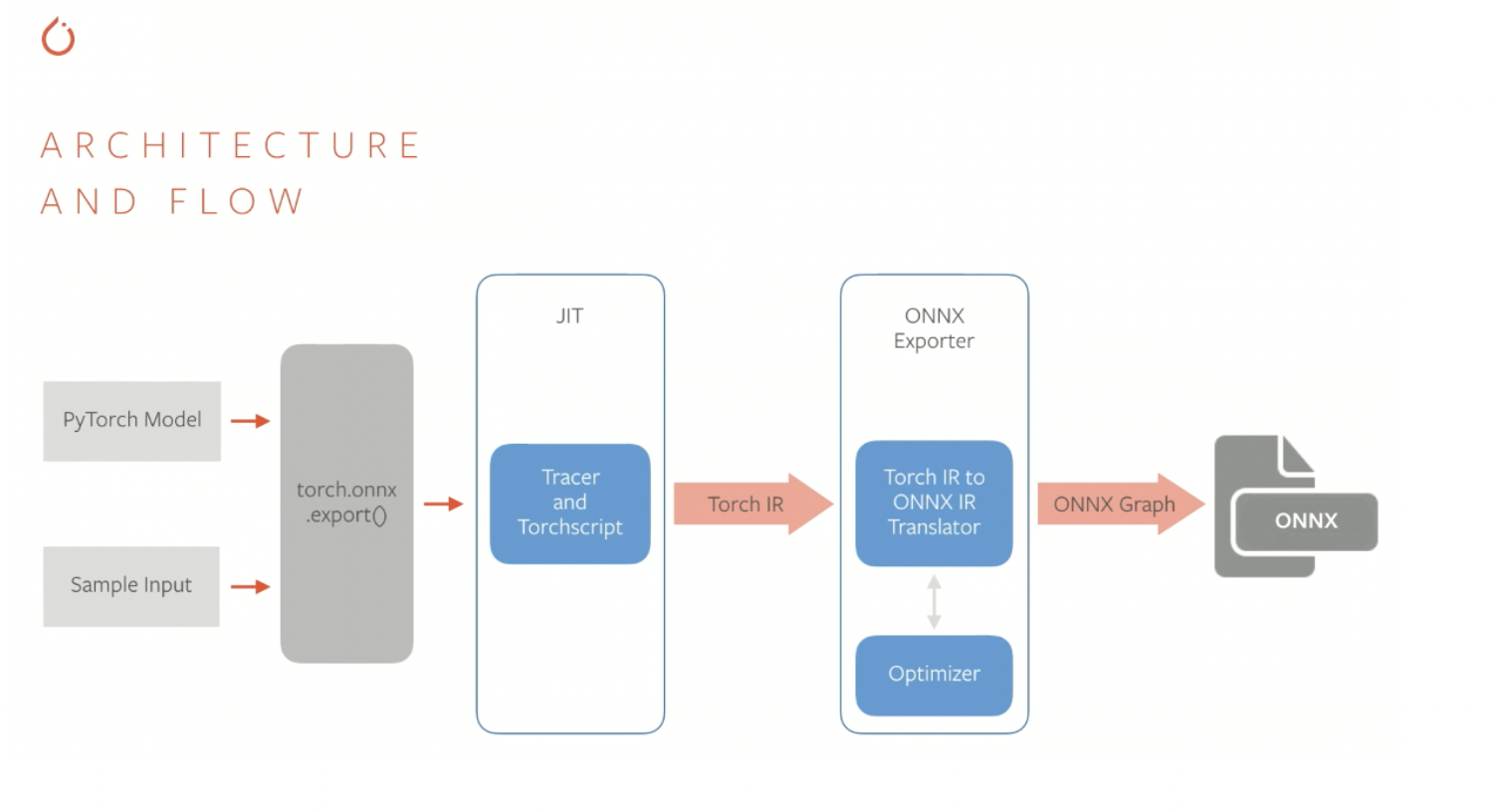
So, how does a dynamic, Python-based PyTorch model become a static, language-agnostic ONNX file? The process involves torch.onnx.export(), a function that "traces" your model's execution.
- Tracing: You provide the model and a sample input tensor. PyTorch executes the model's
forwardpass and records all the operations performed on the tensors. - Intermediate Representation (IR): This recorded sequence of operations is converted into a framework-neutral intermediate representation. In PyTorch, this has historically involved TorchScript.
- ONNX Conversion: The IR is then translated into the ONNX standard, defining the computational graph with ONNX operators.
- Serialization: This final graph, along with the model's learned weights, is saved into a single
.onnxfile.
The diagram below illustrates this flow.
While torch.onnx.export() is the underlying function, the Hugging Face ecosystem provides a powerful and user-friendly wrapper called optimum that simplifies this process, especially for Transformer-based models like Whisper.
3. Practical Export with Hugging Face optimum
optimum is a library designed to accelerate 🤗 Transformers and 🤗 Diffusers models. It provides a seamless bridge to technologies like ONNX Runtime. We will use its command-line interface (CLI) for a practical, engineering-focused approach.
First, let's look at the documentation to understand the tool.
Export a model to ONNX with optimum.exporters.onnx - Hugging Face
The Hugging Face optimum documentation explains how to use the library to export models. We'll focus on the CLI method.
Please read the following sections from the documentation: 'Why use ONNX?': This will reinforce the concepts we just discussed. 'Exporting a model to ONNX using the CLI': Note the pip install command. Skim the list of arguments under the optimum-cli export onnx --help output. Pay special attention to -m (model), output (the directory), and --task. Notice that automatic-speech-recognition is a supported task.
Now, let's put it into practice.
Step 1: Installation
You'll need to install optimum with the ONNX-specific dependencies.
pip install optimum[onnxruntime]
Note: Depending on your hardware, you might install optimum[onnxruntime-gpu] to leverage an NVIDIA GPU.
Step 2: Exporting a Speech Model
Let's export a pre-trained Whisper model. The command is straightforward:
optimum-cli export onnx --model openai/whisper-tiny.en --task automatic-speech-recognition whisper_tiny_onnx/
This command does the following:
--model openai/whisper-tiny.en: Specifies the model from the Hugging Face Hub.--task automatic-speech-recognition: Informsoptimumabout the model's architecture and head, ensuring the correct graph is exported. For generative models like Whisper, this also enables exporting separate encoder and decoder graphs for efficient inference.whisper_tiny_onnx/: The directory where the exported ONNX files (encoder_model.onnx,decoder_model.onnx, etc.) and the tokenizer configuration will be saved.
The following video demonstrates a similar process for a text classification model, highlighting the simplicity and the performance benefits.
Accelerate Transformer inference on CPU with Optimum and ONNX
This video by Julien Simon shows how to use Optimum to export a Transformer model and benchmark the immediate performance gain.
Watch from 00:49 to 02:16 to understand how Optimum integrates with ONNX. Then, watch from 07:18 to 09:21 to see the export code in action and the resulting performance improvement. The principle is the same for our speech model.
As shown in the video, simply converting the model to ONNX and using the ONNX Runtime can yield significant speedups (nearly 30% in his example) with no loss in accuracy.
4. The Challenge with Audio Models: Complex Numbers
While optimum handles many cases gracefully, your ambition to be an audio researcher requires understanding what happens when the export process is not straightforward. Audio models frequently use operations that are challenging for ONNX. The primary culprits are the Short-Time Fourier Transform (STFT) and its inverse (ISTFT).
The problem is twofold:
- The
torch.stftfunction outputs a complex-valued tensor. - The standard ONNX specification has historically had poor support for complex numbers and the specific
aten::stftoperator from PyTorch.
A direct call to torch.onnx.export() on a model containing a native torch.stft layer will fail. A fantastic real-world example of solving this comes from a project to convert Meta's Demucs model (a music source separator) to ONNX.
Converting Demucs v4 (Hybrid Transformer) AI model to ONNX format
This blog post from the Mixxx community is a superb case study on overcoming ONNX export challenges for a complex audio model, HT-Demucs. It goes into the exact mathematical and engineering details required.
Read the sections 'Understanding HTDemucs and the Challenges with ONNX Export' and 'Our Solution'. Focus on: Why the time-frequency branch of the model is problematic (its use of STFT and ISTFT). The core insight of the solution: representing complex numbers with pairs of real-valued tensors. How they rewrote STFT and ISTFT using only real-valued math (1-D convolutions with sine/cosine kernels).
The key takeaway from the Demucs case study is that you can often rewrite unsupported operations using a sequence of supported ones. The Fourier Transform can be expressed as a convolution. By representing a complex number as a pair of real tensors for the real () and imaginary () parts, you can simulate the complex arithmetic in a way that ONNX understands.
The STFT computation becomes:
Where denotes convolution. This is a powerful technique that demonstrates the level of understanding required to adapt cutting-edge research models for practical deployment. The fact that they achieved this rewrite with near-perfect numerical fidelity (MSE < 1e-4) without retraining is a testament to the approach.
5. Advanced Export: Customizing the ONNX Graph
Finally, optimum allows for advanced customization. For instance, you might want to export a model that also outputs internal states, like attention weights, for analysis. The optimum documentation shows exactly how to do this for Whisper.
Export a model to ONNX with optimum.exporters.onnx - Hugging Face
Let's revisit the optimum documentation for an advanced use case: customizing the export configuration to extract attention weights from a Whisper model.
Read the section 'Custom export of Transformers models'. You don't need to understand every line of code, but grasp the main idea: by creating a custom OnnxConfig class, you can modify the model's expected outputs and export a graph that exposes internal states like encoder_attentions.
This level of control is invaluable for research and debugging, allowing you to "peek inside" the model even when running it in a highly optimized, non-Python environment.
Conclusion
In this lesson, you've bridged the gap between a trained PyTorch model and a deployable asset. You now understand the role of ONNX in creating portable and high-performance AI applications.
Key Takeaways:
- ONNX is an open standard for ML models that provides interoperability and enables high-performance inference.
- The Hugging Face
optimumlibrary dramatically simplifies exporting Transformer models to ONNX with tools likeoptimum-cli. - A simple export command, like
optimum-cli export onnx --task automatic-speech-recognition, is often all that's needed for standard models. - Complex audio models using operations like STFT pose a challenge due to ONNX's limited support for complex numbers.
- The solution involves rewriting problematic operations using only real-valued tensors and supported ONNX ops, as demonstrated by the Demucs case study. This is a critical skill for an audio AI researcher.
Preview of the Next Lesson:
We have successfully exported our model to the .onnx format. But is it actually faster? In the next lesson, we will complete the cycle by learning how to perform inference with the exported model using ONNX Runtime and benchmark its performance against the original PyTorch model.