
Hello. In the last lesson, you set a disciplined MVP boundary for the Accessible Job-Application Workspace: an early-career job seeker must be able to add, review, edit, and update applications in one accessible, locally persistent workspace.
This lesson converts that scope into promises that can be built and verified. By the end, you will have a small set of user stories, pass/fail acceptance criteria, and an implementation backlog that is detailed enough to begin once the Next.js repository exists. This is useful portfolio evidence too: it shows that your project began with product decisions rather than a collection of screens.
From MVP features to user stories
A feature such as “manage job applications” is still too broad to implement confidently. Break it down by asking three questions:
- Who needs this?
- What do they need to do?
- Why does it matter?
The standard user-story form is:
As a [specific role], I want [capability], so that [benefit].
For this project, avoid the vague role “user.” Your intended person is specific: an active early-career job seeker tracking their own applications.
User Stories and Acceptance Criteria EXAMPLE (Agile Story Tutorial)
Watch “User Stories and Acceptance Criteria EXAMPLE” by The Business Analysis Doctor - IIBA Certification. It gives a concise explanation of how a story expresses user value and how acceptance criteria set its boundaries.
Start with story structure to distinguish the role, capability, and user value. Then resume at acceptance criteria for the purpose of criteria, checklist versus scenario formats, and the qualities of effective pass/fail conditions.
For your workspace, the MVP capabilities from the previous lesson become four coherent user stories:
| MVP feature | User story |
|---|---|
| Create an application record | As an active job seeker, I want to record a job application, so that I can keep its important details in one place. |
| Review applications | As an active job seeker, I want to see my applications and their next actions in a readable list, so that I can understand what needs attention. |
| Edit and update status | As an active job seeker, I want to update an application’s details and stage, so that my job-search information stays current. |
| Return to saved work | As an active job seeker, I want my recorded applications to remain available when I return, so that I do not have to recreate them. |
Notice what is not a user story:
- “Create an
ApplicationCardcomponent” - “Use local storage”
- “Add a TypeScript interface”
- “Install a form library”
Those can be valid implementation tasks, but they describe the developer’s work, not a user outcome. You will place such tasks beneath the user stories in the implementation backlog.
Acceptance criteria define what “accepted” means
A user story explains the user’s goal. Acceptance criteria state the observable conditions that must be true before that story can be accepted as complete.
They should be:
- Clear: another developer or future you can understand the intended behavior.
- Concise: each criterion covers one meaningful result.
- Testable: it has an observable pass/fail result.
- Outcome-focused: it specifies what the product does, not the framework, component, or storage API used to achieve it.
Everything You Need to Know About Acceptance Criteria
Read Scrum Alliance’s guide to establish the distinction between user stories, acceptance criteria, and a Definition of Done. Focus on criteria as verifiable product outcomes rather than implementation instructions.
In “Acceptance Criteria Defined,” read the definition, then read the remainder of the short section and note its emphasis on clear, concise, and testable statements. In “Acceptance Criteria vs. User Stories: What’s the Difference?”, read the comparison. It explains why stories capture the user’s goal while criteria describe the required result. Then read all of “How to Write Acceptance Criteria,” including the checklist and scenario-based formats. Finish with the Definition of Done distinction in “Acceptance Criteria vs. Definition of Done.”
Two formats are especially useful:
Checklist criteria
Use concise rules when you need to verify information, validation, visibility, or persistence.
- The application list shows each record’s company, role, status, date, and next action.
- Required fields are identified when a submitted application is incomplete.
Scenario criteria
Use Given, When, Then when a user action and its result are central.
Given an application exists in the workspace
When the job seeker changes its status to Interviewing and saves
Then the updated status is shown in the application list.
Both are valid. For this project, use scenario criteria for create and update interactions, and checklist criteria for visible data and accessibility requirements.
Keep the hierarchy clear: epic, story, criterion, task
Your whole MVP can be described as a high-level epic:
Help a job seeker manage personal applications and next actions in one accessible workspace.
The four user stories are smaller slices of value inside that epic. Each story has its own acceptance criteria. Technical tasks exist underneath the story and are only meaningful because they help deliver the story.
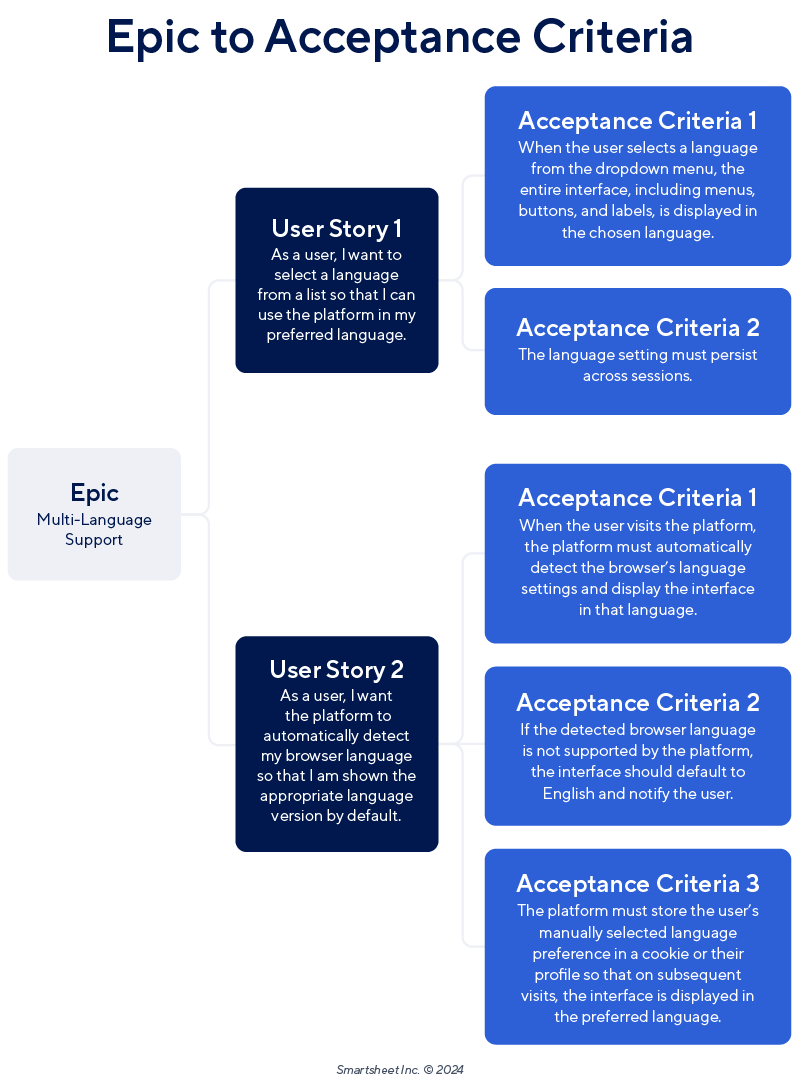
A useful rule is:
| Item | Main question it answers | Example in this project |
|---|---|---|
| Epic | What broad problem are we solving? | Manage a job search in one accessible workspace. |
| Feature | What product capability contributes to that outcome? | Application tracking. |
| User story | Who needs what, and why? | A job seeker wants to record an application so that details are not scattered. |
| Acceptance criterion | What must be true for the story to be accepted? | A valid saved record appears in the application list. |
| Task | What development work may be needed? | Define the application model and create the input form. |
The image’s multi-language example is also a warning: acceptance criteria should belong to a particular story. Do not attach one enormous generic checklist to the entire epic and call it finished.
Make vague MVP terms precise before writing criteria
Words such as “application,” “status,” “readable,” and “persists” sound clear until you try to test them. Before writing criteria, establish a few lightweight product decisions.
For the first release, use the following shared vocabulary:
| Decision | MVP definition |
|---|---|
| Application record | One job opportunity that the job seeker is tracking. |
| Required record fields | Company, role, status, application date, and next action. |
| Status choices | Saved, Applied, Interviewing, Offer, and Rejected. |
| Next action | A short, actionable reminder, such as “Send follow-up email on Monday” or “Prepare for technical interview.” |
| Persistence boundary | Records remain available after refresh or a later visit in the same browser. Accounts and cross-device synchronization are out of scope. |
| Accessible status information | Status is communicated with text, not colour alone. |
| Success feedback | After creating or updating a record, the job seeker receives a visible text confirmation. |
These are intentionally small decisions. The project does not need a full recruiting CRM data model yet. What it needs is enough consistency that you can test the primary workflow without debating what a status or a record means.
Acceptance criteria for the portfolio MVP
The following criteria are ready to place into a project document or issue tracker. They cover the Must-have scope from the previous lesson without committing you to a particular React library, storage API, or visual design.
Story 1: Record an application
As an active job seeker, I want to record a job application, so that I can keep its important details in one place.
Acceptance criteria
- Given the job seeker is viewing the workspace, when they choose to add an application, then they can enter company, role, status, application date, and next action.
- Given all required fields contain valid values, when the job seeker saves the application, then one application record is added to the workspace with the submitted values.
- Given one or more required fields are missing, when the job seeker attempts to save, then the application is not created and each invalid field has a clear text error message.
- Given an application is saved successfully, when the save completes, then a visible text confirmation informs the job seeker that the application was added.
- The create workflow can be completed using a keyboard, and every input and action control has a programmatically associated accessible name.
Criterion 5 is not “extra polish.” Keyboard operation and understandable labels are part of the core product promise.
Story 2: Review applications and the empty workspace
As an active job seeker, I want to see my applications and their next actions in a readable list, so that I can understand what needs attention.
Acceptance criteria
- Given the workspace contains one or more application records, when the job seeker opens the application list, then every record shows company, role, status, application date, and next action.
- Each displayed status includes its text label; colour is not the only way to distinguish stages.
- Given the workspace has no application records, when the job seeker opens it, then they see an empty-state message that explains the purpose of the workspace and provides a clear way to add their first application.
- At 200% browser zoom, application information and primary controls remain visible and usable without clipped text.
- The job seeker can reach the primary list and add-application controls in a logical order with the keyboard, with a visible focus indicator.
Do not add search, filters, board view, dashboards, or tags to this story. They are still valid later enhancements, but they do not determine whether the MVP’s review workflow works.
Story 3: Edit an application and update its status
As an active job seeker, I want to update an application’s details and stage, so that my job-search information stays current.
Acceptance criteria
- Given an application record is displayed, when the job seeker chooses to edit that record, then the current company, role, status, application date, and next action are available for review and editing.
- Given the job seeker changes one or more values and submits valid data, when the update is saved, then the list displays the revised values for that same application.
- Given the job seeker changes an application’s status, when they save, then the displayed status is one of the agreed MVP status choices.
- Given required data is missing or invalid, when the job seeker attempts to save changes, then the existing record is retained and clear text feedback identifies what must be corrected.
- Given an update is saved successfully, when the save completes, then the job seeker receives a visible text confirmation.
The criterion does not say “drag the card to another Kanban column.” Drag-and-drop is an implementation choice and, for this MVP, is unnecessary. An explicit accessible status control meets the user need more reliably.
Story 4: Keep records after returning
As an active job seeker, I want my recorded applications to remain available when I return, so that I do not have to recreate them.
Acceptance criteria
- Given the job seeker has created or edited an application, when they refresh the browser, then the saved application data remains available.
- Given saved records exist in the workspace, when the job seeker opens the workspace later in the same browser, then the list displays those records without requiring them to re-enter the data.
- The application communicates persistence honestly: it does not claim that data is synced across devices or protected by a user account.
- If previously saved data cannot be read, the workspace shows understandable failure feedback rather than silently presenting misleading information.
The implementation may begin with browser-based storage behind a small repository interface. That is a technical decision for later; the acceptance criteria remain focused on what the job seeker experiences.
Recognize weak criteria before they create rework
The difference between a requirement and an implementation instruction matters in professional teams.
| Weak or unsuitable criterion | Why it is weak | Better criterion |
|---|---|---|
| “Use local storage for applications.” | It dictates implementation. | “Saved applications remain available after a browser refresh.” |
| “Add a green status badge.” | It prescribes UI and excludes users who cannot rely on colour. | “Each status is communicated with visible text and is not conveyed by colour alone.” |
| “The form should be user-friendly.” | “User-friendly” cannot pass or fail. | “A submitted form with missing required values identifies every invalid field with clear text feedback.” |
| “Build an application dashboard.” | It is too broad and bundles multiple possible capabilities. | “The list shows company, role, status, date, and next action for each application.” |
| “Use React Hook Form.” | This is a technical task, not a customer outcome. | “The job seeker can create an application only when required information is valid.” |
When a criterion needs many unrelated checks, split the story rather than writing an unmanageable list. A good first target is roughly three to five meaningful criteria per story.
Add a small Definition of Done
Acceptance criteria differ from a Definition of Done.
- Acceptance criteria are specific to one story.
- A Definition of Done is the reusable quality bar you apply to every completed backlog item.
For this project, keep the first Definition of Done practical:
A backlog item is done when its acceptance criteria pass, TypeScript and lint checks pass, relevant tests or documented manual checks are complete, keyboard interaction has been checked for the affected workflow, and the change has been reviewed before merging.
This does not replace story-specific requirements. For example, “records survive browser refresh” belongs only to the persistence story. “TypeScript checks pass” belongs to every completed item.
Create a short implementation backlog
A backlog is an ordered list, not merely a feature wishlist. High-priority items need enough detail to begin soon; future ideas can remain brief until they move closer to implementation.
Your first backlog can live in a docs/backlog.md file now and later become GitHub Issues or cards in a GitHub Project.
| Order | ID | Type | Backlog item | Main dependency |
|---|---|---|---|---|
| 1 | PBI-01 | Refinement task | Document the application fields, fixed status choices, validation rules, and realistic demo records. | None |
| 2 | PBI-02 | Technical task | Define the application data shape and a storage boundary that can initially use local browser persistence. | PBI-01 |
| 3 | PBI-03 | User story | Record an application using the Story 1 acceptance criteria. | PBI-01, PBI-02 |
| 4 | PBI-04 | User story | Review application records and the empty state using the Story 2 acceptance criteria. | PBI-02, PBI-03 |
| 5 | PBI-05 | User story | Edit an application and update its status using the Story 3 acceptance criteria. | PBI-03, PBI-04 |
| 6 | PBI-06 | User story | Persist created and edited records using the Story 4 acceptance criteria. | PBI-02, PBI-03, PBI-05 |
| 7 | PBI-07 | Quality task | Run the Definition of Done checks across the completed primary workflow and document any remaining issues. | PBI-03 through PBI-06 |
There is a useful distinction here:
- Priority reflects user value. Creating, reviewing, updating, and retaining applications are all Must-haves.
- Implementation order reflects dependencies. You need agreed fields and a data shape before building the form that creates those records.
Keep later ideas in a separate enhancement section, without detailed criteria for now:
- Search, filtering, and sorting
- Board view
- Separate contact management
- Keyboard-accessible movement across board stages
- Dashboard insights
- Attachments and tailored-document tracking
This protects the MVP from scope creep while showing that you have thought beyond the first release.
Your planning artifact
Before the next lesson, save the following three items together:
- The four user stories.
- Their acceptance criteria.
- The seven-item implementation backlog and Definition of Done.
A practical structure is:
docs/
  mvp-scope.md
  backlog.md
Keep the backlog lightweight. You are planning a focused portfolio release, not trying to reproduce a large-company Jira process. What matters is that each top item has a clear user outcome, a testable acceptance boundary, and a sensible place in the build order.
Key takeaways
You have now translated your MVP from a feature list into buildable, verifiable work:
- A user story states who needs a capability, what they need, and why it matters.
- Acceptance criteria are observable pass/fail conditions for accepting that specific story.
- Criteria should describe outcomes, not prescribe React components, libraries, or storage mechanisms.
- Accessibility requirements, error feedback, empty states, and persistence are part of the MVP’s functional promise, not decorative additions.
- A short implementation backlog combines user stories with necessary technical tasks and orders them by value and dependency.
- A reusable Definition of Done complements story-specific acceptance criteria.
Next, you will initialize the Next.js and TypeScript repository with linting, formatting, and a consistent branching workflow. The backlog you created here will give that repository a clear first set of issues rather than an undefined starting point.
Can't find a good explanation? Sign up and we'll make it for you
Sign up