Hello! Welcome back to our final lesson in the module on launching on Walmart Marketplace.
In our last session, we focused on the practical steps of configuring shipping templates to match your fulfillment strategy, a crucial step for controlling costs and meeting customer expectations. Now that you know how to set up the operational side, it's time to learn how to measure and maintain its performance.
This lesson addresses the learning outcome: Monitor and maintain key Walmart seller performance metrics to ensure account health. Think of this as the "check engine light" for your Walmart business. Keeping these metrics in good standing is non-negotiable for long-term success, as it directly impacts your visibility, your ability to win the Buy Box, and even your eligibility to sell on the platform at all.
1. The Two Pillars of Account Health
To effectively manage your performance, it's helpful to think of it in two categories:
- Operational Health Metrics: These are the core metrics that measure the performance of your order fulfillment and customer service. They are reactive, meaning they measure how well you handled orders that have already been placed.
- Listing Health Metrics: This primarily refers to your Listing Quality Score. This is a proactive metric that measures the quality of your product listings themselves, influencing your visibility and sales potential before an order is even placed.
We'll tackle both, starting with the critical operational metrics that determine whether your account stays in good standing.
2. Monitoring Your Core Operational Health
For any seller-fulfilled orders (like those from a 3PL or dropshipper), Walmart holds you to a strict set of performance standards. Failing to meet these can lead to serious consequences, including the removal of your listings or even the termination of your account.
The primary place to monitor these is the Performance Dashboard in Walmart Seller Center.
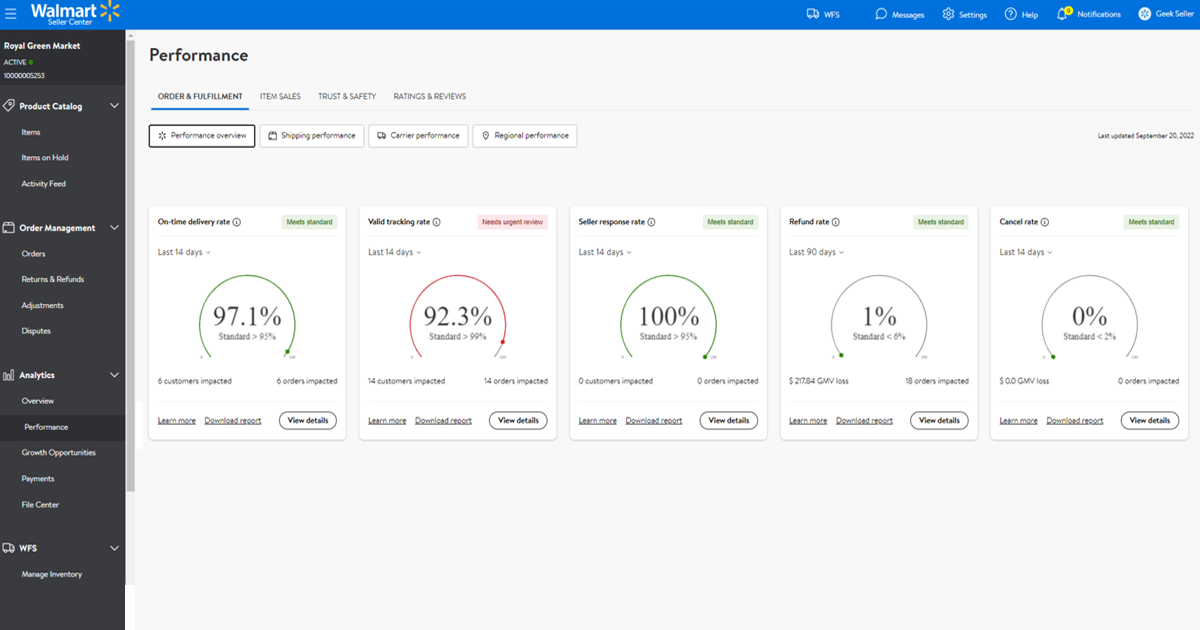
To understand exactly what these metrics are and the standards you must meet, the official Walmart documentation is the best source.
Seller performance standards - Guides | Marketplace Learn
This guide from Walmart Marketplace Learn is the definitive source on seller performance standards. It details each metric, the required threshold, and what causes them to change.
Please read the 'Overview' and 'What is the policy?' sections. Pay very close attention to the table under 'What is the policy?', as it defines each of the six key performance standards, the required targets, and the difference between 'seller accountable' and 'non-seller accountable' issues.
As you've just read, these are the critical metrics for seller-fulfilled orders, evaluated over a 30-day period:
| Performance Standard | Walmart's Required Standard | What it Measures |
|---|---|---|
| On-Time Delivery Rate (OTD) | ≥ 90% | Percentage of orders delivered by the expected delivery date. |
| Valid Tracking Rate (VTR) | ≥ 99% | Percentage of orders shipped with valid tracking information. |
| Seller Response Rate | ≥ 95% | Percentage of customer inquiries responded to within 48 hours. |
| Cancellation Rate | ≤ 2% | Percentage of orders you cancel after the customer places them. |
| Refund Rate | ≤ 6% | Percentage of orders refunded due to seller-fault issues (e.g., damaged, wrong item). |
| Negative Feedback Rate | ≤ 2% | Percentage of orders receiving a 1- or 2-star rating (over 60 days). |
Notice the distinction between "seller accountable" and "non-seller accountable" issues. For example, if you cancel an order because you ran out of stock, that hurts your Cancellation Rate. If you cancel because the customer requested it, it does not. Your IT background will serve you well here, as this is all about data integrity—ensuring the reasons for actions are logged correctly.
Test your understanding!
You use a dropship supplier who confirms they have shipped an order. However, you wait 3 days before uploading the tracking number to Walmart Seller Center. Which two key metrics are most at risk from this delay, and why?
Show answer
- Valid Tracking Rate (VTR): The policy requires you to provide valid tracking after the package is handed to the carrier. A significant delay in uploading can cause the system to flag the order as not having valid tracking in time.
- On-Time Delivery Rate (OTD): Walmart's delivery clock starts ticking based on when you confirm shipment and provide tracking. Delaying this information can make it appear that the order was shipped late, even if the supplier was on time, putting your OTD at risk if the delivery window is tight.
3. Proactively Managing Your Listing Quality Score
Beyond fulfilling orders perfectly, you also need to ensure your listings are high-quality. Walmart uses a "Listing Quality Score" to measure this. A higher score means better visibility in search results, which leads to more sales. Unlike operational metrics which are reactive, improving your listing quality is a proactive way to grow your business.
How to Sell on Walmart.com Marketplace 2026 Tutorial
This video from Travis Marziani does an excellent job of breaking down the concept of the Listing Quality Score and explaining why it's so important for ranking your products.
Watch from 08:06 to 12:37. Focus on understanding the three main components that make up your overall Listing Quality Score.
As the video explained, your overall Listing Quality Score (from 1-100) is made up of a few sub-scores:
- Content & Discoverability Score: Based on the completeness and quality of your listing content. This includes your title, description, attributes, and image count.
- Reviews & Rating Score: Based on the number and quality of customer reviews on your product.
- Offer Score: Based on your price competitiveness, in-stock rate, and shipping speed. This is directly tied to your ability to win the Buy Box.
The great thing is that Walmart Seller Center actually tells you what you need to do to improve your score for each listing. Now, let's look at some practical steps you can take.
How to Sell on Walmart.com Marketplace 2026 Tutorial
Let's continue with the same video to see some actionable tips for improving your Content & Discoverability score.
Watch from 07:50 to 10:28. Pay attention to the specific, practical advice given for optimizing images and filling out product attributes.
Actionable Steps to Improve Listing Quality:
- Use All Image Slots: Don't just upload one or two photos. Use all 7-8 available slots to showcase your product from every angle.
- Fill Out All Attributes: In your listing setup, meticulously fill out not just the required attributes, but also the recommended and optional ones (e.g., color, size, material). This helps customers filter for your product and improves how Walmart's algorithm indexes it.
- Follow Content Guidelines: Keep your title within the recommended length, avoid spelling mistakes, and use HTML sparingly in your description.
Improving these factors directly improves your ranking, which is a powerful way to get ahead of competitors who ignore them.
4. Consequences and How to Respond to Issues
So, what happens if your metrics fall below the required standards? It's crucial to understand the escalation process and how to respond.
Seller performance standards - Guides | Marketplace Learn
Let's return to the official Walmart guide to understand the consequences of poor performance and the types of notifications you'll receive.
Read the 'Additional guidelines' and 'Frequently asked questions' sections. This will explain the warning system and the difference between suppression, suspension, and termination, as well as the appeals process.
Here is the escalation ladder for poor performance:
- Warnings & Alarms: You'll receive emails and Seller Center notifications (which you cannot unsubscribe from) warning you that a metric is slipping.
- Suppression: Your seller-fulfilled listings are removed from Walmart.com. This is a serious warning to fix your operations.
- Suspension: All of your listings (including any WFS items) are removed. Your account is effectively shut down pending a successful appeal.
- Termination: Your selling privileges are permanently revoked. This is final and cannot be appealed.
If your account is suspended, you can appeal by submitting a Business Plan of Action. This is a formal document where you must:
- Identify the root cause of the problem (e.g., "Our 3PL was not meeting their stated shipping times, causing our OTD to drop").
- Outline the specific, concrete steps you have taken to fix the issue (e.g., "We have terminated our contract with 3PL 'A' and have signed with 3PL 'B', whose performance we have verified").
- Explain the preventative measures you've put in place to ensure it doesn't happen again.
Conclusion
Congratulations on completing the "Launching on Walmart Marketplace" module! You've gone from setting up an account to creating, pricing, and shipping a product, and now you know how to monitor the health of your entire operation.
Key Takeaways:
- Your Dashboard is Your Lifeline: Regularly check your Performance Dashboard to monitor the six key operational metrics (OTD, VTR, etc.).
- Meet the Minimums: Failing to meet Walmart's performance standards is not an option and can lead to account suspension.
- Be Proactive with Listing Quality: Continuously improve your Listing Quality Score by optimizing images, attributes, and content to boost your visibility and sales.
- Act on Warnings: If you receive a performance alarm, take immediate action. If suspended, create a thorough Business Plan of Action to appeal.
Next Up:
You now have a solid foundation for selling on Walmart. We're now going to turn our attention to the other e-commerce giant: Amazon. In our first lesson of the next module, "Launching on Amazon with FBA," we will walk through the very first step: completing the Amazon Seller Central account registration and verification process.