Hello! Welcome back to our module on launching on Walmart Marketplace.
In our last lesson, we focused on the critical task of setting a competitive price to win the Walmart Buy Box. We established that the algorithm heavily favors sellers who offer the best overall value, which is determined not just by price, but also by shipping speed and cost.
Today, we'll build directly on that knowledge. You'll learn how to take your shipping strategy and translate it into the specific settings Walmart uses. This is how you communicate your shipping promises to both Walmart and your customers. This lesson will show you how to configure shipping templates for dropshipping or 3PL fulfillment on Walmart. Mastering this is essential for controlling your costs, meeting customer expectations, and competing effectively for the Buy Box.
1. What Are Shipping Templates and Why They Matter
Think of a shipping template as a container for a set of rules that defines your shipping offer: how much you charge, how quickly you deliver, and where you deliver to. Every product you list must be assigned to a shipping template.
These templates are more than just a technical requirement; they are a core part of your business strategy on the platform.
Walmart Shipping Templates: Which One Is Best for Your ...
To understand the strategic importance of templates, let's start with this excellent guide from GoAura.
Please read the introduction and the sections 'What Are Shipping Templates on Walmart Marketplace?' and 'Why Shipping Templates Matter for Walmart Sellers'. Pay close attention to how templates directly influence your Buy Box performance and customer experience.
As you just read, well-configured shipping templates are critical for:
- Winning the Buy Box: Fast and free shipping is a major factor.
- Improving Customer Experience: Clear, accurate shipping costs and times reduce cart abandonment.
- Operational Flexibility: You can create different templates for different products. For example, you might have one template for lightweight items fulfilled by a dropshipper and another for bulky items stored at a 3PL.
2. Matching Templates to Your Fulfillment Model
Before creating a template, it's crucial to understand how your fulfillment method connects to the template types Walmart offers. On Walmart, you have two primary fulfillment paths:
- Walmart Fulfillment Services (WFS): This is Walmart's version of Amazon FBA. You send your inventory to a Walmart fulfillment center, and they handle storage, picking, packing, and shipping. When you use WFS, Walmart controls the shipping settings to guarantee two-day delivery. You don't need to configure shipping templates for WFS items.
- Seller-Fulfilled: This is any method where you or a partner are responsible for shipping. This is the model that requires you to configure shipping templates. It includes:
- Dropshipping: Your supplier ships directly to the customer.
- Third-Party Logistics (3PL): You store inventory with a partner who fulfills orders on your behalf.
For seller-fulfilled models, Walmart offers several template types. Let's review the most relevant ones for your goals.
Walmart Shipping Templates: Which One Is Best for Your ...
The GoAura article provides a great breakdown of the different template types. Understanding these options is key to choosing the right strategy.
Read the section 'Types of Shipping Templates: Which One Is Right for Your Business?'. Focus on the descriptions for the Paid Standard, Custom, and International templates, as these are the most relevant for dropshipping and 3PL fulfillment.
Here’s a quick summary of the key templates for your business model:
- Paid Standard & Custom Templates: These are your workhorses for any US-based fulfillment, whether it's a 3PL or a domestic dropship supplier. They give you the flexibility to set shipping rates based on order price or item weight, define different transit times for different US regions, and offer free shipping.
- International Shipping Template: This template is specifically designed for when you are dropshipping from outside the US, such as from China. It allows for the longer transit times (e.g., 7-13 days) required for international shipping.
- TwoDay Delivery Template: This is a premium option you can apply for once you have a proven track record of fast, reliable shipping. Earning the TwoDay badge provides a significant Buy Box advantage.
3. How to Create a Shipping Template: A Practical Walkthrough
Let's walk through the process of creating a shipping template for a common scenario: using a US-based 3PL or dropship supplier.
First, let's get familiar with the official terminology and process from Walmart's own documentation.
Shipping Templates: Overview - Guides | Marketplace Learn
This guide from Walmart Marketplace Learn is the official source of truth. It outlines the basic process and the different template types you can create.
Read the 'How does it work?' and 'Manual shipping settings (domestic)' sections. This will ground you in the core concepts before we see them in action.
Now that you have the official overview, let's look at the actual interface you'll be using in Seller Center.
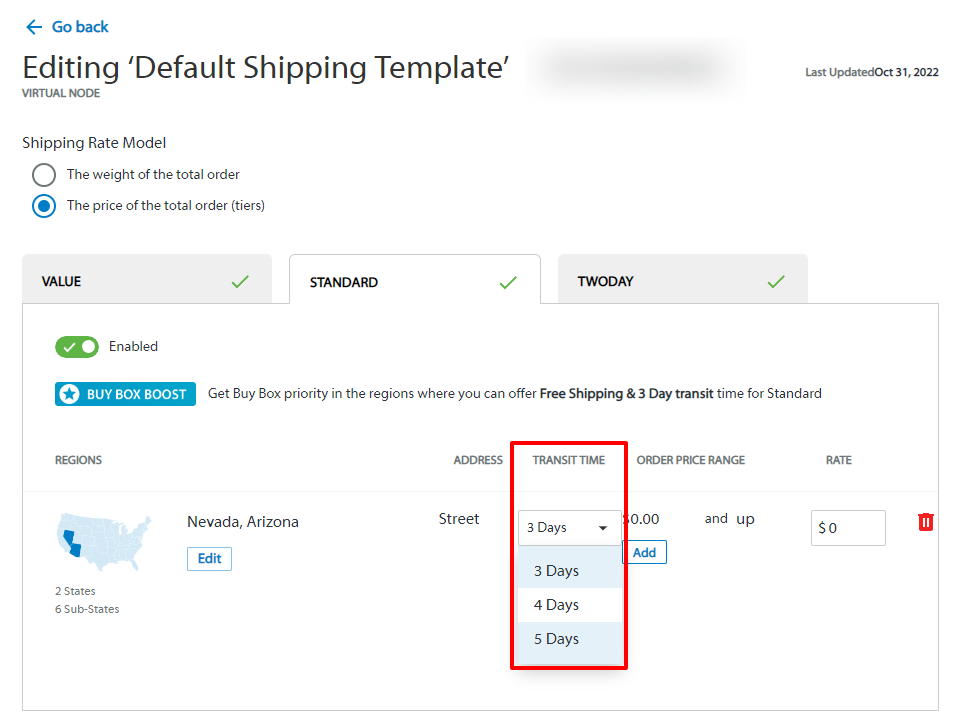
To see this process live, let's watch a quick, practical demonstration.
How to Create Walmart Special Standard Shipping Template | Disable Your Free Shipping on Walmart
This video from Ecomclips provides a concise, step-by-step tutorial on how to create a 'Paid Standard' shipping template within Walmart Seller Center.
Watch from 00:45 to 01:52. Observe how the user navigates to the templates section, selects a 'Paid Standard Template', chooses a shipping rate model, and configures shipping costs based on the total order price.
To summarize the steps:
- In Seller Center, navigate to Settings > Shipping Templates.
- Click Create New Template and select the type (e.g., Paid Standard, Custom).
- Name your template descriptively (e.g., "3PL - Standard Shipping").
- Configure the settings:
- Shipping Rate Model: Choose whether to base your shipping fee on the total order price or the total order weight.
- Regions & Transit Time: Specify the delivery time for different parts of the US. Your 3PL or dropshipper will provide you with this information.
- Shipping Price: Set the cost for the customer. You can create tiers, such as offering free shipping for orders above a certain value.
- Save the template.
Test your understanding!
Imagine your US-based 3PL partner gives you the following rate card:
- Shipping to all 48 contiguous US states takes 3-5 business days.
- They charge you a flat fee of $6.95 for any order under $75.
- Orders $75 and over are free for you to ship.
You want to pass these savings to your customer. How would you set up a Paid Standard Template to reflect this?
Show answer
- Name: "3PL Free Ship Over $75"
- Shipping Rate Model: "Price of the total order"
- Region: Select all 48 contiguous states.
- Transit Time: Choose "3-5 business days".
- Shipping Price Tiers:
- Tier 1: If order price is from $0.01 to $74.99, shipping cost is $6.95.
- Tier 2: If order price is from $75 and up, shipping cost is $0.00 (Free Shipping).
4. Assigning Templates and Critical "Gotchas"
Creating a template is step one. Step two is assigning it to your products (SKUs). You have two ways to do this.
-
Manually: For a few products, you can go into the item details page in your catalog and select the desired shipping template from a dropdown menu. The video from Ecomclips briefly showed this at the end (
01:52). -
In Bulk: For managing a larger catalog, this is the most efficient method. Given your IT background, you'll appreciate this approach. You can download a spreadsheet, specify the template ID for each SKU, and upload it.

Finally, there are a few crucial operational rules you must know to avoid issues. These are often missed by new sellers.
Shipping Templates: Overview - Guides | Marketplace Learn
Let's return to the official Walmart documentation one last time. The FAQ section contains some non-obvious but very important rules.
Read the 'Frequently asked questions' section carefully. Pay special attention to the four-hour waiting period after creating a template, and the daily edit limits.
Key Operational Rules to Remember:
- The 4-Hour Rule: You MUST wait at least four hours after creating a new shipping template before assigning SKUs to it. If you do it sooner, the assignment may fail, and your items will revert to the default template.
- Template Edit Limits: You are limited to one change per template per hour, and up to 10 edits per day. Exceeding this will lock the template for 24 hours. Plan your changes carefully.
- Disabling Value Shipping: The default "Value" shipping method offers free but slow shipping. To disable it for an item, you must create and assign it to a "Paid Standard Template" (after the 4-hour wait).
Conclusion
You now have a complete framework for configuring your shipping strategy on Walmart. By correctly setting up and assigning shipping templates, you gain control over your customer's shipping experience, manage your costs, and significantly improve your ability to compete for the Buy Box.
Key Takeaways:
- Templates Define Your Offer: Shipping templates are how you communicate your shipping speed, cost, and delivery regions for all seller-fulfilled orders.
- Match Template to Model: Use Paid Standard/Custom templates for US-based 3PLs and dropshippers, and the International template for dropshipping from overseas.
- Configuration is Key: Set up your templates to accurately reflect the services and costs from your fulfillment partner. Use tiered pricing to strategically offer free shipping.
- Bulk Updates are Efficient: For catalogs with many SKUs, use the bulk update feature to assign template IDs via spreadsheet.
- Mind the Rules: Always remember the 4-hour waiting period after creating a template and the daily edit limits to avoid frustrating errors.
Next Up:
You've now learned how to create a quality listing, price it competitively, and configure its shipping. The final piece of the launch puzzle is maintaining a healthy seller account. In our next lesson, we will focus on how to monitor and maintain key Walmart seller performance metrics to ensure account health, which is vital for long-term success and retaining your Buy Box eligibility.