Hello! Welcome to the first lesson of Module 4: Launching on Walmart Marketplace.
In the previous module, you mastered the critical process of sourcing a product and vetting suppliers, culminating in evaluating product samples to ensure quality. With a high-quality product ready, it's now time to get it in front of customers.
Today, we'll tackle the first and most crucial step in this process. The learning outcome for this lesson is to complete the Walmart Seller application and account verification process. This is a practical, hands-on task that serves as the gateway to selling on one of the world's largest online marketplaces. Because you've already set up your US business entity and bank account in Module 1, you have a significant head start.
Let's get your business ready to go live on Walmart.
1. Preparation is Key: Your Pre-Application Checklist
Walmart's application process is more rigorous than some other platforms. They prioritize sellers who are established and can demonstrate reliability. Gathering all your information beforehand is the single most important step to ensure a smooth and fast approval.
To understand exactly what Walmart is looking for, the following article provides an excellent overview of their core evaluation criteria.
Walmart Marketplace Approval: Get Accepted Faster (2026)
The article 'Walmart Marketplace Approval' from StarterX clearly outlines the five core criteria Walmart uses to evaluate sellers. Understanding these will help you prepare your application effectively.
Read the section titled 'What Is the Walmart Marketplace Approval Process?'. Focus on the five core criteria: Business Legitimacy, Verified Product Information, Fulfillment Capability, Customer Service Readiness, and Marketplace Performance History.
Based on these criteria, let's assemble your required documents and information. Most of this should be readily available from your work in Modules 1 and 3.
Your Walmart Application Checklist:
- US Business Tax ID (EIN): The Employer Identification Number for your US LLC.
- W-9 Tax Form Information: This confirms your business name and EIN match IRS records.
- Verifiable US Physical Address: The business address you set up, not a P.O. Box.
- US Business Bank Account Details: Your account with Mercury or Payoneer.
- Product Identifiers (GTINs/UPCs): The GS1-verified UPCs for the products you've sourced.
- History of E-commerce Success (Optional but recommended): A link to your existing online store, even if it was for local sales, demonstrates experience.
- A Defined Fulfillment Plan: You should be able to state how you will ship orders (e.g., from a 3PL partner or via dropshipping).
The video below reinforces these requirements and gives a great overview of the entire process from start to finish.
UPDATED How to Apply to Sell on Walmart Marketplace Step by Step
Noah Mincis provides a concise list of the documents and criteria you'll need before you even start the application.
Watch from 01:06 to 03:32. Pay attention to how he emphasizes that all your documents—EIN, business registration, address—must match perfectly.
The single most critical factor for approval is consistency. The legal business name, address, and EIN must be identical across all documents (business registration, IRS letter, bank account). Even a small discrepancy like "LLC" vs. "L.L.C." can trigger a manual review or rejection.
Test your understanding!
An applicant registers their business as "Global Exports LLC" and gets an EIN under that name. However, their fintech business bank account is registered under their personal name, "John Doe".
Why will this application almost certainly be rejected by Walmart, and what is the required fix?
Show answer
-
Reason for Rejection: Walmart's automated systems will flag a mismatch between the business entity name ("Global Exports LLC") on the application and the bank account holder's name ("John Doe"). They require the bank account to be held by the same legal entity that is applying to sell. This is a standard anti-fraud and compliance check.
-
The Fix: The applicant must ensure their business bank account is registered under the legal business name, "Global Exports LLC", not their personal name. All documents submitted must be consistent.
2. The Application: A Step-by-Step Walkthrough
Once your documents are in order, you're ready to apply. The process has two main phases: creating your initial account and then completing the onboarding verification steps.
Step 1: Initial Account Creation
You will start at the Walmart Marketplace sign-up page.
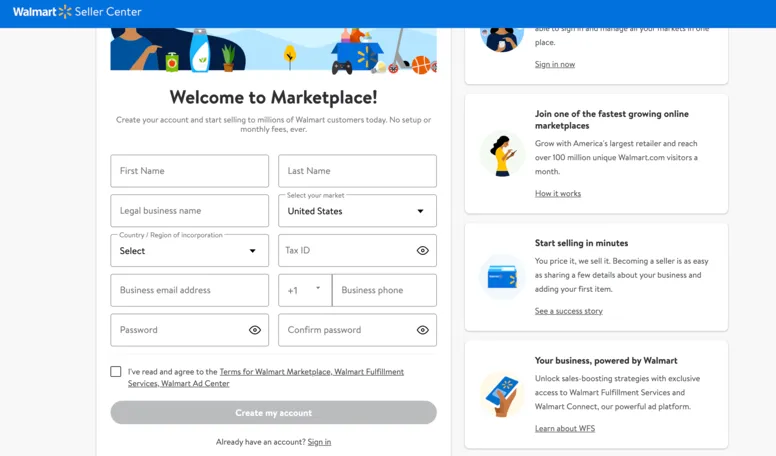
This first video segment will walk you through filling out these initial fields.
UPDATED How to Apply to Sell on Walmart Marketplace Step by Step
Let's watch the application process in action. This clip shows exactly how to fill out the initial sign-up form.
Watch from 03:32 to 04:57. Follow along as he enters the key business details. Notice the advice to use a professional business email address if possible.
After submitting this form, you will receive a verification email. You'll need to enter the code to proceed.

Step 2: The Onboarding Dashboard & Verification
Once your email is verified, you will gain access to the Walmart Seller Center, but your account won't be live yet. You must complete a three-step onboarding process.
The next video segment provides a clear guide to these final verification steps.
UPDATED How to Apply to Sell on Walmart Marketplace Step by Step
This clip breaks down the three final onboarding steps you must complete within the Seller Center: Business Verification, Payments, and Shipping.
Watch from 04:57 to 06:41. Pay close attention to each section: Business Verification: Where you submit your tax and address details for final validation. Payments: How to connect your payment processor (you'll select Payoneer here). Shipping & Returns: How to set up your primary warehouse address and basic shipping settings. Keep this simple for now; we will configure detailed shipping templates in a later lesson.
Once you submit all three sections, your application is officially under review.
3. After You Submit: The Waiting Period and Troubleshooting
You've done the hard work, and now the review process begins.
Approval Timeline
The approval timeline can vary, typically taking anywhere from a few days to a few weeks. Walmart's systems are verifying your information against various databases (IRS, GS1, etc.).
Walmart Marketplace Approval: Get Accepted Faster (2026)
This article provides a helpful breakdown of the approval timeline and the stages involved.
Read the section 'How Long Does Walmart Marketplace Approval Take?'. This will give you a realistic expectation for the waiting period and explains what's happening behind the scenes.
What if Your Application is Rejected?
It's possible for an application to be rejected, but it's usually for a fixable reason. Understanding the common pitfalls is the best way to avoid them.
Walmart Seller Application: How to Get Approved (2026)
The 'Walmart Seller Application' guide from AURA lists the most frequent reasons for application denial. Reviewing this can help you double-check your own application for potential red flags.
Read the section 'What if my Application is Not Approved?'. The most common reasons are inconsistent business information, invalid UPCs, or an unclear fulfillment plan.
If you are rejected, you will still have access to the Seller Center. You can open a support case to ask for clarification on the rejection reason and provide corrected information to appeal the decision.
Conclusion
Congratulations on completing this critical step! You now have a comprehensive understanding of the entire Walmart Seller application and verification process, from preparation to submission and troubleshooting.
Key Takeaways:
- Preparation is Paramount: The key to a fast approval is having all your documents—EIN, W-9, bank details, UPCs—ready and ensuring the information is 100% consistent across every form.
- The Process is Multi-Step: It involves an initial sign-up, email verification, and a three-part onboarding process within the Seller Center (Business Verification, Payments, Shipping).
- Approval is Not Instant: Expect a review period of several days to weeks as Walmart verifies your data.
- Rejection is Often Fixable: Most rejections are due to simple data mismatches, which can be corrected and appealed through Seller Support.
Next Up:
Once you receive that exciting "approved" email, your journey on Walmart truly begins. In our next lesson, we will navigate the Walmart Seller Center to learn how to manage your listings, pricing, and orders, setting the stage for your first sale.