Introduction
In the previous lesson, we tackled the challenge of model size on a single GPU by integrating quantization into our custom inference engine. You implemented a QuantizedLinear layer, allowing the engine to load and execute models with a significantly smaller memory footprint.
However, even with 4-bit quantization, the largest and most powerful models—those with 70 billion parameters or more—still exceed the VRAM capacity of a single consumer or even enterprise GPU. To run these models, we must move from a single-GPU to a multi-GPU architecture. This lesson addresses the learning outcome: Add tensor-parallel execution capabilities to the engine for multi-GPU deployment.
We will explore tensor parallelism (TP), a powerful technique for splitting the weights of a single model layer across multiple GPUs. You will learn the core mechanics of how TP works for transformer blocks and then implement the necessary components to integrate these capabilities directly into your capstone inference engine.
1. The Challenge of "Too-Big-to-Fit" Models
First, let's establish why we need a new parallelism strategy. Quantization reduces memory usage, but there's a hard limit to what it can achieve before model quality degrades unacceptably. For truly massive models, we have no choice but to combine the memory of multiple GPUs.
LLM Inference Optimization #2: Tensor, Data & Expert Parallelism (TP, DP, EP, MoE)
To start, let's watch a brief segment that introduces the problem of growing model sizes and the fundamental need for parallelism in LLM inference.
Watch the first two minutes of this video by Faradawn Yang, from 00:00 to 01:54. It clearly frames the memory and compute challenges that motivate the use of multi-GPU strategies.
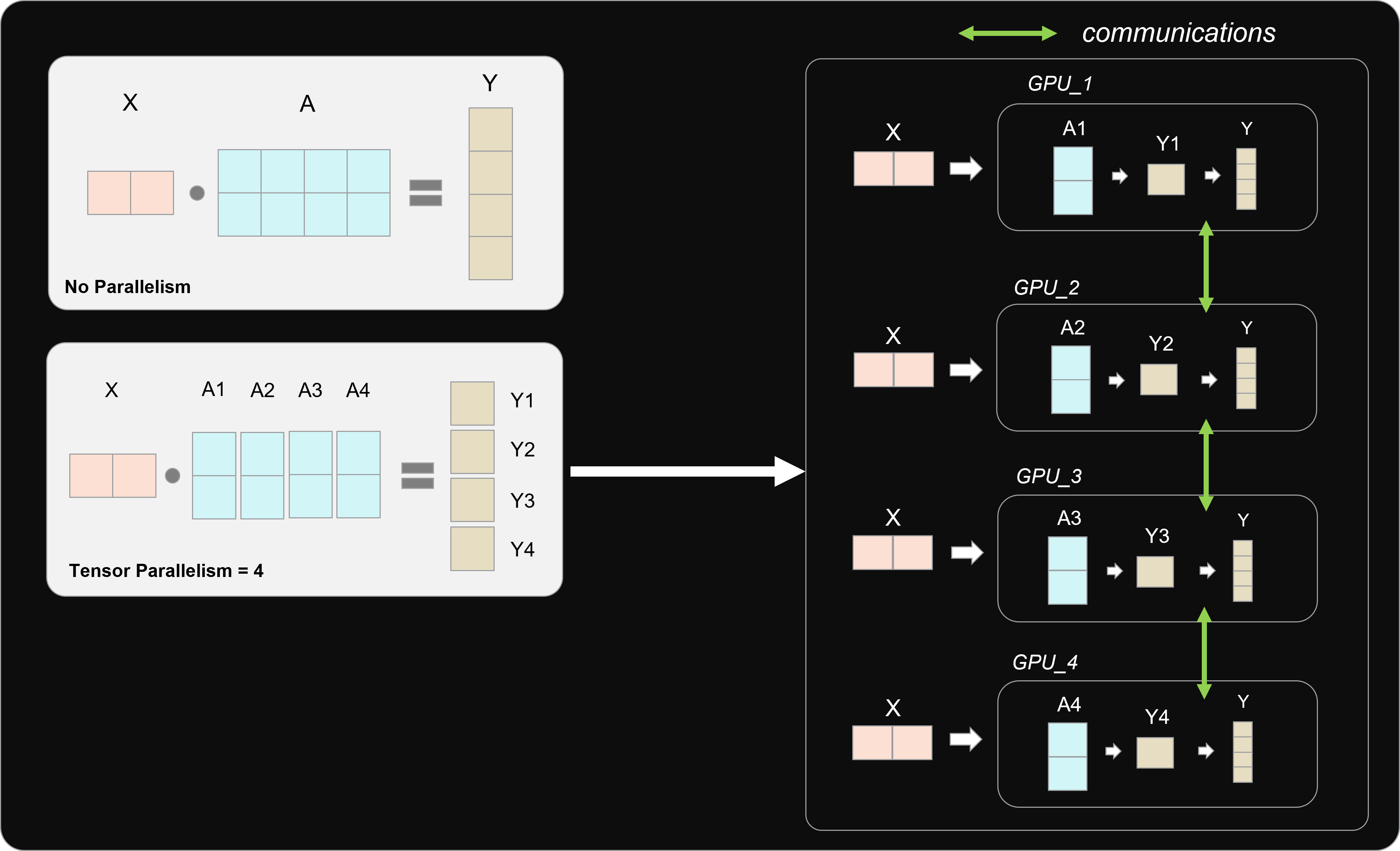
As the video explains, when a model's weights cannot fit into one GPU's memory, we must "shard" the model. Tensor parallelism is a specific, highly efficient way of doing this for inference. It works by splitting the computation within a single layer, as opposed to pipeline parallelism which puts different layers on different GPUs.
2. The Tensor Parallelism Recipe: Column vs. Row Splitting
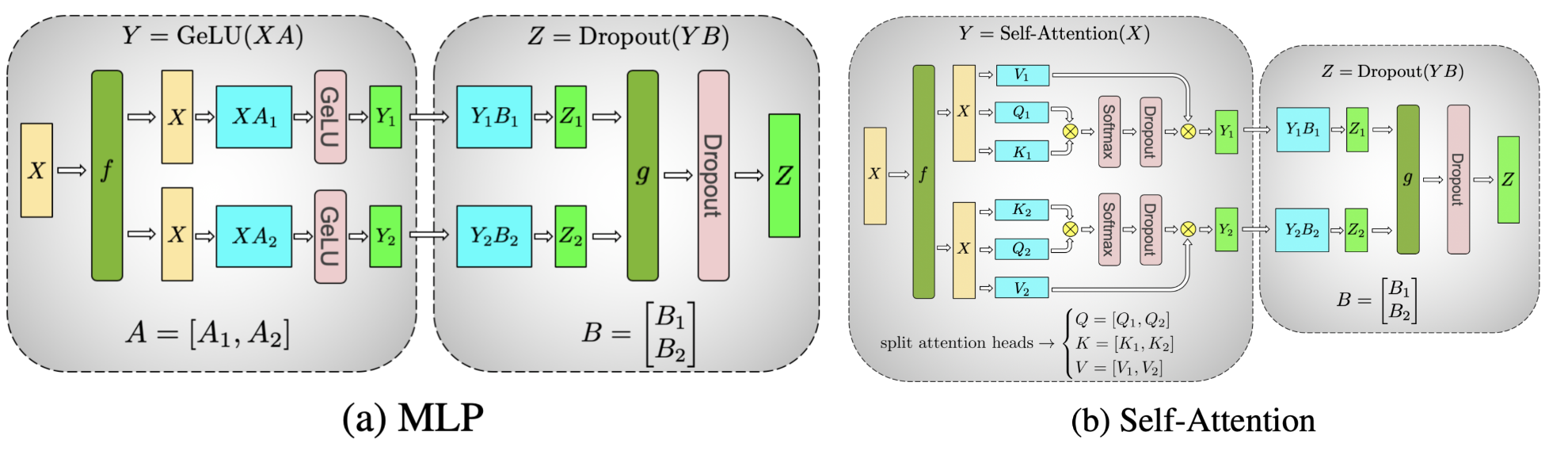
The most common and effective method for tensor parallelism in transformers was popularized by the Megatron-LM paper. It follows a specific, clever pattern of splitting weight matrices to minimize communication overhead. The key is to alternate between splitting matrices by columns and by rows.
To build a concrete, step-by-step understanding of this process, we will work through a detailed manual example.
This article by Lewis Won provides an exceptionally clear, by-the-numbers walkthrough of tensor parallelism for a two-layer MLP block. It will give you a solid foundation before we write any code.
Please read the following two sections: 'Forward pass': Follow the detailed calculations from 'Step 1: Initial Setup' through 'Step 3: Forward Pass for Z = Dropout(Y * B)'. Pay close attention to how matrix A is split by columns and B is split by rows, and note where the All-Reduce communication step becomes necessary. 'Why split Matrix A by columns, Matrix B by rows': This section explains the mathematical and efficiency rationale behind the 'Column -> Row' pattern. Understanding this is crucial for implementing it correctly. There is no need to go through the backward pass section for our inference-focused engine.
As you've just read, the Column -> Row pattern is a deliberate design choice.
- Column Parallelism: The operation
Y = f(X @ A)whereAis split into[A1, A2]results in a naturally sharded output[Y1, Y2] = [f(X @ A1), f(X @ A2)]. This requires zero communication. - Row Parallelism: The operation
Z = [Y1, Y2] @ [B1; B2](where;denotes row-stacking) is mathematically equivalent to(Y1 @ B1) + (Y2 @ B2). This requires an All-Reduce operation to sum the partial results from each GPU.
By sequencing a column-parallel layer followed by a row-parallel layer, the expensive All-Reduce operation is needed only once for the entire block. This pattern is applied to both the MLP and Attention blocks in a transformer.
3. Implementing Parallel Layers in PyTorch
Now, let's translate this concept into code for our engine. We'll create two custom nn.Module classes: ColumnParallelLinear and RowParallelLinear. These will act as drop-in replacements for nn.Linear.
The following blog post provides excellent context by showing how production systems like Hugging Face's TGI and vLLM implement this very idea.
Tensor Parallelism and Sequence Parallelism: Detailed Analysis
This post by Insu Jang analyzes tensor parallelism implementations. It connects the concepts we've discussed directly to code.
Please read the section titled 'Tensor Model Parallelism'. Focus on how q_proj, k_proj, and v_proj are mapped to column parallelism, while out_proj is mapped to row parallelism. Pay special attention to the forward method of TensorParallelRowLinear which explicitly shows the torch.distributed.all_reduce call.
Inspired by these examples, we will implement our own versions. Create a new file in your project named parallel.py.
First, add some helper functions to interact with PyTorch's distributed process group:
# parallel.py

import torch
import torch.distributed as dist

_TENSOR_MODEL_PARALLEL_GROUP = None
_TENSOR_MODEL_PARALLEL_WORLD_SIZE = None
_TENSOR_MODEL_PARALLEL_RANK = None

def initialize_model_parallel(tensor_model_parallel_size: int = 1):
    """
    Initializes the tensor model parallel group.
    """
    global _TENSOR_MODEL_PARALLEL_GROUP
    global _TENSOR_MODEL_PARALLEL_WORLD_SIZE
    global _TENSOR_MODEL_PARALLEL_RANK

    if not dist.is_available() or not dist.is_initialized():
        raise RuntimeError("PyTorch distributed is not available or not initialized.")

    _TENSOR_MODEL_PARALLEL_WORLD_SIZE = tensor_model_parallel_size


    # Create a process group for tensor parallelism
    # In a more complex setup (with pipeline/data parallelism), you would create subgroups.
    # For now, our TP group is the entire world.
    num_tensor_model_parallel_groups = dist.get_world_size() // tensor_model_parallel_size

    for i in range(num_tensor_model_parallel_groups):
        ranks = list(range(i * tensor_model_parallel_size, (i + 1) * tensor_model_parallel_size))
        group = dist.new_group(ranks)
        if dist.get_rank() in ranks:
            _TENSOR_MODEL_PARALLEL_GROUP = group
            _TENSOR_MODEL_PARALLEL_RANK = dist.get_rank() % tensor_model_parallel_size


def get_tensor_model_parallel_world_size():
    return _TENSOR_MODEL_PARALLEL_WORLD_SIZE

def get_tensor_model_parallel_rank():
    return _TENSOR_MODEL_PARALLEL_RANK

def get_tensor_model_parallel_group():
    return _TENSOR_MODEL_PARALLEL_GROUP
Now, add the implementation for the parallel linear layers:
# parallel.py (continued)

import torch.nn as nn
import torch.nn.functional as F
from torch.nn.parameter import Parameter

class _CopyToParallelRegion(torch.autograd.Function):
    """Pass the input to the parallel region."""
    @staticmethod
    def forward(ctx, input_):
        return input_

    @staticmethod
    def backward(ctx, grad_output):
        return dist.all_reduce(grad_output, group=get_tensor_model_parallel_group())

class _ReduceFromParallelRegion(torch.autograd.Function):
    """All-reduce the input from the parallel region."""
    @staticmethod
    def forward(ctx, input_):
        return dist.all_reduce(input_, group=get_tensor_model_parallel_group())

    @staticmethod
    def backward(ctx, grad_output):
        return grad_output


class ColumnParallelLinear(nn.Module):
    def __init__(self, in_features: int, out_features: int, bias: bool = True):
        super().__init__()

        self.in_features = in_features
        self.out_features = out_features
        world_size = get_tensor_model_parallel_world_size()

        if out_features % world_size != 0:
            raise ValueError(f"out_features ({out_features}) must be divisible by "
                             f"tensor parallel world_size ({world_size})")

        self.out_features_per_partition = out_features // world_size

        self.weight = Parameter(torch.empty(
            self.out_features_per_partition, self.in_features
        ))
        if bias:
            self.bias = Parameter(torch.empty(self.out_features_per_partition))
        else:
            self.register_parameter('bias', None)

    def forward(self, input_):


        # The input is expected to be a complete tensor (not sharded).
        # We perform a local matmul with the sharded weight.
        output_parallel = F.linear(input_, self.weight, self.bias)


        # The output is now sharded. For the backward pass, we need to gather gradients.
        # This is handled by applying the autograd function.
        return _CopyToParallelRegion.apply(output_parallel)


class RowParallelLinear(nn.Module):
    def __init__(self, in_features: int, out_features: int, bias: bool = True):
        super().__init__()

        self.in_features = in_features
        self.out_features = out_features
        world_size = get_tensor_model_parallel_world_size()

        if in_features % world_size != 0:
            raise ValueError(f"in_features ({in_features}) must be divisible by "
                             f"tensor parallel world_size ({world_size})")

        self.in_features_per_partition = in_features // world_size

        self.weight = Parameter(torch.empty(
            self.out_features, self.in_features_per_partition
        ))
        if bias:
            self.bias = Parameter(torch.empty(self.out_features))
        else:
            self.register_parameter('bias', None)

    def forward(self, input_):


        # The input is expected to be sharded.
        # Apply the autograd function to handle gradient propagation correctly.
        input_parallel = _ReduceFromParallelRegion.apply(input_)


        # Perform a local matmul. This gives a partial result.
        output_parallel = F.linear(input_parallel, self.weight)


        # All-reduce the partial results to get the final output.
        # This is the main communication step in the forward pass.
        output = dist.all_reduce(output_parallel, group=get_tensor_model_parallel_group(), async_op=False)

        if self.bias is not None:
            output = output + self.bias

        return output
- The
_CopyToParallelRegionand_ReduceFromParallelRegionautograd functions are crucial for ensuring gradients are correctly handled during backpropagation (even if we're only doing inference, usingParameterrequires correct grad handling). The key takeaway is how the backward pass communication is the reverse of the forward pass. ColumnParallelLinearsplits itsweightandbiasalong the output dimension. Its forward pass produces a sharded output.RowParallelLinearsplits itsweightalong the input dimension. Its forward pass takes a sharded input and performs anall_reduceto produce a complete output.
4. Integrating Tensor Parallelism into the Engine
The final step is to modify your engine's model loading procedure to use these new layers. This is analogous to how you integrated the QuantizedLinear layer. You'll traverse the model and replace nn.Linear layers with either ColumnParallelLinear or RowParallelLinear based on their name and role in the transformer block.
1. Create the replacement function in parallel.py:
# parallel.py (continued)
import logging

def replace_with_tensor_parallel_layers(module, prefix=""):
    for name, child in module.named_children():
        new_prefix = f"{prefix}.{name}" if prefix else name
        if isinstance(child, nn.Linear):


            # For decoder-only models, these are the typical layer names
            # that get column-wise parallelism.
            if any(n in new_prefix for n in ["q_proj", "k_proj", "v_proj", "gate_proj", "up_proj"]):
                new_layer = ColumnParallelLinear(child.in_features, child.out_features, child.bias is not None)


            # These layers get row-wise parallelism.
            elif any(n in new_prefix for n in ["o_proj", "down_proj"]):
                new_layer = RowParallelLinear(child.in_features, child.out_features, child.bias is not None)
            else:
                logging.warning(f"Layer {new_prefix} not recognized for TP. Keeping as is.")
                continue

            setattr(module, name, new_layer)
            logging.info(f"Replaced {new_prefix} with {type(new_layer).__name__}")
        else:


            # Recurse into submodules
            replace_with_tensor_parallel_layers(child, prefix=new_prefix)
2. Modify your engine launcher script:
Your main script that launches the engine must now initialize the distributed environment.
# main_engine.py (example)
import torch
import torch.distributed as dist
from parallel import initialize_model_parallel, replace_with_tensor_parallel_layers, get_tensor_model_parallel_rank

def main():


    # 1. Initialize Distributed Environment
    dist.init_process_group(backend="nccl")
    world_size = dist.get_world_size()
    rank = dist.get_rank()
    torch.cuda.set_device(rank)


    # For now, let's assume TP size is the world size
    tensor_parallel_size = world_size
    initialize_model_parallel(tensor_parallel_size)


    # 2. Load Model Architecture (on CPU first to avoid OOM)
    # model = AutoModelForCausalLM.from_pretrained(..., torch_dtype=torch.float16, use_cache=False)
    # # model is on meta device or CPU


    # 3. Replace layers with TP versions
    # replace_with_tensor_parallel_layers(model)


    # 4. Load Sharded Weights
    # Now, you need a mechanism to load the weights. Each rank loads only its shard.
    # For a layer replaced with ColumnParallelLinear, rank 'i' would load columns
    # from (i * shard_size) to ((i+1) * shard_size) of the original weight matrix.
    # This is a non-trivial step. Frameworks like Hugging Face's Accelerate can help.
    # For this exercise, you can manually shard a saved checkpoint.


    # A simplified loading example:
    # with torch.no_grad():
    #     for name, param in model.named_parameters():
    #         # logic to load the correct shard of 'param' from a file
    #         # into the parameter on the current rank.
    #         pass


    # model.to(torch.cuda.current_device())


    # ... rest of your engine setup (Scheduler, PagedKVCacheManager, Executor)

if __name__ == "__main__":
    main()
To run this, you would use torchrun:torchrun --nproc_per_node=2 main_engine.py (for 2 GPUs on one machine).
The sharded weight loading is a complex topic. For this capstone, you can simplify it by saving a model's state dict, then writing a separate utility script that splits the weights for each relevant layer into tp_rank_00_*.bin, tp_rank_01_*.bin, etc., which your main_engine.py script can then load based on its rank.
Conclusion
This lesson has been a deep dive into one of the most fundamental techniques for scaling LLM inference. You've gone from the high-level concept of model sharding to the low-level mechanics of column and row parallelism and their implementation in PyTorch.
Key Takeaways:
- Tensor Parallelism (TP) splits individual weight matrices across GPUs, enabling models that are too large for a single device.
- The
Column -> Rowparallelism pattern is a highly efficient strategy that minimizes communication by requiring only oneall_reduceoperation per transformer block in the forward pass. - Integrating TP into an engine involves creating custom parallel layers (
ColumnParallelLinear,RowParallelLinear) and a model surgery process to replace the standardnn.Linearlayers. - Running a TP model requires a distributed environment (initialized via
torch.distributed) and a sharded checkpoint loading mechanism where each GPU rank loads only its specific slice of the weights.
Preview of the next lesson:
Your custom engine is now architecturally complete. It has a scheduler, an advanced memory manager, and support for both single-GPU optimization (quantization) and multi-GPU scaling (tensor parallelism). In the next lesson, we will complete the capstone project by implementing the final user-facing components: request ingestion and response streaming layers for an end-to-end test. This will turn your powerful backend into a functional service.