Hello! Welcome to the first lesson in our final module, "Game Analysis for Continuous Improvement."
Throughout this course, we've built a strong foundation in tactics, checkmates, calculation, and converting advantages. In our last lesson, you learned the crucial skill of simplifying a winning position to secure the victory. But what about the games that don't go so well? The most effective way to increase your rating is to learn from your losses, and that requires a systematic process.
Given your background in digital marketing and data analysis, you'll find this process familiar. Just as you would analyze campaign metrics to find points of failure and optimize performance, we're going to use Chess.com's tools to analyze your game data, identify the critical error, and lay the groundwork for improvement.
Today's lesson focuses on the first and most important step of this process. Your learning outcome is to use Chess.com's game analysis report to identify the most critical mistake in a recent loss. We'll learn how to navigate the report, understand what the key metrics mean, and pinpoint the one move that had the biggest impact on the game's result.
1. The Game Review Dashboard: Your Post-Game Debrief
After every game on Chess.com, you have the opportunity to run a "Game Review." Think of this as your performance report. It uses a powerful chess engine (Stockfish) to evaluate every move and provides a summary of how well you played.
To get started, let's understand the main components you'll see on the initial review screen.
This page from the Chess.com Help Center provides a concise overview of the Game Review's key features. We'll focus on the definitions of the graph, accuracy score, and move classifications.
Read the sections titled 'Highlights' and 'Move classification'. Pay close attention to the table defining each move type, especially 'Mistake' and 'Blunder'.
As the article explains, there are two key elements to focus on initially:
- The Game Graph: This is a visual timeline of the advantage in the game. When the bar is high on the white side, White is winning. When it's high on the black side, Black is winning. A sudden, sharp drop in this graph is a clear signal that a major error occurred.
- Move Classifications: The engine categorizes every move. For our purposes, the most important categories are:
- Mistake (
?): A bad move that significantly worsens your position. - Blunder (
??): A very bad, often game-losing, move that typically loses material or allows a checkmate.
- Mistake (

2. What Do the Classifications Actually Mean?
The terms "Mistake" and "Blunder" are tied to a numerical evaluation change. In chess analysis, the unit of account is roughly equivalent to the value of a pawn. A score of +1.00 means White is ahead by the equivalent of one pawn. A score of -5.00 means Black is ahead by the equivalent of a rook.
A Blunder represents a massive swing in this evaluation, while a Mistake is a significant, but smaller, swing.
Chess.com's Game Report explained!
The video 'Chess.com's Game Report explained!' by the Chess Vibes channel does an excellent job of breaking down what these evaluation swings look like in practice.
Watch the segment from 02:52 to 07:05. The presenter provides an excellent explanation of what the evaluation numbers mean and shows a concrete example of how a single blunder swings the evaluation from a winning position (+2.36) to a losing one (-4.45).
The key insight here is that a critical mistake is one that causes a large, negative change in the evaluation bar. Identifying these moments is the core of our task today.
3. Finding Your Critical Mistake
Now that we know what we're looking for, how do we find it? There are two simple and effective methods using the Game Review report.
Method 1: Follow the Graph
The quickest way to find the most critical mistake is to look for the biggest "cliff" in the game graph—the point where your evaluation plummets.
How To Use 'Game Review' And Analysis Tools (@chess)
The video 'How To Use 'Game Review' And Analysis Tools' provides a perfect demonstration of this technique.
Watch from 03:20 to 04:30. Notice how the presenter immediately identifies the key moments of the game simply by looking at the peaks and valleys in the evaluation graph. Also, watch from 09:12 to 09:40, where he explicitly says he uses the graph to find the 'huge cliff' where he missed an opportunity.
By clicking on the point in the graph where the evaluation drops, the board will jump directly to that position, showing you the move that caused the damage.
Method 2: Scan the Move List
After the review is complete, you can scroll through the list of moves played in the game. Each move will have a symbol next to it corresponding to its classification. You can simply scan down the list and look for the first move marked with a ?? (Blunder) or a ? (Mistake) that occurred while the position was relatively equal or in your favor.
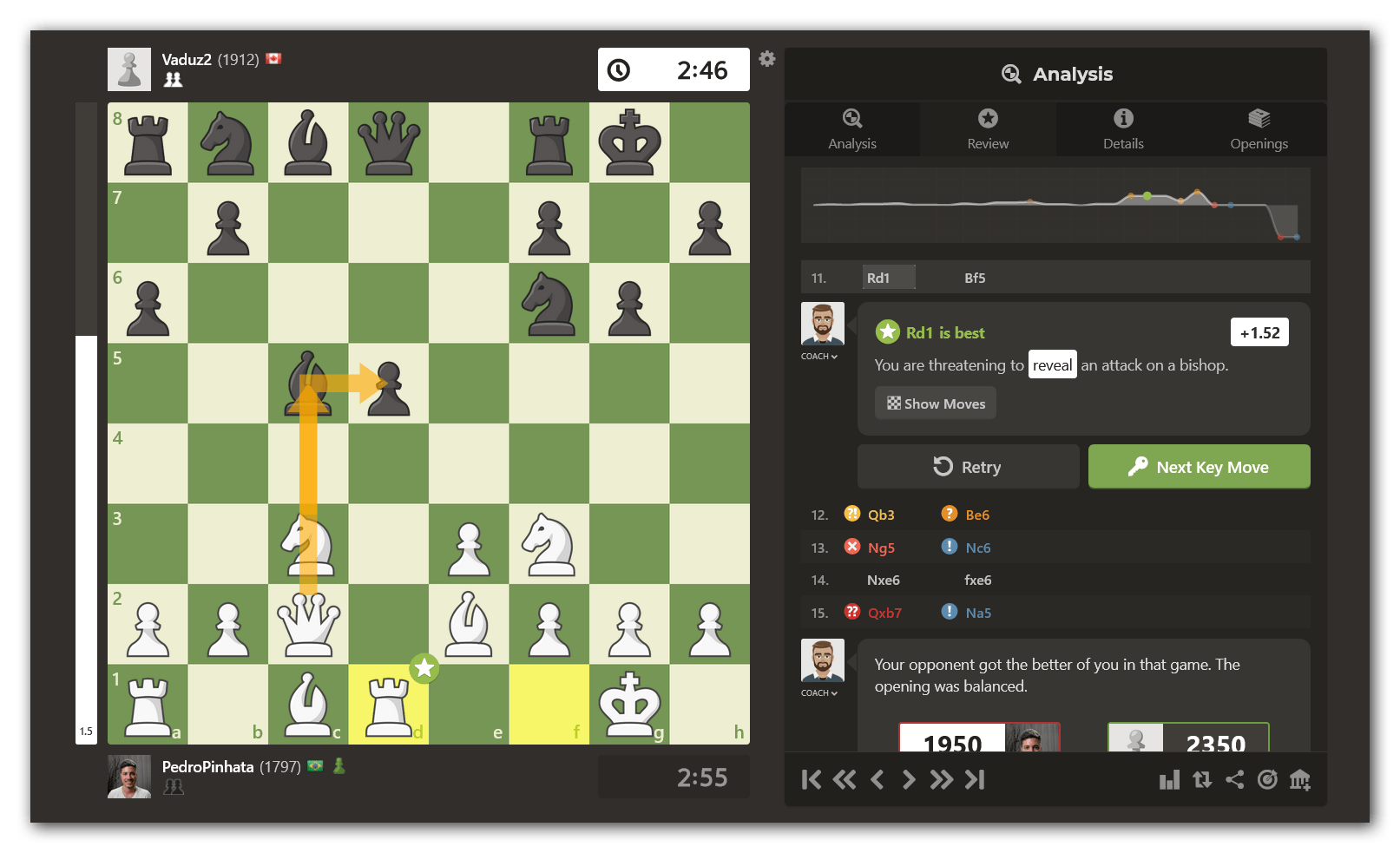
The most critical mistake is usually the one that turns an equal or advantageous position into a clearly losing one. It's often not the final move that loses the game, but the one that started the decisive downfall.
Practical Exercise: Find Your Mistake
Now it's time to apply this. Your task is to perform the first step of game analysis on one of your own games.
- Open Chess.com and go to your Game Archive. You can find this by hovering over "Play" and clicking "Archive".
- Select a recent game that you lost. Choose a game that was competitive for a while, not one where you lost in the first few moves.
- Click the green "Game Review" button to start the analysis.
- Once the report loads, use the Game Graph to find the single biggest drop in your evaluation. Click on that point in the graph to jump to the move.
- Look at the move classification. Confirm that it is labeled a "Mistake" or a "Blunder."
That's it. For today, your only goal is to successfully identify this single critical move. In our next lesson, we will explore how to understand why it was a mistake.
Conclusion
Learning from your games is the most direct path to chess improvement. It's a feedback loop: you play, you analyze, you learn, and you play better next time. Today, you've learned the essential first step of that loop: using the powerful tools on Chess.com to pinpoint the exact moment the game turned against you.
Key Takeaways:
- The Game Review report is your primary tool for post-game analysis.
- "Mistakes" and "Blunders" are moves that cause a large, negative swing in the engine's evaluation of the position.
- The fastest way to find your most critical mistake is by looking for the biggest drop in your favor on the Game Graph.
- Alternatively, you can scan the move list for the
?(Mistake) and??(Blunder) symbols to find your key errors.
Preview of the Next Lesson:
Identifying a mistake is only half the battle. To truly learn from it, you must understand why it was a mistake and what you should have done instead. In our next lesson, we will focus on exactly that. You will learn to play through the engine's recommended alternative line to understand why it was superior to the move you played.