
Good to see you again. Your campaign brief for PeakSip ended with a measurement requirement: campaign traffic must be identifiable, first-time purchases must be measurable, and the reported values must be trustworthy. UTM-tagged URLs solve the first part of that requirement. They label incoming traffic so that analytics can distinguish a paid social visit from an email click or paid-search click—and distinguish one promotion from another.
In this lesson, you will learn to construct UTM-tagged URLs and, more importantly, to use a naming convention that keeps reporting usable as campaigns multiply. This is a practical launch skill: a technically valid link is not enough if the campaign names fragment into several inconsistent rows in GA4.
What a UTM-tagged URL does
A UTM-tagged URL is an ordinary destination URL with extra information added after it. That added portion is called the query string. It contains parameter–value pairs that describe the marketing activity responsible for the click.
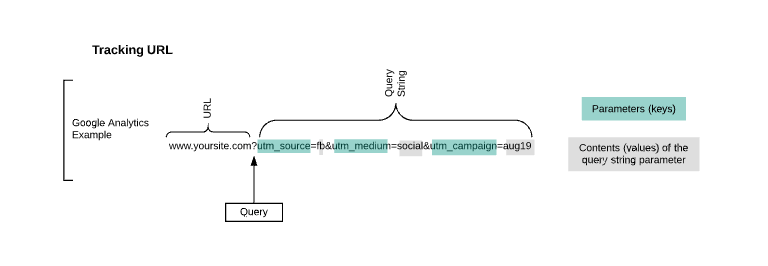
For example, this is a normal landing-page URL:
https://www.peaksip.example/collections/bottles
This is a UTM-tagged version for a Facebook paid-social ad:
https://www.peaksip.example/collections/bottles?utm_source=facebook&utm_medium=paid_social&utm_campaign=peaksip-first10-uk-2025q1
The customer still lands on the same PeakSip page. But when GA4 receives the visit, it can record that the session came from:
- Source:
facebook - Medium:
paid_social - Campaign:
peaksip-first10-uk-2025q1
A UTM tag does not create a purchase event, make an ad perform better, or prove that an ad caused a sale. It is a traffic label. Its value is that it makes subsequent analysis possible: you can compare sessions, conversions, revenue, CPA, and ROAS by the labels you deliberately applied.
URL builders: Collect campaign data with custom URLs
Read Google Analytics Help’s “URL builders: Collect campaign data with custom URLs.” It establishes the core parameters, explains why consistent tagging protects reporting quality, and shows the URL syntax you will use.
In “Add utm parameters to URL,” read why tagged links matter, then review the definitions and example for source, medium, and campaign. In “UTM best practices,” focus on the rows for Source, Medium, Campaign, Content, and Naming and field consistency. Finally, in “URL builders” under “Manual set up,” read the construction rules, including the examples and the note on case sensitivity.
The labels appear in GA4’s acquisition reporting. The precise report navigation comes later in the GA4 module; for now, remember the key reporting connection:
| What you put in the URL | What you can later inspect |
|---|---|
utm_source=facebook | Session source: facebook |
utm_medium=paid_social | Session medium: paid_social |
utm_campaign=peaksip-first10-uk-2025q1 | Session campaign: peaksip-first10-uk-2025q1 |

The five classic UTM parameters
The three core parameters should be present in every manually tagged external campaign URL:
| Parameter | Decision it records | PeakSip example | Practical rule |
|---|---|---|---|
utm_source | The specific platform, publisher, or referrer sending the click | facebook | Keep it stable for the same source. Do not call Facebook facebook in one campaign and fb in another. |
utm_medium | The broad marketing channel or traffic type | paid_social | Use a controlled, small set of medium values. |
utm_campaign | The specific marketing initiative or promotion | peaksip-first10-uk-2025q1 | Use one exact campaign name across all links belonging to that initiative. |
utm_content | The creative, placement, link position, or variation | video-commuter-a | Use it when you need to compare versions that share the same source, medium, and campaign. |
utm_term | A paid-search keyword identifier | insulated-bottle | Use only when keyword-level identification is part of your tracking plan. |
The central distinction is this:
- Source answers: Which platform or publisher sent this person?
- Medium answers: What kind of marketing channel was it?
- Campaign answers: Which promotion or initiative was this?
- Content answers: Which particular ad, creative, or link version was clicked?
- Term answers: Which keyword was associated with this click?
Suppose PeakSip runs the same first-purchase offer in Facebook ads and a newsletter.
| Channel activity | Source | Medium | Campaign |
|---|---|---|---|
| Facebook prospecting ad | facebook | paid_social | peaksip-first10-uk-2025q1 |
| Email to subscribers | newsletter | email | peaksip-first10-uk-2025q1 |
The campaign stays the same because the commercial initiative is the same. The source and medium change because the traffic arrives from different places and types of activity.
This consistency lets you answer two useful but different questions:
- Which channels contributed to the first-order offer?
- Within each channel, how did the first-order offer perform?
URL syntax: build the link without breaking it
The structure is simple, but small syntax mistakes make the tag unreliable.
destination-url?first-parameter=value&next-parameter=value&another-parameter=value
There are three rules:
- Put one question mark,
?, between the destination URL and the first parameter. - Write each parameter as
key=value. - Separate later parameter–value pairs with ampersands,
&.
For PeakSip, a fully tagged Facebook creative might be:
https://www.peaksip.example/collections/bottles?utm_source=facebook&utm_medium=paid_social&utm_campaign=peaksip-first10-uk-2025q1&utm_content=video-commuter-a
Read it in parts:
https://www.peaksip.example/collections/bottles
is the page the visitor should reach.
?utm_source=facebook
starts the query string and identifies the source.
&utm_medium=paid_social
adds the channel type.
&utm_campaign=peaksip-first10-uk-2025q1
identifies the commercial promotion.
&utm_content=video-commuter-a
identifies the particular creative variation.
When the landing page already has a query string
Sometimes the landing page already contains a parameter, perhaps to preselect a product variation:
https://www.peaksip.example/collections/bottles?colour=blue
The URL already has its one question mark. Add UTMs with an ampersand:
https://www.peaksip.example/collections/bottles?colour=blue&utm_source=facebook&utm_medium=paid_social&utm_campaign=peaksip-first10-uk-2025q1&utm_content=video-commuter-a
Do not add a second question mark. A common broken version looks like this:
https://www.peaksip.example/collections/bottles?colour=blue?utm_source=facebook
The second ? is incorrect. This is exactly the kind of minor implementation error that can make a campaign difficult to analyse after money has been spent.
UTM parameters in Google Analytics 4 || GA4 campaign tracking with UTMs
Watch Analytics Mania – Google Analytics & Tag Manager’s “UTM parameters in Google Analytics 4 || GA4 campaign tracking with UTMs.” The selected segments reinforce the taxonomy of the classic parameters and demonstrate manual construction of a tagged URL.
Watch the parameter roles to compare medium, source, campaign, term, and content. Then watch manual construction, focusing on how the landing-page URL is extended and why a consistent convention matters when links are created repeatedly.
A naming convention is a reporting system
A URL can be syntactically correct and still create bad data. Consider these campaign values:
First10
first_10
FIRST10_UK
first10-sale
A reporting tool treats these as different values. Instead of one campaign row, you have four. That means conversion totals, spend, and revenue may be split across multiple rows, obscuring performance.
For this course, use the following practical convention:
| Component | Rule | Example |
|---|---|---|
| Capitalization | Use lowercase only. | facebook, not Facebook |
| Word separator | Use hyphens between words. Avoid spaces. | video-commuter-a |
| Source vocabulary | Use one approved value per source. | facebook, instagram, google, newsletter |
| Medium vocabulary | Use one approved value per channel type. | paid_social, email, cpc |
| Campaign format | Use a readable, shared structure. | brand-offer-market-period |
| Content format | Describe a distinguishable creative or placement. | video-commuter-a, static-gym-b |
| Term format | Use a consistent keyword representation if required. | insulated-bottle |
For the PeakSip campaign, the campaign naming pattern is:
peaksip-first10-uk-2025q1
It contains:
| Part | Meaning |
|---|---|
peaksip | Brand or business |
first10 | Offer or initiative |
uk | Market |
2025q1 | Time period |
There is no single universal naming template. A larger company may require region, product line, objective, or a campaign ID. What matters is that the team defines one convention before launch, documents it, and uses it exactly.
Keep source and medium especially disciplined:
- Do not alternate between
paid-social,paidsocial, andpaid_social. - Do not use
facebookas the source for one ad andmetafor another unless the measurement plan deliberately defines those as distinct sources. - Do not use campaign names as source values. For example,
utm_source=first10does not describe a platform or referrer. - Do not put customer email addresses, names, order IDs, or other personal data into UTM values. URLs may be stored in browser histories, shared, and logged by multiple systems.
Construct three campaign URLs for the same offer
Return to the previous lesson’s brief: PeakSip is running a 14-day offer, FIRST10, to acquire first-time UK purchasers. The campaign is called peaksip-first10-uk-2025q1.
1. Facebook paid-social video ad
The marketer wants to compare a commuter-focused video with other creative later. Use utm_content for that distinction.
https://www.peaksip.example/collections/bottles?utm_source=facebook&utm_medium=paid_social&utm_campaign=peaksip-first10-uk-2025q1&utm_content=video-commuter-a
2. Newsletter hero link
The same commercial offer appears in an email. The creative is not an ad variation in this example, but there are two links in the email: one in the hero and one at the bottom. The hero link gets this URL:
https://www.peaksip.example/collections/bottles?utm_source=newsletter&utm_medium=email&utm_campaign=peaksip-first10-uk-2025q1&utm_content=hero-cta
The footer link could use the same source, medium, and campaign, but a different content value:
https://www.peaksip.example/collections/bottles?utm_source=newsletter&utm_medium=email&utm_campaign=peaksip-first10-uk-2025q1&utm_content=footer-cta
Now GA4 can distinguish the two email links without treating them as separate campaigns.
3. Manually tagged paid-search landing link
For a manually tagged search link, use cpc as the medium and add utm_term only if the keyword-level label is part of the agreed convention.
https://www.peaksip.example/collections/bottles?utm_source=google&utm_medium=cpc&utm_campaign=peaksip-first10-uk-2025q1&utm_content=rsa-commuter-v1&utm_term=insulated-bottle
This is an illustration of manual UTM construction. In a live Google Ads account, tracking may instead rely on Google Ads auto-tagging and the account’s established tracking policy. Do not add a competing manual approach casually; follow the measurement setup that the account uses.
Use a URL register before launch
Do not create campaign links in scattered messages, ad comments, or browser tabs. Maintain a simple shared URL register. It can begin as a spreadsheet.
| Channel | Destination page | Source | Medium | Campaign | Content | Final URL checked? |
|---|---|---|---|---|---|---|
/collections/bottles | facebook | paid_social | peaksip-first10-uk-2025q1 | video-commuter-a | Yes | |
| Newsletter | /collections/bottles | newsletter | email | peaksip-first10-uk-2025q1 | hero-cta | Yes |
| Google Search | /collections/bottles | google | cpc | peaksip-first10-uk-2025q1 | rsa-commuter-v1 | Yes |
The register has two jobs:
- It prevents inconsistent spellings and accidental duplication.
- It makes campaign setup auditable: another marketer can see what was used, where, and why.
Before publishing, use this compact launch check:
- Confirm that the destination page is correct, live, mobile-friendly, and relevant to the offer.
- Confirm that the link is for an external campaign. Do not use UTMs on internal website navigation, because doing so can overwrite the original acquisition source.
- Confirm the presence of
utm_source,utm_medium, andutm_campaign. - Compare every value against the agreed naming convention and URL register.
- Click the completed URL and verify that it resolves to the intended page with no error.
- Check the offer, code, or landing-page message independently; UTMs label the visit but do not validate the customer experience.
Key takeaways
UTM parameters turn an otherwise ambiguous campaign click into structured acquisition data.
- Use
utm_sourcefor the specific sender or platform,utm_mediumfor the broad channel type, andutm_campaignfor the marketing initiative. - Use
utm_contentto distinguish creatives, placements, or links within the same campaign; useutm_termonly when keyword-level tracking is needed. - Begin the query string with one
?, write parameter–value pairs askey=value, and separate later pairs with&. - Use lowercase, controlled vocabulary, and one documented campaign-naming pattern to prevent fragmented reporting.
- Keep a shared URL register and test every final link before launch.
- Tag external campaign links, not internal website links.
Next, you will build a measurement plan that connects the customer journey to trackable events, conversions, and KPIs. UTMs will provide the acquisition labels; the measurement plan will define what happens after the click and how success is evaluated.
Can't find a good explanation? Sign up and we'll make it for you
Sign up