
Hello! Welcome to the final lesson in our module on "Working with Databases."
In our last lesson, we completed our tour of CRUD operations by covering Update and Delete. We also ended with a critical warning about a security vulnerability called SQL Injection and briefly introduced its solution: parameterized queries.
Today, we will focus entirely on this crucial security practice. As a software developer, you're likely familiar with the concept of SQL injection, but seeing how it's handled in a low-code environment like n8n is essential for building robust and secure automations. This lesson will equip you to write safe, dynamic queries that can handle user input without exposing your database to attack.
By the end of this lesson, you will be able to confidently use parameterized queries to prevent SQL injection vulnerabilities in your n8n workflows.
1. The Threat: What is SQL Injection?
Before we implement the solution, let's be crystal clear about the problem. SQL Injection happens when an attacker can inject malicious SQL code into your query, often by providing specially crafted input to your application. If your workflow constructs SQL queries by simply concatenating strings with user-provided data, it is likely vulnerable.
This isn't a theoretical risk; it's one of the most common and damaging web application vulnerabilities.
Your Favorite n8n Tutorial Just Gave Hackers Full Access to Your ...
The following article gives a direct and practical explanation of how an SQL injection attack could play out in an n8n workflow. It's a stark reminder of why security can't be an afterthought.
Please read the section titled 'Data Extraction: Easier Than You Think'. Pay close attention to the scenario presented, where a simple webhook is exploited to dump an entire database table.
As the article vividly illustrates, a seemingly harmless query like this:SELECT * FROM tickets WHERE id = {{ $json["ticketId"] }}
Can be turned into a destructive command if an attacker sends a ticketId like:1 OR 1=1; SELECT * FROM customers--
The database would then execute:SELECT * FROM tickets WHERE id = 1 OR 1=1; SELECT * FROM customers--
The OR 1=1 makes the WHERE clause always true, and the -- comments out the rest of the original query, allowing the attacker's injected SELECT statement to run, potentially exposing your entire customers table.
2. The Solution: Parameterized Queries
The defense against SQL injection is to never mix your code (the SQL statement) with your data (the values from user input). This is achieved using parameterized queries, also known as prepared statements.
The process involves two steps:
- You write your SQL query using placeholders (e.g.,
$1,$2, or?depending on the database system) instead of actual values. - You provide the values for these placeholders separately.
The database driver then combines them safely, ensuring that the values you provide are treated strictly as data and cannot be executed as SQL commands.
3. Implementing Parameterized Queries in n8n
Fortunately, n8n's database nodes are designed to make this easy. When using the Execute Query operation, you have a dedicated field for your parameters.
The official n8n documentation for the Postgres node clearly explains how to use this feature. The principle is the same for other SQL nodes like MySQL, though the placeholder syntax might differ (? for MySQL vs. $n for Postgres).
First, review the 'Execute Query' section to see where the Query field is. Then, read the section 'Use query parameters' carefully. It shows exactly how to link placeholders in your query to incoming data.
Let's put this into practice.
Hands-On: Securely Fetching a Contact
We will build a simple workflow that takes an email address as input and safely fetches the corresponding record from our contacts table.
- Create a
ManualTrigger: Add aManualtrigger node to your canvas. We will use this to simulate incoming data. - Add a
SetNode: Connect aSetnode to the trigger. This will hold the "user input" we want to search for.- Set Mode to
Append. - Add one value:
- Name:
email_to_find, Value:bob@example.com(assuming a 'Bob' exists in yourcontactstable from a previous lesson).
- Name:
- Set Mode to
- Add the Database Node (The Wrong Way - For Demonstration ONLY):
- Add a
Postgresnode (or your database of choice). - Set Operation to
Execute Query. - In the Query field, type the following vulnerable query:
SELECT * FROM contacts WHERE email = '{{ $json.email_to_find }}' - Execute the node. It will likely work for
bob@example.com. But as we've seen, this pattern is dangerous because it mixes the data directly into the query string. Do not use this in production.
- Add a
- Configure the Database Node (The Right Way):
- Now, let's fix it. Modify the
Postgresnode. - Change the Query to use a placeholder:
SELECT * FROM contacts WHERE email = $1 - Go to the Options tab (or scroll down to Additional Fields).
- In the Query Parameters field, we need to supply the value for
$1. Use an expression to reference the email from theSetnode:{{ $json.email_to_find }} - n8n will now pass this value as a safe, sanitized parameter to the database.
- Now, let's fix it. Modify the
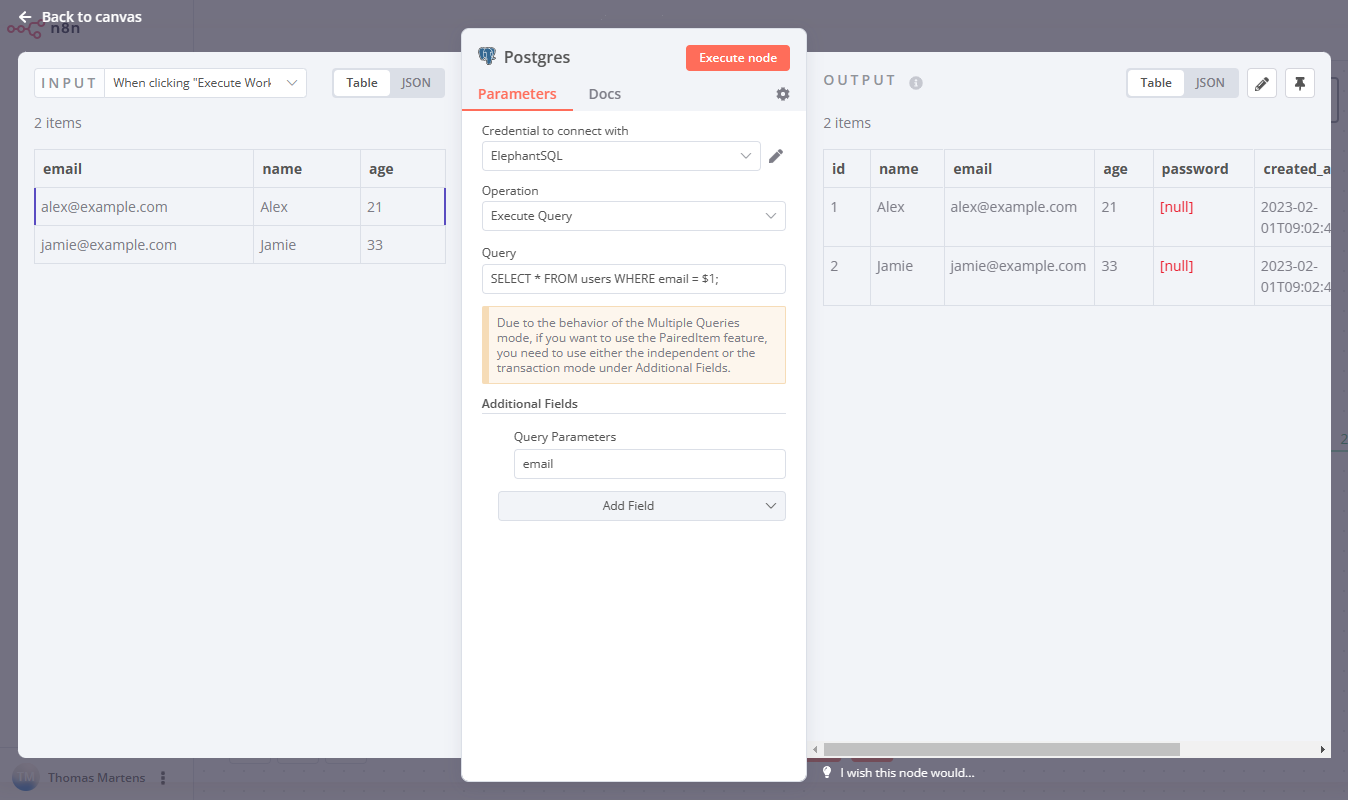
Execute the workflow again. The result is the same, but the implementation is now secure.
Test your understanding!
You need to update a contact's name based on their ID. The incoming data from a webhook is {"id": 123, "newName": "Robert"}. You are using the Execute Query operation in a Postgres node.
Which of the following is the correct and secure way to configure the node?
A) Query: UPDATE contacts SET name = '{{ $json.newName }}' WHERE id = {{ $json.id }}
Query Parameters: (empty)
B) Query: UPDATE contacts SET name = $1 WHERE id = $2
Query Parameters: {{ $json.newName }}, {{ $json.id }}
C) Query: UPDATE contacts SET name = $2 WHERE id = $1
Query Parameters: {{ $json.id }}, {{ $json.newName }}
Show answer
Option C is correct. The placeholders ($1, $2, etc.) are positional. The values in the Query Parameters field, separated by commas, correspond to these placeholders in order. Therefore, $1 will be replaced by the first value ({{ $json.id }}) and $2 by the second ({{ $json.newName }}).
Option B is incorrect because it would try to set the name to the ID and match the WHERE clause on the new name, which is logically flawed. Option A is incorrect because it uses string concatenation and is vulnerable to SQL injection.
4. Advanced Use Cases: AI Agents and Dynamic Queries
Parameterized queries are not limited to simple WHERE clauses. They are essential for any dynamic SQL, including more complex scenarios involving AI agents, a key interest of yours. When you allow an AI to interact with your database, you want to strictly control what it can do.
Build Database Agents That Get Smarter With Every Query (n8n)
This video from The AI Automators discusses different patterns for allowing an AI agent to interact with a database. It introduces the concept of 'prepared queries' as a highly secure method.
Watch this short clip from 20:14 to 21:58. The speaker explains how parameterized queries (which they call 'prepared queries') provide a safe and reliable way to give an AI agent controlled access to a database.
As the video explains, by defining a set of pre-approved, parameterized queries, you create a "toolset" for your AI. The AI can choose which tool to use and provide the parameters, but it cannot write arbitrary, potentially harmful SQL.
This method gives you the perfect balance: flexibility for the AI within a secure, well-defined boundary.
5. A Final Layer of Defense: The Principle of Least Privilege
Using parameterized queries is your primary defense against SQL injection. However, a robust security posture relies on defense-in-depth. What if a flaw is found in the database driver or n8n itself?
This is where the Principle of Least Privilege comes in. The database credentials you use in n8n should have the absolute minimum permissions required to do their job.
- If a workflow only needs to read data, connect with a read-only user.
- If it only needs to insert into a single
logstable, create a user that can onlyINSERTinto that one table. - Never use your
postgressuperuser orrootaccount in an n8n credential.
How to Build Smarter RAG Database Agents (n8n)
The same creators expand on this in another video, highlighting the danger of using a superuser and the importance of creating a restricted user.
Watch this segment from 17:53 to 18:53. It explains why creating a read-only user is critical to prevent both malicious attacks and accidental data destruction by an AI agent.
By combining parameterized queries with least-privilege database users, you create a formidable defense for your data. Even if an attacker were to bypass the parameterization and execute a malicious command (like DROP TABLE), the action would fail if the database user doesn't have permission to perform it.
Conclusion
Today you've mastered one of the most important concepts for building production-grade workflows. You've moved beyond simply making database queries work to making them secure.
Key Takeaways:
- SQL Injection is a serious threat that occurs when user input is insecurely concatenated into a query string.
- Parameterized Queries are the solution. They separate SQL code from data, ensuring input is treated as values, not commands.
- In n8n, use the
Execute Queryoperation with placeholders (like$1,$2) in the query and provide the data in theQuery Parametersfield. - Always apply the Principle of Least Privilege by creating dedicated, restricted-permission database users for your n8n credentials.
This lesson concludes our module on database interactions. You now have the skills to securely perform all CRUD operations in your n8n workflows.
In our next module, "Modular and Reusable Workflows," we'll shift our focus from individual nodes to workflow architecture. We'll start by learning how to create and call sub-workflows, a powerful technique for organizing complex logic and building reusable components.