
Hello again. In the previous lesson, you learned how to write code in a Colab cell, run it, and read the output underneath. Now you will give your code a memory: variables let you store a value under a meaningful name and use that value later.
By the end of this lesson, you will be able to assign values to variables, choose clear variable names, and recognize four foundational Python data types: integers, floating-point numbers, strings, and Boolean values. These distinctions matter immediately in coding and will become especially important once you begin working with tabular data.
Variables: naming a value
A variable is a name that refers to a value. In this line:
age = 21
ageis the variable name.=is the assignment operator.21is the value being assigned.
Read this as: “Assign the value 21 to the name age.” It is not a mathematical claim that two things are equal. Python records that, in the current notebook session, age refers to 21.
Try this in a fresh Colab code cell:
age = 21
print(age)
The output is:
21
When Python encounters age without quotation marks, it looks up the value stored under that name. Compare:
language = "Python"

print(language)
print("language")
Output:
Python
language
The first line prints the value stored in language. The second prints the literal text language, because quotation marks tell Python that the contents are text.
A variable may be assigned a new value later:
score = 10
print(score)

score = 15
print(score)
Output:
10
15
After the second assignment, score refers to 15; it does not still refer to 10. In a notebook, this also means cell run order matters. If you rerun an earlier cell that assigns score = 10, you have changed the value available to later cells.
This short video from Bro Code, Python variables for beginners, gives a visual introduction to variables and the four types you will use here.
Python variables for beginners ❎
Watch “Python variables for beginners” by Bro Code to see variable assignment and each core data type demonstrated in code.
Begin with variables for the basic idea of assigning and printing a named value. Then watch integers, floats, strings, and Booleans. Focus on the visual syntax: decimals in floats, quotation marks around strings, and capitalized unquoted True and False.
Four essential types of values
Python determines a value’s type from how you write it. The same characters can represent different types depending on their syntax.
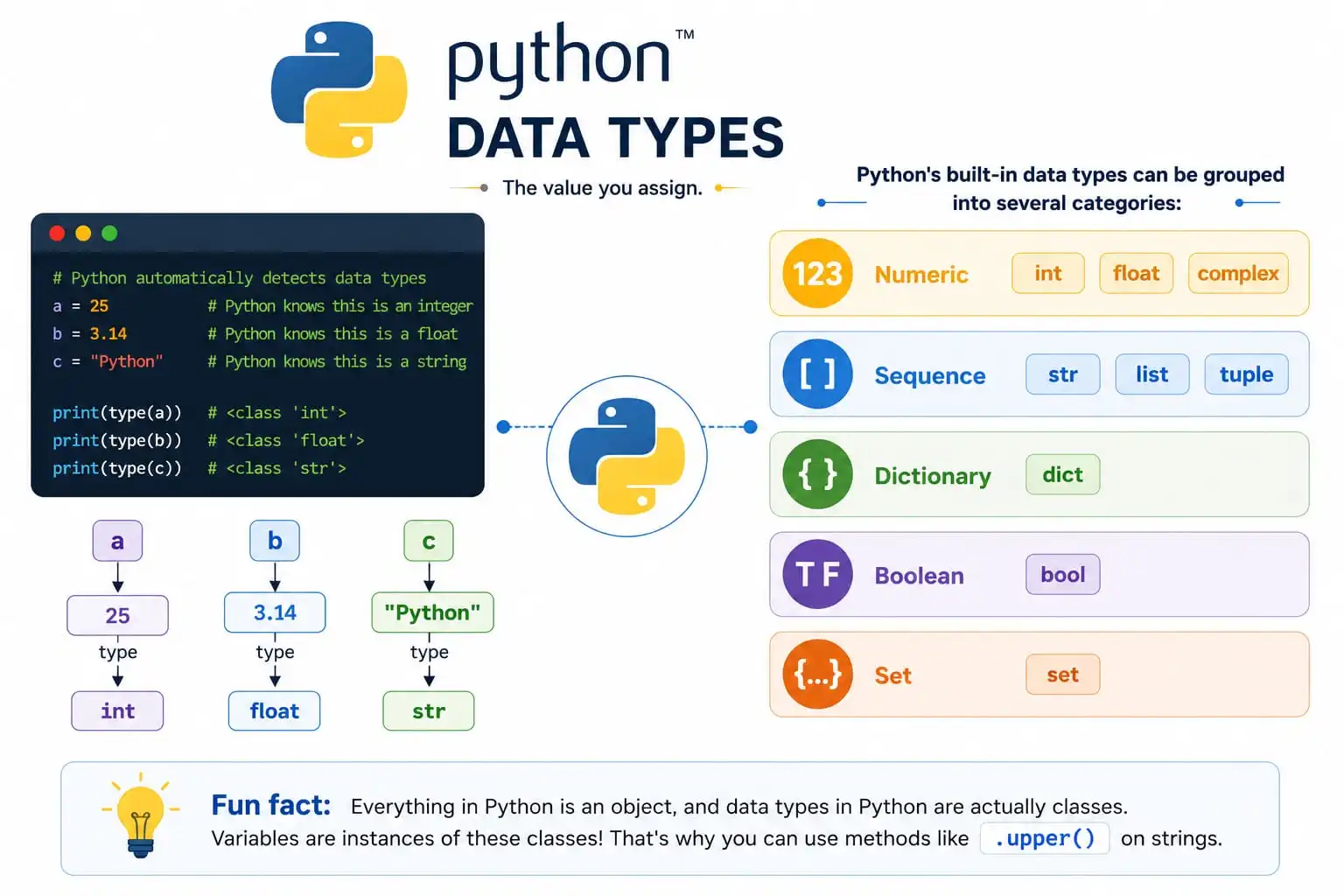
| Type | Python name | What it represents | Examples |
|---|---|---|---|
| Integer | int | Whole numbers | 0, 42, -8 |
| Floating-point number | float | Numbers written with a decimal point | 3.14, -0.5, 12.0 |
| String | str | Text, enclosed in quotes | "hello", 'A12', "42" |
| Boolean | bool | One of two logical states | True, False |
Integers
An integer is a whole number: no decimal point appears in its written form.
number_of_students = 28
year_started = 2026
temperature_change = -4

print(number_of_students)
print(year_started)
print(temperature_change)
These values can be used for counts, positions, years, or other quantities that are naturally whole.
Floating-point numbers
A float is a number with a decimal point. Even when the decimal part is zero, Python treats it as a float.
average_rating = 4.8
distance_km = 2.5
price = 12.0

print(average_rating)
print(distance_km)
print(price)
Here, 12 and 12.0 have similar numerical meanings, but they are different Python types:
whole_number = 12
decimal_number = 12.0
The first is an int; the second is a float.
Strings
A string is text enclosed in quotation marks. You can use either single quotes or double quotes, provided the opening and closing quotes match.
name = "Sam"
course = 'Python Foundations'
postal_code = "02138"
A string can contain letters, spaces, punctuation, and digits. The key question is not “Does it look like a number?” but “Should Python treat it as a number?”
quantity = 42
item_code = "042"
quantity is an integer because you might calculate with it. item_code is text because it is an identifier: preserving the leading zero matters. This distinction will matter later when data is loaded from CSV files. A column of identification codes may look numerical but should often remain text.
Boolean values
A Boolean represents one of two states:
is_logged_in = True
has_finished = False
The only Boolean literals are exactly:
True
False
They must begin with capital letters and must not be surrounded by quotation marks.
has_access = True      # Boolean
has_access_text = "True"  # String, not Boolean
Booleans will become useful in the next lesson when your programs need to choose between actions based on conditions.
Ask Python: type()
When you are uncertain, do not guess. Python has a built-in type() function that reports the type of a value or variable.
Run this cell:
number_of_days = 7
completion_rate = 0.75
project_name = "Data cleanup"
is_submitted = False

print(type(number_of_days))
print(type(completion_rate))
print(type(project_name))
print(type(is_submitted))
You should see:
<class 'int'>
<class 'float'>
<class 'str'>
<class 'bool'>
The <class '...'> wording reflects how Python implements types internally. For now, focus on the final labels: int, float, str, and bool.
Python does not require you to declare a variable’s type before assigning it. The current value determines the type:
value = 8
print(type(value))

value = "eight"
print(type(value))
Output:
<class 'int'>
<class 'str'>
This is valid Python, though clear programs usually keep a variable’s meaning consistent. Changing a variable called customer_id from a text ID to a mathematical quantity, for example, would make later code harder to understand.
For a concise written reference, read the relevant parts of Programiz’s Python Variables and Literals.
Python Variables and Literals (With Examples)
Read “Python Variables and Literals” from Programiz to reinforce assignment syntax, sensible naming, and the literal forms of the four types.
In the “Python Variables” section, read the introduction to variables, then continue through “Assigning values to Variables in Python” and “Changing the Value of a Variable.” In “Rules for Naming Python Variables,” pay particular attention to meaningful names and underscores. Finally, in “Python Literals,” read the Integer, Floating-Point, String, and Boolean subsections; skip the Complex and collection-literal material for now. For strings, use the string explanation to check the quotation-mark rule.
Naming variables clearly
Python variable names should communicate what their values mean. Prefer:
student_count = 28
average_score = 86.5
is_complete = False
over vague names such as:
x = 28
a = 86.5
flag = False
Short names are sometimes appropriate in a tiny calculation, but descriptive names are much more helpful as programs grow.
Use these practical rules:
- Start a variable name with a letter or an underscore.
- After that, use letters, digits, and underscores.
- Do not use spaces or hyphens.
- Python distinguishes uppercase from lowercase letters:
scoreandScoreare different names. - Avoid reserved Python words such as
True,False, andif. - For names containing multiple words, use lowercase words separated by underscores:
total_cost,user_name,is_active.
| Name | Valid? | Reason |
|---|---|---|
book_title | Yes | Clear and follows the usual underscore style |
score2 | Yes | Digits are allowed after the first character |
2nd_score | No | A name cannot begin with a digit |
second score | No | Spaces are not allowed |
second-score | No | Python reads - as subtraction |
True | No | It is a reserved Boolean literal |
A small notebook record
Create a new cell and enter the following code. Before running it, identify the type you expect for each variable.
book_title = "Python for Data Analysis"
pages_read = 42
reading_progress = 0.35
finished = False

print(book_title)
print(pages_read)
print(reading_progress)
print(finished)

print(type(book_title))
print(type(pages_read))
print(type(reading_progress))
print(type(finished))
You have just represented four kinds of information that could plausibly appear in a dataset:
- a descriptive label,
- a whole-number count,
- a decimal measurement,
- and a yes-or-no status.
Try changing finished to True, then rerun the cell. Next, change pages_read from 42 to "42" and inspect its type again. The displayed characters look similar, but Python now interprets the value differently because quotation marks change it into text.
Key takeaways
A variable is a meaningful name assigned to a value with =. You can print the variable’s value by writing its name without quotation marks, and a later assignment replaces the variable’s current value.
The four types to recognize are:
intfor whole numbers, such as42floatfor decimals, such as42.0strfor quoted text, such as"42"boolfor the unquoted valuesTrueandFalse
Use type() whenever you need to verify what Python thinks a value is. In the next lesson, you will use these values with arithmetic, string operations, and type conversions to deliberately produce new results.
Can't find a good explanation? Sign up and we'll make it for you
Sign up